| 1 |
# wavetable synthesizer |
| 2 |
|
| 3 |
within the "Wavetable" tab of the instrument editor, Furnace allows you to modulate or combine 1 or 2 waves to create unique "animated" sounds. think of it like a VST or a plugin, as it's basically an extension of regular wavetable soundchips that still allow it to run on real hardware. |
| 4 |
|
| 5 |
this is accomplished by selecting a wave or two, a mode, and adjusting the settings as needed until you come up with a sound that you like, without taking up a load of space. this allows you to create unique sound effects or instruments, that, when used well, almost sound like they're Amiga samples. |
| 6 |
|
| 7 |
unfortunately, on some chips like the HuC6280, you cannot use the wavetable synth to animate waveforms and have them sound smooth, as the chip resets the channel's phase when a waveform is changed while the channel is playing. on certain frequencies, this can be avoided, but not on most, unfortunately. |
| 8 |
|
| 9 |
 |
| 10 |
|
| 11 |
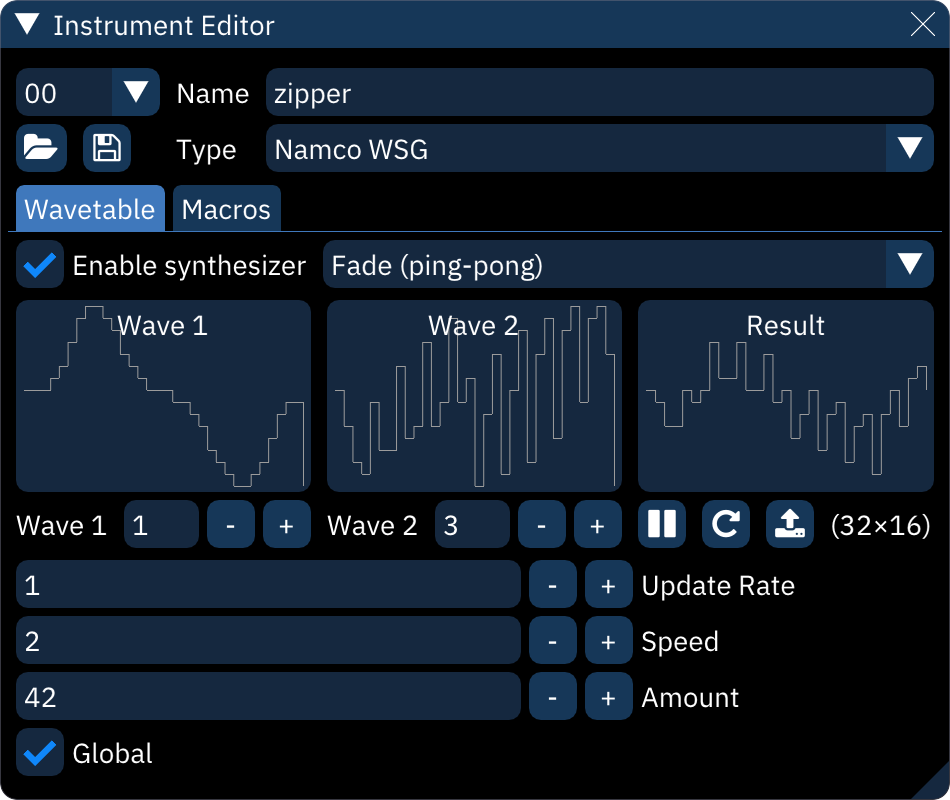
input waveforms should match the size of the wavetable or unexpected results may occur. |
| 12 |
|
| 13 |
- **Enable synthesizer**: must be on for the rest of this to work. |
| 14 |
- synthesizer type: selects the synthesis algorithm. |
| 15 |
- waveform displays. |
| 16 |
- **Wave 1**: selects input waveform. |
| 17 |
- this will turn yellow to indicate that a Waveform macro is set. |
| 18 |
- **Wave 2**: selects second input waveform. only appears when a dual-waveform synthesizer is selected. |
| 19 |
- **Pause preview**: toggles live waveform preview. |
| 20 |
- **Restart preview**: restarts preview from initial state. |
| 21 |
- **Copy to new wavetable**: copies the currently displayed output waveform into the wavetable as a new entry. |
| 22 |
- (width×height): size of wavetable. |
| 23 |
- **Update Rate**: time in ticks between waveform changes. |
| 24 |
- **Speed**: rate of change with each update. |
| 25 |
- **Amount**: strength of synthesizer function. |
| 26 |
- **Power**: only appears when synthesizer type is "Phase Modulation". |
| 27 |
- **Global**: |
| 28 |
- if disabled, each note resets the synthesizer to the start. |
| 29 |
- if enabled, synthesis continues unbroken from note to note. |