| 1 |
# ESFM instrument editor |
| 2 |
|
| 3 |
the ESFM editor is divided into 6 tabs: |
| 4 |
|
| 5 |
- **FM**: for controlling the basic parameters of FM sound source. |
| 6 |
- **Macros (OP1)**: for macros controlling FM parameters of operator 1. |
| 7 |
- **Macros (OP2)**: for macros controlling FM parameters of operator 2. |
| 8 |
- **Macros (OP3)**: for macros controlling FM parameters of operator 3. |
| 9 |
- **Macros (OP4)**: for macros controlling FM parameters of operator 4. |
| 10 |
- **Macros**: for other macros (volume/arp/pitch/pan/operator 4 noise mode). |
| 11 |
|
| 12 |
## FM |
| 13 |
|
| 14 |
ESFM is four-operator, meaning it takes four oscillators to produce a single sound. |
| 15 |
|
| 16 |
unlike most four-operator FM synthesizers, however, ESFM does not have an algorithm selection. instead, it uses a fixed operator arrangement, but allows you to independently control the output and modulation input levels of each operator. this allows it to reproduce a few common four-operator algorithms, as well as unique combinations where operators act as modulators and carriers at the same time. |
| 17 |
|
| 18 |
these apply to the instrument as a whole: |
| 19 |
- **OP4 Noise Mode**: determines the mode used to produce noise in operator 4. |
| 20 |
- Normal: noise is disabled. |
| 21 |
- Snare: takes the snare noise generation mode from OPL. square + noise. |
| 22 |
- HiHat: ring modulates with operator 3 and adds noise. |
| 23 |
- Top: ring modulates with operator 3 and double pitch modulation input. |
| 24 |
- these are normally used for the drum channels in ESFM's OPL3 compatibility mode. |
| 25 |
- however, in ESFM, operator 4 can be modulated by operator 3, whereas in OPL3 drum mode the rhythm channels cannot be modulated. |
| 26 |
- __note__: usage of noise mode "Top" is discouraged for now as it is not properly emulated yet, and results may change when the emulation gets fixed in the future. |
| 27 |
- **Octave**: sets the "block" of the frequency register, which affects note range and precision. |
| 28 |
- **operator routing preview**: shows how operators are connected with each other and with the audio output (at the bottom). |
| 29 |
- left-click pops up a small "operators changes with volume?" dialog where each operator can be toggled to scale with volume level. |
| 30 |
- right-click switches to a preview display of the waveform generated on a new note: |
| 31 |
- left-click restarts the preview. |
| 32 |
- middle-click pauses and unpauses the preview. |
| 33 |
- right-click returns to algorithm view. |
| 34 |
|
| 35 |
these apply to each operator: |
| 36 |
- the crossed-arrows button can be dragged to rearrange operators. |
| 37 |
- **Amplitude Modulation (AM)**: makes the operator affected by LFO tremolo. |
| 38 |
- **AM Depth (DAM/AMD)**: when enabled, LFO tremolo is deeper (1dB off; 4.8dB on). |
| 39 |
- **Sustain flag (SUS)**: when enabled, the envelope pauses ("sustains") once it reaches the Sustain Level and does not proceed to the release phase until note off. |
| 40 |
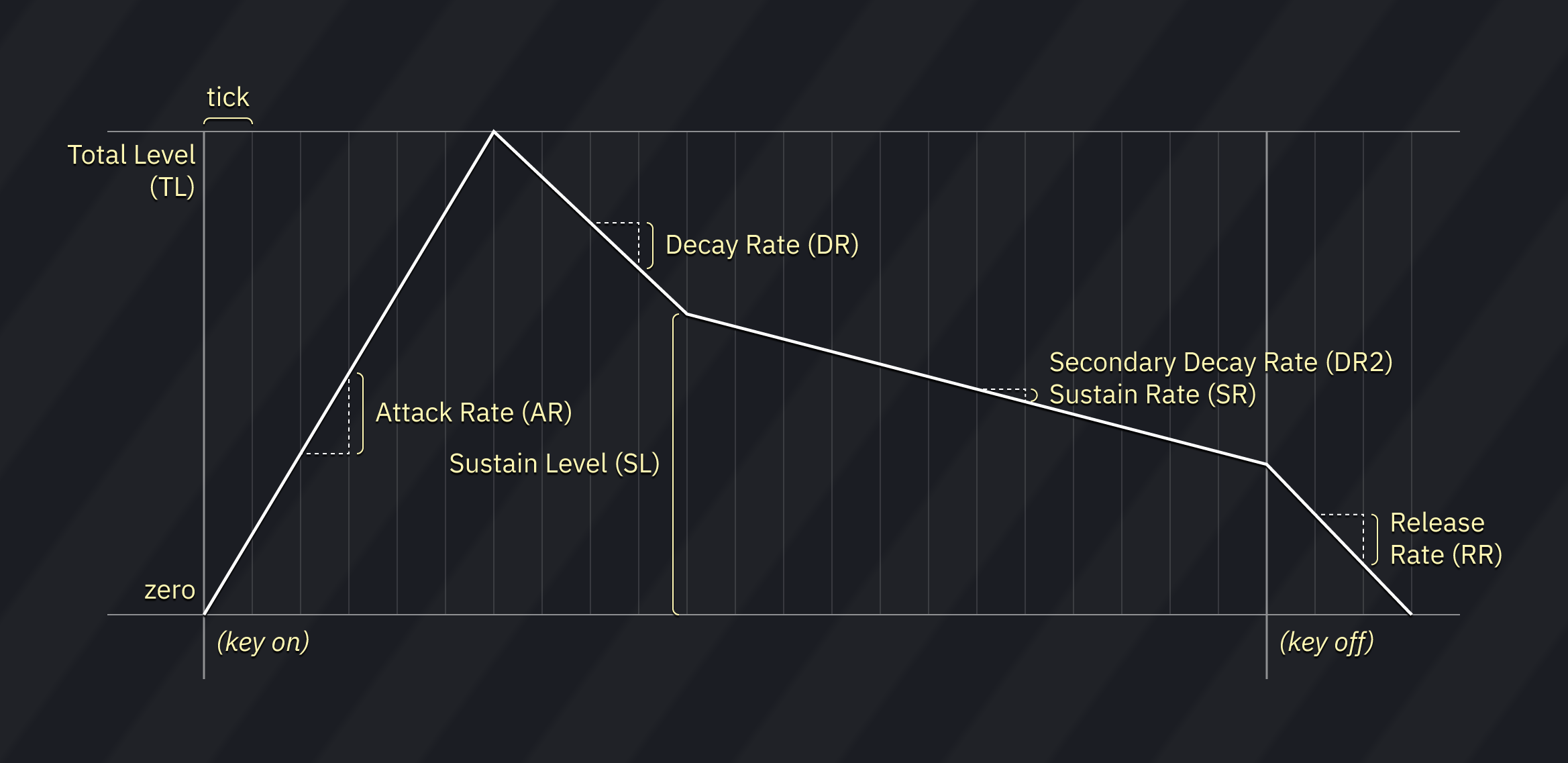
- **Envelope Delay (DL)**: determines the delay time before the envelope is triggered. the bigger the value, the longer the delay (0 to 7). |
| 41 |
- a change of one unit doubles or halves the delay time. |
| 42 |
- a value of 0 results in no delay. |
| 43 |
- **Attack Rate (AR)**: determines the rising time for the sound. the bigger the value, the faster the attack (0 to 15). |
| 44 |
- **Decay Rate (DR)**: determines the diminishing time for the sound. the higher the value, the shorter the decay. it's the initial amplitude decay rate (0 to 15). |
| 45 |
- **Sustain Level (SL)**: determines the point at which the sound ceases to decay and changes to a sound having a constant level. the sustain level is expressed as a fraction of the maximum level (0 to 15). |
| 46 |
- **Release Rate (RR)**: determines the rate at which the sound disappears after note off. the higher the value, the shorter the release (0 to 15). |
| 47 |
- **Total Level (TL)**: represents the envelope’s highest amplitude, with 0 being the largest and 63 (decimal) the smallest. a change of one unit is about 0.75 dB. |
| 48 |
- **Key Scale Level (KSL)**: also known as "Level Scale". determines the degree to which the amplitude decreases according to the pitch. |
| 49 |
|
| 50 |
 |
| 51 |
|
| 52 |
- **Key Scale Rate (KSR)**: also known as "Rate Scale". determines the degree to which the envelope execution speed increases according to the pitch. |
| 53 |
- **Frequency Multiplier (MULT)**: sets the coarse pitch offset in relation to the note (0 to 15). the values follow the harmonic scale. for example, 0 is -1 octave, 1 is 0 octaves, 2 is 1 octave, 3 is 1 octave 7 semitones, and so on. |
| 54 |
- note that values 11, 13 and 14 behave as 10, 12 and 15 respectively. |
| 55 |
- **Tune (CT)**: sets the semitone offset in relation to the note (-24 to 24). |
| 56 |
- this is a software effect. |
| 57 |
- **Fine Detune (DT)**: shifts the pitch in fine steps (-128 to 127). 0 is the base pitch, -128 is -1 semitone, 127 is nearly +1 semitone. |
| 58 |
- this is a software effect. |
| 59 |
- **Left (L)**: toggles output to the left channel from the operator to the audio output. |
| 60 |
- **Right (R)**: toggles output to the right channel from the operator to the audio output. |
| 61 |
- **Waveform Select (WS)**: changes the waveform of the operator (0 to 7). |
| 62 |
- **Vibrato (VIB)**: makes the operator affected by LFO vibrato. |
| 63 |
- **Vibrato Depth (DVB/FMD)**: when enabled, vibrato is deeper. |
| 64 |
|
| 65 |
### routing controls |
| 66 |
|
| 67 |
- **Output Level (OL)**: sets the output level from this operator to the audio output (0 to 7). |
| 68 |
- 7 is the loudest level and 1 is the softest, while 0 disables audio output. |
| 69 |
- a change of one unit is about 6 dB. |
| 70 |
- this output scaling factor is applied after TL and envelope scaling have been performed. |
| 71 |
- **Modulation Input Level (MI)**: sets the modulation level from the previous operator to this operator (0 to 7). |
| 72 |
- 7 is the strongest level and 1 is the weakest, while 0 disables modulation. |
| 73 |
- a change of one unit is about 6 dB. |
| 74 |
- for operator 1 this controls the **feedback level**. |
| 75 |
- this modulation scaling factor is applied after the previous operator's TL and envelope scaling have been performed, but is unaffected by OL above. |
| 76 |
|
| 77 |
### common algorithms |
| 78 |
|
| 79 |
this table contains a list of modulation input/output level values which resemble common algorithms in Yamaha FM chips. |
| 80 |
|
| 81 |
__note__: MI1 is not included as it is the feedback level. |
| 82 |
|
| 83 |
| algorithm | OL1 | MI2 | OL2 | MI3 | OL3 | MI4 | OL4 | |
| 84 |
|--------------------------------|:---:|:---:|:---:|:---:|:---:|:---:|:---:| |
| 85 |
| OPN algorithm **0** | 0 | 7 | 0 | 7 | 0 | 7 | 7 | |
| 86 |
| OPN algorithm **4** | 0 | 7 | 7 | 0 | 0 | 7 | 7 | |
| 87 |
| OPN algorithm **6** | 0 | 7 | 7 | 0 | 7 | 0 | 7 | |
| 88 |
| OPN algorithm **7** | 7 | 0 | 7 | 0 | 7 | 0 | 7 | |
| 89 |
| OPL3 algorithm **1** | 7 | 0 | 0 | 7 | 0 | 7 | 7 | |
| 90 |
| OPL3 algorithm **3** | 7 | 0 | 0 | 7 | 7 | 0 | 7 | |
| 91 |
| OPL3 algorithm **1** (variant) | 0 | 7 | 0 | 7 | 7 | 0 | 7 | |
| 92 |
|
| 93 |
### fixed frequency mode |
| 94 |
|
| 95 |
each operator has a Fixed Frequency mode. once enabled, the operator runs at the specified frequency regardless of the note. |
| 96 |
|
| 97 |
when fixed frequency mode is enabled, the Tune and Fine Detune sliders will be replaced by **Block (Blk)** and **FreqNum (F)**, which allow you to input a raw frequency value into the operator. |
| 98 |
the actual frequency is determined by the formula: `FreqNum*(2^Block)`. |
| 99 |
|
| 100 |
in other words, FreqNum defines the base frequency, while Block determines the scaling factor in octaves. |
| 101 |
|
| 102 |
## macros |
| 103 |
|
| 104 |
these macros allow you to control several parameters of FM per tick. |
| 105 |
|
| 106 |
## OP1-OP4 Macros |
| 107 |
|
| 108 |
most parameters are listed above. |
| 109 |
|
| 110 |
### envelope delay macro tricks |
| 111 |
|
| 112 |
due to a quirk in how the envelope delay feature works, the **Envelope Delay** macro can control the operator's key-on status for a limited amount of time after a note is played. a value of 0 represents key-on, while a value of 7 represents key-off. |
| 113 |
|
| 114 |
note that the macro cannot exceed 659.1 ms in length - anything beyond that will be treated as a value of 0. |
| 115 |
|
| 116 |
### operator arpeggio and pitch macros |
| 117 |
|
| 118 |
among the available macros are **Op. Arpeggio** and **Op. Pitch**. these work like the **Arpeggio** and **Pitch** macros featured below, but are applied to the individual operator, overriding the **Arpeggio**/**Pitch** macros respectively. |
| 119 |
|
| 120 |
the **Tune** and **Fine Detune** FM parameters are still respected when using these macros. |
| 121 |
|
| 122 |
### fixed frequency macros |
| 123 |
|
| 124 |
when fixed frequency is enabled for an operator, the **Op. Arpeggio** and **Op. Pitch** macros will be replaced by the **Block** and **FreqNum** macros. these can be used to change the operator's fixed frequency over time. |
| 125 |
|
| 126 |
## Macros |
| 127 |
|
| 128 |
- **Volume**: volume sequence. |
| 129 |
- **Arpeggio**: pitch sequence. |
| 130 |
- **OP4 Noise Mode**: operator 4 noise mode sequence. |
| 131 |
- **Panning**: enables output on left/right channels. |
| 132 |
- note that each operator also has its own pan controls, which get masked by this global pan control. |
| 133 |
- **Pitch**: fine pitch. |
| 134 |
- **Relative**: when enabled, pitch changes are relative to the current pitch. |
| 135 |
- **Phase Reset**: restarts all operators and resets the waveform to its start. |