| 1 |
# instrument editor |
| 2 |
|
| 3 |
the instrument editor allows you to edit instruments. |
| 4 |
it can be activated by double-clicking on an instrument in the instrument list. |
| 5 |
|
| 6 |
alternatively, window > instrument editor displays it. |
| 7 |
|
| 8 |
## main |
| 9 |
|
| 10 |
 |
| 11 |
|
| 12 |
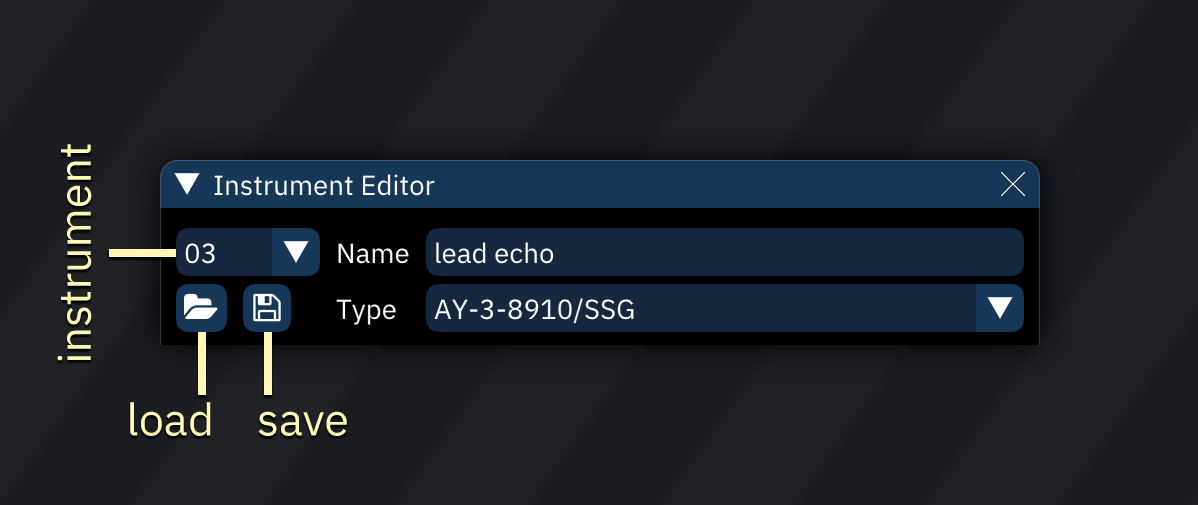
- **Select**: displays a list of instruments in the song. |
| 13 |
- **Load**: open an instrument file. |
| 14 |
- **Save**: save current instrument to a file. |
| 15 |
- right-click to see additional options, such as saving in DefleMask preset format (.dmp). |
| 16 |
- **Name**: changes the instrument name. |
| 17 |
- **Type**: changes the instrument type (usually chip-specific). |
| 18 |
- if changed, all applicable settings and macros will remain unchanged. |
| 19 |
- you may have to adjust them afterwards. |
| 20 |
|
| 21 |
## instrument types |
| 22 |
|
| 23 |
the following instrument types are available: |
| 24 |
|
| 25 |
- [ADPCM-A](adpcm-a.md) - for use with ADPCM-A sample chip. |
| 26 |
- [ADPCM-B](adpcm-b.md) - for use with ADPCM-B sample chip. |
| 27 |
- [Atari Lynx](lynx.md) - for use with Atari Lynx handheld console. |
| 28 |
- [AY-3-8910/SSG](ay8910.md) - for use with AY-3-8910 PSG sound source and SSG portion in YM2610. |
| 29 |
- [AY8930](ay8930.md) - for use with Microchip AY8930 E-PSG sound source. |
| 30 |
- [Beeper](beeper.md) - for use with PC Speaker and ZX Spectrum Beeper (SFX-like engine). |
| 31 |
- [Bifurcator](bifurcator.md) - for use with Bifurcator chip. |
| 32 |
- [C140](c140.md) - for use with C140 sample chip. |
| 33 |
- [C219](c219.md) - for use with C219 sample chip. |
| 34 |
- [C64](c64.md) - for use with Commodore 64 SID. |
| 35 |
- [Dave](dave.md) - for use with Dave chip. |
| 36 |
- [ES5506](es5506.md) - for use with Ensoniq ES5506 sound chip. |
| 37 |
- [FDS](fds.md) - for use with Famicom Disk System sound source. |
| 38 |
- [FM (ESFM)](fm-esfm.md) - for use with ESFM. |
| 39 |
- [FM (OPL)](fm-opll.md) - for use with YM3526 (OPL), YM3812 (OPL2) and YMF262 (OPL3). |
| 40 |
- [FM (OPLL)](fm-opll.md) - for use with YM2413. |
| 41 |
- [FM (OPM)](fm-opm.md) - for use with YM2151. |
| 42 |
- [FM (OPN)](fm-opn.md) - for use with YM2612, YM2203, YM2608, YM2610 and YM2610B. |
| 43 |
- [FM (OPZ)](fm-opz.md) - for use with YM2414. |
| 44 |
- [GA20](ga20.md) - for use with GA20 sample chip. |
| 45 |
- [Game Boy Advance DMA](gbadma.md) - for use with Game Boy Advance in direct mode. |
| 46 |
- [Game Boy Advance MinMod](gbaminmod.md) - for use with Game Boy Advance with the MinMod software mixing driver. |
| 47 |
- [Game Boy](game-boy.md) - for use with Game Boy APU. |
| 48 |
- [Generic Sample](sample.md) for controlling Amiga and other sample channels/chips like YM2612's Channel 6 PCM mode, NES channel 5, Sega PCM, X1-010 and PC Engine's sample playback mode. |
| 49 |
- [K007232](k007232.md) - for use with K007232 sample chip. |
| 50 |
- [K053260](k053260.md) - for use with K053260 sample chip. |
| 51 |
- [Konami SCC/Bubble System WSG](scc.md) - for use with Konami SCC and Wavetable portion in Bubble System's sound hardware. |
| 52 |
- [MSM5232](msm5232.md) - for use with MSM5232 PSG sound source. |
| 53 |
- [MSM6258](msm6258.md) - for use with MSM6258 sample chip. |
| 54 |
- [MSM6295](msm6295.md) - for use with MSM6295 sample chip. |
| 55 |
- [MultiPCM/OPL4 PCM](multipcm.md) - for use with OPL4's sample part. |
| 56 |
- [Namco 163](n163.md) - for use with Namco 163. |
| 57 |
- [Namco WSG](wsg.md) - for use with Namco WSG wavetable chips, including C15 and C30. |
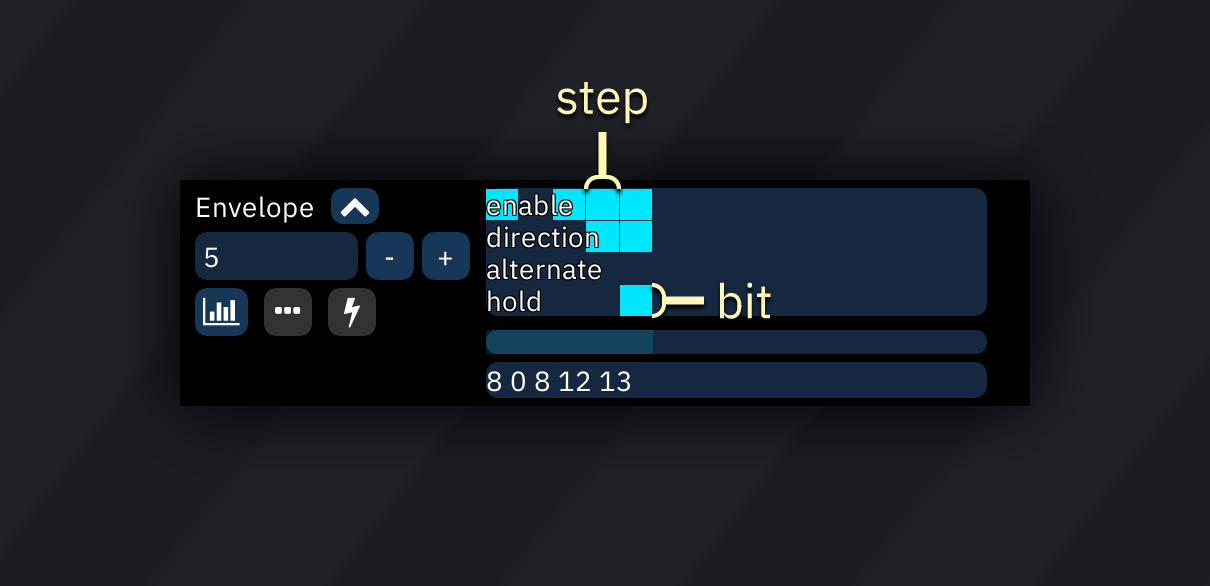
| 58 |
- [NES](nes.md) - for use with NES. |
| 59 |
- [PC Engine](pce.md) - for use with PC Engine's wavetable synthesizer. |
| 60 |
- [PET](pet.md) - for use with Commodore PET. |
| 61 |
- [Pokémon Mini/QuadTone](pokemini.md) - for use with these systems. |
| 62 |
- [POKEY](pokey.md) - for use with Atari 8-bit computers and their POKEY sound source. |
| 63 |
- [PowerNoise](powernoise.md) - for use with PowerNoise chip. |
| 64 |
- [PV-1000](pv1000.md) - for use with Casio PV-1000. |
| 65 |
- [QSound](qsound.md) - for use with QSound sample chip. |
| 66 |
- [RF5C68](rf5c68.md) - for use with RF5C68 sample chip. |
| 67 |
- [SAA1099](saa.md) - for use with Philips SAA1099 PSG sound source. |
| 68 |
- [SegaPCM](segapcm.md) - for use with SegaPCM sample chip. |
| 69 |
- [Seta/Allumer X1-010](x1_010.md) - for use with Wavetable portion in Seta/Allumer X1-010. |
| 70 |
- [SID2](sid2.md) - for use with SID2 fantasy chip. |
| 71 |
- [SID3](sid3.md) - for use with SID3 fantasy chip. |
| 72 |
- [SM8521](sm8521.md) - for use with SM8521 chip, used in Tiger Game.com. |
| 73 |
- [SN76489/Sega PSG](psg.md) - for use with TI SN76489 and derivatives like Sega Master System's PSG. |
| 74 |
- [SNES](snes.md) - for use with SNES. |
| 75 |
- [Sound Unit](su.md) - for use with Sound Unit chip. |
| 76 |
- [T6W28](t6w28.md) - for use with Toshiba T6W28 PSG sound source. |
| 77 |
- [TED](ted.md) - for use with Commodore Plus/4 and Commodore 16's TED chip. |
| 78 |
- [TIA](tia.md) - for use with Atari 2600 chip. |
| 79 |
- [VERA](vera.md) - for use with Commander X16 VERA. |
| 80 |
- [VIC](vic.md) - for use with VIC-20 sound chip. |
| 81 |
- [Virtual Boy](virtual-boy.md) - for use with Virtual Boy. |
| 82 |
- [VRC6](vrc6.md) - for use with VRC6's PSG sound source. |
| 83 |
- [Watara Supervision](watarasv.md) - for use with Watara Supervision. |
| 84 |
- [WonderSwan](wonderswan.md) - for use with WonderSwan's wavetable synthesizer. |
| 85 |
- [YMZ280B](ymz280b.md) - for use with YMZ280B sample chip. |
| 86 |
|
| 87 |
## macros |
| 88 |
|
| 89 |
macros are incredibly versatile tools for automating instrument parameters. |
| 90 |
|
| 91 |
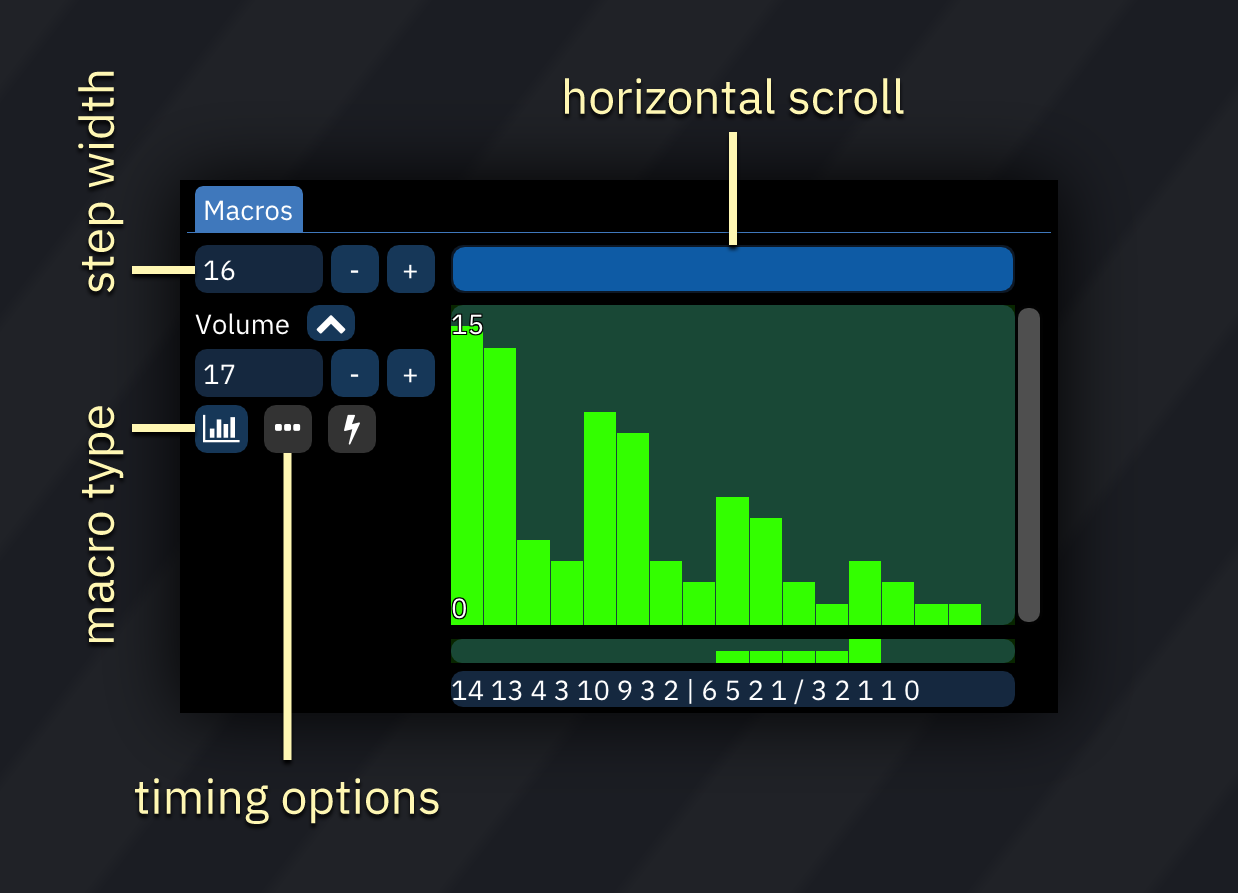
after creating an instrument, open the Instrument Editor and select the "Macros" tab. there may be multiple macro tabs to control individual FM operators and such. |
| 92 |
|
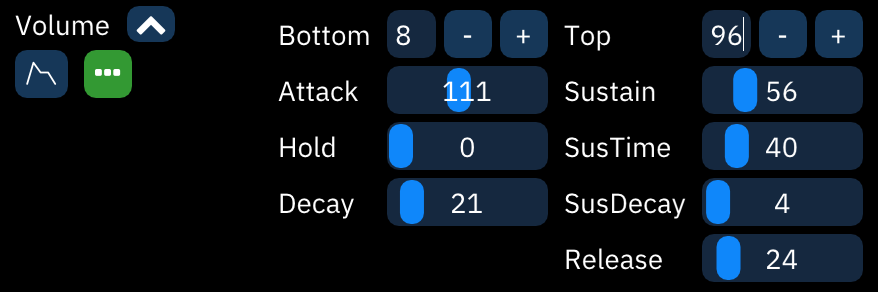
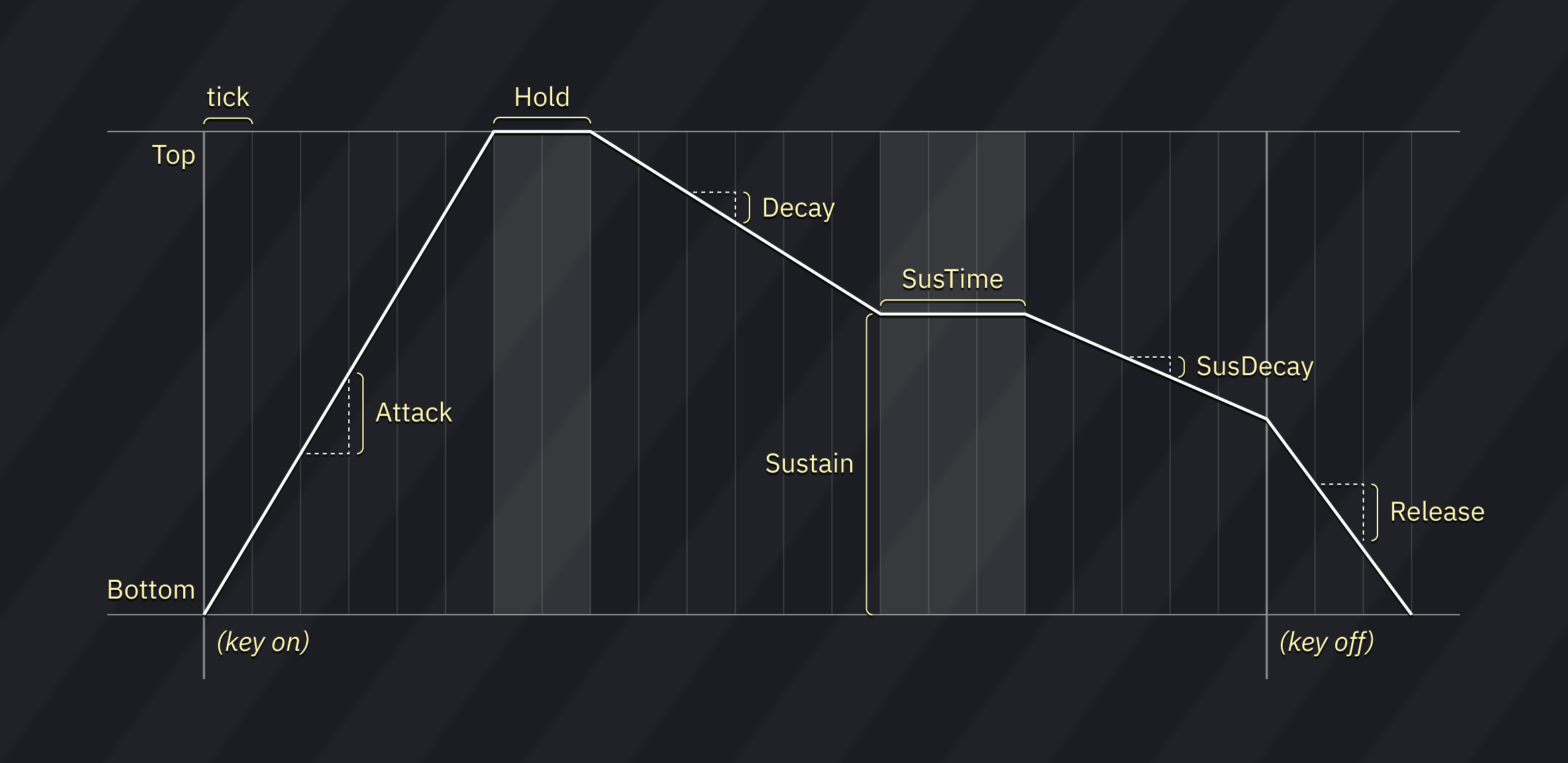
| 93 |
 |
| 94 |
|
| 95 |
the very first numeric entry sets the visible width of the bars in sequence-type macros. the scrollbar affects the view of all macros at once. there is a matching scrollbar at the bottom underneath all the macros. |
| 96 |
|
| 97 |
each macro has the following parameters: |
| 98 |
- macro type (explained below) |
| 99 |
- timing options: |
| 100 |
- **Step Length (ticks)**: determines the number of ticks between macro steps. default is 1. |
| 101 |
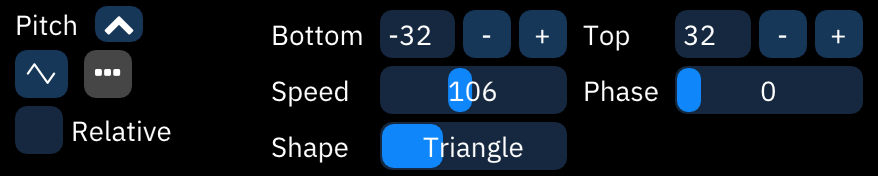
- **Delay**: delays the macro until this many ticks have elapsed. default is 0. |
| 102 |
- the button is highlighted if either of these parameters is set to non-default values. |
| 103 |
|
| 104 |
## macro types |
| 105 |
|
| 106 |
there are three macro types: |
| 107 |
|
| 108 |
-  **Sequence:** a sequence of numeric values. |
| 109 |
-  **ADSR:** this is an attack/decay/sustain/release envelope. |
| 110 |
-  **LFO:** Low Frequency Oscillator. |
| 111 |
|
| 112 |
### sequence |
| 113 |
|
| 114 |
this is the most basic macro type. when the instrument is played, every value in the macro will be output sequentially, from left to right. |
| 115 |
|
| 116 |
 |
| 117 |
|
| 118 |
 |
| 119 |
|
| 120 |
 |
| 121 |
|
| 122 |
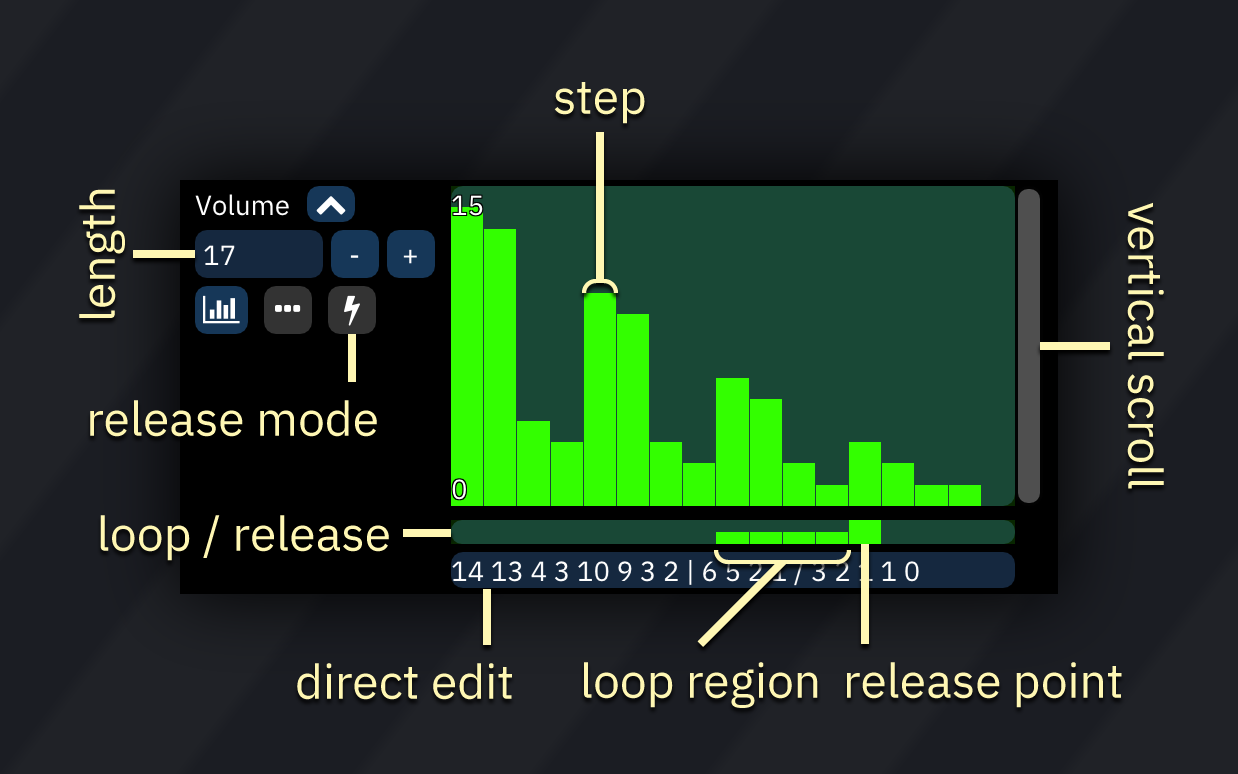
the Length field allows you to set the number of steps in the sequence. |
| 123 |
|
| 124 |
the sequence view allows you to edit the macro. |
| 125 |
- press and hold the left mouse button to start drawing. release to stop drawing. |
| 126 |
- press and hold the right mouse button to draw a line. |
| 127 |
- the start point will be set to the cursor position. |
| 128 |
- move the cursor to change the end point. |
| 129 |
- release to finish drawing the line. |
| 130 |
|
| 131 |
the sequence view may be adjusted using the following combinations: |
| 132 |
- hold Ctrl and use the scroll wheel to zoom horizontally. |
| 133 |
- hold Ctrl-Shift and use the scroll wheel to zoom vertically. |
| 134 |
- the scrollbar at the right allows you to scroll vertically (if possible). |
| 135 |
- you may hold Shift and use the scroll wheel to scroll vertically as well. |
| 136 |
|
| 137 |
right-click on the sequence view to open a menu: |
| 138 |
- **copy**: copy this macro to clipboard. |
| 139 |
- **paste**: pastes the macro. |
| 140 |
- **clear**: clears the macro. |
| 141 |
- **clear contents**: resets all values to 0. |
| 142 |
- **offset**: |
| 143 |
- **X**: slides the data "horizontally" within the macro, filling the gap with zeroes. data moved past the start or end is lost. |
| 144 |
- **Y**: increases or decreases all values, clipping them if they would move past the allowed range. |
| 145 |
- **scale**: |
| 146 |
- **X**: stretches the macro. |
| 147 |
- **Y**: multiplies all values by the scale factor, clipping them if they would exceed the allowed range. |
| 148 |
- **randomize**: replaces all values with random values between **Min** and **Max**. |
| 149 |
|
| 150 |
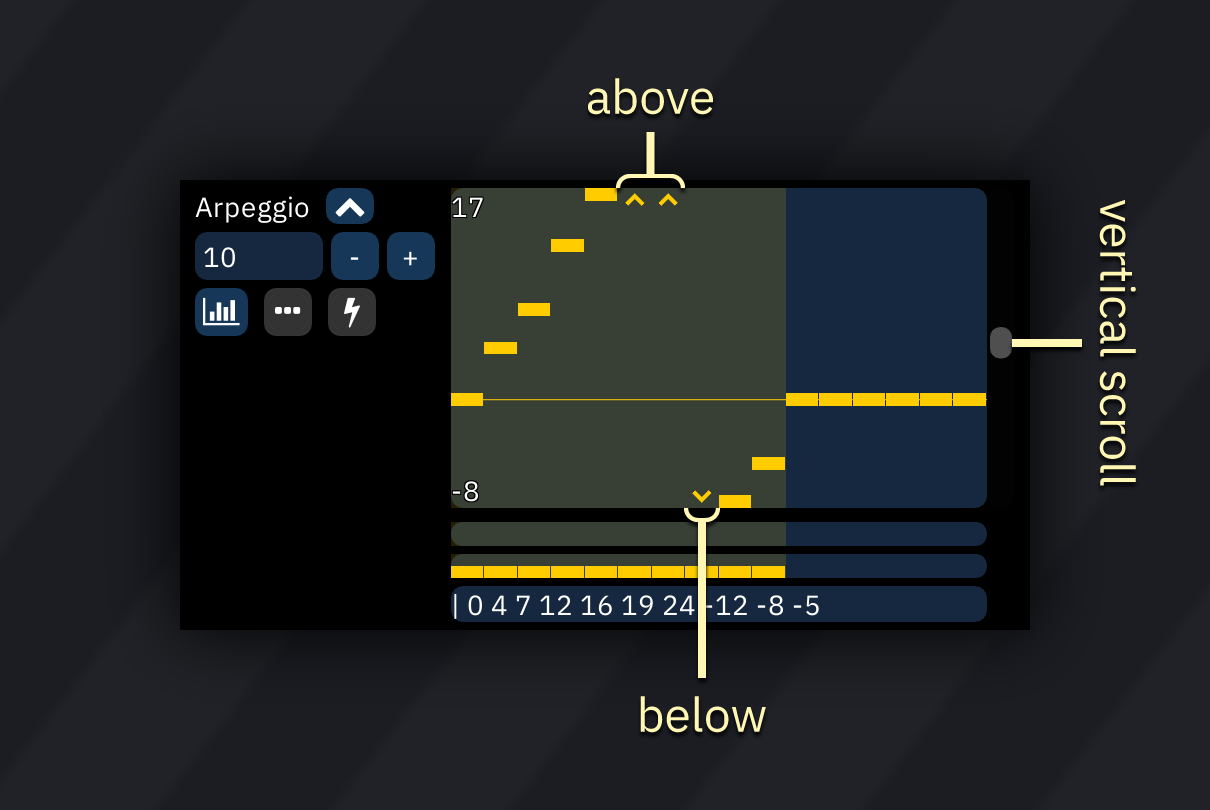
arpeggio and pitch macros may have values above or below the visible area. indicators will be shown until they are scrolled into view. |
| 151 |
|
| 152 |
bitmask-style macros show labels for each of their bits. these are edited as toggles. |
| 153 |
- drawing lines is not possible in these macros. |
| 154 |
|
| 155 |
under the sequence view there is a bar that allows you to set loop and release points. |
| 156 |
- click to set the loop start point; the end point is the last step or release point. |
| 157 |
- right-click to remove the loop point. |
| 158 |
- shift-click to set the release point. |
| 159 |
- the macro will stop at the release point until the note is released (`===` or `REL`). |
| 160 |
- if the loop point is set, and it is placed before the release point, the macro will loop until note release instead. |
| 161 |
- shift-right-click to remove the release point. |
| 162 |
|
| 163 |
arpeggio macros have an additional bar under the sequence view to set steps to "relative" or "fixed": |
| 164 |
- by default, step values are offsets **relative** to the note. |
| 165 |
- if clicked on, a step value becomes **fixed** and will be played at its corresponding note without regard to the currently playing note. |
| 166 |
- values are counted from `C-0`. for example, a fixed value of 48 produces a `C-4` note. |
| 167 |
- fixed values are especially useful for noise or percussion. |
| 168 |
|
| 169 |
the sequence can be edited in the text input field at the very bottom. the following symbols have special meanings: |
| 170 |
- `|`: loop point. |
| 171 |
- `/`: release point. |
| 172 |
- in arpeggio macros, `@` prefixed to a value indicates that it is a fixed value as described above. |
| 173 |
|
| 174 |
in bitmask-style macros, the values are added up in binary and converted to decimal. |
| 175 |
|
| 176 |
the release mode parameter determines how macro release (`===` or `REL` in the pattern) is handled: |
| 177 |
- **Active**: jumps to release position on release. |
| 178 |
- **Passive**: does not jump to release position. this will result in delay if release position has not been reached yet. |
| 179 |
|
| 180 |
### ADSR |
| 181 |
|
| 182 |
 |
| 183 |
|
| 184 |
- **Bottom** and **Top** determine the macro's output range (Bottom can be larger than Top to invert the envelope!). all outputs will be between these two values. |
| 185 |
- Attack, Decay, Sustain, SusDecay, and Release accept inputs between 0 to 255. these are scaled to the distance between Bottom and Top. |
| 186 |
- the output starts at Bottom. |
| 187 |
- **Attack** is how much the output moves toward Top with each tick. |
| 188 |
- **Hold** sets how many ticks to stay at Top before Decay. |
| 189 |
- **Decay** is how much the output moves to the Sustain level. |
| 190 |
- **Sustain** is how far from Bottom the value stays while the note is on. |
| 191 |
- **SusTime** is how many ticks to stay at Sustain until SusDecay. |
| 192 |
- **SusDecay** is how much the output moves toward Bottom with each tick while the note is on. |
| 193 |
- **Release** is how much the output moves toward Bottom with each tick after the note is released. |
| 194 |
|
| 195 |
 |
| 196 |
|
| 197 |
### LFO |
| 198 |
|
| 199 |
 |
| 200 |
|
| 201 |
- **Bottom** and **Top** determine the macro's output range (Bottom can be larger than Top to invert the waveform!). |
| 202 |
- **Speed** is how quickly the LFO position moves. |
| 203 |
- **Phase** defines the starting LFO position, measured in 1/1024 increments. |
| 204 |
- **Shape** is the waveform of the LFO. there are three waveforms: |
| 205 |
- Triangle: Bottom > Top > Bottom. |
| 206 |
- Saw: moves from Bottom to Top, and then jumps back to Bottom. |
| 207 |
- Square: alternates between Bottom and Top. |
| 208 |
|
| 209 |
|
| 210 |
|
| 211 |
## wavetable |
| 212 |
|
| 213 |
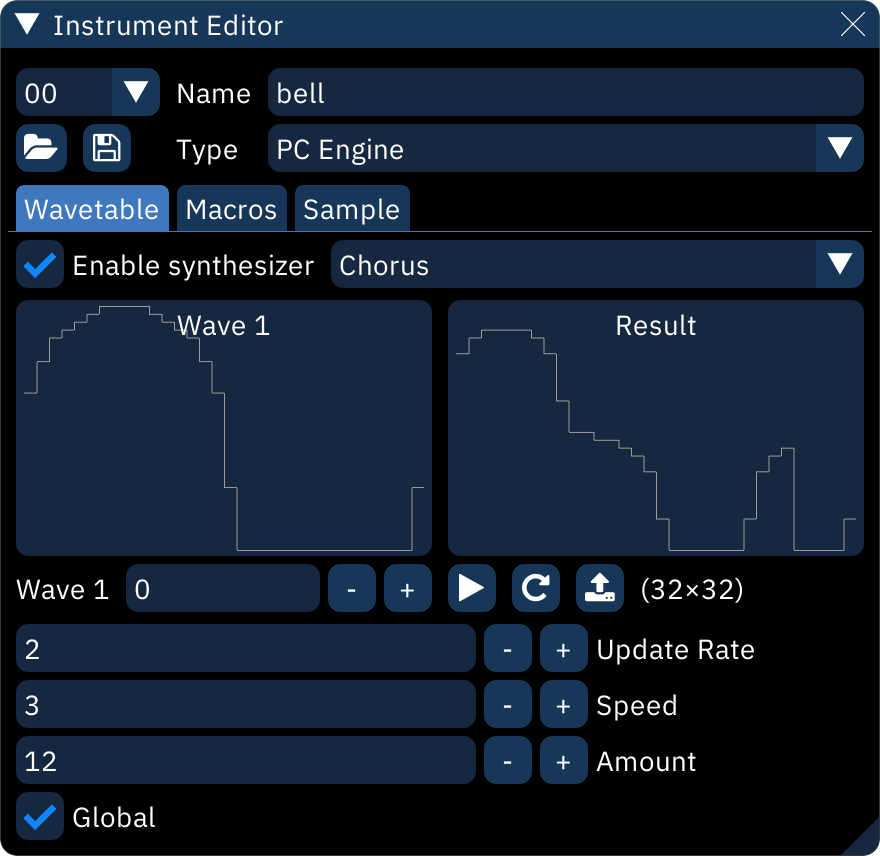
this tab appears for PC Engine, FDS, Namco WSG, and other wavetable-based instruments. |
| 214 |
|
| 215 |
 |
| 216 |
|
| 217 |
when **Enable synthesizer** is off, the wavetable used for the instrument may be selected by creating a Waveform macro with a single value. |
| 218 |
|
| 219 |
to use the wavetable synthesizer, refer to [the wavetable synthesizer section](wavesynth.md). |
| 220 |
|
| 221 |
|
| 222 |
## sample |
| 223 |
|
| 224 |
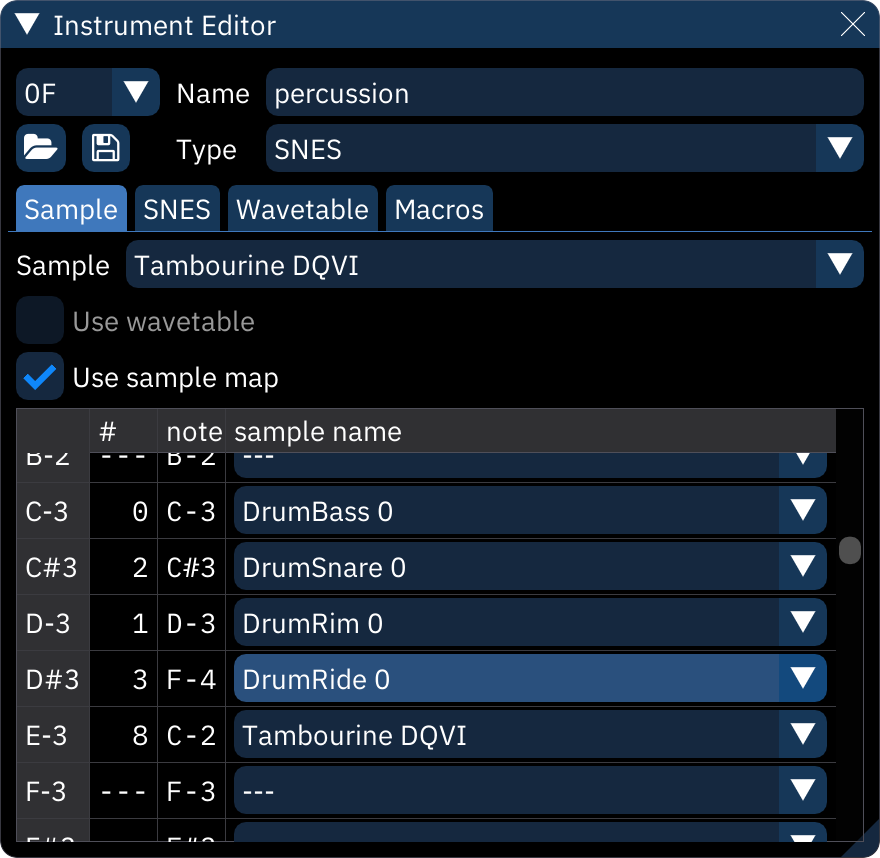
this tab appears for Generic PCM DAC, Amiga and SNES. |
| 225 |
|
| 226 |
 |
| 227 |
|
| 228 |
see the [Generic Sample section](sample.md) for more information. |