| 1 |
# OPLL FM synthesis instrument editor |
| 2 |
|
| 3 |
the OPLL FM editor is divided into 5 tabs: |
| 4 |
|
| 5 |
- **FM**: for controlling the basic parameters of FM sound source. |
| 6 |
- **Macros (FM)**: for macros controlling algorithm, waveform and feedback. |
| 7 |
- **Macros (OP1)**: for macros controlling FM parameters of operator 1. |
| 8 |
- **Macros (OP2)**: for macros controlling FM parameters of operator 2. |
| 9 |
- **Macros**: for other macros (volume/arp/pitch/patch). |
| 10 |
|
| 11 |
## FM |
| 12 |
|
| 13 |
the OPLL synthesizer is two-operator, meaning it takes two oscillators to produce a single sound. |
| 14 |
however, unlike the other FM chips, only one custom patch may be set at a time, shared among all 9 channels. |
| 15 |
|
| 16 |
but don't worry! there also are 15 preset patches that you may select at any time. |
| 17 |
|
| 18 |
these apply to the instrument as a whole: |
| 19 |
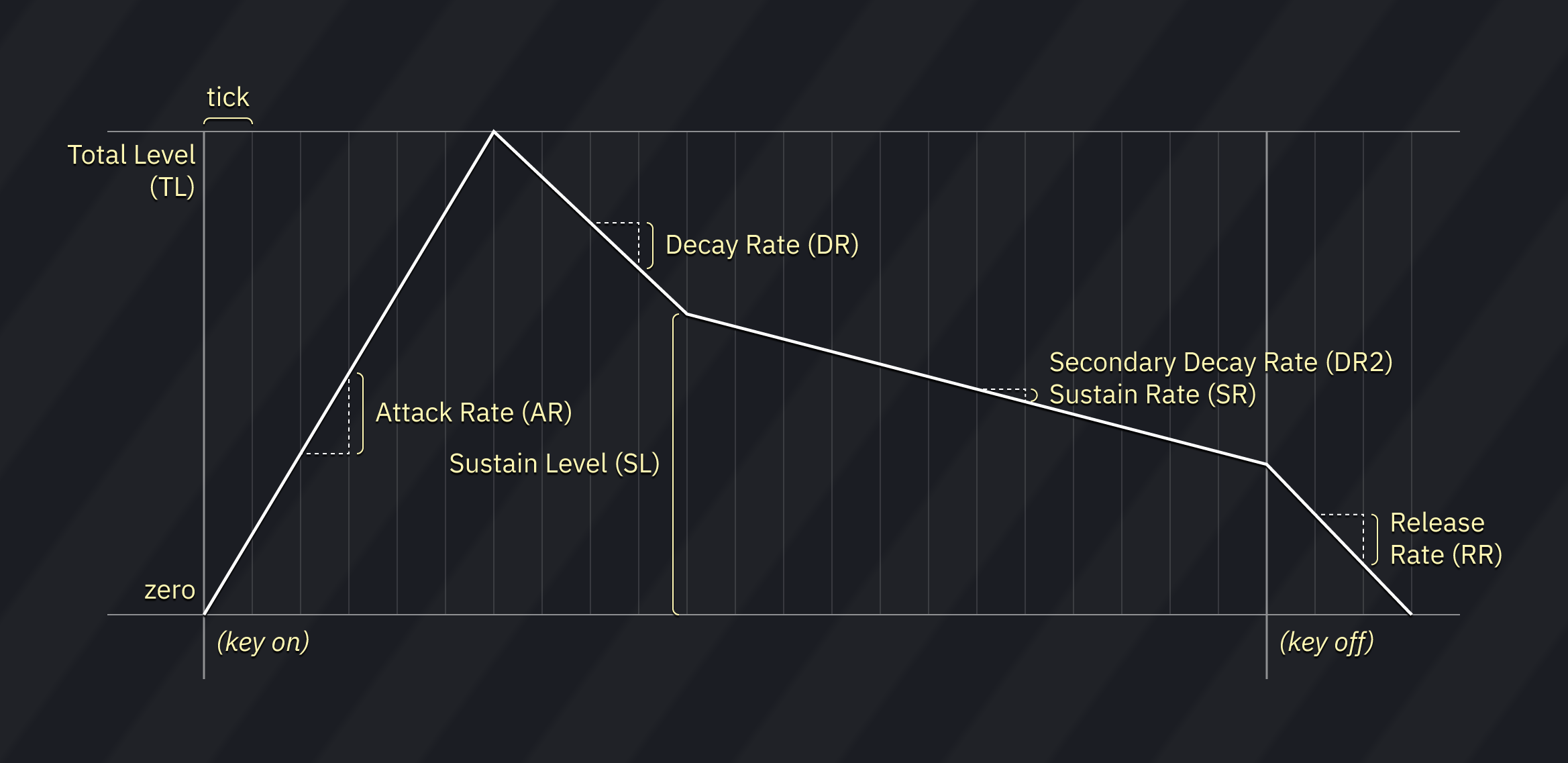
- **Feedback (FB)**: determines how many times operator 1 returns its output to itself (0 to 7). |
| 20 |
- **Sustain (SUS)**: enables the sustain flag (sets the release rate to 5). |
| 21 |
|
| 22 |
- **Octave**: sets the "block" of the frequency register, which affects note range and precision. |
| 23 |
- **OP2 Half Sine (DC)**: sets the waveform produced by carrier operator to half-sine. |
| 24 |
- **OP1 Half Sine (DM)**: sets the waveform produced by modulator operator to half-sine. |
| 25 |
- **preset dropdown**: selects OPLL preset instrument. |
| 26 |
- this is the selector for the preset patches I mentioned before. |
| 27 |
- once a preset patch is selected, only the volume is configurable. |
| 28 |
- only one user-specified patch may be applied at a time! |
| 29 |
|
| 30 |
if you select the special Drums patch, you may use the instrument in Drums mode of OPLL. an extra setting also appears: |
| 31 |
- **Fixed frequency mode**: allows you to set a fixed frequency for the drum channels. |
| 32 |
|
| 33 |
these apply to each operator: |
| 34 |
- the crossed-arrows button can be dragged to rearrange operators. |
| 35 |
- **Amplitude Modulation (AM)**: makes the operator affected by LFO tremolo. |
| 36 |
- **Envelope generator sustain flag (EGS)**: when enabled, value of Sustain Level is in effect. |
| 37 |
- **Attack Rate (AR)**: determines the rising time for the sound. the bigger the value, the faster the attack (0 to 15). |
| 38 |
- **Decay Rate (DR)**: determines the diminishing time for the sound. the higher the value, the shorter the decay. it's the initial amplitude decay rate (0 to 15). |
| 39 |
- **Sustain Level (SL)**: determines the point at which the sound ceases to decay and changes to a sound having a constant level. the sustain level is expressed as a fraction of the maximum level (0 to 15). |
| 40 |
- **Release Rate (RR)**: determines the rate at which the sound disappears after note off. the higher the value, the shorter the release (0 to 15). |
| 41 |
- **Total Level (TL)**: represents the envelope’s highest amplitude, with 0 being the largest and 63 (decimal) the smallest. a change of one unit is about 0.75 dB. |
| 42 |
- in the case of the second operator, it goes from 0 to 15 instead. |
| 43 |
- **Key Scale Level (KSL)**: also known as "Level Scale". determines the degree to which the amplitude decreases according to the pitch. |
| 44 |
|
| 45 |
 |
| 46 |
|
| 47 |
- **Envelope Scale (KSR)**: also known as "Key Scale". determines the degree to which the envelope execution speed increases according to the pitch. |
| 48 |
- **Frequency Multiplier (MULT)**: sets the coarse pitch offset in relation to the note (0 to 15). the values follow the harmonic scale. for example, 0 is -1 octave, 1 is 0 octaves, 2 is 1 octave, 3 is 1 octave 7 semitones, and so on. |
| 49 |
- note that values 11, 13 and 14 behave as 10, 12 and 12 respectively. |
| 50 |
- **Vibrato (VIB)**: makes the operator affected by LFO vibrato. |
| 51 |
|
| 52 |
## macros |
| 53 |
|
| 54 |
these macros allow you to control several parameters of FM per tick. |
| 55 |
|
| 56 |
## FM Macros |
| 57 |
|
| 58 |
all parameters are listed above. |
| 59 |
|
| 60 |
## OP1-OP4 Macros |
| 61 |
|
| 62 |
all parameters are listed above. |
| 63 |
|
| 64 |
## Macros |
| 65 |
|
| 66 |
- **Arpeggio**: pitch change sequence. |
| 67 |
- **Patch**: changes the playing preset mid-note. |
| 68 |
- through use of this macro, you may unlock different glitched sounds. useful for distortion guitars! |
| 69 |
- **Pitch**: fine pitch. |
| 70 |
- **Relative**: when enabled, pitch changes are relative to the current pitch. |
| 71 |
- **Phase Reset**: restarts all operators and resets the waveform to its start. |
| 72 |
|
| 73 |
|
| 74 |
## links |
| 75 |
|
| 76 |
[FM instrument tutorial](https://www.youtube.com/watch?v=wS8edjurjDw): A great starting point to learn how create and work with FM sounds. this was made for DefleMask, but all the same principles apply. |