| 1 |
# OPL FM synthesis instrument editor |
| 2 |
|
| 3 |
the OPL FM editor is divided into 7 tabs: |
| 4 |
|
| 5 |
- **FM**: for controlling the basic parameters of FM sound source. |
| 6 |
- **Macros (FM)**: for macros controlling algorithm and feedback. |
| 7 |
- **Macros (OP1)**: for macros controlling FM parameters of operator 1. |
| 8 |
- **Macros (OP2)**: for macros controlling FM parameters of operator 2. |
| 9 |
- **Macros (OP3)**: for macros controlling FM parameters of operator 3 (only when 4-op flag is set and only on OPL3!). |
| 10 |
- **Macros (OP4)**: for macros controlling FM parameters of operator 4 (only when 4-op flag is set and only on OPL3!). |
| 11 |
- **Macros**: for other macros (volume/arp/pitch/pan). |
| 12 |
|
| 13 |
## FM |
| 14 |
|
| 15 |
the OPL synthesizers are nominally two-operator (OPL3 supports 4-operator mode on up to six channels), meaning it takes two oscillators to produce a single sound. |
| 16 |
|
| 17 |
these apply to the instrument as a whole: |
| 18 |
- **Algorithm (ALG)**: determines how operators are connected to each other (0-1 range and OPL1 and OPL2; 0-3 range on OPL3 4op mode). |
| 19 |
- left-click pops up a small "operators changes with volume?" dialog where each operator can be toggled to scale with volume level. |
| 20 |
- right-click to switch to a preview display of the waveform generated on a new note: |
| 21 |
- left-click restarts the preview. |
| 22 |
- middle-click pauses and unpauses the preview. |
| 23 |
- right-click returns to algorithm view. |
| 24 |
- **Feedback (FB)**: determines how many times operator 1 returns its output to itself (0 to 7). |
| 25 |
|
| 26 |
- **Octave**: sets the "block" of the frequency register, which affects note range and precision. |
| 27 |
- **4-op**: enables 4-operator FM instrument editor mode (only on OPL3). |
| 28 |
- **Drums**: enables OPL drum mode editor. |
| 29 |
|
| 30 |
these apply to each operator: |
| 31 |
- the crossed-arrows button can be dragged to rearrange operators. |
| 32 |
- **Amplitude Modulation (AM)**: makes the operator affected by LFO tremolo. |
| 33 |
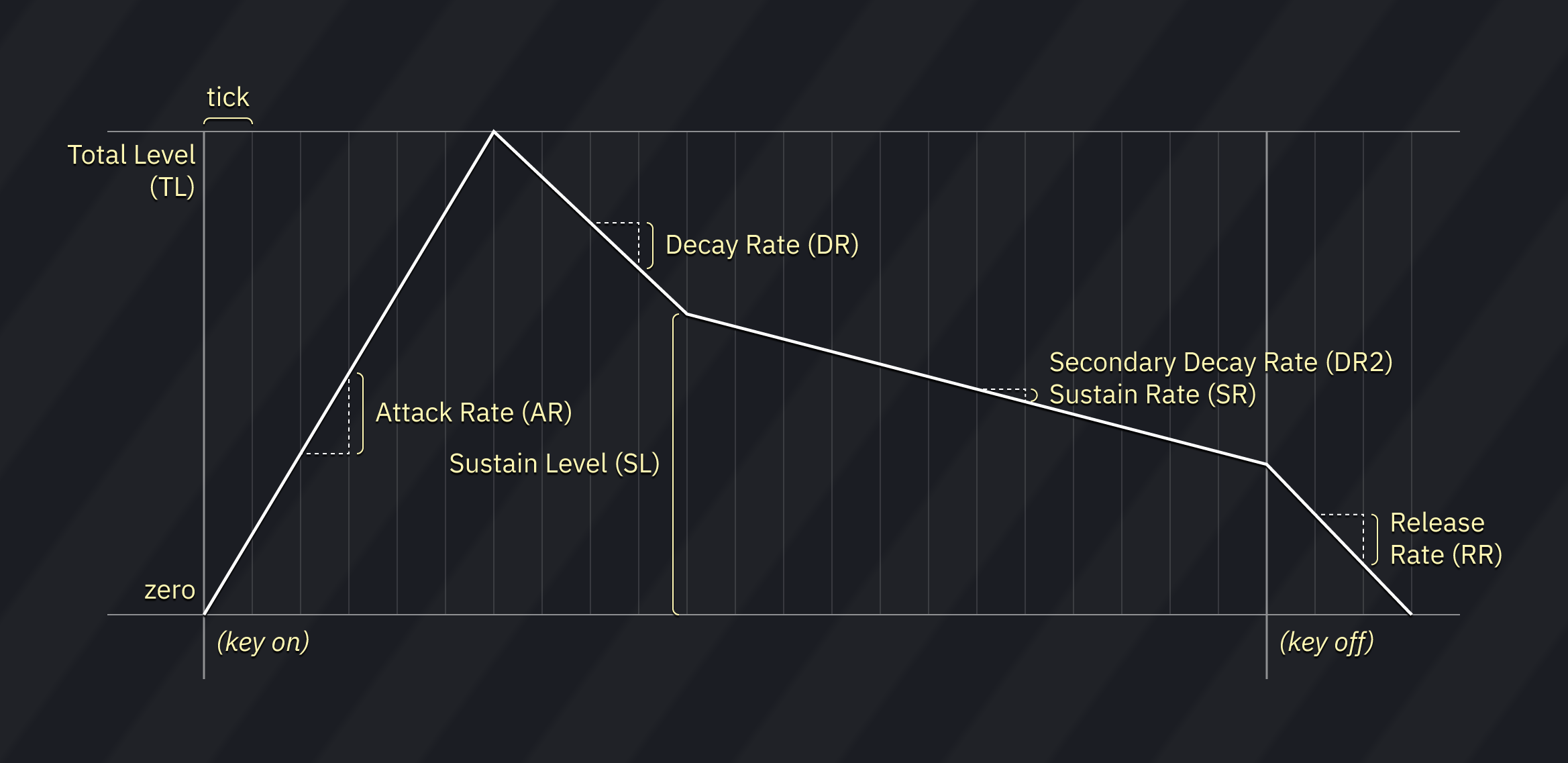
- **Sustain flag (SUS)**: when enabled, the envelope pauses ("sustains") once it reaches the Sustain Level and does not proceed to the release phase until note off. |
| 34 |
- **Attack Rate (AR)**: determines the rising time for the sound. the bigger the value, the faster the attack (0 to 15). |
| 35 |
- **Decay Rate (DR)**: determines the diminishing time for the sound. the higher the value, the shorter the decay. it's the initial amplitude decay rate (0 to 15). |
| 36 |
- **Sustain Level (SL)**: determines the point at which the sound ceases to decay and changes to a sound having a constant level. the sustain level is expressed as a fraction of the maximum level (0 to 15). |
| 37 |
- **Release Rate (RR)**: determines the rate at which the sound disappears after note off. the higher the value, the shorter the release (0 to 15). |
| 38 |
- **Total Level (TL)**: represents the envelope’s highest amplitude, with 0 being the largest and 63 (decimal) the smallest. a change of one unit is about 0.75 dB. |
| 39 |
- **Key Scale Level (KSL)**: also known as "Level Scale". determines the degree to which the amplitude decreases according to the pitch. |
| 40 |
|
| 41 |
 |
| 42 |
|
| 43 |
- **Key Scale Rate (KSR)**: also known as "Rate Scale". determines the degree to which the envelope execution speed increases according to the pitch. |
| 44 |
- **Frequency Multiplier (MULT)**: sets the coarse pitch offset in relation to the note (0 to 15). the values follow the harmonic scale. for example, 0 is -1 octave, 1 is 0 octaves, 2 is 1 octave, 3 is 1 octave 7 semitones, and so on. |
| 45 |
- note that values 11, 13 and 14 behave as 10, 12 and 12 respectively. |
| 46 |
- **Waveform Select (WS)**: changes the waveform of the operator (OPL2 and OPL3 only, 0-3 range on OPL2 and 0-7 on OPL3). |
| 47 |
- **Vibrato (VIB)**: makes the operator affected by LFO vibrato. |
| 48 |
|
| 49 |
## macros |
| 50 |
|
| 51 |
these macros allow you to control several parameters of FM per tick. |
| 52 |
|
| 53 |
## FM Macros |
| 54 |
|
| 55 |
all parameters are listed above. |
| 56 |
|
| 57 |
## OP1-OP4 Macros |
| 58 |
|
| 59 |
all parameters are listed above. |
| 60 |
|
| 61 |
## Macros |
| 62 |
|
| 63 |
- **Volume**: volume sequence. |
| 64 |
- **Arpeggio**: pitch sequence. |
| 65 |
- **Panning**: enables output on left/right/rear channels. OPL3 only. |
| 66 |
- **Pitch**: fine pitch. |
| 67 |
- **Relative**: when enabled, pitch changes are relative to the current pitch. |
| 68 |
- **Phase Reset**: restarts all operators and resets the waveform to its start. |
| 69 |
|
| 70 |
## OPL (drums) instrument editor |
| 71 |
|
| 72 |
this is similar to the OPL instrument editor, but sets the parameters of snare, tom, top and hi-hat directly once a drums instrument is activated. |