| 1 |
--- |
| 2 |
Title: Text Attributes and Markup |
| 3 |
--- |
| 4 |
|
| 5 |
# Text Attributes |
| 6 |
|
| 7 |
Attributed text is used in a number of places in Pango. It is used as the |
| 8 |
input to the itemization process and also when creating a [[email protected]]. |
| 9 |
|
| 10 |
Attributes can influence the various stages of the rendering pipeline. For example, |
| 11 |
font or size attributes will influence the font selection that is happening during |
| 12 |
itemization, font features and letterspacing attributes will influence shaping, and |
| 13 |
color or underline attributes will be used for rendering. |
| 14 |
|
| 15 |
Pango uses a simple structs for individual attributes, such as |
| 16 |
[[email protected]] or [[email protected]]. Each attribute has a type, |
| 17 |
and a start and end index that determine the range of characters that the attribute |
| 18 |
applies to. See the [[email protected]] enumeration for all the possible |
| 19 |
attribute types. |
| 20 |
|
| 21 |
Attributes rarely come alone. Pango uses the [[email protected]] structure |
| 22 |
to hold all attributes that apply to a piece of text. |
| 23 |
|
| 24 |
# Pango Markup |
| 25 |
|
| 26 |
Frequently, you want to display some text to the user with attributes applied to |
| 27 |
part of the text (for example, you might want bold or italicized words). With the |
| 28 |
base Pango interfaces, you could create a [[email protected]] and apply it to |
| 29 |
the text; the problem is that you'd need to apply attributes to some numeric range |
| 30 |
of characters, for example "characters 12-17." This is broken from an |
| 31 |
internationalization standpoint; once the text is translated, the word you wanted |
| 32 |
to italicize could be in a different position. |
| 33 |
|
| 34 |
The solution is to include the text attributes in the string to be translated. |
| 35 |
Pango provides this feature with a small markup language. You can parse a marked-up |
| 36 |
string into the string text plus a [[email protected]] using either of |
| 37 |
[func@parse_markup] or [func@markup_parser_new]. |
| 38 |
|
| 39 |
A simple example of a marked-up string might be: |
| 40 |
|
| 41 |
``` |
| 42 |
<span foreground="blue" size="x-large">Blue text</span> is <i>cool</i>! |
| 43 |
``` |
| 44 |
|
| 45 |
 |
| 46 |
|
| 47 |
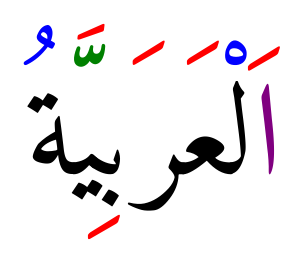
A more elaborate example of using markup to color combining marks in |
| 48 |
Arabic text: |
| 49 |
|
| 50 |
``` |
| 51 |
<span foreground="purple">ا</span><span foreground="red">َ</span>ل<span foreground="blue">ْ</span>ع<span foreground="red">َ</span>ر<span foreground="red">َ</span>ب<span foreground="red">ِ</span>ي<span foreground="green">ّ</span><span foreground="red">َ</span>ة<span foreground="blue">ُ</span> |
| 52 |
``` |
| 53 |
|
| 54 |
 |
| 55 |
|
| 56 |
Pango uses GMarkup to parse this language, which means that XML features |
| 57 |
such as numeric character entities such as `©` for © can be used too. |
| 58 |
|
| 59 |
The root tag of a marked-up document is `<markup>`, but [[email protected]_markup] |
| 60 |
allows you to omit this tag, so you will most likely never need to use it. |
| 61 |
The most general markup tag is `<span>`, then there are some convenience |
| 62 |
tags. |
| 63 |
|
| 64 |
## The `<span>` Attributes |
| 65 |
|
| 66 |
font |
| 67 |
font_desc |
| 68 |
: A font description string, such as "Sans Italic 12". See |
| 69 |
[[email protected]_string] for a description of the format of |
| 70 |
the string representation. Note that any other span attributes will override |
| 71 |
this description. So if you have "Sans Italic" and also a style="normal" |
| 72 |
attribute, you will get Sans normal, not italic. |
| 73 |
|
| 74 |
font_family |
| 75 |
face |
| 76 |
: A font family name. |
| 77 |
|
| 78 |
font_size |
| 79 |
size |
| 80 |
: Font size in 1024ths of a point, or in points (e.g. '12.5pt'), or one of the |
| 81 |
absolute sizes 'xx-small', 'x-small', 'small', 'medium', 'large', 'x-large', |
| 82 |
'xx-large', or a percentage (e.g. '200%'), or one of the relative sizes 'smaller' |
| 83 |
or 'larger'. |
| 84 |
If you want to specify a absolute size, it's usually easier to take advantage |
| 85 |
of the ability to specify a partial font description using 'font'; you can use |
| 86 |
font='12.5' rather than size='12800' or size='12.5pt'. |
| 87 |
Support for specifying font sizes in points or as percentages was added in |
| 88 |
Pango 1.50. |
| 89 |
|
| 90 |
font_style |
| 91 |
style |
| 92 |
: One of 'normal', 'oblique', 'italic'. |
| 93 |
|
| 94 |
font_weight |
| 95 |
weight |
| 96 |
: One of 'ultralight', 'light', 'normal', 'bold', 'ultrabold', 'heavy', or a |
| 97 |
numeric weight. |
| 98 |
|
| 99 |
font_variant |
| 100 |
variant |
| 101 |
: One of 'normal', 'small-caps', 'all-small-caps', 'petite-caps', 'all-petite-caps', |
| 102 |
'unicase', 'title-caps'. Values other than 'normal' and 'small-caps' are available |
| 103 |
since 1.50. |
| 104 |
|
| 105 |
font_stretch |
| 106 |
stretch |
| 107 |
: One of 'ultracondensed', 'extracondensed', |
| 108 |
'condensed', 'semicondensed', 'normal', 'semiexpanded', 'expanded', |
| 109 |
'extraexpanded', 'ultraexpanded'. |
| 110 |
|
| 111 |
font_features |
| 112 |
: A comma-separated list of OpenType font feature settings, in the same syntax as |
| 113 |
accepted by CSS. E.g: `font_features='dlig=1, -kern, afrc on'`. |
| 114 |
|
| 115 |
foreground |
| 116 |
fgcolor |
| 117 |
color |
| 118 |
: An RGB color specification such as '#00FF00' or a color name such as 'red'. |
| 119 |
Since 1.38, an RGBA color specification such as '#00FF007F' will be interpreted |
| 120 |
as specifying both a foreground color and foreground alpha. |
| 121 |
|
| 122 |
background |
| 123 |
bgcolor |
| 124 |
: An RGB color specification such as '#00FF00' or a color name such as 'red'. |
| 125 |
Since 1.38, an RGBA color specification such as '#00FF007F' will be interpreted |
| 126 |
as specifying both a background color and background alpha. |
| 127 |
|
| 128 |
alpha |
| 129 |
fgalpha |
| 130 |
: An alpha value for the foreground color, either a plain integer between 1 and |
| 131 |
65536 or a percentage value like '50%'. |
| 132 |
|
| 133 |
background_alpha |
| 134 |
bgalpha |
| 135 |
: An alpha value for the background color, either a plain integer between 1 and |
| 136 |
65536 or a percentage value like '50%'. |
| 137 |
|
| 138 |
underline |
| 139 |
: One of 'none', 'single', 'double', 'low', 'error'. |
| 140 |
|
| 141 |
underline_color |
| 142 |
: The color of underlines; an RGB color specification such as '#00FF00' or a color |
| 143 |
name such as 'red'. |
| 144 |
|
| 145 |
overline |
| 146 |
: One of 'none' or 'single'. Overline support was added in Pango 1.46. |
| 147 |
|
| 148 |
overline_color |
| 149 |
: The color of overlines; an RGB color specification such as '#00FF00' or a color |
| 150 |
name such as 'red'. Overline support was added in Pango 1.46. |
| 151 |
|
| 152 |
rise |
| 153 |
: Vertical displacement, in Pango units or in points (e.g. '5pt'). Can be |
| 154 |
negative for subscript, positive for superscript. |
| 155 |
Support for specifying rise in points was added in Pango 1.50. |
| 156 |
|
| 157 |
baseline_shift |
| 158 |
: Vertical displacement. In contrast to rise, baseline_shift attributes are cumulative. |
| 159 |
The value can be a length in Pango units or in points (e.g. '5pt'), or 'superscript' |
| 160 |
or 'subscript'. Available since 1.50. |
| 161 |
|
| 162 |
font_scale: |
| 163 |
: Font size change. The possible values are 'superscript', 'subscript' or 'small-caps'. |
| 164 |
This is similar to the font_size values 'smaller' or 'larger', but uses font metrics |
| 165 |
to find the new size. Available since 1.50. |
| 166 |
|
| 167 |
strikethrough |
| 168 |
: 'true' or 'false' whether to strike through the text. |
| 169 |
|
| 170 |
strikethrough_color |
| 171 |
: The color of strikethrough lines; an RGB color specification such as '#00FF00' |
| 172 |
or a color name such as 'red'. |
| 173 |
|
| 174 |
fallback |
| 175 |
: 'true' or 'false' whether to enable fallback. If disabled, then characters will |
| 176 |
only be used from the closest matching font on the system. No fallback will be |
| 177 |
done to other fonts on the system that might contain the characters in the text. |
| 178 |
Fallback is enabled by default. Most applications should not disable fallback. |
| 179 |
|
| 180 |
lang |
| 181 |
: A language code, indicating the text language. |
| 182 |
|
| 183 |
letter_spacing |
| 184 |
: Inter-letter spacing in 1024ths of a point. |
| 185 |
|
| 186 |
gravity |
| 187 |
: One of 'south', 'east', 'north', 'west', 'auto'. |
| 188 |
|
| 189 |
gravity_hint |
| 190 |
: One of 'natural', 'strong', 'line'. |
| 191 |
|
| 192 |
show |
| 193 |
: Specifies what special characters to show visibly. The value can be 'none' |
| 194 |
or a combination of 'spaces', 'line-breaks' and 'ignorables', combined with '|'. |
| 195 |
Support for showing special characters was added in Pango 1.44. |
| 196 |
|
| 197 |
insert_hyphens |
| 198 |
: 'true' or 'false' to indicate whether hyphens should be inserted when breaking |
| 199 |
lines in the middle of words. Available since Pango 1.44. |
| 200 |
|
| 201 |
allow_breaks |
| 202 |
: 'true' or 'false' to indicate whether breaking lines is allowed. Available |
| 203 |
since Pango 1.44. |
| 204 |
|
| 205 |
line_height |
| 206 |
: Overrides the line height. The value can be either a factor (< 1024) that is |
| 207 |
used to scale up the logical extents of runs or an absolute value (in 1024th |
| 208 |
of a point). |
| 209 |
Available since Pango 1.50. |
| 210 |
|
| 211 |
text_transform |
| 212 |
: Specifies how characters are transformed during shaping. The values can be |
| 213 |
'none', 'lowercase', 'uppercase' or 'capitalize'. Support for text transformation |
| 214 |
was added in Pango 1.50. |
| 215 |
|
| 216 |
segment |
| 217 |
: Overrides word or sentence boundaries. The value can be 'word' or 'sentence', |
| 218 |
to indicate that the span should be treated as a single word or sentence. |
| 219 |
Overlapping segments will be split to allow this, and line breaks will be |
| 220 |
adjusted accordingly. Available since Pango 1.50. |
| 221 |
|
| 222 |
## Convenience Tags |
| 223 |
|
| 224 |
`<b>` |
| 225 |
: Bold |
| 226 |
|
| 227 |
`<big>` |
| 228 |
: Makes font relatively larger, equivalent to `<span size="larger">` |
| 229 |
|
| 230 |
`<i>` |
| 231 |
: Italic |
| 232 |
|
| 233 |
`<s>` |
| 234 |
: Strikethrough |
| 235 |
|
| 236 |
`<sub>` |
| 237 |
: Subscript |
| 238 |
|
| 239 |
`<sup>` |
| 240 |
: Superscript |
| 241 |
|
| 242 |
`<small>` |
| 243 |
: Makes font relatively smaller, equivalent to `<span size="smaller">` |
| 244 |
|
| 245 |
`<tt>` |
| 246 |
: Monospace font |
| 247 |
|
| 248 |
`<u>` |
| 249 |
: Underline |