| 1 |
--- |
| 2 |
Title: Rendering with Cairo |
| 3 |
--- |
| 4 |
|
| 5 |
# Rendering with Cairo |
| 6 |
|
| 7 |
The Cairo library is a vector graphics library with a powerful rendering model. |
| 8 |
It has such features as anti-aliased primitives, alpha-compositing, and gradients. |
| 9 |
Multiple backends for Cairo are available, to allow rendering to images, to PDF |
| 10 |
files, and to the screen on X and on other windowing systems. The functions in |
| 11 |
this section allow using Pango to render to Cairo surfaces. |
| 12 |
|
| 13 |
Using Pango with Cairo is straightforward. A `PangoContext` created with |
| 14 |
pango_cairo_font_map_create_context() can be used on any Cairo context (`cairo_t`), |
| 15 |
but needs to be updated to match the current transformation matrix and target |
| 16 |
surface of the Cairo context using pango_cairo_update_context(). The convenience |
| 17 |
functions pango_cairo_create_layout() and pango_cairo_update_layout() handle |
| 18 |
the common case where the program doesn't need to manipulate the properties of |
| 19 |
the `PangoContext`. |
| 20 |
|
| 21 |
When you get the metrics of a layout or of a piece of a layout using functions |
| 22 |
such as pango_layout_get_extents(), the reported metrics are in user-space |
| 23 |
coordinates. If a piece of text is 10 units long, and you call |
| 24 |
`cairo_scale (cr, 2.0)`, it still is more-or-less 10 units long. However, the |
| 25 |
results will be affected by hinting (that is, the process of adjusting the text |
| 26 |
to look good on the pixel grid), so you shouldn't assume they are completely |
| 27 |
independent of the current transformation matrix. Note that the basic metrics |
| 28 |
functions in Pango report results in integer Pango units. To get to the floating |
| 29 |
point units used in Cairo divide by `PANGO_SCALE`. |
| 30 |
|
| 31 |
## Using Pango with Cairo |
| 32 |
|
| 33 |
``` |
| 34 |
#include <math.h> |
| 35 |
#include <pango/pangocairo.h> |
| 36 |
|
| 37 |
#define RADIUS 150 |
| 38 |
#define N_WORDS 10 |
| 39 |
#define FONT "Sans Bold 27" |
| 40 |
|
| 41 |
static void |
| 42 |
draw_text (cairo_t *cr) |
| 43 |
{ |
| 44 |
PangoLayout *layout; |
| 45 |
PangoFontDescription *desc; |
| 46 |
int i; |
| 47 |
|
| 48 |
/* Center coordinates on the middle of the region we are drawing */ |
| 49 |
cairo_translate (cr, RADIUS, RADIUS); |
| 50 |
|
| 51 |
/* Create a PangoLayout, set the font and text */ |
| 52 |
layout = pango_cairo_create_layout (cr); |
| 53 |
|
| 54 |
pango_layout_set_text (layout, "Text", -1); |
| 55 |
desc = pango_font_description_from_string (FONT); |
| 56 |
pango_layout_set_font_description (layout, desc); |
| 57 |
pango_font_description_free (desc); |
| 58 |
|
| 59 |
/* Draw the layout N_WORDS times in a circle */ |
| 60 |
for (i = 0; i < N_WORDS; i++) |
| 61 |
{ |
| 62 |
int width, height; |
| 63 |
double angle = (360. * i) / N_WORDS; |
| 64 |
double red; |
| 65 |
|
| 66 |
cairo_save (cr); |
| 67 |
|
| 68 |
/* Gradient from red at angle == 60 to blue at angle == 240 */ |
| 69 |
red = (1 + cos ((angle - 60) * G_PI / 180.)) / 2; |
| 70 |
cairo_set_source_rgb (cr, red, 0, 1.0 - red); |
| 71 |
|
| 72 |
cairo_rotate (cr, angle * G_PI / 180.); |
| 73 |
|
| 74 |
/* Inform Pango to re-layout the text with the new transformation */ |
| 75 |
pango_cairo_update_layout (cr, layout); |
| 76 |
|
| 77 |
pango_layout_get_size (layout, &width, &height); |
| 78 |
cairo_move_to (cr, - ((double)width / PANGO_SCALE) / 2, - RADIUS); |
| 79 |
pango_cairo_show_layout (cr, layout); |
| 80 |
|
| 81 |
cairo_restore (cr); |
| 82 |
} |
| 83 |
|
| 84 |
/* free the layout object */ |
| 85 |
g_object_unref (layout); |
| 86 |
} |
| 87 |
|
| 88 |
int |
| 89 |
main (int argc, char **argv) |
| 90 |
{ |
| 91 |
cairo_t *cr; |
| 92 |
char *filename; |
| 93 |
cairo_status_t status; |
| 94 |
cairo_surface_t *surface; |
| 95 |
|
| 96 |
if (argc != 2) |
| 97 |
{ |
| 98 |
g_printerr ("Usage: cairosimple OUTPUT_FILENAME\n"); |
| 99 |
return 1; |
| 100 |
} |
| 101 |
|
| 102 |
filename = argv[1]; |
| 103 |
|
| 104 |
surface = cairo_image_surface_create (CAIRO_FORMAT_ARGB32, |
| 105 |
2 * RADIUS, 2 * RADIUS); |
| 106 |
cr = cairo_create (surface); |
| 107 |
|
| 108 |
cairo_set_source_rgb (cr, 1.0, 1.0, 1.0); |
| 109 |
cairo_paint (cr); |
| 110 |
draw_text (cr); |
| 111 |
cairo_destroy (cr); |
| 112 |
|
| 113 |
status = cairo_surface_write_to_png (surface, filename); |
| 114 |
cairo_surface_destroy (surface); |
| 115 |
|
| 116 |
if (status != CAIRO_STATUS_SUCCESS) |
| 117 |
{ |
| 118 |
g_printerr ("Could not save png to '%s'\n", filename); |
| 119 |
return 1; |
| 120 |
} |
| 121 |
|
| 122 |
return 0; |
| 123 |
} |
| 124 |
``` |
| 125 |
|
| 126 |
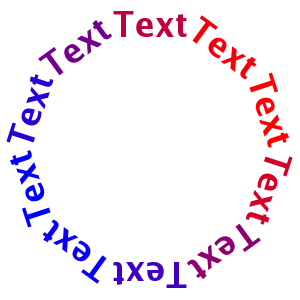
Once you build and run the example code above, you should see the |
| 127 |
following result: |
| 128 |
|
| 129 |
 |