| 1 |
--- |
| 2 |
Title: Fonts and Glyphs |
| 3 |
--- |
| 4 |
|
| 5 |
# Fonts |
| 6 |
|
| 7 |
Pango supports a flexible architecture where a particular rendering architecture |
| 8 |
can supply an implementation of fonts. The `PangoFont` structure represents an |
| 9 |
abstract rendering-system-independent font. Pango provides routines to list |
| 10 |
available fonts, and to load a font matching a given description. |
| 11 |
|
| 12 |
Conceptually, Pango groups fonts into faces and families which are identified |
| 13 |
by a name. A *font face* provides the different sizes of a single font style. |
| 14 |
A *font family* provides the available styles of a font. |
| 15 |
|
| 16 |
As an example, "Helvetica" is a family, "Helvetica Bold" is a face of this |
| 17 |
family, and "Helvetica Bold 12pt" is a concrete font of this face. |
| 18 |
|
| 19 |
# Font Enumeration |
| 20 |
|
| 21 |
The central object for dealing with the available fonts on a system and caching |
| 22 |
loaded fonts is a [[email protected]]. An application typically uses a single |
| 23 |
font map. |
| 24 |
|
| 25 |
Since the font map depends on the rendering architecture in use, you'll need to |
| 26 |
use the backend function pango_cairo_font_map_get_default() to obtain the default |
| 27 |
fontmap. Depending on the platform, it will return a `PangoCairoFcFontMap`, a |
| 28 |
`PangoCairoWin32FontMap` or a `PangoCairoCoreTextFontMap`. |
| 29 |
|
| 30 |
Once you have a fontmap, you can enumerate the available font families with |
| 31 |
[[email protected]_families]. To enumerate the faces of a font family, |
| 32 |
use [[email protected]_faces]. |
| 33 |
|
| 34 |
# Font Descriptions |
| 35 |
|
| 36 |
Since loading fonts uses system resources, Pango provides a way to describe |
| 37 |
a font without loading it. A [[email protected]] is a struct that |
| 38 |
contains enough information to load a concrete font with |
| 39 |
[[email protected]_font] or [[email protected]_font]. You can |
| 40 |
obtain a font description from a font face using [[email protected]], |
| 41 |
or by parsing a string such as |
| 42 |
|
| 43 |
Helvetica Bold 12pt |
| 44 |
|
| 45 |
with [[email protected]_string]. |
| 46 |
|
| 47 |
# Glyphs |
| 48 |
|
| 49 |
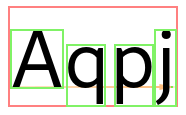
A font provides information about glyphs and how to position and render them. |
| 50 |
The Pango rendering pipeline uses this information to create a |
| 51 |
[[email protected]], which contains the glyphs corresponding to the |
| 52 |
characters in the text and related information such as glyph positions and sizes, |
| 53 |
and clustering information (i.e. which glyphs correspond to which characters). |
| 54 |
|
| 55 |
 |
| 56 |
|
| 57 |
A glyph is identified by a [[email protected]], which is a numeric ID. Note that |
| 58 |
glyph IDs are font-specific: the same character can be represented by diffferent |
| 59 |
glyph IDs in different fonts. |
| 60 |
|
| 61 |
The mapping between characters and glyphs is in general neither 1-1 nor a map: |
| 62 |
a single glyph may represent multiple characters (as is the case with ligatures), |
| 63 |
a single character may be represented by multiple glyphs (for example, when |
| 64 |
combining accents and base character), and in complex scripts, multiple characters |
| 65 |
may form clusters that get rearranged and represented by multiple glyphs. |