| 1 |
 |
| 2 |
|
| 3 |
 |
| 4 |
|
| 5 |
## 高效的 C++ JSON 解析/生成器,提供 SAX 及 DOM 风格 API |
| 6 |
|
| 7 |
Tencent is pleased to support the open source community by making RapidJSON available. |
| 8 |
|
| 9 |
Copyright (C) 2015 THL A29 Limited, a Tencent company, and Milo Yip. |
| 10 |
|
| 11 |
* [RapidJSON GitHub](https://github.com/Tencent/rapidjson/) |
| 12 |
* RapidJSON 文档 |
| 13 |
* [English](http://rapidjson.org/) |
| 14 |
* [简体中文](http://rapidjson.org/zh-cn/) |
| 15 |
* [GitBook](https://www.gitbook.com/book/miloyip/rapidjson/details/zh-cn) 可下载 PDF/EPUB/MOBI,但不含 API 参考手册。 |
| 16 |
|
| 17 |
## Build 状态 |
| 18 |
|
| 19 |
| [Linux][lin-link] | [Windows][win-link] | [Coveralls][cov-link] | |
| 20 |
| :---------------: | :-----------------: | :-------------------: | |
| 21 |
| ![lin-badge] | ![win-badge] | ![cov-badge] | |
| 22 |
|
| 23 |
[lin-badge]: https://travis-ci.org/Tencent/rapidjson.svg?branch=master "Travis build status" |
| 24 |
[lin-link]: https://travis-ci.org/Tencent/rapidjson "Travis build status" |
| 25 |
[win-badge]: https://ci.appveyor.com/api/projects/status/l6qulgqahcayidrf/branch/master?svg=true "AppVeyor build status" |
| 26 |
[win-link]: https://ci.appveyor.com/project/miloyip/rapidjson-0fdqj/branch/master "AppVeyor build status" |
| 27 |
[cov-badge]: https://coveralls.io/repos/Tencent/rapidjson/badge.svg?branch=master "Coveralls coverage" |
| 28 |
[cov-link]: https://coveralls.io/r/Tencent/rapidjson?branch=master "Coveralls coverage" |
| 29 |
|
| 30 |
## 简介 |
| 31 |
|
| 32 |
RapidJSON 是一个 C++ 的 JSON 解析器及生成器。它的灵感来自 [RapidXml](http://rapidxml.sourceforge.net/)。 |
| 33 |
|
| 34 |
* RapidJSON 小而全。它同时支持 SAX 和 DOM 风格的 API。SAX 解析器只有约 500 行代码。 |
| 35 |
|
| 36 |
* RapidJSON 快。它的性能可与 `strlen()` 相比。可支持 SSE2/SSE4.2 加速。 |
| 37 |
|
| 38 |
* RapidJSON 独立。它不依赖于 BOOST 等外部库。它甚至不依赖于 STL。 |
| 39 |
|
| 40 |
* RapidJSON 对内存友好。在大部分 32/64 位机器上,每个 JSON 值只占 16 字节(除字符串外)。它预设使用一个快速的内存分配器,令分析器可以紧凑地分配内存。 |
| 41 |
|
| 42 |
* RapidJSON 对 Unicode 友好。它支持 UTF-8、UTF-16、UTF-32 (大端序/小端序),并内部支持这些编码的检测、校验及转码。例如,RapidJSON 可以在分析一个 UTF-8 文件至 DOM 时,把当中的 JSON 字符串转码至 UTF-16。它也支持代理对(surrogate pair)及 `"\u0000"`(空字符)。 |
| 43 |
|
| 44 |
在 [这里](doc/features.zh-cn.md) 可读取更多特点。 |
| 45 |
|
| 46 |
JSON(JavaScript Object Notation)是一个轻量的数据交换格式。RapidJSON 应该完全遵从 RFC7159/ECMA-404,并支持可选的放宽语法。 关于 JSON 的更多信息可参考: |
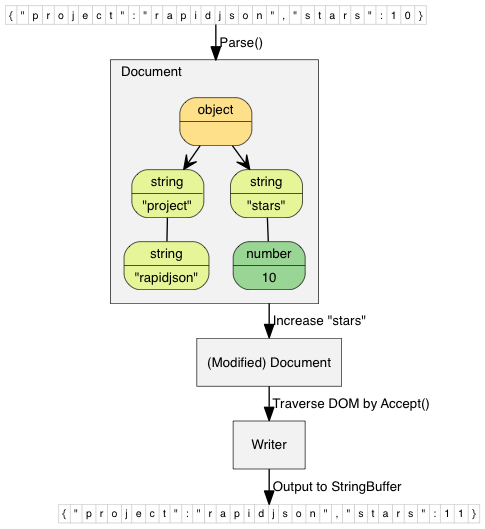
| 47 |
* [Introducing JSON](http://json.org/) |
| 48 |
* [RFC7159: The JavaScript Object Notation (JSON) Data Interchange Format](https://tools.ietf.org/html/rfc7159) |
| 49 |
* [Standard ECMA-404: The JSON Data Interchange Format](https://www.ecma-international.org/publications/standards/Ecma-404.htm) |
| 50 |
|
| 51 |
## v1.1 中的亮点 (2016-8-25) |
| 52 |
|
| 53 |
* 加入 [JSON Pointer](doc/pointer.zh-cn.md) 功能,可更简单地访问及更改 DOM。 |
| 54 |
* 加入 [JSON Schema](doc/schema.zh-cn.md) 功能,可在解析或生成 JSON 时进行校验。 |
| 55 |
* 加入 [放宽的 JSON 语法](doc/dom.zh-cn.md) (注释、尾随逗号、NaN/Infinity) |
| 56 |
* 使用 [C++11 范围 for 循环](doc/tutorial.zh-cn.md) 去遍历 array 和 object。 |
| 57 |
* 在 x86-64 架构下,缩减每个 `Value` 的内存开销从 24 字节至 16 字节。 |
| 58 |
|
| 59 |
其他改动请参考 [change log](CHANGELOG.md). |
| 60 |
|
| 61 |
## 兼容性 |
| 62 |
|
| 63 |
RapidJSON 是跨平台的。以下是一些曾测试的平台/编译器组合: |
| 64 |
* Visual C++ 2008/2010/2013 在 Windows (32/64-bit) |
| 65 |
* GNU C++ 3.8.x 在 Cygwin |
| 66 |
* Clang 3.4 在 Mac OS X (32/64-bit) 及 iOS |
| 67 |
* Clang 3.4 在 Android NDK |
| 68 |
|
| 69 |
用户也可以在他们的平台上生成及执行单元测试。 |
| 70 |
|
| 71 |
## 安装 |
| 72 |
|
| 73 |
RapidJSON 是只有头文件的 C++ 库。只需把 `include/rapidjson` 目录复制至系统或项目的 include 目录中。 |
| 74 |
|
| 75 |
RapidJSON 依赖于以下软件: |
| 76 |
* [CMake](https://cmake.org/) 作为通用生成工具 |
| 77 |
* (optional) [Doxygen](http://www.doxygen.org) 用于生成文档 |
| 78 |
* (optional) [googletest](https://github.com/google/googletest) 用于单元及性能测试 |
| 79 |
|
| 80 |
生成测试及例子的步骤: |
| 81 |
|
| 82 |
1. 执行 `git submodule update --init` 去获取 thirdparty submodules (google test)。 |
| 83 |
2. 在 rapidjson 目录下,建立一个 `build` 目录。 |
| 84 |
3. 在 `build` 目录下执行 `cmake ..` 命令以设置生成。Windows 用户可使用 cmake-gui 应用程序。 |
| 85 |
4. 在 Windows 下,编译生成在 build 目录中的 solution。在 Linux 下,于 build 目录运行 `make`。 |
| 86 |
|
| 87 |
成功生成后,你会在 `bin` 的目录下找到编译后的测试及例子可执行文件。而生成的文档将位于 build 下的 `doc/html` 目录。要执行测试,请在 build 下执行 `make test` 或 `ctest`。使用 `ctest -V` 命令可获取详细的输出。 |
| 88 |
|
| 89 |
我们也可以把程序库安装至全系统中,只要在具管理权限下从 build 目录执行 `make install` 命令。这样会按系统的偏好设置安装所有文件。当安装 RapidJSON 后,其他的 CMake 项目需要使用它时,可以通过在 `CMakeLists.txt` 加入一句 `find_package(RapidJSON)`。 |
| 90 |
|
| 91 |
## 用法一览 |
| 92 |
|
| 93 |
此简单例子解析一个 JSON 字符串至一个 document (DOM),对 DOM 作出简单修改,最终把 DOM 转换(stringify)至 JSON 字符串。 |
| 94 |
|
| 95 |
~~~~~~~~~~cpp |
| 96 |
// rapidjson/example/simpledom/simpledom.cpp` |
| 97 |
#include "rapidjson/document.h" |
| 98 |
#include "rapidjson/writer.h" |
| 99 |
#include "rapidjson/stringbuffer.h" |
| 100 |
#include <iostream> |
| 101 |
|
| 102 |
using namespace rapidjson; |
| 103 |
|
| 104 |
int main() { |
| 105 |
// 1. 把 JSON 解析至 DOM。 |
| 106 |
const char* json = "{\"project\":\"rapidjson\",\"stars\":10}"; |
| 107 |
Document d; |
| 108 |
d.Parse(json); |
| 109 |
|
| 110 |
// 2. 利用 DOM 作出修改。 |
| 111 |
Value& s = d["stars"]; |
| 112 |
s.SetInt(s.GetInt() + 1); |
| 113 |
|
| 114 |
// 3. 把 DOM 转换(stringify)成 JSON。 |
| 115 |
StringBuffer buffer; |
| 116 |
Writer<StringBuffer> writer(buffer); |
| 117 |
d.Accept(writer); |
| 118 |
|
| 119 |
// Output {"project":"rapidjson","stars":11} |
| 120 |
std::cout << buffer.GetString() << std::endl; |
| 121 |
return 0; |
| 122 |
} |
| 123 |
~~~~~~~~~~ |
| 124 |
|
| 125 |
注意此例子并没有处理潜在错误。 |
| 126 |
|
| 127 |
下图展示执行过程。 |
| 128 |
|
| 129 |
 |
| 130 |
|
| 131 |
还有许多 [例子](https://github.com/Tencent/rapidjson/tree/master/example) 可供参考: |
| 132 |
|
| 133 |
* DOM API |
| 134 |
* [tutorial](https://github.com/Tencent/rapidjson/blob/master/example/tutorial/tutorial.cpp): DOM API 的基本使用方法。 |
| 135 |
|
| 136 |
* SAX API |
| 137 |
* [simplereader](https://github.com/Tencent/rapidjson/blob/master/example/simplereader/simplereader.cpp): 使用 `Reader` 解析 JSON 时,打印所有 SAX 事件。 |
| 138 |
* [condense](https://github.com/Tencent/rapidjson/blob/master/example/condense/condense.cpp): 移除 JSON 中所有空白符的命令行工具。 |
| 139 |
* [pretty](https://github.com/Tencent/rapidjson/blob/master/example/pretty/pretty.cpp): 为 JSON 加入缩进与换行的命令行工具,当中使用了 `PrettyWriter`。 |
| 140 |
* [capitalize](https://github.com/Tencent/rapidjson/blob/master/example/capitalize/capitalize.cpp): 把 JSON 中所有字符串改为大写的命令行工具。 |
| 141 |
* [messagereader](https://github.com/Tencent/rapidjson/blob/master/example/messagereader/messagereader.cpp): 使用 SAX API 去解析一个 JSON 报文。 |
| 142 |
* [serialize](https://github.com/Tencent/rapidjson/blob/master/example/serialize/serialize.cpp): 使用 SAX API 去序列化 C++ 对象,生成 JSON。 |
| 143 |
* [jsonx](https://github.com/Tencent/rapidjson/blob/master/example/jsonx/jsonx.cpp): 实现了一个 `JsonxWriter`,它能把 SAX 事件写成 [JSONx](https://www-01.ibm.com/support/knowledgecenter/SS9H2Y_7.1.0/com.ibm.dp.doc/json_jsonx.html)(一种 XML)格式。这个例子是把 JSON 输入转换成 JSONx 格式的命令行工具。 |
| 144 |
|
| 145 |
* Schema API |
| 146 |
* [schemavalidator](https://github.com/Tencent/rapidjson/blob/master/example/schemavalidator/schemavalidator.cpp): 使用 JSON Schema 去校验 JSON 的命令行工具。 |
| 147 |
|
| 148 |
* 进阶 |
| 149 |
* [prettyauto](https://github.com/Tencent/rapidjson/blob/master/example/prettyauto/prettyauto.cpp): [pretty](https://github.com/Tencent/rapidjson/blob/master/example/pretty/pretty.cpp) 的修改版本,可自动处理任何 UTF 编码的 JSON。 |
| 150 |
* [parsebyparts](https://github.com/Tencent/rapidjson/blob/master/example/parsebyparts/parsebyparts.cpp): 这例子中的 `AsyncDocumentParser` 类使用 C++ 线程来逐段解析 JSON。 |
| 151 |
* [filterkey](https://github.com/Tencent/rapidjson/blob/master/example/filterkey/filterkey.cpp): 移取使用者指定的键值的命令行工具。 |
| 152 |
* [filterkeydom](https://github.com/Tencent/rapidjson/blob/master/example/filterkey/filterkey.cpp): 如上的工具,但展示如何使用生成器(generator)去填充一个 `Document`。 |