| 1 |
# `codeanatomy` -- Draw Code Anatomy # |
| 2 |
|
| 3 |
|
| 4 |
(C) 2019 Hồng-Phúc Bùi |
| 5 |
|
| 6 |
The idea of this Package is to typeset illustrations of pieces of code with |
| 7 |
annotations on each single parts of code (Code Anatomy). The origin of this idea is |
| 8 |
code illustrations in the texbook _Computer Science An Interdisciplinary Approach_ |
| 9 |
from Robert Sedgewick and Kevin Wayne. |
| 10 |
|
| 11 |
This package just provides tools to draw those figures. |
| 12 |
|
| 13 |
Some illustrations can be found here: |
| 14 |
<a href="https://introcs.cs.princeton.edu/java/home/">https://introcs.cs.princeton.edu/java/home/</a> |
| 15 |
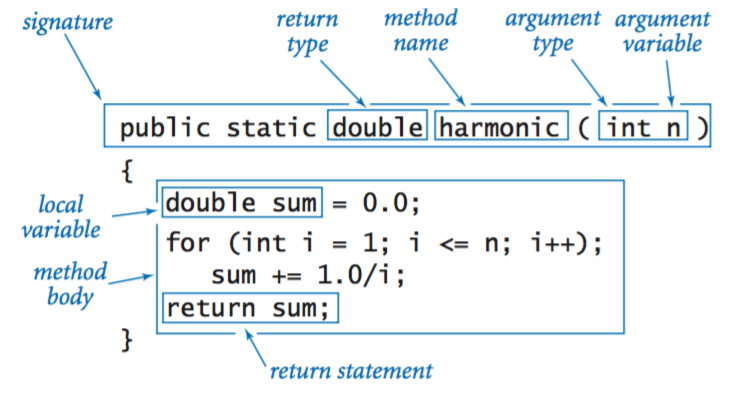
For example: Anatomy of a static method: |
| 16 |
|
| 17 |
|
| 18 |
__ |
| 19 |
|
| 20 |
|
| 21 |
## Licence ## |
| 22 |
|
| 23 |
|
| 24 |
This package may be distributed and/or modified under the conditions of the |
| 25 |
LaTeX Project Public License (LPPL), either version 1.3c of this |
| 26 |
License or any later version. The latest version |
| 27 |
of this license is in the file https://www.latex-project.org/lppl.txt |
| 28 |
|
| 29 |
## Build and Install (for Distributor) ## |
| 30 |
|
| 31 |
|
| 32 |
* To build the style file `codeanatomy.sty` just run **one** of |
| 33 |
|
| 34 |
``` |
| 35 |
latex codeanatomy.ins |
| 36 |
pdflatex codeanatomy.ins |
| 37 |
xelatex codeanatomy.ins |
| 38 |
lualatex codeanatomy.ins |
| 39 |
``` |
| 40 |
|
| 41 |
then you can copy `codeanatomy.sty` to your local `texmf` tree, where latex can find it. |
| 42 |
|
| 43 |
* To create PDF Document manual you must use `lualatex` |
| 44 |
|
| 45 |
``` |
| 46 |
lualatex codeanatomy.dtx |
| 47 |
lualatex codeanatomy.usage.tex |
| 48 |
lualatex codeanatomy.lstlisting.tex |
| 49 |
``` |
| 50 |
|
| 51 |
(`lualatex` because of my name, really ego right! It needs unicode to be typeset correctly.) |
| 52 |
|
| 53 |
## Development ## |
| 54 |
|
| 55 |
|
| 56 |
I try to use latex3 as much as posible. You can use |
| 57 |
|
| 58 |
``` |
| 59 |
l3build doc |
| 60 |
``` |
| 61 |
|
| 62 |
to create the style file and documentation files at once. You can also (like I also do) use `make` |
| 63 |
to call repeatly tasks. |
| 64 |
|