| 1 |
# latex-alert-message - available on [CTAN](http://www.ctan.org/pkg/alertmessage) |
| 2 |
Alert messages for LaTeX - Inspired by [Bootstrap alerts](http://www.w3schools.com/bootstrap/bootstrap_alerts.asp) |
| 3 |
|
| 4 |
|
| 5 |
[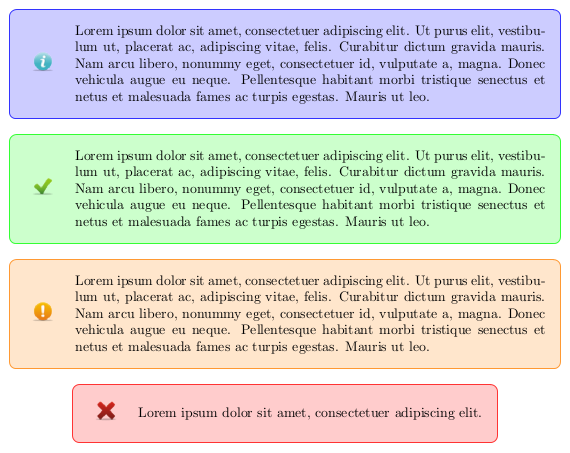](https://raw.githubusercontent.com/pidupuis/latex-alert-message/master/panels.png) |
| 6 |
|
| 7 |
## Installation |
| 8 |
|
| 9 |
#### Clean installation |
| 10 |
|
| 11 |
To install the package properly, download the [TDS archive](https://github.com/pidupuis/latex-alert-message/blob/master/alertmessage.tds.zip?raw=true). Then extract the archive into the texmf folder and install the package as following: |
| 12 |
|
| 13 |
```bash |
| 14 |
sudo unzip alertmessage.tds.zip -d "$(kpsewhich -var-value TEXMFLOCAL)" |
| 15 |
sudo texhash |
| 16 |
``` |
| 17 |
|
| 18 |
The package will be available from anywhere on your computer. |
| 19 |
|
| 20 |
#### Use the package without installation |
| 21 |
|
| 22 |
You can use the package without installation by putting the [package file](https://raw.githubusercontent.com/pidupuis/latex-alert-message/master/alertmessage.sty) and the [images](https://github.com/pidupuis/latex-alert-message/tree/master/img) in the root directory of your LaTeX project. |
| 23 |
|
| 24 |
Download the [latest release](https://github.com/pidupuis/latex-alert-message/releases/tag/v1.0) as a full example project or look at the [example.tex](https://github.com/pidupuis/latex-alert-message/blob/master/example.tex). |
| 25 |
|
| 26 |
## Documentation |
| 27 |
|
| 28 |
Include the package in the header of your TeX file: |
| 29 |
```tex |
| 30 |
\usepackage{alertmessage} |
| 31 |
``` |
| 32 |
|
| 33 |
And simply call the methods you need. There are four panels availables for `information`, `warnings`, `errors` or `success` messages. |
| 34 |
|
| 35 |
```tex |
| 36 |
\alertinfo{Lorem ipsum dolor sit amet.} |
| 37 |
\alertsuccess{Lorem ipsum dolor sit amet.} |
| 38 |
\alertwarning{Lorem ipsum dolor sit amet.} |
| 39 |
\alerterror{Lorem ipsum dolor sit amet.} |
| 40 |
``` |
| 41 |
|
| 42 |
The panel will adapt its size according to the length of the text (as you can see in the example). |
| 43 |
|
| 44 |
## Contributing |
| 45 |
|
| 46 |
Feel free to open [issues](https://github.com/pidupuis/latex-alert-message/issues) or create [pull requests](https://github.com/pidupuis/latex-alert-message/pulls). |
| 47 |
|
| 48 |
If you want to modify the package for personal use, you can manually edit the [package file](https://github.com/pidupuis/latex-alert-message/blob/master/alertmessage.sty). |
| 49 |
|
| 50 |
If you want to create a TDS archive to share your modifications with your friends, use the [TDS generation script](https://github.com/pidupuis/latex-alert-message/blob/master/generate_tds.sh). |
| 51 |
|
| 52 |
If you want to deploy your modifications on the CTAN by yourself, please take a different package name. |
| 53 |
|
| 54 |
## Releases |
| 55 |
|
| 56 |
* [v1.1](https://github.com/pidupuis/latex-alert-message/releases/tag/v1.1) [2015-08-04]: Provides TDS archive to facilitate the installation process. |
| 57 |
* [v1.0](https://github.com/pidupuis/latex-alert-message/releases/tag/v1.0) [2015-08-02]: Provides macros for `information`, `warnings`, `errors` or `success` alerts. |
| 58 |
|
| 59 |
|