| 1 |
# plantuml |
| 2 |
|
| 3 |
Version |
| 4 |
|
| 5 |
> A LuaLaTeX package for PlantUML in LaTeX |
| 6 |
|
| 7 |
[PlantUML](http://plantuml.com/) is a program which transforms text into UML diagrams. |
| 8 |
This package allows for embedding PlantUML diagrams using the PlantUML source. |
| 9 |
|
| 10 |
Currently, this project runs with [lualatex](http://www.luatex.org/) only. |
| 11 |
Check [issue #1](https://github.com/koppor/plantuml/issues/1) for the current state of affairs for support pdflatex. |
| 12 |
|
| 13 |
## Preconditions |
| 14 |
|
| 15 |
1. Environment variable `PLANTUML_JAR` set to the location of `plantuml.jar`. |
| 16 |
You get it from <https://sourceforge.net/projects/plantuml/files/plantuml.jar/download>. |
| 17 |
2. Windows: Environment variable `GRAPHVIZ_DOT` set to the location of `dot.exe`. |
| 18 |
Example: `C:\Program Files (x86)\Graphviz2.38\bin\dot.exe`. |
| 19 |
You can install graphviz using `choco install graphviz`. |
| 20 |
3. lualatex available with command line parameter `-shell-escape` included. |
| 21 |
4. In case you want to have the images as PDFs (and not using TikZ or PNG), ensure that `inkscape.exe` and `pdfcrop` are in your path. |
| 22 |
You can get inkscape using `choco install inkscape`. |
| 23 |
`pdfcrop` should be part of your latex distribution. |
| 24 |
|
| 25 |
## Examples |
| 26 |
|
| 27 |
### Minimal Example |
| 28 |
|
| 29 |
**LaTeX source:** |
| 30 |
|
| 31 |
```latex |
| 32 |
\documentclass{scrartcl} |
| 33 |
\usepackage{plantuml} |
| 34 |
\begin{document} |
| 35 |
\begin{plantuml} |
| 36 |
@startuml |
| 37 |
Alice -> Bob: test |
| 38 |
@enduml |
| 39 |
\end{plantuml} |
| 40 |
\end{document} |
| 41 |
``` |
| 42 |
|
| 43 |
**Compilation:** `lualatex -shell-escape example-minimal` |
| 44 |
|
| 45 |
**Result:** |
| 46 |
|
| 47 |
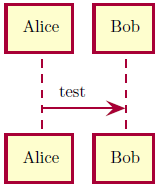 |
| 48 |
|
| 49 |
### Example Class Relations Rendered Using SVG |
| 50 |
|
| 51 |
**LaTeX source:** |
| 52 |
|
| 53 |
```latex |
| 54 |
\documentclass{scrartcl} |
| 55 |
\usepackage{graphics} |
| 56 |
\usepackage{epstopdf} |
| 57 |
\epstopdfDeclareGraphicsRule{.svg}{pdf}{.pdf}{ |
| 58 |
inkscape "#1" --export-filename="\OutputFile" |
| 59 |
} |
| 60 |
\usepackage[output=svg]{plantuml} |
| 61 |
\begin{document} |
| 62 |
\begin{plantuml} |
| 63 |
@startuml |
| 64 |
class Car |
| 65 |
|
| 66 |
Driver - Car : drives > |
| 67 |
Car *- Wheel : have 4 > |
| 68 |
Car -- Person : < owns |
| 69 |
@enduml |
| 70 |
\end{plantuml} |
| 71 |
\end{document} |
| 72 |
``` |
| 73 |
|
| 74 |
**For older Inkscape use this LaTeX source:** |
| 75 |
|
| 76 |
```latex |
| 77 |
\documentclass{scrartcl} |
| 78 |
\usepackage{graphics} |
| 79 |
\usepackage{epstopdf} |
| 80 |
\epstopdfDeclareGraphicsRule{.svg}{pdf}{.pdf}{ |
| 81 |
inkscape -z --file=#1 --export-pdf=\OutputFile |
| 82 |
} |
| 83 |
\usepackage[output=svg]{plantuml} |
| 84 |
\begin{document} |
| 85 |
\begin{plantuml} |
| 86 |
@startuml |
| 87 |
class Car |
| 88 |
|
| 89 |
Driver - Car : drives > |
| 90 |
Car *- Wheel : have 4 > |
| 91 |
Car -- Person : < owns |
| 92 |
@enduml |
| 93 |
\end{plantuml} |
| 94 |
\end{document} |
| 95 |
``` |
| 96 |
|
| 97 |
**Compilation:** `lualatex -shell-escape example-class-relations` |
| 98 |
|
| 99 |
**Result:** |
| 100 |
|
| 101 |
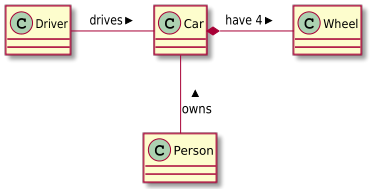 |
| 102 |
|
| 103 |
## Installation |
| 104 |
|
| 105 |
Your latex distribution should take care. |
| 106 |
|
| 107 |
For manual installation, copy `plantuml.*` to your local `texmf` folder in the sub directory `tex/latex/plantuml`. |
| 108 |
See [the discussion at tex.sx](https://tex.stackexchange.com/q/27982/9075) for the concrete location of the folder on your system. |
| 109 |
|
| 110 |
## Development |
| 111 |
|
| 112 |
The release is built using [GitHub Actions](https://github.com/features/actions) ([workflow file](https://github.com/koppor/plantuml/blob/master/.github/workflows/build-and-publish.yml)) using [`release.sh`](release.sh). |
| 113 |
|
| 114 |
Release preparation: |
| 115 |
|
| 116 |
1. Adapt copyright year (line 1) |
| 117 |
2. Adapt as date and version number (line 6) in `plantuml.sty`. |
| 118 |
3. Adapt `CHANGELOG.md`. |
| 119 |
4. Set a git tag and push. |
| 120 |
|
| 121 |
## Alternative Solutions |
| 122 |
|
| 123 |
[TikZ-UML](https://perso.ensta-paristech.fr/~kielbasi/tikzuml/) is a very powerful package based on [TikZ](https://www.ctan.org/pkg/pgf). |
| 124 |
More alternative solutions are collected at the [CTAN topic UML](https://www.ctan.org/topic/uml). |
| 125 |
|
| 126 |
## License |
| 127 |
|
| 128 |
`SPDX-License-Identifier: LPPL-1.3c+` |