| 1 |
Metadata-Version: 2.1 |
| 2 |
Name: transitions |
| 3 |
Version: 0.9.2 |
| 4 |
Summary: A lightweight, object-oriented Python state machine implementation with many extensions. |
| 5 |
Home-page: http://github.com/pytransitions/transitions |
| 6 |
Download-URL: https://github.com/pytransitions/transitions/archive/0.9.2.tar.gz |
| 7 |
Author: Tal Yarkoni |
| 8 |
Author-email: [email protected] |
| 9 |
Maintainer: Alexander Neumann |
| 10 |
Maintainer-email: [email protected] |
| 11 |
License: MIT |
| 12 |
Classifier: License :: OSI Approved :: MIT License |
| 13 |
Classifier: Programming Language :: Python :: 2 |
| 14 |
Classifier: Programming Language :: Python :: 2.7 |
| 15 |
Classifier: Programming Language :: Python :: 3 |
| 16 |
Classifier: Programming Language :: Python :: 3.8 |
| 17 |
Classifier: Programming Language :: Python :: 3.9 |
| 18 |
Classifier: Programming Language :: Python :: 3.10 |
| 19 |
Classifier: Programming Language :: Python :: 3.11 |
| 20 |
Classifier: Programming Language :: Python :: 3.12 |
| 21 |
Description-Content-Type: text/markdown |
| 22 |
License-File: LICENSE |
| 23 |
Requires-Dist: six |
| 24 |
Provides-Extra: diagrams |
| 25 |
Requires-Dist: pygraphviz; extra == "diagrams" |
| 26 |
Provides-Extra: test |
| 27 |
Requires-Dist: pytest; extra == "test" |
| 28 |
|
| 29 |
## Quickstart |
| 30 |
|
| 31 |
They say [a good example is worth](https://www.google.com/webhp?ie=UTF-8#q=%22a+good+example+is+worth%22&start=20) 100 pages of API documentation, a million directives, or a thousand words. |
| 32 |
|
| 33 |
Well, "they" probably lie... but here's an example anyway: |
| 34 |
|
| 35 |
```python |
| 36 |
from transitions import Machine |
| 37 |
import random |
| 38 |
|
| 39 |
class NarcolepticSuperhero(object): |
| 40 |
|
| 41 |
# Define some states. Most of the time, narcoleptic superheroes are just like |
| 42 |
# everyone else. Except for... |
| 43 |
states = ['asleep', 'hanging out', 'hungry', 'sweaty', 'saving the world'] |
| 44 |
|
| 45 |
def __init__(self, name): |
| 46 |
|
| 47 |
# No anonymous superheroes on my watch! Every narcoleptic superhero gets |
| 48 |
# a name. Any name at all. SleepyMan. SlumberGirl. You get the idea. |
| 49 |
self.name = name |
| 50 |
|
| 51 |
# What have we accomplished today? |
| 52 |
self.kittens_rescued = 0 |
| 53 |
|
| 54 |
# Initialize the state machine |
| 55 |
self.machine = Machine(model=self, states=NarcolepticSuperhero.states, initial='asleep') |
| 56 |
|
| 57 |
# Add some transitions. We could also define these using a static list of |
| 58 |
# dictionaries, as we did with states above, and then pass the list to |
| 59 |
# the Machine initializer as the transitions= argument. |
| 60 |
|
| 61 |
# At some point, every superhero must rise and shine. |
| 62 |
self.machine.add_transition(trigger='wake_up', source='asleep', dest='hanging out') |
| 63 |
|
| 64 |
# Superheroes need to keep in shape. |
| 65 |
self.machine.add_transition('work_out', 'hanging out', 'hungry') |
| 66 |
|
| 67 |
# Those calories won't replenish themselves! |
| 68 |
self.machine.add_transition('eat', 'hungry', 'hanging out') |
| 69 |
|
| 70 |
# Superheroes are always on call. ALWAYS. But they're not always |
| 71 |
# dressed in work-appropriate clothing. |
| 72 |
self.machine.add_transition('distress_call', '*', 'saving the world', |
| 73 |
before='change_into_super_secret_costume') |
| 74 |
|
| 75 |
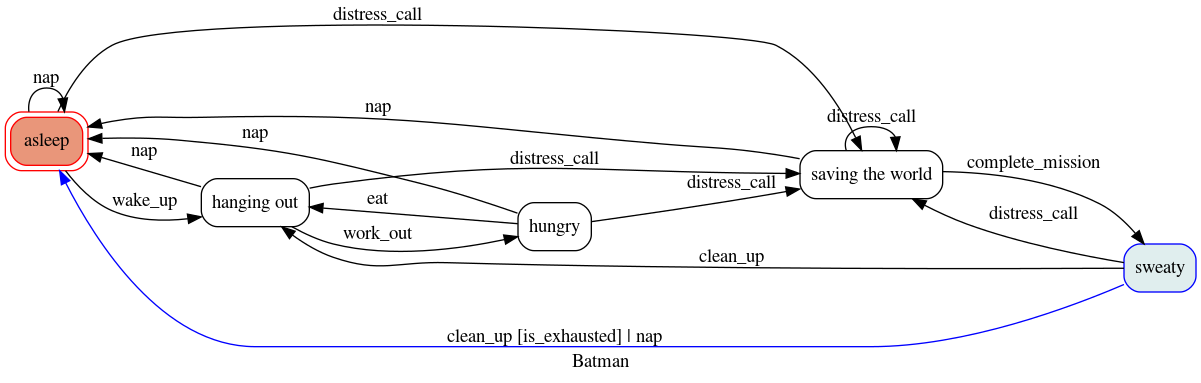
# When they get off work, they're all sweaty and disgusting. But before |
| 76 |
# they do anything else, they have to meticulously log their latest |
| 77 |
# escapades. Because the legal department says so. |
| 78 |
self.machine.add_transition('complete_mission', 'saving the world', 'sweaty', |
| 79 |
after='update_journal') |
| 80 |
|
| 81 |
# Sweat is a disorder that can be remedied with water. |
| 82 |
# Unless you've had a particularly long day, in which case... bed time! |
| 83 |
self.machine.add_transition('clean_up', 'sweaty', 'asleep', conditions=['is_exhausted']) |
| 84 |
self.machine.add_transition('clean_up', 'sweaty', 'hanging out') |
| 85 |
|
| 86 |
# Our NarcolepticSuperhero can fall asleep at pretty much any time. |
| 87 |
self.machine.add_transition('nap', '*', 'asleep') |
| 88 |
|
| 89 |
def update_journal(self): |
| 90 |
""" Dear Diary, today I saved Mr. Whiskers. Again. """ |
| 91 |
self.kittens_rescued += 1 |
| 92 |
|
| 93 |
@property |
| 94 |
def is_exhausted(self): |
| 95 |
""" Basically a coin toss. """ |
| 96 |
return random.random() < 0.5 |
| 97 |
|
| 98 |
def change_into_super_secret_costume(self): |
| 99 |
print("Beauty, eh?") |
| 100 |
``` |
| 101 |
|
| 102 |
There, now you've baked a state machine into `NarcolepticSuperhero`. Let's take him/her/it out for a spin... |
| 103 |
|
| 104 |
```python |
| 105 |
>>> batman = NarcolepticSuperhero("Batman") |
| 106 |
>>> batman.state |
| 107 |
'asleep' |
| 108 |
|
| 109 |
>>> batman.wake_up() |
| 110 |
>>> batman.state |
| 111 |
'hanging out' |
| 112 |
|
| 113 |
>>> batman.nap() |
| 114 |
>>> batman.state |
| 115 |
'asleep' |
| 116 |
|
| 117 |
>>> batman.clean_up() |
| 118 |
MachineError: "Can't trigger event clean_up from state asleep!" |
| 119 |
|
| 120 |
>>> batman.wake_up() |
| 121 |
>>> batman.work_out() |
| 122 |
>>> batman.state |
| 123 |
'hungry' |
| 124 |
|
| 125 |
# Batman still hasn't done anything useful... |
| 126 |
>>> batman.kittens_rescued |
| 127 |
0 |
| 128 |
|
| 129 |
# We now take you live to the scene of a horrific kitten entreement... |
| 130 |
>>> batman.distress_call() |
| 131 |
'Beauty, eh?' |
| 132 |
>>> batman.state |
| 133 |
'saving the world' |
| 134 |
|
| 135 |
# Back to the crib. |
| 136 |
>>> batman.complete_mission() |
| 137 |
>>> batman.state |
| 138 |
'sweaty' |
| 139 |
|
| 140 |
>>> batman.clean_up() |
| 141 |
>>> batman.state |
| 142 |
'asleep' # Too tired to shower! |
| 143 |
|
| 144 |
# Another productive day, Alfred. |
| 145 |
>>> batman.kittens_rescued |
| 146 |
1 |
| 147 |
``` |
| 148 |
|
| 149 |
While we cannot read the mind of the actual batman, we surely can visualize the current state of our `NarcolepticSuperhero`. |
| 150 |
|
| 151 |
 |
| 152 |
|
| 153 |
Have a look at the [Diagrams](#diagrams) extensions if you want to know how. |
| 154 |
|
| 155 |
## The non-quickstart |
| 156 |
|
| 157 |
A state machine is a _model_ of behavior composed of a finite number of _states_ and _transitions_ between those states. Within each state and transition some _action_ can be performed. A state machine needs to start at some _initial state_. When using `transitions`, a state machine may consist of multiple objects where some (_machines_) contain definitions for the manipulation of other (_models_). Below, we will look at some core concepts and how to work with them. |
| 158 |
|
| 159 |
### Some key concepts |
| 160 |
|
| 161 |
- **State**. A state represents a particular condition or stage in the state machine. It's a distinct mode of behavior or phase in a process. |
| 162 |
|
| 163 |
- **Transition**. This is the process or event that causes the state machine to change from one state to another. |
| 164 |
|
| 165 |
- **Model**. The actual stateful structure. It's the entity that gets updated during transitions. It may also define _actions_ that will be executed during transitions. For instance, right before a transition or when a state is entered or exited. |
| 166 |
|
| 167 |
- **Machine**. This is the entity that manages and controls the model, states, transitions, and actions. It's the conductor that orchestrates the entire process of the state machine. |
| 168 |
|
| 169 |
- **Trigger**. This is the event that initiates a transition, the method that sends the signal to start a transition. |
| 170 |
|
| 171 |
- **Action**. Specific operation or task that is performed when a certain state is entered, exited, or during a transition. The action is implemented through _callbacks_, which are functions that get executed when some event happens. |
| 172 |
|
| 173 |
### Basic initialization |
| 174 |
|
| 175 |
Getting a state machine up and running is pretty simple. Let's say you have the object `lump` (an instance of class `Matter`), and you want to manage its states: |
| 176 |
|
| 177 |
```python |
| 178 |
class Matter(object): |
| 179 |
pass |
| 180 |
|
| 181 |
lump = Matter() |
| 182 |
``` |
| 183 |
|
| 184 |
You can initialize a (_minimal_) working state machine bound to the model `lump` like this: |
| 185 |
|
| 186 |
```python |
| 187 |
from transitions import Machine |
| 188 |
machine = Machine(model=lump, states=['solid', 'liquid', 'gas', 'plasma'], initial='solid') |
| 189 |
|
| 190 |
# Lump now has a new state attribute! |
| 191 |
lump.state |
| 192 |
>>> 'solid' |
| 193 |
``` |
| 194 |
|
| 195 |
An alternative is to not explicitly pass a model to the `Machine` initializer: |
| 196 |
|
| 197 |
```python |
| 198 |
|
| 199 |
machine = Machine(states=['solid', 'liquid', 'gas', 'plasma'], initial='solid') |
| 200 |
|
| 201 |
# The machine instance itself now acts as a model |
| 202 |
machine.state |
| 203 |
>>> 'solid' |
| 204 |
``` |
| 205 |
|
| 206 |
Note that this time I did not pass the `lump` model as an argument. The first argument passed to `Machine` acts as a model. So when I pass something there, all the convenience functions will be added to the object. If no model is provided then the `machine` instance itself acts as a model. |
| 207 |
|
| 208 |
When at the beginning I said "minimal", it was because while this state machine is technically operational, it doesn't actually _do_ anything. It starts in the `'solid'` state, but won't ever move into another state, because no transitions are defined... yet! |
| 209 |
|
| 210 |
Let's try again. |
| 211 |
|
| 212 |
```python |
| 213 |
# The states |
| 214 |
states=['solid', 'liquid', 'gas', 'plasma'] |
| 215 |
|
| 216 |
# And some transitions between states. We're lazy, so we'll leave out |
| 217 |
# the inverse phase transitions (freezing, condensation, etc.). |
| 218 |
transitions = [ |
| 219 |
{ 'trigger': 'melt', 'source': 'solid', 'dest': 'liquid' }, |
| 220 |
{ 'trigger': 'evaporate', 'source': 'liquid', 'dest': 'gas' }, |
| 221 |
{ 'trigger': 'sublimate', 'source': 'solid', 'dest': 'gas' }, |
| 222 |
{ 'trigger': 'ionize', 'source': 'gas', 'dest': 'plasma' } |
| 223 |
] |
| 224 |
|
| 225 |
# Initialize |
| 226 |
machine = Machine(lump, states=states, transitions=transitions, initial='liquid') |
| 227 |
|
| 228 |
# Now lump maintains state... |
| 229 |
lump.state |
| 230 |
>>> 'liquid' |
| 231 |
|
| 232 |
# And that state can change... |
| 233 |
# Either calling the shiny new trigger methods |
| 234 |
lump.evaporate() |
| 235 |
lump.state |
| 236 |
>>> 'gas' |
| 237 |
|
| 238 |
# Or by calling the trigger method directly |
| 239 |
lump.trigger('ionize') |
| 240 |
lump.state |
| 241 |
>>> 'plasma' |
| 242 |
``` |
| 243 |
|
| 244 |
Notice the shiny new methods attached to the `Matter` instance (`evaporate()`, `ionize()`, etc.). |
| 245 |
Each method triggers the corresponding transition. |
| 246 |
Transitions can also be triggered _dynamically_ by calling the `trigger()` method provided with the name of the transition, as shown above. |
| 247 |
More on this in the [Triggering a transition](#triggers) section. |
| 248 |
|
| 249 |
|
| 250 |
### <a name="states"></a>States |
| 251 |
|
| 252 |
The soul of any good state machine (and of many bad ones, no doubt) is a set of states. Above, we defined the valid model states by passing a list of strings to the `Machine` initializer. But internally, states are actually represented as `State` objects. |
| 253 |
|
| 254 |
You can initialize and modify States in a number of ways. Specifically, you can: |
| 255 |
|
| 256 |
- pass a string to the `Machine` initializer giving the name(s) of the state(s), or |
| 257 |
- directly initialize each new `State` object, or |
| 258 |
- pass a dictionary with initialization arguments |
| 259 |
|
| 260 |
The following snippets illustrate several ways to achieve the same goal: |
| 261 |
|
| 262 |
```python |
| 263 |
# import Machine and State class |
| 264 |
from transitions import Machine, State |
| 265 |
|
| 266 |
# Create a list of 3 states to pass to the Machine |
| 267 |
# initializer. We can mix types; in this case, we |
| 268 |
# pass one State, one string, and one dict. |
| 269 |
states = [ |
| 270 |
State(name='solid'), |
| 271 |
'liquid', |
| 272 |
{ 'name': 'gas'} |
| 273 |
] |
| 274 |
machine = Machine(lump, states) |
| 275 |
|
| 276 |
# This alternative example illustrates more explicit |
| 277 |
# addition of states and state callbacks, but the net |
| 278 |
# result is identical to the above. |
| 279 |
machine = Machine(lump) |
| 280 |
solid = State('solid') |
| 281 |
liquid = State('liquid') |
| 282 |
gas = State('gas') |
| 283 |
machine.add_states([solid, liquid, gas]) |
| 284 |
``` |
| 285 |
|
| 286 |
States are initialized _once_ when added to the machine and will persist until they are removed from it. In other words: if you alter the attributes of a state object, this change will NOT be reset the next time you enter that state. Have a look at how to [extend state features](#state-features) in case you require some other behaviour. |
| 287 |
|
| 288 |
#### <a name="state-callbacks"></a>Callbacks |
| 289 |
|
| 290 |
But just having states and being able to move around between them (transitions) isn't very useful by itself. What if you want to do something, perform some _action_ when you enter or exit a state? This is where _callbacks_ come in. |
| 291 |
|
| 292 |
A `State` can also be associated with a list of `enter` and `exit` callbacks, which are called whenever the state machine enters or leaves that state. You can specify callbacks during initialization by passing them to a `State` object constructor, in a state property dictionary, or add them later. |
| 293 |
|
| 294 |
For convenience, whenever a new `State` is added to a `Machine`, the methods `on_enter_«state name»` and `on_exit_«state name»` are dynamically created on the Machine (not on the model!), which allow you to dynamically add new enter and exit callbacks later if you need them. |
| 295 |
|
| 296 |
```python |
| 297 |
# Our old Matter class, now with a couple of new methods we |
| 298 |
# can trigger when entering or exit states. |
| 299 |
class Matter(object): |
| 300 |
def say_hello(self): print("hello, new state!") |
| 301 |
def say_goodbye(self): print("goodbye, old state!") |
| 302 |
|
| 303 |
lump = Matter() |
| 304 |
|
| 305 |
# Same states as above, but now we give StateA an exit callback |
| 306 |
states = [ |
| 307 |
State(name='solid', on_exit=['say_goodbye']), |
| 308 |
'liquid', |
| 309 |
{ 'name': 'gas', 'on_exit': ['say_goodbye']} |
| 310 |
] |
| 311 |
|
| 312 |
machine = Machine(lump, states=states) |
| 313 |
machine.add_transition('sublimate', 'solid', 'gas') |
| 314 |
|
| 315 |
# Callbacks can also be added after initialization using |
| 316 |
# the dynamically added on_enter_ and on_exit_ methods. |
| 317 |
# Note that the initial call to add the callback is made |
| 318 |
# on the Machine and not on the model. |
| 319 |
machine.on_enter_gas('say_hello') |
| 320 |
|
| 321 |
# Test out the callbacks... |
| 322 |
machine.set_state('solid') |
| 323 |
lump.sublimate() |
| 324 |
>>> 'goodbye, old state!' |
| 325 |
>>> 'hello, new state!' |
| 326 |
``` |
| 327 |
|
| 328 |
Note that `on_enter_«state name»` callback will _not_ fire when a Machine is first initialized. For example if you have an `on_enter_A()` callback defined, and initialize the `Machine` with `initial='A'`, `on_enter_A()` will not be fired until the next time you enter state `A`. (If you need to make sure `on_enter_A()` fires at initialization, you can simply create a dummy initial state and then explicitly call `to_A()` inside the `__init__` method.) |
| 329 |
|
| 330 |
In addition to passing in callbacks when initializing a `State`, or adding them dynamically, it's also possible to define callbacks in the model class itself, which may increase code clarity. For example: |
| 331 |
|
| 332 |
```python |
| 333 |
class Matter(object): |
| 334 |
def say_hello(self): print("hello, new state!") |
| 335 |
def say_goodbye(self): print("goodbye, old state!") |
| 336 |
def on_enter_A(self): print("We've just entered state A!") |
| 337 |
|
| 338 |
lump = Matter() |
| 339 |
machine = Machine(lump, states=['A', 'B', 'C']) |
| 340 |
``` |
| 341 |
|
| 342 |
Now, any time `lump` transitions to state `A`, the `on_enter_A()` method defined in the `Matter` class will fire. |
| 343 |
|
| 344 |
You can make use of `on_final` callbacks which will be triggered when a state with `final=True` is entered. |
| 345 |
```python |
| 346 |
from transitions import Machine, State |
| 347 |
|
| 348 |
states = [State(name='idling'), |
| 349 |
State(name='rescuing_kitten'), |
| 350 |
State(name='offender_gone', final=True), |
| 351 |
State(name='offender_caught', final=True)] |
| 352 |
|
| 353 |
transitions = [["called", "idling", "rescuing_kitten"], # we will come when called |
| 354 |
{"trigger": "intervene", |
| 355 |
"source": "rescuing_kitten", |
| 356 |
"dest": "offender_gone", # we |
| 357 |
"conditions": "offender_is_faster"}, # unless they are faster |
| 358 |
["intervene", "rescuing_kitten", "offender_caught"]] |
| 359 |
|
| 360 |
|
| 361 |
class FinalSuperhero(object): |
| 362 |
|
| 363 |
def __init__(self, speed): |
| 364 |
self.machine = Machine(self, states=states, transitions=transitions, initial="idling", on_final="claim_success") |
| 365 |
self.speed = speed |
| 366 |
|
| 367 |
def offender_is_faster(self, offender_speed): |
| 368 |
return self.speed < offender_speed |
| 369 |
|
| 370 |
def claim_success(self, **kwargs): |
| 371 |
print("The kitten is safe.") |
| 372 |
|
| 373 |
|
| 374 |
hero = FinalSuperhero(speed=10) # we are not in shape today |
| 375 |
hero.called() |
| 376 |
assert hero.is_rescuing_kitten() |
| 377 |
hero.intervene(offender_speed=15) |
| 378 |
# >>> 'The kitten is safe' |
| 379 |
assert hero.machine.get_state(hero.state).final # it's over |
| 380 |
assert hero.is_offender_gone() # maybe next time ... |
| 381 |
``` |
| 382 |
|
| 383 |
#### <a name="checking-state"></a>Checking state |
| 384 |
|
| 385 |
You can always check the current state of the model by either: |
| 386 |
|
| 387 |
- inspecting the `.state` attribute, or |
| 388 |
- calling `is_«state name»()` |
| 389 |
|
| 390 |
And if you want to retrieve the actual `State` object for the current state, you can do that through the `Machine` instance's `get_state()` method. |
| 391 |
|
| 392 |
```python |
| 393 |
lump.state |
| 394 |
>>> 'solid' |
| 395 |
lump.is_gas() |
| 396 |
>>> False |
| 397 |
lump.is_solid() |
| 398 |
>>> True |
| 399 |
machine.get_state(lump.state).name |
| 400 |
>>> 'solid' |
| 401 |
``` |
| 402 |
|
| 403 |
If you'd like you can choose your own state attribute name by passing the `model_attribute` argument while initializing the `Machine`. This will also change the name of `is_«state name»()` to `is_«model_attribute»_«state name»()` though. Similarly, auto transitions will be named `to_«model_attribute»_«state name»()` instead of `to_«state name»()`. This is done to allow multiple machines to work on the same model with individual state attribute names. |
| 404 |
|
| 405 |
```python |
| 406 |
lump = Matter() |
| 407 |
machine = Machine(lump, states=['solid', 'liquid', 'gas'], model_attribute='matter_state', initial='solid') |
| 408 |
lump.matter_state |
| 409 |
>>> 'solid' |
| 410 |
# with a custom 'model_attribute', states can also be checked like this: |
| 411 |
lump.is_matter_state_solid() |
| 412 |
>>> True |
| 413 |
lump.to_matter_state_gas() |
| 414 |
>>> True |
| 415 |
``` |
| 416 |
|
| 417 |
#### <a name="enum-state"></a>Enumerations |
| 418 |
|
| 419 |
So far we have seen how we can give state names and use these names to work with our state machine. |
| 420 |
If you favour stricter typing and more IDE code completion (or you just can't type 'sesquipedalophobia' any longer because the word scares you) using [Enumerations](https://docs.python.org/3/library/enum.html) might be what you are looking for: |
| 421 |
|
| 422 |
```python |
| 423 |
import enum # Python 2.7 users need to have 'enum34' installed |
| 424 |
from transitions import Machine |
| 425 |
|
| 426 |
class States(enum.Enum): |
| 427 |
ERROR = 0 |
| 428 |
RED = 1 |
| 429 |
YELLOW = 2 |
| 430 |
GREEN = 3 |
| 431 |
|
| 432 |
transitions = [['proceed', States.RED, States.YELLOW], |
| 433 |
['proceed', States.YELLOW, States.GREEN], |
| 434 |
['error', '*', States.ERROR]] |
| 435 |
|
| 436 |
m = Machine(states=States, transitions=transitions, initial=States.RED) |
| 437 |
assert m.is_RED() |
| 438 |
assert m.state is States.RED |
| 439 |
state = m.get_state(States.RED) # get transitions.State object |
| 440 |
print(state.name) # >>> RED |
| 441 |
m.proceed() |
| 442 |
m.proceed() |
| 443 |
assert m.is_GREEN() |
| 444 |
m.error() |
| 445 |
assert m.state is States.ERROR |
| 446 |
``` |
| 447 |
|
| 448 |
You can mix enums and strings if you like (e.g. `[States.RED, 'ORANGE', States.YELLOW, States.GREEN]`) but note that internally, `transitions` will still handle states by name (`enum.Enum.name`). |
| 449 |
Thus, it is not possible to have the states `'GREEN'` and `States.GREEN` at the same time. |
| 450 |
|
| 451 |
### <a name="transitions"></a>Transitions |
| 452 |
|
| 453 |
Some of the above examples already illustrate the use of transitions in passing, but here we'll explore them in more detail. |
| 454 |
|
| 455 |
As with states, each transition is represented internally as its own object – an instance of class `Transition`. The quickest way to initialize a set of transitions is to pass a dictionary, or list of dictionaries, to the `Machine` initializer. We already saw this above: |
| 456 |
|
| 457 |
```python |
| 458 |
transitions = [ |
| 459 |
{ 'trigger': 'melt', 'source': 'solid', 'dest': 'liquid' }, |
| 460 |
{ 'trigger': 'evaporate', 'source': 'liquid', 'dest': 'gas' }, |
| 461 |
{ 'trigger': 'sublimate', 'source': 'solid', 'dest': 'gas' }, |
| 462 |
{ 'trigger': 'ionize', 'source': 'gas', 'dest': 'plasma' } |
| 463 |
] |
| 464 |
machine = Machine(model=Matter(), states=states, transitions=transitions) |
| 465 |
``` |
| 466 |
|
| 467 |
Defining transitions in dictionaries has the benefit of clarity, but can be cumbersome. If you're after brevity, you might choose to define transitions using lists. Just make sure that the elements in each list are in the same order as the positional arguments in the `Transition` initialization (i.e., `trigger`, `source`, `destination`, etc.). |
| 468 |
|
| 469 |
The following list-of-lists is functionally equivalent to the list-of-dictionaries above: |
| 470 |
|
| 471 |
```python |
| 472 |
transitions = [ |
| 473 |
['melt', 'solid', 'liquid'], |
| 474 |
['evaporate', 'liquid', 'gas'], |
| 475 |
['sublimate', 'solid', 'gas'], |
| 476 |
['ionize', 'gas', 'plasma'] |
| 477 |
] |
| 478 |
``` |
| 479 |
|
| 480 |
Alternatively, you can add transitions to a `Machine` after initialization: |
| 481 |
|
| 482 |
```python |
| 483 |
machine = Machine(model=lump, states=states, initial='solid') |
| 484 |
machine.add_transition('melt', source='solid', dest='liquid') |
| 485 |
``` |
| 486 |
|
| 487 |
#### <a name="triggers"></a>Triggering a transition |
| 488 |
|
| 489 |
For a transition to be executed, some event needs to _trigger_ it. There are two ways to do this: |
| 490 |
|
| 491 |
1. Using the automatically attached method in the base model: |
| 492 |
```python |
| 493 |
>>> lump.melt() |
| 494 |
>>> lump.state |
| 495 |
'liquid' |
| 496 |
>>> lump.evaporate() |
| 497 |
>>> lump.state |
| 498 |
'gas' |
| 499 |
``` |
| 500 |
|
| 501 |
Note how you don't have to explicitly define these methods anywhere; the name of each transition is bound to the model passed to the `Machine` initializer (in this case, `lump`). This also means that your model **should not** already contain methods with the same name as event triggers since `transitions` will only attach convenience methods to your model if the spot is not already taken. If you want to modify that behaviour, have a look at the [FAQ](examples/Frequently%20asked%20questions.ipynb). |
| 502 |
2. Using the `trigger` method, now attached to your model (if it hasn't been there before). This method lets you execute transitions by name in case dynamic triggering is required: |
| 503 |
```python |
| 504 |
>>> lump.trigger('melt') |
| 505 |
>>> lump.state |
| 506 |
'liquid' |
| 507 |
>>> lump.trigger('evaporate') |
| 508 |
>>> lump.state |
| 509 |
'gas' |
| 510 |
``` |
| 511 |
|
| 512 |
#### Triggering invalid transitions |
| 513 |
|
| 514 |
By default, triggering an invalid transition will raise an exception: |
| 515 |
|
| 516 |
```python |
| 517 |
>>> lump.to_gas() |
| 518 |
>>> # This won't work because only objects in a solid state can melt |
| 519 |
>>> lump.melt() |
| 520 |
transitions.core.MachineError: "Can't trigger event melt from state gas!" |
| 521 |
``` |
| 522 |
|
| 523 |
This behavior is generally desirable, since it helps alert you to problems in your code. But in some cases, you might want to silently ignore invalid triggers. You can do this by setting `ignore_invalid_triggers=True` (either on a state-by-state basis, or globally for all states): |
| 524 |
|
| 525 |
```python |
| 526 |
>>> # Globally suppress invalid trigger exceptions |
| 527 |
>>> m = Machine(lump, states, initial='solid', ignore_invalid_triggers=True) |
| 528 |
>>> # ...or suppress for only one group of states |
| 529 |
>>> states = ['new_state1', 'new_state2'] |
| 530 |
>>> m.add_states(states, ignore_invalid_triggers=True) |
| 531 |
>>> # ...or even just for a single state. Here, exceptions will only be suppressed when the current state is A. |
| 532 |
>>> states = [State('A', ignore_invalid_triggers=True), 'B', 'C'] |
| 533 |
>>> m = Machine(lump, states) |
| 534 |
>>> # ...this can be inverted as well if just one state should raise an exception |
| 535 |
>>> # since the machine's global value is not applied to a previously initialized state. |
| 536 |
>>> states = ['A', 'B', State('C')] # the default value for 'ignore_invalid_triggers' is False |
| 537 |
>>> m = Machine(lump, states, ignore_invalid_triggers=True) |
| 538 |
``` |
| 539 |
|
| 540 |
If you need to know which transitions are valid from a certain state, you can use `get_triggers`: |
| 541 |
|
| 542 |
```python |
| 543 |
m.get_triggers('solid') |
| 544 |
>>> ['melt', 'sublimate'] |
| 545 |
m.get_triggers('liquid') |
| 546 |
>>> ['evaporate'] |
| 547 |
m.get_triggers('plasma') |
| 548 |
>>> [] |
| 549 |
# you can also query several states at once |
| 550 |
m.get_triggers('solid', 'liquid', 'gas', 'plasma') |
| 551 |
>>> ['melt', 'evaporate', 'sublimate', 'ionize'] |
| 552 |
``` |
| 553 |
|
| 554 |
If you have followed this documentation from the beginning, you will notice that `get_triggers` actually returns more triggers than the explicitly defined ones shown above, such as `to_liquid` and so on. |
| 555 |
These are called `auto-transitions` and will be introduced in the next section. |
| 556 |
|
| 557 |
#### <a name="automatic-transitions-for-all-states"></a>Automatic transitions for all states |
| 558 |
|
| 559 |
In addition to any transitions added explicitly, a `to_«state»()` method is created automatically whenever a state is added to a `Machine` instance. This method transitions to the target state no matter which state the machine is currently in: |
| 560 |
|
| 561 |
```python |
| 562 |
lump.to_liquid() |
| 563 |
lump.state |
| 564 |
>>> 'liquid' |
| 565 |
lump.to_solid() |
| 566 |
lump.state |
| 567 |
>>> 'solid' |
| 568 |
``` |
| 569 |
|
| 570 |
If you desire, you can disable this behavior by setting `auto_transitions=False` in the `Machine` initializer. |
| 571 |
|
| 572 |
#### <a name="transitioning-from-multiple-states"></a>Transitioning from multiple states |
| 573 |
|
| 574 |
A given trigger can be attached to multiple transitions, some of which can potentially begin or end in the same state. For example: |
| 575 |
|
| 576 |
```python |
| 577 |
machine.add_transition('transmogrify', ['solid', 'liquid', 'gas'], 'plasma') |
| 578 |
machine.add_transition('transmogrify', 'plasma', 'solid') |
| 579 |
# This next transition will never execute |
| 580 |
machine.add_transition('transmogrify', 'plasma', 'gas') |
| 581 |
``` |
| 582 |
|
| 583 |
In this case, calling `transmogrify()` will set the model's state to `'solid'` if it's currently `'plasma'`, and set it to `'plasma'` otherwise. (Note that only the _first_ matching transition will execute; thus, the transition defined in the last line above won't do anything.) |
| 584 |
|
| 585 |
You can also make a trigger cause a transition from _all_ states to a particular destination by using the `'*'` wildcard: |
| 586 |
|
| 587 |
```python |
| 588 |
machine.add_transition('to_liquid', '*', 'liquid') |
| 589 |
``` |
| 590 |
|
| 591 |
Note that wildcard transitions will only apply to states that exist at the time of the add_transition() call. Calling a wildcard-based transition when the model is in a state added after the transition was defined will elicit an invalid transition message, and will not transition to the target state. |
| 592 |
|
| 593 |
#### <a name="reflexive-from-multiple-states"></a>Reflexive transitions from multiple states |
| 594 |
|
| 595 |
A reflexive trigger (trigger that has the same state as source and destination) can easily be added specifying `=` as destination. |
| 596 |
This is handy if the same reflexive trigger should be added to multiple states. |
| 597 |
For example: |
| 598 |
|
| 599 |
```python |
| 600 |
machine.add_transition('touch', ['liquid', 'gas', 'plasma'], '=', after='change_shape') |
| 601 |
``` |
| 602 |
|
| 603 |
This will add reflexive transitions for all three states with `touch()` as trigger and with `change_shape` executed after each trigger. |
| 604 |
|
| 605 |
#### <a name="internal-transitions"></a>Internal transitions |
| 606 |
|
| 607 |
In contrast to reflexive transitions, internal transitions will never actually leave the state. |
| 608 |
This means that transition-related callbacks such as `before` or `after` will be processed while state-related callbacks `exit` or `enter` will not. |
| 609 |
To define a transition to be internal, set the destination to `None`. |
| 610 |
|
| 611 |
```python |
| 612 |
machine.add_transition('internal', ['liquid', 'gas'], None, after='change_shape') |
| 613 |
``` |
| 614 |
|
| 615 |
#### <a name="ordered-transitions"></a> Ordered transitions |
| 616 |
|
| 617 |
A common desire is for state transitions to follow a strict linear sequence. For instance, given states `['A', 'B', 'C']`, you might want valid transitions for `A` → `B`, `B` → `C`, and `C` → `A` (but no other pairs). |
| 618 |
|
| 619 |
To facilitate this behavior, Transitions provides an `add_ordered_transitions()` method in the `Machine` class: |
| 620 |
|
| 621 |
```python |
| 622 |
states = ['A', 'B', 'C'] |
| 623 |
# See the "alternative initialization" section for an explanation of the 1st argument to init |
| 624 |
machine = Machine(states=states, initial='A') |
| 625 |
machine.add_ordered_transitions() |
| 626 |
machine.next_state() |
| 627 |
print(machine.state) |
| 628 |
>>> 'B' |
| 629 |
# We can also define a different order of transitions |
| 630 |
machine = Machine(states=states, initial='A') |
| 631 |
machine.add_ordered_transitions(['A', 'C', 'B']) |
| 632 |
machine.next_state() |
| 633 |
print(machine.state) |
| 634 |
>>> 'C' |
| 635 |
# Conditions can be passed to 'add_ordered_transitions' as well |
| 636 |
# If one condition is passed, it will be used for all transitions |
| 637 |
machine = Machine(states=states, initial='A') |
| 638 |
machine.add_ordered_transitions(conditions='check') |
| 639 |
# If a list is passed, it must contain exactly as many elements as the |
| 640 |
# machine contains states (A->B, ..., X->A) |
| 641 |
machine = Machine(states=states, initial='A') |
| 642 |
machine.add_ordered_transitions(conditions=['check_A2B', ..., 'check_X2A']) |
| 643 |
# Conditions are always applied starting from the initial state |
| 644 |
machine = Machine(states=states, initial='B') |
| 645 |
machine.add_ordered_transitions(conditions=['check_B2C', ..., 'check_A2B']) |
| 646 |
# With `loop=False`, the transition from the last state to the first state will be omitted (e.g. C->A) |
| 647 |
# When you also pass conditions, you need to pass one condition less (len(states)-1) |
| 648 |
machine = Machine(states=states, initial='A') |
| 649 |
machine.add_ordered_transitions(loop=False) |
| 650 |
machine.next_state() |
| 651 |
machine.next_state() |
| 652 |
machine.next_state() # transitions.core.MachineError: "Can't trigger event next_state from state C!" |
| 653 |
``` |
| 654 |
|
| 655 |
#### <a name="queued-transitions"></a>Queued transitions |
| 656 |
|
| 657 |
The default behaviour in Transitions is to process events instantly. This means events within an `on_enter` method will be processed _before_ callbacks bound to `after` are called. |
| 658 |
|
| 659 |
```python |
| 660 |
def go_to_C(): |
| 661 |
global machine |
| 662 |
machine.to_C() |
| 663 |
|
| 664 |
def after_advance(): |
| 665 |
print("I am in state B now!") |
| 666 |
|
| 667 |
def entering_C(): |
| 668 |
print("I am in state C now!") |
| 669 |
|
| 670 |
states = ['A', 'B', 'C'] |
| 671 |
machine = Machine(states=states, initial='A') |
| 672 |
|
| 673 |
# we want a message when state transition to B has been completed |
| 674 |
machine.add_transition('advance', 'A', 'B', after=after_advance) |
| 675 |
|
| 676 |
# call transition from state B to state C |
| 677 |
machine.on_enter_B(go_to_C) |
| 678 |
|
| 679 |
# we also want a message when entering state C |
| 680 |
machine.on_enter_C(entering_C) |
| 681 |
machine.advance() |
| 682 |
>>> 'I am in state C now!' |
| 683 |
>>> 'I am in state B now!' # what? |
| 684 |
``` |
| 685 |
|
| 686 |
The execution order of this example is |
| 687 |
|
| 688 |
``` |
| 689 |
prepare -> before -> on_enter_B -> on_enter_C -> after. |
| 690 |
``` |
| 691 |
|
| 692 |
If queued processing is enabled, a transition will be finished before the next transition is triggered: |
| 693 |
|
| 694 |
```python |
| 695 |
machine = Machine(states=states, queued=True, initial='A') |
| 696 |
... |
| 697 |
machine.advance() |
| 698 |
>>> 'I am in state B now!' |
| 699 |
>>> 'I am in state C now!' # That's better! |
| 700 |
``` |
| 701 |
|
| 702 |
This results in |
| 703 |
|
| 704 |
``` |
| 705 |
prepare -> before -> on_enter_B -> queue(to_C) -> after -> on_enter_C. |
| 706 |
``` |
| 707 |
|
| 708 |
**Important note:** when processing events in a queue, the trigger call will _always_ return `True`, since there is no way to determine at queuing time whether a transition involving queued calls will ultimately complete successfully. This is true even when only a single event is processed. |
| 709 |
|
| 710 |
```python |
| 711 |
machine.add_transition('jump', 'A', 'C', conditions='will_fail') |
| 712 |
... |
| 713 |
# queued=False |
| 714 |
machine.jump() |
| 715 |
>>> False |
| 716 |
# queued=True |
| 717 |
machine.jump() |
| 718 |
>>> True |
| 719 |
``` |
| 720 |
|
| 721 |
When a model is removed from the machine, `transitions` will also remove all related events from the queue. |
| 722 |
|
| 723 |
```python |
| 724 |
class Model: |
| 725 |
def on_enter_B(self): |
| 726 |
self.to_C() # add event to queue ... |
| 727 |
self.machine.remove_model(self) # aaaand it's gone |
| 728 |
``` |
| 729 |
|
| 730 |
#### <a name="conditional-transitions"></a>Conditional transitions |
| 731 |
|
| 732 |
Sometimes you only want a particular transition to execute if a specific condition occurs. You can do this by passing a method, or list of methods, in the `conditions` argument: |
| 733 |
|
| 734 |
```python |
| 735 |
# Our Matter class, now with a bunch of methods that return booleans. |
| 736 |
class Matter(object): |
| 737 |
def is_flammable(self): return False |
| 738 |
def is_really_hot(self): return True |
| 739 |
|
| 740 |
machine.add_transition('heat', 'solid', 'gas', conditions='is_flammable') |
| 741 |
machine.add_transition('heat', 'solid', 'liquid', conditions=['is_really_hot']) |
| 742 |
``` |
| 743 |
|
| 744 |
In the above example, calling `heat()` when the model is in state `'solid'` will transition to state `'gas'` if `is_flammable` returns `True`. Otherwise, it will transition to state `'liquid'` if `is_really_hot` returns `True`. |
| 745 |
|
| 746 |
For convenience, there's also an `'unless'` argument that behaves exactly like conditions, but inverted: |
| 747 |
|
| 748 |
```python |
| 749 |
machine.add_transition('heat', 'solid', 'gas', unless=['is_flammable', 'is_really_hot']) |
| 750 |
``` |
| 751 |
|
| 752 |
In this case, the model would transition from solid to gas whenever `heat()` fires, provided that both `is_flammable()` and `is_really_hot()` return `False`. |
| 753 |
|
| 754 |
Note that condition-checking methods will passively receive optional arguments and/or data objects passed to triggering methods. For instance, the following call: |
| 755 |
|
| 756 |
```python |
| 757 |
lump.heat(temp=74) |
| 758 |
# equivalent to lump.trigger('heat', temp=74) |
| 759 |
``` |
| 760 |
|
| 761 |
... would pass the `temp=74` optional kwarg to the `is_flammable()` check (possibly wrapped in an `EventData` instance). For more on this, see the [Passing data](#passing-data) section below. |
| 762 |
|
| 763 |
#### <a name="check-transitions"></a>Check transitions |
| 764 |
|
| 765 |
If you want to make sure a transition is possible before you go ahead with it, you can use the `may_<trigger_name>` functions that have been added to your model. |
| 766 |
Your model also contains the `may_trigger` function to check a trigger by name: |
| 767 |
|
| 768 |
```python |
| 769 |
# check if the current temperature is hot enough to trigger a transition |
| 770 |
if lump.may_heat(): |
| 771 |
# if lump.may_trigger("heat"): |
| 772 |
lump.heat() |
| 773 |
``` |
| 774 |
|
| 775 |
This will execute all `prepare` callbacks and evaluate the conditions assigned to the potential transitions. |
| 776 |
Transition checks can also be used when a transition's destination is not available (yet): |
| 777 |
|
| 778 |
```python |
| 779 |
machine.add_transition('elevate', 'solid', 'spiritual') |
| 780 |
assert not lump.may_elevate() # not ready yet :( |
| 781 |
assert not lump.may_trigger("elevate") # same result for checks via trigger name |
| 782 |
``` |
| 783 |
|
| 784 |
#### <a name="transition-callbacks"></a>Callbacks |
| 785 |
|
| 786 |
You can attach callbacks to transitions as well as states. Every transition has `'before'` and `'after'` attributes that contain a list of methods to call before and after the transition executes: |
| 787 |
|
| 788 |
```python |
| 789 |
class Matter(object): |
| 790 |
def make_hissing_noises(self): print("HISSSSSSSSSSSSSSSS") |
| 791 |
def disappear(self): print("where'd all the liquid go?") |
| 792 |
|
| 793 |
transitions = [ |
| 794 |
{ 'trigger': 'melt', 'source': 'solid', 'dest': 'liquid', 'before': 'make_hissing_noises'}, |
| 795 |
{ 'trigger': 'evaporate', 'source': 'liquid', 'dest': 'gas', 'after': 'disappear' } |
| 796 |
] |
| 797 |
|
| 798 |
lump = Matter() |
| 799 |
machine = Machine(lump, states, transitions=transitions, initial='solid') |
| 800 |
lump.melt() |
| 801 |
>>> "HISSSSSSSSSSSSSSSS" |
| 802 |
lump.evaporate() |
| 803 |
>>> "where'd all the liquid go?" |
| 804 |
``` |
| 805 |
|
| 806 |
There is also a `'prepare'` callback that is executed as soon as a transition starts, before any `'conditions'` are checked or other callbacks are executed. |
| 807 |
|
| 808 |
```python |
| 809 |
class Matter(object): |
| 810 |
heat = False |
| 811 |
attempts = 0 |
| 812 |
def count_attempts(self): self.attempts += 1 |
| 813 |
def heat_up(self): self.heat = random.random() < 0.25 |
| 814 |
def stats(self): print('It took you %i attempts to melt the lump!' %self.attempts) |
| 815 |
|
| 816 |
@property |
| 817 |
def is_really_hot(self): |
| 818 |
return self.heat |
| 819 |
|
| 820 |
|
| 821 |
states=['solid', 'liquid', 'gas', 'plasma'] |
| 822 |
|
| 823 |
transitions = [ |
| 824 |
{ 'trigger': 'melt', 'source': 'solid', 'dest': 'liquid', 'prepare': ['heat_up', 'count_attempts'], 'conditions': 'is_really_hot', 'after': 'stats'}, |
| 825 |
] |
| 826 |
|
| 827 |
lump = Matter() |
| 828 |
machine = Machine(lump, states, transitions=transitions, initial='solid') |
| 829 |
lump.melt() |
| 830 |
lump.melt() |
| 831 |
lump.melt() |
| 832 |
lump.melt() |
| 833 |
>>> "It took you 4 attempts to melt the lump!" |
| 834 |
``` |
| 835 |
|
| 836 |
Note that `prepare` will not be called unless the current state is a valid source for the named transition. |
| 837 |
|
| 838 |
Default actions meant to be executed before or after _every_ transition can be passed to `Machine` during initialization with |
| 839 |
`before_state_change` and `after_state_change` respectively: |
| 840 |
|
| 841 |
```python |
| 842 |
class Matter(object): |
| 843 |
def make_hissing_noises(self): print("HISSSSSSSSSSSSSSSS") |
| 844 |
def disappear(self): print("where'd all the liquid go?") |
| 845 |
|
| 846 |
states=['solid', 'liquid', 'gas', 'plasma'] |
| 847 |
|
| 848 |
lump = Matter() |
| 849 |
m = Machine(lump, states, before_state_change='make_hissing_noises', after_state_change='disappear') |
| 850 |
lump.to_gas() |
| 851 |
>>> "HISSSSSSSSSSSSSSSS" |
| 852 |
>>> "where'd all the liquid go?" |
| 853 |
``` |
| 854 |
|
| 855 |
There are also two keywords for callbacks which should be executed _independently_ a) of how many transitions are possible, |
| 856 |
b) if any transition succeeds and c) even if an error is raised during the execution of some other callback. |
| 857 |
Callbacks passed to `Machine` with `prepare_event` will be executed _once_ before processing possible transitions |
| 858 |
(and their individual `prepare` callbacks) takes place. |
| 859 |
Callbacks of `finalize_event` will be executed regardless of the success of the processed transitions. |
| 860 |
Note that if an error occurred it will be attached to `event_data` as `error` and can be retrieved with `send_event=True`. |
| 861 |
|
| 862 |
```python |
| 863 |
from transitions import Machine |
| 864 |
|
| 865 |
class Matter(object): |
| 866 |
def raise_error(self, event): raise ValueError("Oh no") |
| 867 |
def prepare(self, event): print("I am ready!") |
| 868 |
def finalize(self, event): print("Result: ", type(event.error), event.error) |
| 869 |
|
| 870 |
states=['solid', 'liquid', 'gas', 'plasma'] |
| 871 |
|
| 872 |
lump = Matter() |
| 873 |
m = Machine(lump, states, prepare_event='prepare', before_state_change='raise_error', |
| 874 |
finalize_event='finalize', send_event=True) |
| 875 |
try: |
| 876 |
lump.to_gas() |
| 877 |
except ValueError: |
| 878 |
pass |
| 879 |
print(lump.state) |
| 880 |
|
| 881 |
# >>> I am ready! |
| 882 |
# >>> Result: <class 'ValueError'> Oh no |
| 883 |
# >>> initial |
| 884 |
``` |
| 885 |
|
| 886 |
Sometimes things just don't work out as intended and we need to handle exceptions and clean up the mess to keep things going. |
| 887 |
We can pass callbacks to `on_exception` to do this: |
| 888 |
|
| 889 |
```python |
| 890 |
from transitions import Machine |
| 891 |
|
| 892 |
class Matter(object): |
| 893 |
def raise_error(self, event): raise ValueError("Oh no") |
| 894 |
def handle_error(self, event): |
| 895 |
print("Fixing things ...") |
| 896 |
del event.error # it did not happen if we cannot see it ... |
| 897 |
|
| 898 |
states=['solid', 'liquid', 'gas', 'plasma'] |
| 899 |
|
| 900 |
lump = Matter() |
| 901 |
m = Machine(lump, states, before_state_change='raise_error', on_exception='handle_error', send_event=True) |
| 902 |
try: |
| 903 |
lump.to_gas() |
| 904 |
except ValueError: |
| 905 |
pass |
| 906 |
print(lump.state) |
| 907 |
|
| 908 |
# >>> Fixing things ... |
| 909 |
# >>> initial |
| 910 |
``` |
| 911 |
|
| 912 |
### <a name="resolution"></a>Callable resolution |
| 913 |
|
| 914 |
As you have probably already realized, the standard way of passing callables to states, conditions and transitions is by name. When processing callbacks and conditions, `transitions` will use their name to retrieve the related callable from the model. If the method cannot be retrieved and it contains dots, `transitions` will treat the name as a path to a module function and try to import it. Alternatively, you can pass names of properties or attributes. They will be wrapped into functions but cannot receive event data for obvious reasons. You can also pass callables such as (bound) functions directly. As mentioned earlier, you can also pass lists/tuples of callables names to the callback parameters. Callbacks will be executed in the order they were added. |
| 915 |
|
| 916 |
```python |
| 917 |
from transitions import Machine |
| 918 |
from mod import imported_func |
| 919 |
|
| 920 |
import random |
| 921 |
|
| 922 |
|
| 923 |
class Model(object): |
| 924 |
|
| 925 |
def a_callback(self): |
| 926 |
imported_func() |
| 927 |
|
| 928 |
@property |
| 929 |
def a_property(self): |
| 930 |
""" Basically a coin toss. """ |
| 931 |
return random.random() < 0.5 |
| 932 |
|
| 933 |
an_attribute = False |
| 934 |
|
| 935 |
|
| 936 |
model = Model() |
| 937 |
machine = Machine(model=model, states=['A'], initial='A') |
| 938 |
machine.add_transition('by_name', 'A', 'A', conditions='a_property', after='a_callback') |
| 939 |
machine.add_transition('by_reference', 'A', 'A', unless=['a_property', 'an_attribute'], after=model.a_callback) |
| 940 |
machine.add_transition('imported', 'A', 'A', after='mod.imported_func') |
| 941 |
|
| 942 |
model.by_name() |
| 943 |
model.by_reference() |
| 944 |
model.imported() |
| 945 |
``` |
| 946 |
|
| 947 |
The callable resolution is done in `Machine.resolve_callable`. |
| 948 |
This method can be overridden in case more complex callable resolution strategies are required. |
| 949 |
|
| 950 |
**Example** |
| 951 |
|
| 952 |
```python |
| 953 |
class CustomMachine(Machine): |
| 954 |
@staticmethod |
| 955 |
def resolve_callable(func, event_data): |
| 956 |
# manipulate arguments here and return func, or super() if no manipulation is done. |
| 957 |
super(CustomMachine, CustomMachine).resolve_callable(func, event_data) |
| 958 |
``` |
| 959 |
|
| 960 |
### <a name="execution-order"></a>Callback execution order |
| 961 |
|
| 962 |
In summary, there are currently three ways to trigger events. You can call a model's convenience functions like `lump.melt()`, |
| 963 |
execute triggers by name such as `lump.trigger("melt")` or dispatch events on multiple models with `machine.dispatch("melt")` |
| 964 |
(see section about multiple models in [alternative initialization patterns](#alternative-initialization-patterns)). |
| 965 |
Callbacks on transitions are then executed in the following order: |
| 966 |
|
| 967 |
| Callback | Current State | Comments | |
| 968 |
|---------------------------------| :------------------: |---------------------------------------------------------------------------------------------| |
| 969 |
| `'machine.prepare_event'` | `source` | executed _once_ before individual transitions are processed | |
| 970 |
| `'transition.prepare'` | `source` | executed as soon as the transition starts | |
| 971 |
| `'transition.conditions'` | `source` | conditions _may_ fail and halt the transition | |
| 972 |
| `'transition.unless'` | `source` | conditions _may_ fail and halt the transition | |
| 973 |
| `'machine.before_state_change'` | `source` | default callbacks declared on model | |
| 974 |
| `'transition.before'` | `source` | | |
| 975 |
| `'state.on_exit'` | `source` | callbacks declared on the source state | |
| 976 |
| `<STATE CHANGE>` | | | |
| 977 |
| `'state.on_enter'` | `destination` | callbacks declared on the destination state | |
| 978 |
| `'transition.after'` | `destination` | | |
| 979 |
| `'machine.on_final'` | `destination` | callbacks on children will be called first | |
| 980 |
| `'machine.after_state_change'` | `destination` | default callbacks declared on model; will also be called after internal transitions | |
| 981 |
| `'machine.on_exception'` | `source/destination` | callbacks will be executed when an exception has been raised | |
| 982 |
| `'machine.finalize_event'` | `source/destination` | callbacks will be executed even if no transition took place or an exception has been raised | |
| 983 |
|
| 984 |
If any callback raises an exception, the processing of callbacks is not continued. This means that when an error occurs before the transition (in `state.on_exit` or earlier), it is halted. In case there is a raise after the transition has been conducted (in `state.on_enter` or later), the state change persists and no rollback is happening. Callbacks specified in `machine.finalize_event` will always be executed unless the exception is raised by a finalizing callback itself. Note that each callback sequence has to be finished before the next stage is executed. Blocking callbacks will halt the execution order and therefore block the `trigger` or `dispatch` call itself. If you want callbacks to be executed in parallel, you could have a look at the [extensions](#extensions) `AsyncMachine` for asynchronous processing or `LockedMachine` for threading. |
| 985 |
|
| 986 |
### <a name="passing-data"></a>Passing data |
| 987 |
|
| 988 |
Sometimes you need to pass the callback functions registered at machine initialization some data that reflects the model's current state. |
| 989 |
Transitions allows you to do this in two different ways. |
| 990 |
|
| 991 |
First (the default), you can pass any positional or keyword arguments directly to the trigger methods (created when you call `add_transition()`): |
| 992 |
|
| 993 |
```python |
| 994 |
class Matter(object): |
| 995 |
def __init__(self): self.set_environment() |
| 996 |
def set_environment(self, temp=0, pressure=101.325): |
| 997 |
self.temp = temp |
| 998 |
self.pressure = pressure |
| 999 |
def print_temperature(self): print("Current temperature is %d degrees celsius." % self.temp) |
| 1000 |
def print_pressure(self): print("Current pressure is %.2f kPa." % self.pressure) |
| 1001 |
|
| 1002 |
lump = Matter() |
| 1003 |
machine = Machine(lump, ['solid', 'liquid'], initial='solid') |
| 1004 |
machine.add_transition('melt', 'solid', 'liquid', before='set_environment') |
| 1005 |
|
| 1006 |
lump.melt(45) # positional arg; |
| 1007 |
# equivalent to lump.trigger('melt', 45) |
| 1008 |
lump.print_temperature() |
| 1009 |
>>> 'Current temperature is 45 degrees celsius.' |
| 1010 |
|
| 1011 |
machine.set_state('solid') # reset state so we can melt again |
| 1012 |
lump.melt(pressure=300.23) # keyword args also work |
| 1013 |
lump.print_pressure() |
| 1014 |
>>> 'Current pressure is 300.23 kPa.' |
| 1015 |
|
| 1016 |
``` |
| 1017 |
|
| 1018 |
You can pass any number of arguments you like to the trigger. |
| 1019 |
|
| 1020 |
There is one important limitation to this approach: every callback function triggered by the state transition must be able to handle _all_ of the arguments. This may cause problems if the callbacks each expect somewhat different data. |
| 1021 |
|
| 1022 |
To get around this, Transitions supports an alternate method for sending data. If you set `send_event=True` at `Machine` initialization, all arguments to the triggers will be wrapped in an `EventData` instance and passed on to every callback. (The `EventData` object also maintains internal references to the source state, model, transition, machine, and trigger associated with the event, in case you need to access these for anything.) |
| 1023 |
|
| 1024 |
```python |
| 1025 |
class Matter(object): |
| 1026 |
|
| 1027 |
def __init__(self): |
| 1028 |
self.temp = 0 |
| 1029 |
self.pressure = 101.325 |
| 1030 |
|
| 1031 |
# Note that the sole argument is now the EventData instance. |
| 1032 |
# This object stores positional arguments passed to the trigger method in the |
| 1033 |
# .args property, and stores keywords arguments in the .kwargs dictionary. |
| 1034 |
def set_environment(self, event): |
| 1035 |
self.temp = event.kwargs.get('temp', 0) |
| 1036 |
self.pressure = event.kwargs.get('pressure', 101.325) |
| 1037 |
|
| 1038 |
def print_pressure(self): print("Current pressure is %.2f kPa." % self.pressure) |
| 1039 |
|
| 1040 |
lump = Matter() |
| 1041 |
machine = Machine(lump, ['solid', 'liquid'], send_event=True, initial='solid') |
| 1042 |
machine.add_transition('melt', 'solid', 'liquid', before='set_environment') |
| 1043 |
|
| 1044 |
lump.melt(temp=45, pressure=1853.68) # keyword args |
| 1045 |
lump.print_pressure() |
| 1046 |
>>> 'Current pressure is 1853.68 kPa.' |
| 1047 |
|
| 1048 |
``` |
| 1049 |
|
| 1050 |
### <a name="alternative-initialization-patterns"></a>Alternative initialization patterns |
| 1051 |
|
| 1052 |
In all of the examples so far, we've attached a new `Machine` instance to a separate model (`lump`, an instance of class `Matter`). While this separation keeps things tidy (because you don't have to monkey patch a whole bunch of new methods into the `Matter` class), it can also get annoying, since it requires you to keep track of which methods are called on the state machine, and which ones are called on the model that the state machine is bound to (e.g., `lump.on_enter_StateA()` vs. `machine.add_transition()`). |
| 1053 |
|
| 1054 |
Fortunately, Transitions is flexible, and supports two other initialization patterns. |
| 1055 |
|
| 1056 |
First, you can create a standalone state machine that doesn't require another model at all. Simply omit the model argument during initialization: |
| 1057 |
|
| 1058 |
```python |
| 1059 |
machine = Machine(states=states, transitions=transitions, initial='solid') |
| 1060 |
machine.melt() |
| 1061 |
machine.state |
| 1062 |
>>> 'liquid' |
| 1063 |
``` |
| 1064 |
|
| 1065 |
If you initialize the machine this way, you can then attach all triggering events (like `evaporate()`, `sublimate()`, etc.) and all callback functions directly to the `Machine` instance. |
| 1066 |
|
| 1067 |
This approach has the benefit of consolidating all of the state machine functionality in one place, but can feel a little bit unnatural if you think state logic should be contained within the model itself rather than in a separate controller. |
| 1068 |
|
| 1069 |
An alternative (potentially better) approach is to have the model inherit from the `Machine` class. Transitions is designed to support inheritance seamlessly. (just be sure to override class `Machine`'s `__init__` method!): |
| 1070 |
|
| 1071 |
```python |
| 1072 |
class Matter(Machine): |
| 1073 |
def say_hello(self): print("hello, new state!") |
| 1074 |
def say_goodbye(self): print("goodbye, old state!") |
| 1075 |
|
| 1076 |
def __init__(self): |
| 1077 |
states = ['solid', 'liquid', 'gas'] |
| 1078 |
Machine.__init__(self, states=states, initial='solid') |
| 1079 |
self.add_transition('melt', 'solid', 'liquid') |
| 1080 |
|
| 1081 |
lump = Matter() |
| 1082 |
lump.state |
| 1083 |
>>> 'solid' |
| 1084 |
lump.melt() |
| 1085 |
lump.state |
| 1086 |
>>> 'liquid' |
| 1087 |
``` |
| 1088 |
|
| 1089 |
Here you get to consolidate all state machine functionality into your existing model, which often feels more natural than sticking all of the functionality we want in a separate standalone `Machine` instance. |
| 1090 |
|
| 1091 |
A machine can handle multiple models which can be passed as a list like `Machine(model=[model1, model2, ...])`. |
| 1092 |
In cases where you want to add models _as well as_ the machine instance itself, you can pass the class variable placeholder (string) `Machine.self_literal` during initialization like `Machine(model=[Machine.self_literal, model1, ...])`. |
| 1093 |
You can also create a standalone machine, and register models dynamically via `machine.add_model` by passing `model=None` to the constructor. |
| 1094 |
Furthermore, you can use `machine.dispatch` to trigger events on all currently added models. |
| 1095 |
Remember to call `machine.remove_model` if machine is long-lasting and your models are temporary and should be garbage collected: |
| 1096 |
|
| 1097 |
```python |
| 1098 |
class Matter(): |
| 1099 |
pass |
| 1100 |
|
| 1101 |
lump1 = Matter() |
| 1102 |
lump2 = Matter() |
| 1103 |
|
| 1104 |
# setting 'model' to None or passing an empty list will initialize the machine without a model |
| 1105 |
machine = Machine(model=None, states=states, transitions=transitions, initial='solid') |
| 1106 |
|
| 1107 |
machine.add_model(lump1) |
| 1108 |
machine.add_model(lump2, initial='liquid') |
| 1109 |
|
| 1110 |
lump1.state |
| 1111 |
>>> 'solid' |
| 1112 |
lump2.state |
| 1113 |
>>> 'liquid' |
| 1114 |
|
| 1115 |
# custom events as well as auto transitions can be dispatched to all models |
| 1116 |
machine.dispatch("to_plasma") |
| 1117 |
|
| 1118 |
lump1.state |
| 1119 |
>>> 'plasma' |
| 1120 |
assert lump1.state == lump2.state |
| 1121 |
|
| 1122 |
machine.remove_model([lump1, lump2]) |
| 1123 |
del lump1 # lump1 is garbage collected |
| 1124 |
del lump2 # lump2 is garbage collected |
| 1125 |
``` |
| 1126 |
|
| 1127 |
If you don't provide an initial state in the state machine constructor, `transitions` will create and add a default state called `'initial'`. |
| 1128 |
If you do not want a default initial state, you can pass `initial=None`. |
| 1129 |
However, in this case you need to pass an initial state every time you add a model. |
| 1130 |
|
| 1131 |
```python |
| 1132 |
machine = Machine(model=None, states=states, transitions=transitions, initial=None) |
| 1133 |
|
| 1134 |
machine.add_model(Matter()) |
| 1135 |
>>> "MachineError: No initial state configured for machine, must specify when adding model." |
| 1136 |
machine.add_model(Matter(), initial='liquid') |
| 1137 |
``` |
| 1138 |
|
| 1139 |
Models with multiple states could attach multiple machines using different `model_attribute` values. As mentioned in [Checking state](#checking-state), this will add custom `is/to_<model_attribute>_<state_name>` functions: |
| 1140 |
|
| 1141 |
```python |
| 1142 |
lump = Matter() |
| 1143 |
|
| 1144 |
matter_machine = Machine(lump, states=['solid', 'liquid', 'gas'], initial='solid') |
| 1145 |
# add a second machine to the same model but assign a different state attribute |
| 1146 |
shipment_machine = Machine(lump, states=['delivered', 'shipping'], initial='delivered', model_attribute='shipping_state') |
| 1147 |
|
| 1148 |
lump.state |
| 1149 |
>>> 'solid' |
| 1150 |
lump.is_solid() # check the default field |
| 1151 |
>>> True |
| 1152 |
lump.shipping_state |
| 1153 |
>>> 'delivered' |
| 1154 |
lump.is_shipping_state_delivered() # check the custom field. |
| 1155 |
>>> True |
| 1156 |
lump.to_shipping_state_shipping() |
| 1157 |
>>> True |
| 1158 |
lump.is_shipping_state_delivered() |
| 1159 |
>>> False |
| 1160 |
``` |
| 1161 |
|
| 1162 |
### Logging |
| 1163 |
|
| 1164 |
Transitions includes very rudimentary logging capabilities. A number of events – namely, state changes, transition triggers, and conditional checks – are logged as INFO-level events using the standard Python `logging` module. This means you can easily configure logging to standard output in a script: |
| 1165 |
|
| 1166 |
```python |
| 1167 |
# Set up logging; The basic log level will be DEBUG |
| 1168 |
import logging |
| 1169 |
logging.basicConfig(level=logging.DEBUG) |
| 1170 |
# Set transitions' log level to INFO; DEBUG messages will be omitted |
| 1171 |
logging.getLogger('transitions').setLevel(logging.INFO) |
| 1172 |
|
| 1173 |
# Business as usual |
| 1174 |
machine = Machine(states=states, transitions=transitions, initial='solid') |
| 1175 |
... |
| 1176 |
``` |
| 1177 |
|
| 1178 |
### <a name="restoring"></a>(Re-)Storing machine instances |
| 1179 |
|
| 1180 |
Machines are picklable and can be stored and loaded with `pickle`. For Python 3.3 and earlier `dill` is required. |
| 1181 |
|
| 1182 |
```python |
| 1183 |
import dill as pickle # only required for Python 3.3 and earlier |
| 1184 |
|
| 1185 |
m = Machine(states=['A', 'B', 'C'], initial='A') |
| 1186 |
m.to_B() |
| 1187 |
m.state |
| 1188 |
>>> B |
| 1189 |
|
| 1190 |
# store the machine |
| 1191 |
dump = pickle.dumps(m) |
| 1192 |
|
| 1193 |
# load the Machine instance again |
| 1194 |
m2 = pickle.loads(dump) |
| 1195 |
|
| 1196 |
m2.state |
| 1197 |
>>> B |
| 1198 |
|
| 1199 |
m2.states.keys() |
| 1200 |
>>> ['A', 'B', 'C'] |
| 1201 |
``` |
| 1202 |
|
| 1203 |
### <a name="typing-support"></a> Typing support |
| 1204 |
|
| 1205 |
As you probably noticed, `transitions` uses some of Python's dynamic features to give you handy ways to handle models. However, static type checkers don't like model attributes and methods not being known before runtime. Historically, `transitions` also didn't assign convenience methods already defined on models to prevent accidental overrides. |
| 1206 |
|
| 1207 |
But don't worry! You can use the machine constructor parameter `model_override` to change how models are decorated. If you set `model_override=True`, `transitions` will only override already defined methods. This prevents new methods from showing up at runtime and also allows you to define which helper methods you want to use. |
| 1208 |
|
| 1209 |
```python |
| 1210 |
from transitions import Machine |
| 1211 |
|
| 1212 |
# Dynamic assignment |
| 1213 |
class Model: |
| 1214 |
pass |
| 1215 |
|
| 1216 |
model = Model() |
| 1217 |
default_machine = Machine(model, states=["A", "B"], transitions=[["go", "A", "B"]], initial="A") |
| 1218 |
print(model.__dict__.keys()) # all convenience functions have been assigned |
| 1219 |
# >> dict_keys(['trigger', 'to_A', 'may_to_A', 'to_B', 'may_to_B', 'go', 'may_go', 'is_A', 'is_B', 'state']) |
| 1220 |
assert model.is_A() # Unresolved attribute reference 'is_A' for class 'Model' |
| 1221 |
|
| 1222 |
|
| 1223 |
# Predefined assigment: We are just interested in calling our 'go' event and will trigger the other events by name |
| 1224 |
class PredefinedModel: |
| 1225 |
# state (or another parameter if you set 'model_attribute') will be assigned anyway |
| 1226 |
# because we need to keep track of the model's state |
| 1227 |
state: str |
| 1228 |
|
| 1229 |
def go(self) -> bool: |
| 1230 |
raise RuntimeError("Should be overridden!") |
| 1231 |
|
| 1232 |
def trigger(self, trigger_name: str) -> bool: |
| 1233 |
raise RuntimeError("Should be overridden!") |
| 1234 |
|
| 1235 |
|
| 1236 |
model = PredefinedModel() |
| 1237 |
override_machine = Machine(model, states=["A", "B"], transitions=[["go", "A", "B"]], initial="A", model_override=True) |
| 1238 |
print(model.__dict__.keys()) |
| 1239 |
# >> dict_keys(['trigger', 'go', 'state']) |
| 1240 |
model.trigger("to_B") |
| 1241 |
assert model.state == "B" |
| 1242 |
``` |
| 1243 |
|
| 1244 |
If you want to use all the convenience functions and throw some callbacks into the mix, defining a model can get pretty complicated when you have a lot of states and transitions defined. |
| 1245 |
The method `generate_base_model` in `transitions` can generate a base model from a machine configuration to help you out with that. |
| 1246 |
|
| 1247 |
```python |
| 1248 |
from transitions.experimental.utils import generate_base_model |
| 1249 |
simple_config = { |
| 1250 |
"states": ["A", "B"], |
| 1251 |
"transitions": [ |
| 1252 |
["go", "A", "B"], |
| 1253 |
], |
| 1254 |
"initial": "A", |
| 1255 |
"before_state_change": "call_this", |
| 1256 |
"model_override": True, |
| 1257 |
} |
| 1258 |
|
| 1259 |
class_definition = generate_base_model(simple_config) |
| 1260 |
with open("base_model.py", "w") as f: |
| 1261 |
f.write(class_definition) |
| 1262 |
|
| 1263 |
# ... in another file |
| 1264 |
from transitions import Machine |
| 1265 |
from base_model import BaseModel |
| 1266 |
|
| 1267 |
class Model(BaseModel): # call_this will be an abstract method in BaseModel |
| 1268 |
|
| 1269 |
def call_this(self) -> None: |
| 1270 |
# do something |
| 1271 |
|
| 1272 |
model = Model() |
| 1273 |
machine = Machine(model, **simple_config) |
| 1274 |
``` |
| 1275 |
|
| 1276 |
Defining model methods that will be overridden adds a bit of extra work. |
| 1277 |
It might be cumbersome to switch back and forth to make sure event names are spelled correctly, especially if states and transitions are defined in lists before or after your model. You can cut down on the boilerplate and the uncertainty of working with strings by defining states as enums. You can also define transitions right in your model class with the help of `add_transitions` and `event`. |
| 1278 |
It's up to you whether you use the function decorator `add_transitions` or event to assign values to attributes depends on your preferred code style. |
| 1279 |
They both work the same way, have the same signature, and should result in (almost) the same IDE type hints. |
| 1280 |
As this is still a work in progress, you'll need to create a custom Machine class and use with_model_definitions for transitions to check for transitions defined that way. |
| 1281 |
|
| 1282 |
```python |
| 1283 |
from enum import Enum |
| 1284 |
|
| 1285 |
from transitions.experimental.utils import with_model_definitions, event, add_transitions, transition |
| 1286 |
from transitions import Machine |
| 1287 |
|
| 1288 |
|
| 1289 |
class State(Enum): |
| 1290 |
A = "A" |
| 1291 |
B = "B" |
| 1292 |
C = "C" |
| 1293 |
|
| 1294 |
|
| 1295 |
class Model: |
| 1296 |
|
| 1297 |
state: State = State.A |
| 1298 |
|
| 1299 |
@add_transitions(transition(source=State.A, dest=State.B), [State.C, State.A]) |
| 1300 |
@add_transitions({"source": State.B, "dest": State.A}) |
| 1301 |
def foo(self): ... |
| 1302 |
|
| 1303 |
bar = event( |
| 1304 |
{"source": State.B, "dest": State.A, "conditions": lambda: False}, |
| 1305 |
transition(source=State.B, dest=State.C) |
| 1306 |
) |
| 1307 |
|
| 1308 |
|
| 1309 |
@with_model_definitions # don't forget to define your model with this decorator! |
| 1310 |
class MyMachine(Machine): |
| 1311 |
pass |
| 1312 |
|
| 1313 |
|
| 1314 |
model = Model() |
| 1315 |
machine = MyMachine(model, states=State, initial=model.state) |
| 1316 |
model.foo() |
| 1317 |
model.bar() |
| 1318 |
assert model.state == State.C |
| 1319 |
model.foo() |
| 1320 |
assert model.state == State.A |
| 1321 |
``` |
| 1322 |
|
| 1323 |
### <a name="extensions"></a> Extensions |
| 1324 |
|
| 1325 |
Even though the core of transitions is kept lightweight, there are a variety of MixIns to extend its functionality. Currently supported are: |
| 1326 |
|
| 1327 |
- **Hierarchical State Machines** for nesting and reuse |
| 1328 |
- **Diagrams** to visualize the current state of a machine |
| 1329 |
- **Threadsafe Locks** for parallel execution |
| 1330 |
- **Async callbacks** for asynchronous execution |
| 1331 |
- **Custom States** for extended state-related behaviour |
| 1332 |
|
| 1333 |
There are two mechanisms to retrieve a state machine instance with the desired features enabled. |
| 1334 |
The first approach makes use of the convenience `factory` with the four parameters `graph`, `nested`, `locked` or `asyncio` set to `True` if the feature is required: |
| 1335 |
|
| 1336 |
```python |
| 1337 |
from transitions.extensions import MachineFactory |
| 1338 |
|
| 1339 |
# create a machine with mixins |
| 1340 |
diagram_cls = MachineFactory.get_predefined(graph=True) |
| 1341 |
nested_locked_cls = MachineFactory.get_predefined(nested=True, locked=True) |
| 1342 |
async_machine_cls = MachineFactory.get_predefined(asyncio=True) |
| 1343 |
|
| 1344 |
# create instances from these classes |
| 1345 |
# instances can be used like simple machines |
| 1346 |
machine1 = diagram_cls(model, state, transitions) |
| 1347 |
machine2 = nested_locked_cls(model, state, transitions) |
| 1348 |
``` |
| 1349 |
|
| 1350 |
This approach targets experimental use since in this case the underlying classes do not have to be known. |
| 1351 |
However, classes can also be directly imported from `transitions.extensions`. The naming scheme is as follows: |
| 1352 |
|
| 1353 |
| | Diagrams | Nested | Locked | Asyncio | |
| 1354 |
| -----------------------------: | :------: | :----: | :----: | :-----: | |
| 1355 |
| Machine | ✘ | ✘ | ✘ | ✘ | |
| 1356 |
| GraphMachine | ✓ | ✘ | ✘ | ✘ | |
| 1357 |
| HierarchicalMachine | ✘ | ✓ | ✘ | ✘ | |
| 1358 |
| LockedMachine | ✘ | ✘ | ✓ | ✘ | |
| 1359 |
| HierarchicalGraphMachine | ✓ | ✓ | ✘ | ✘ | |
| 1360 |
| LockedGraphMachine | ✓ | ✘ | ✓ | ✘ | |
| 1361 |
| LockedHierarchicalMachine | ✘ | ✓ | ✓ | ✘ | |
| 1362 |
| LockedHierarchicalGraphMachine | ✓ | ✓ | ✓ | ✘ | |
| 1363 |
| AsyncMachine | ✘ | ✘ | ✘ | ✓ | |
| 1364 |
| AsyncGraphMachine | ✓ | ✘ | ✘ | ✓ | |
| 1365 |
| HierarchicalAsyncMachine | ✘ | ✓ | ✘ | ✓ | |
| 1366 |
| HierarchicalAsyncGraphMachine | ✓ | ✓ | ✘ | ✓ | |
| 1367 |
|
| 1368 |
To use a feature-rich state machine, one could write: |
| 1369 |
|
| 1370 |
```python |
| 1371 |
from transitions.extensions import LockedHierarchicalGraphMachine as LHGMachine |
| 1372 |
|
| 1373 |
machine = LHGMachine(model, states, transitions) |
| 1374 |
``` |
| 1375 |
|
| 1376 |
#### <a name="hsm"></a>Hierarchical State Machine (HSM) |
| 1377 |
|
| 1378 |
Transitions includes an extension module which allows nesting states. |
| 1379 |
This allows us to create contexts and to model cases where states are related to certain subtasks in the state machine. |
| 1380 |
To create a nested state, either import `NestedState` from transitions or use a dictionary with the initialization arguments `name` and `children`. |
| 1381 |
Optionally, `initial` can be used to define a sub state to transit to, when the nested state is entered. |
| 1382 |
|
| 1383 |
```python |
| 1384 |
from transitions.extensions import HierarchicalMachine |
| 1385 |
|
| 1386 |
states = ['standing', 'walking', {'name': 'caffeinated', 'children':['dithering', 'running']}] |
| 1387 |
transitions = [ |
| 1388 |
['walk', 'standing', 'walking'], |
| 1389 |
['stop', 'walking', 'standing'], |
| 1390 |
['drink', '*', 'caffeinated'], |
| 1391 |
['walk', ['caffeinated', 'caffeinated_dithering'], 'caffeinated_running'], |
| 1392 |
['relax', 'caffeinated', 'standing'] |
| 1393 |
] |
| 1394 |
|
| 1395 |
machine = HierarchicalMachine(states=states, transitions=transitions, initial='standing', ignore_invalid_triggers=True) |
| 1396 |
|
| 1397 |
machine.walk() # Walking now |
| 1398 |
machine.stop() # let's stop for a moment |
| 1399 |
machine.drink() # coffee time |
| 1400 |
machine.state |
| 1401 |
>>> 'caffeinated' |
| 1402 |
machine.walk() # we have to go faster |
| 1403 |
machine.state |
| 1404 |
>>> 'caffeinated_running' |
| 1405 |
machine.stop() # can't stop moving! |
| 1406 |
machine.state |
| 1407 |
>>> 'caffeinated_running' |
| 1408 |
machine.relax() # leave nested state |
| 1409 |
machine.state # phew, what a ride |
| 1410 |
>>> 'standing' |
| 1411 |
# machine.on_enter_caffeinated_running('callback_method') |
| 1412 |
``` |
| 1413 |
|
| 1414 |
A configuration making use of `initial` could look like this: |
| 1415 |
|
| 1416 |
```python |
| 1417 |
# ... |
| 1418 |
states = ['standing', 'walking', {'name': 'caffeinated', 'initial': 'dithering', 'children': ['dithering', 'running']}] |
| 1419 |
transitions = [ |
| 1420 |
['walk', 'standing', 'walking'], |
| 1421 |
['stop', 'walking', 'standing'], |
| 1422 |
# this transition will end in 'caffeinated_dithering'... |
| 1423 |
['drink', '*', 'caffeinated'], |
| 1424 |
# ... that is why we do not need do specify 'caffeinated' here anymore |
| 1425 |
['walk', 'caffeinated_dithering', 'caffeinated_running'], |
| 1426 |
['relax', 'caffeinated', 'standing'] |
| 1427 |
] |
| 1428 |
# ... |
| 1429 |
``` |
| 1430 |
|
| 1431 |
The `initial` keyword of the `HierarchicalMachine` constructor accepts nested states (e.g. `initial='caffeinated_running'`) and a list of states which is considered to be a parallel state (e.g. `initial=['A', 'B']`) or the current state of another model (`initial=model.state`) which should be effectively one of the previous mentioned options. Note that when passing a string, `transition` will check the targeted state for `initial` substates and use this as an entry state. This will be done recursively until a substate does not mention an initial state. Parallel states or a state passed as a list will be used 'as is' and no further initial evaluation will be conducted. |
| 1432 |
|
| 1433 |
Note that your previously created state object _must be_ a `NestedState` or a derived class of it. |
| 1434 |
The standard `State` class used in simple `Machine` instances lacks features required for nesting. |
| 1435 |
|
| 1436 |
```python |
| 1437 |
from transitions.extensions.nesting import HierarchicalMachine, NestedState |
| 1438 |
from transitions import State |
| 1439 |
m = HierarchicalMachine(states=['A'], initial='initial') |
| 1440 |
m.add_state('B') # fine |
| 1441 |
m.add_state({'name': 'C'}) # also fine |
| 1442 |
m.add_state(NestedState('D')) # fine as well |
| 1443 |
m.add_state(State('E')) # does not work! |
| 1444 |
``` |
| 1445 |
|
| 1446 |
Some things that have to be considered when working with nested states: State _names are concatenated_ with `NestedState.separator`. |
| 1447 |
Currently the separator is set to underscore ('\_') and therefore behaves similar to the basic machine. |
| 1448 |
This means a substate `bar` from state `foo` will be known by `foo_bar`. A substate `baz` of `bar` will be referred to as `foo_bar_baz` and so on. |
| 1449 |
When entering a substate, `enter` will be called for all parent states. The same is true for exiting substates. |
| 1450 |
Third, nested states can overwrite transition behaviour of their parents. |
| 1451 |
If a transition is not known to the current state it will be delegated to its parent. |
| 1452 |
|
| 1453 |
**This means that in the standard configuration, state names in HSMs MUST NOT contain underscores.** |
| 1454 |
For `transitions` it's impossible to tell whether `machine.add_state('state_name')` should add a state named `state_name` or add a substate `name` to the state `state`. |
| 1455 |
In some cases this is not sufficient however. |
| 1456 |
For instance if state names consist of more than one word and you want/need to use underscore to separate them instead of `CamelCase`. |
| 1457 |
To deal with this, you can change the character used for separation quite easily. |
| 1458 |
You can even use fancy unicode characters if you use Python 3. |
| 1459 |
Setting the separator to something else than underscore changes some of the behaviour (auto_transition and setting callbacks) though: |
| 1460 |
|
| 1461 |
```python |
| 1462 |
from transitions.extensions import HierarchicalMachine |
| 1463 |
from transitions.extensions.nesting import NestedState |
| 1464 |
NestedState.separator = '↦' |
| 1465 |
states = ['A', 'B', |
| 1466 |
{'name': 'C', 'children':['1', '2', |
| 1467 |
{'name': '3', 'children': ['a', 'b', 'c']} |
| 1468 |
]} |
| 1469 |
] |
| 1470 |
|
| 1471 |
transitions = [ |
| 1472 |
['reset', 'C', 'A'], |
| 1473 |
['reset', 'C↦2', 'C'] # overwriting parent reset |
| 1474 |
] |
| 1475 |
|
| 1476 |
# we rely on auto transitions |
| 1477 |
machine = HierarchicalMachine(states=states, transitions=transitions, initial='A') |
| 1478 |
machine.to_B() # exit state A, enter state B |
| 1479 |
machine.to_C() # exit B, enter C |
| 1480 |
machine.to_C.s3.a() # enter C↦a; enter C↦3↦a; |
| 1481 |
machine.state |
| 1482 |
>>> 'C↦3↦a' |
| 1483 |
assert machine.is_C.s3.a() |
| 1484 |
machine.to('C↦2') # not interactive; exit C↦3↦a, exit C↦3, enter C↦2 |
| 1485 |
machine.reset() # exit C↦2; reset C has been overwritten by C↦3 |
| 1486 |
machine.state |
| 1487 |
>>> 'C' |
| 1488 |
machine.reset() # exit C, enter A |
| 1489 |
machine.state |
| 1490 |
>>> 'A' |
| 1491 |
# s.on_enter('C↦3↦a', 'callback_method') |
| 1492 |
``` |
| 1493 |
|
| 1494 |
Instead of `to_C_3_a()` auto transition is called as `to_C.s3.a()`. If your substate starts with a digit, transitions adds a prefix 's' ('3' becomes 's3') to the auto transition `FunctionWrapper` to comply with the attribute naming scheme of Python. |
| 1495 |
If interactive completion is not required, `to('C↦3↦a')` can be called directly. Additionally, `on_enter/exit_<<state name>>` is replaced with `on_enter/exit(state_name, callback)`. State checks can be conducted in a similar fashion. Instead of `is_C_3_a()`, the `FunctionWrapper` variant `is_C.s3.a()` can be used. |
| 1496 |
|
| 1497 |
To check whether the current state is a substate of a specific state, `is_state` supports the keyword `allow_substates`: |
| 1498 |
|
| 1499 |
```python |
| 1500 |
machine.state |
| 1501 |
>>> 'C.2.a' |
| 1502 |
machine.is_C() # checks for specific states |
| 1503 |
>>> False |
| 1504 |
machine.is_C(allow_substates=True) |
| 1505 |
>>> True |
| 1506 |
assert machine.is_C.s2() is False |
| 1507 |
assert machine.is_C.s2(allow_substates=True) # FunctionWrapper support allow_substate as well |
| 1508 |
``` |
| 1509 |
|
| 1510 |
You can use enumerations in HSMs as well but keep in mind that `Enum` are compared by value. |
| 1511 |
If you have a value more than once in a state tree those states cannot be distinguished. |
| 1512 |
|
| 1513 |
```python |
| 1514 |
states = [States.RED, States.YELLOW, {'name': States.GREEN, 'children': ['tick', 'tock']}] |
| 1515 |
states = ['A', {'name': 'B', 'children': states, 'initial': States.GREEN}, States.GREEN] |
| 1516 |
machine = HierarchicalMachine(states=states) |
| 1517 |
machine.to_B() |
| 1518 |
machine.is_GREEN() # returns True even though the actual state is B_GREEN |
| 1519 |
``` |
| 1520 |
|
| 1521 |
`HierarchicalMachine` has been rewritten from scratch to support parallel states and better isolation of nested states. |
| 1522 |
This involves some tweaks based on community feedback. |
| 1523 |
To get an idea of processing order and configuration have a look at the following example: |
| 1524 |
|
| 1525 |
```python |
| 1526 |
from transitions.extensions.nesting import HierarchicalMachine |
| 1527 |
import logging |
| 1528 |
states = ['A', 'B', {'name': 'C', 'parallel': [{'name': '1', 'children': ['a', 'b', 'c'], 'initial': 'a', |
| 1529 |
'transitions': [['go', 'a', 'b']]}, |
| 1530 |
{'name': '2', 'children': ['x', 'y', 'z'], 'initial': 'z'}], |
| 1531 |
'transitions': [['go', '2_z', '2_x']]}] |
| 1532 |
|
| 1533 |
transitions = [['reset', 'C_1_b', 'B']] |
| 1534 |
logging.basicConfig(level=logging.INFO) |
| 1535 |
machine = HierarchicalMachine(states=states, transitions=transitions, initial='A') |
| 1536 |
machine.to_C() |
| 1537 |
# INFO:transitions.extensions.nesting:Exited state A |
| 1538 |
# INFO:transitions.extensions.nesting:Entered state C |
| 1539 |
# INFO:transitions.extensions.nesting:Entered state C_1 |
| 1540 |
# INFO:transitions.extensions.nesting:Entered state C_2 |
| 1541 |
# INFO:transitions.extensions.nesting:Entered state C_1_a |
| 1542 |
# INFO:transitions.extensions.nesting:Entered state C_2_z |
| 1543 |
machine.go() |
| 1544 |
# INFO:transitions.extensions.nesting:Exited state C_1_a |
| 1545 |
# INFO:transitions.extensions.nesting:Entered state C_1_b |
| 1546 |
# INFO:transitions.extensions.nesting:Exited state C_2_z |
| 1547 |
# INFO:transitions.extensions.nesting:Entered state C_2_x |
| 1548 |
machine.reset() |
| 1549 |
# INFO:transitions.extensions.nesting:Exited state C_1_b |
| 1550 |
# INFO:transitions.extensions.nesting:Exited state C_2_x |
| 1551 |
# INFO:transitions.extensions.nesting:Exited state C_1 |
| 1552 |
# INFO:transitions.extensions.nesting:Exited state C_2 |
| 1553 |
# INFO:transitions.extensions.nesting:Exited state C |
| 1554 |
# INFO:transitions.extensions.nesting:Entered state B |
| 1555 |
``` |
| 1556 |
|
| 1557 |
When using `parallel` instead of `children`, `transitions` will enter all states of the passed list at the same time. |
| 1558 |
Which substate to enter is defined by `initial` which should _always_ point to a direct substate. |
| 1559 |
A novel feature is to define local transitions by passing the `transitions` keyword in a state definition. |
| 1560 |
The above defined transition `['go', 'a', 'b']` is only valid in `C_1`. |
| 1561 |
While you can reference substates as done in `['go', '2_z', '2_x']` you cannot reference parent states directly in locally defined transitions. |
| 1562 |
When a parent state is exited, its children will also be exited. |
| 1563 |
In addition to the processing order of transitions known from `Machine` where transitions are considered in the order they were added, `HierarchicalMachine` considers hierarchy as well. |
| 1564 |
Transitions defined in substates will be evaluated first (e.g. `C_1_a` is left before `C_2_z`) and transitions defined with wildcard `*` will (for now) only add transitions to root states (in this example `A`, `B`, `C`) |
| 1565 |
Starting with _0.8.0_ nested states can be added directly and will issue the creation of parent states on-the-fly: |
| 1566 |
|
| 1567 |
```python |
| 1568 |
m = HierarchicalMachine(states=['A'], initial='A') |
| 1569 |
m.add_state('B_1_a') |
| 1570 |
m.to_B_1() |
| 1571 |
assert m.is_B(allow_substates=True) |
| 1572 |
``` |
| 1573 |
|
| 1574 |
_Experimental in 0.9.1:_ |
| 1575 |
You can make use of `on_final` callbacks either in states or on the HSM itself. Callbacks will be triggered if a) the state itself is tagged with `final` and has just been entered or b) all substates are considered final and at least one substate just entered a final state. In case of b) all parents will be considered final as well if condition b) holds true for them. This might be useful in cases where processing happens in parallel and your HSM or any parent state should be notified when all substates have reached a final state: |
| 1576 |
|
| 1577 |
|
| 1578 |
```python |
| 1579 |
from transitions.extensions import HierarchicalMachine |
| 1580 |
from functools import partial |
| 1581 |
|
| 1582 |
# We initialize this parallel HSM in state A: |
| 1583 |
# / X |
| 1584 |
# / / yI |
| 1585 |
# A -> B - Y - yII [final] |
| 1586 |
# \ Z - zI |
| 1587 |
# \ zII [final] |
| 1588 |
|
| 1589 |
def final_event_raised(name): |
| 1590 |
print("{} is final!".format(name)) |
| 1591 |
|
| 1592 |
|
| 1593 |
states = ['A', {'name': 'B', 'parallel': [{'name': 'X', 'final': True, 'on_final': partial(final_event_raised, 'X')}, |
| 1594 |
{'name': 'Y', 'transitions': [['final_Y', 'yI', 'yII']], |
| 1595 |
'initial': 'yI', |
| 1596 |
'on_final': partial(final_event_raised, 'Y'), |
| 1597 |
'states': |
| 1598 |
['yI', {'name': 'yII', 'final': True}] |
| 1599 |
}, |
| 1600 |
{'name': 'Z', 'transitions': [['final_Z', 'zI', 'zII']], |
| 1601 |
'initial': 'zI', |
| 1602 |
'on_final': partial(final_event_raised, 'Z'), |
| 1603 |
'states': |
| 1604 |
['zI', {'name': 'zII', 'final': True}] |
| 1605 |
}, |
| 1606 |
], |
| 1607 |
"on_final": partial(final_event_raised, 'B')}] |
| 1608 |
|
| 1609 |
machine = HierarchicalMachine(states=states, on_final=partial(final_event_raised, 'Machine'), initial='A') |
| 1610 |
# X will emit a final event right away |
| 1611 |
machine.to_B() |
| 1612 |
# >>> X is final! |
| 1613 |
print(machine.state) |
| 1614 |
# >>> ['B_X', 'B_Y_yI', 'B_Z_zI'] |
| 1615 |
# Y's substate is final now and will trigger 'on_final' on Y |
| 1616 |
machine.final_Y() |
| 1617 |
# >>> Y is final! |
| 1618 |
print(machine.state) |
| 1619 |
# >>> ['B_X', 'B_Y_yII', 'B_Z_zI'] |
| 1620 |
# Z's substate becomes final which also makes all children of B final and thus machine itself |
| 1621 |
machine.final_Z() |
| 1622 |
# >>> Z is final! |
| 1623 |
# >>> B is final! |
| 1624 |
# >>> Machine is final! |
| 1625 |
``` |
| 1626 |
|
| 1627 |
##### Reuse of previously created HSMs |
| 1628 |
|
| 1629 |
Besides semantic order, nested states are very handy if you want to specify state machines for specific tasks and plan to reuse them. |
| 1630 |
Before _0.8.0_, a `HierarchicalMachine` would not integrate the machine instance itself but the states and transitions by creating copies of them. |
| 1631 |
However, since _0.8.0_ `(Nested)State` instances are just **referenced** which means changes in one machine's collection of states and events will influence the other machine instance. Models and their state will not be shared though. |
| 1632 |
Note that events and transitions are also copied by reference and will be shared by both instances if you do not use the `remap` keyword. |
| 1633 |
This change was done to be more in line with `Machine` which also uses passed `State` instances by reference. |
| 1634 |
|
| 1635 |
```python |
| 1636 |
count_states = ['1', '2', '3', 'done'] |
| 1637 |
count_trans = [ |
| 1638 |
['increase', '1', '2'], |
| 1639 |
['increase', '2', '3'], |
| 1640 |
['decrease', '3', '2'], |
| 1641 |
['decrease', '2', '1'], |
| 1642 |
['done', '3', 'done'], |
| 1643 |
['reset', '*', '1'] |
| 1644 |
] |
| 1645 |
|
| 1646 |
counter = HierarchicalMachine(states=count_states, transitions=count_trans, initial='1') |
| 1647 |
|
| 1648 |
counter.increase() # love my counter |
| 1649 |
states = ['waiting', 'collecting', {'name': 'counting', 'children': counter}] |
| 1650 |
|
| 1651 |
transitions = [ |
| 1652 |
['collect', '*', 'collecting'], |
| 1653 |
['wait', '*', 'waiting'], |
| 1654 |
['count', 'collecting', 'counting'] |
| 1655 |
] |
| 1656 |
|
| 1657 |
collector = HierarchicalMachine(states=states, transitions=transitions, initial='waiting') |
| 1658 |
collector.collect() # collecting |
| 1659 |
collector.count() # let's see what we got; counting_1 |
| 1660 |
collector.increase() # counting_2 |
| 1661 |
collector.increase() # counting_3 |
| 1662 |
collector.done() # collector.state == counting_done |
| 1663 |
collector.wait() # collector.state == waiting |
| 1664 |
``` |
| 1665 |
|
| 1666 |
If a `HierarchicalMachine` is passed with the `children` keyword, the initial state of this machine will be assigned to the new parent state. |
| 1667 |
In the above example we see that entering `counting` will also enter `counting_1`. |
| 1668 |
If this is undesired behaviour and the machine should rather halt in the parent state, the user can pass `initial` as `False` like `{'name': 'counting', 'children': counter, 'initial': False}`. |
| 1669 |
|
| 1670 |
Sometimes you want such an embedded state collection to 'return' which means after it is done it should exit and transit to one of your super states. |
| 1671 |
To achieve this behaviour you can remap state transitions. |
| 1672 |
In the example above we would like the counter to return if the state `done` was reached. |
| 1673 |
This is done as follows: |
| 1674 |
|
| 1675 |
```python |
| 1676 |
states = ['waiting', 'collecting', {'name': 'counting', 'children': counter, 'remap': {'done': 'waiting'}}] |
| 1677 |
|
| 1678 |
... # same as above |
| 1679 |
|
| 1680 |
collector.increase() # counting_3 |
| 1681 |
collector.done() |
| 1682 |
collector.state |
| 1683 |
>>> 'waiting' # be aware that 'counting_done' will be removed from the state machine |
| 1684 |
``` |
| 1685 |
|
| 1686 |
As mentioned above, using `remap` will **copy** events and transitions since they could not be valid in the original state machine. |
| 1687 |
If a reused state machine does not have a final state, you can of course add the transitions manually. |
| 1688 |
If 'counter' had no 'done' state, we could just add `['done', 'counter_3', 'waiting']` to achieve the same behaviour. |
| 1689 |
|
| 1690 |
In cases where you want states and transitions to be copied by value rather than reference (for instance, if you want to keep the pre-0.8 behaviour) you can do so by creating a `NestedState` and assigning deep copies of the machine's events and states to it. |
| 1691 |
|
| 1692 |
```python |
| 1693 |
from transitions.extensions.nesting import NestedState |
| 1694 |
from copy import deepcopy |
| 1695 |
|
| 1696 |
# ... configuring and creating counter |
| 1697 |
|
| 1698 |
counting_state = NestedState(name="counting", initial='1') |
| 1699 |
counting_state.states = deepcopy(counter.states) |
| 1700 |
counting_state.events = deepcopy(counter.events) |
| 1701 |
|
| 1702 |
states = ['waiting', 'collecting', counting_state] |
| 1703 |
``` |
| 1704 |
|
| 1705 |
For complex state machines, sharing configurations rather than instantiated machines might be more feasible. |
| 1706 |
Especially since instantiated machines must be derived from `HierarchicalMachine`. |
| 1707 |
Such configurations can be stored and loaded easily via JSON or YAML (see the [FAQ](examples/Frequently%20asked%20questions.ipynb)). |
| 1708 |
`HierarchicalMachine` allows defining substates either with the keyword `children` or `states`. |
| 1709 |
If both are present, only `children` will be considered. |
| 1710 |
|
| 1711 |
```python |
| 1712 |
counter_conf = { |
| 1713 |
'name': 'counting', |
| 1714 |
'states': ['1', '2', '3', 'done'], |
| 1715 |
'transitions': [ |
| 1716 |
['increase', '1', '2'], |
| 1717 |
['increase', '2', '3'], |
| 1718 |
['decrease', '3', '2'], |
| 1719 |
['decrease', '2', '1'], |
| 1720 |
['done', '3', 'done'], |
| 1721 |
['reset', '*', '1'] |
| 1722 |
], |
| 1723 |
'initial': '1' |
| 1724 |
} |
| 1725 |
|
| 1726 |
collector_conf = { |
| 1727 |
'name': 'collector', |
| 1728 |
'states': ['waiting', 'collecting', counter_conf], |
| 1729 |
'transitions': [ |
| 1730 |
['collect', '*', 'collecting'], |
| 1731 |
['wait', '*', 'waiting'], |
| 1732 |
['count', 'collecting', 'counting'] |
| 1733 |
], |
| 1734 |
'initial': 'waiting' |
| 1735 |
} |
| 1736 |
|
| 1737 |
collector = HierarchicalMachine(**collector_conf) |
| 1738 |
collector.collect() |
| 1739 |
collector.count() |
| 1740 |
collector.increase() |
| 1741 |
assert collector.is_counting_2() |
| 1742 |
``` |
| 1743 |
|
| 1744 |
#### <a name="diagrams"></a> Diagrams |
| 1745 |
|
| 1746 |
Additional Keywords: |
| 1747 |
|
| 1748 |
- `title` (optional): Sets the title of the generated image. |
| 1749 |
- `show_conditions` (default False): Shows conditions at transition edges |
| 1750 |
- `show_auto_transitions` (default False): Shows auto transitions in graph |
| 1751 |
- `show_state_attributes` (default False): Show callbacks (enter, exit), tags and timeouts in graph |
| 1752 |
|
| 1753 |
Transitions can generate basic state diagrams displaying all valid transitions between states. |
| 1754 |
The basic diagram support generates a [mermaid](https://mermaid.js.org) state machine definition which can be used with mermaid's [live editor](https://mermaid.live), in markdown files in GitLab or GitHub and other web services. |
| 1755 |
For instance, this code: |
| 1756 |
```python |
| 1757 |
from transitions.extensions.diagrams import HierarchicalGraphMachine |
| 1758 |
import pyperclip |
| 1759 |
|
| 1760 |
states = ['A', 'B', {'name': 'C', |
| 1761 |
'final': True, |
| 1762 |
'parallel': [{'name': '1', 'children': ['a', {"name": "b", "final": True}], |
| 1763 |
'initial': 'a', |
| 1764 |
'transitions': [['go', 'a', 'b']]}, |
| 1765 |
{'name': '2', 'children': ['a', {"name": "b", "final": True}], |
| 1766 |
'initial': 'a', |
| 1767 |
'transitions': [['go', 'a', 'b']]}]}] |
| 1768 |
transitions = [['reset', 'C', 'A'], ["init", "A", "B"], ["do", "B", "C"]] |
| 1769 |
|
| 1770 |
|
| 1771 |
m = HierarchicalGraphMachine(states=states, transitions=transitions, initial="A", show_conditions=True, |
| 1772 |
title="Mermaid", graph_engine="mermaid", auto_transitions=False) |
| 1773 |
m.init() |
| 1774 |
|
| 1775 |
pyperclip.copy(m.get_graph().draw(None)) # using pyperclip for convenience |
| 1776 |
print("Graph copied to clipboard!") |
| 1777 |
``` |
| 1778 |
|
| 1779 |
Produces this diagram (check the document source to see the markdown notation): |
| 1780 |
|
| 1781 |
```mermaid |
| 1782 |
--- |
| 1783 |
Mermaid Graph |
| 1784 |
--- |
| 1785 |
stateDiagram-v2 |
| 1786 |
direction LR |
| 1787 |
classDef s_default fill:white,color:black |
| 1788 |
classDef s_inactive fill:white,color:black |
| 1789 |
classDef s_parallel color:black,fill:white |
| 1790 |
classDef s_active color:red,fill:darksalmon |
| 1791 |
classDef s_previous color:blue,fill:azure |
| 1792 |
|
| 1793 |
state "A" as A |
| 1794 |
Class A s_previous |
| 1795 |
state "B" as B |
| 1796 |
Class B s_active |
| 1797 |
state "C" as C |
| 1798 |
C --> [*] |
| 1799 |
Class C s_default |
| 1800 |
state C { |
| 1801 |
state "1" as C_1 |
| 1802 |
state C_1 { |
| 1803 |
[*] --> C_1_a |
| 1804 |
state "a" as C_1_a |
| 1805 |
state "b" as C_1_b |
| 1806 |
C_1_b --> [*] |
| 1807 |
} |
| 1808 |
-- |
| 1809 |
state "2" as C_2 |
| 1810 |
state C_2 { |
| 1811 |
[*] --> C_2_a |
| 1812 |
state "a" as C_2_a |
| 1813 |
state "b" as C_2_b |
| 1814 |
C_2_b --> [*] |
| 1815 |
} |
| 1816 |
} |
| 1817 |
|
| 1818 |
C --> A: reset |
| 1819 |
A --> B: init |
| 1820 |
B --> C: do |
| 1821 |
C_1_a --> C_1_b: go |
| 1822 |
C_2_a --> C_2_b: go |
| 1823 |
[*] --> A |
| 1824 |
``` |
| 1825 |
|
| 1826 |
To use more sophisticated graphing functionality, you'll need to have `graphviz` and/or `pygraphviz` installed. |
| 1827 |
To generate graphs with the package `graphviz`, you need to install [Graphviz](https://graphviz.org/) manually or via a package manager. |
| 1828 |
|
| 1829 |
sudo apt-get install graphviz graphviz-dev # Ubuntu and Debian |
| 1830 |
brew install graphviz # MacOS |
| 1831 |
conda install graphviz python-graphviz # (Ana)conda |
| 1832 |
|
| 1833 |
Now you can install the actual Python packages |
| 1834 |
|
| 1835 |
pip install graphviz pygraphviz # install graphviz and/or pygraphviz manually... |
| 1836 |
pip install transitions[diagrams] # ... or install transitions with 'diagrams' extras which currently depends on pygraphviz |
| 1837 |
|
| 1838 |
Currently, `GraphMachine` will use `pygraphviz` when available and fall back to `graphviz` when `pygraphviz` cannot be |
| 1839 |
found. |
| 1840 |
If `graphviz` is not available either, `mermaid` will be used. |
| 1841 |
This can be overridden by passing `graph_engine="graphviz"` (or `"mermaid"`) to the constructor. |
| 1842 |
Note that this default might change in the future and `pygraphviz` support may be dropped. |
| 1843 |
With `Model.get_graph()` you can get the current graph or the region of interest (roi) and draw it like this: |
| 1844 |
|
| 1845 |
```python |
| 1846 |
# import transitions |
| 1847 |
|
| 1848 |
from transitions.extensions import GraphMachine |
| 1849 |
m = Model() |
| 1850 |
# without further arguments pygraphviz will be used |
| 1851 |
machine = GraphMachine(model=m, ...) |
| 1852 |
# when you want to use graphviz explicitly |
| 1853 |
machine = GraphMachine(model=m, graph_engine="graphviz", ...) |
| 1854 |
# in cases where auto transitions should be visible |
| 1855 |
machine = GraphMachine(model=m, show_auto_transitions=True, ...) |
| 1856 |
|
| 1857 |
# draw the whole graph ... |
| 1858 |
m.get_graph().draw('my_state_diagram.png', prog='dot') |
| 1859 |
# ... or just the region of interest |
| 1860 |
# (previous state, active state and all reachable states) |
| 1861 |
roi = m.get_graph(show_roi=True).draw('my_state_diagram.png', prog='dot') |
| 1862 |
``` |
| 1863 |
|
| 1864 |
This produces something like this: |
| 1865 |
|
| 1866 |
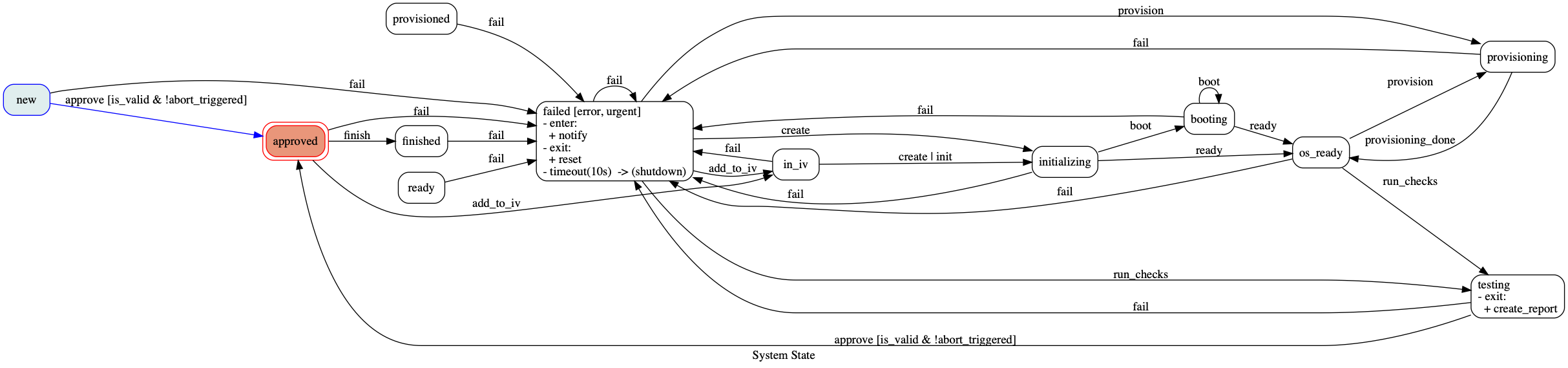 |
| 1867 |
|
| 1868 |
Independent of the backend you use, the draw function also accepts a file descriptor or a binary stream as the first argument. If you set this parameter to `None`, the byte stream will be returned: |
| 1869 |
|
| 1870 |
```python |
| 1871 |
import io |
| 1872 |
|
| 1873 |
with open('a_graph.png', 'bw') as f: |
| 1874 |
# you need to pass the format when you pass objects instead of filenames. |
| 1875 |
m.get_graph().draw(f, format="png", prog='dot') |
| 1876 |
|
| 1877 |
# you can pass a (binary) stream too |
| 1878 |
b = io.BytesIO() |
| 1879 |
m.get_graph().draw(b, format="png", prog='dot') |
| 1880 |
|
| 1881 |
# or just handle the binary string yourself |
| 1882 |
result = m.get_graph().draw(None, format="png", prog='dot') |
| 1883 |
assert result == b.getvalue() |
| 1884 |
``` |
| 1885 |
|
| 1886 |
References and partials passed as callbacks will be resolved as good as possible: |
| 1887 |
|
| 1888 |
```python |
| 1889 |
from transitions.extensions import GraphMachine |
| 1890 |
from functools import partial |
| 1891 |
|
| 1892 |
|
| 1893 |
class Model: |
| 1894 |
|
| 1895 |
def clear_state(self, deep=False, force=False): |
| 1896 |
print("Clearing state ...") |
| 1897 |
return True |
| 1898 |
|
| 1899 |
|
| 1900 |
model = Model() |
| 1901 |
machine = GraphMachine(model=model, states=['A', 'B', 'C'], |
| 1902 |
transitions=[ |
| 1903 |
{'trigger': 'clear', 'source': 'B', 'dest': 'A', 'conditions': model.clear_state}, |
| 1904 |
{'trigger': 'clear', 'source': 'C', 'dest': 'A', |
| 1905 |
'conditions': partial(model.clear_state, False, force=True)}, |
| 1906 |
], |
| 1907 |
initial='A', show_conditions=True) |
| 1908 |
|
| 1909 |
model.get_graph().draw('my_state_diagram.png', prog='dot') |
| 1910 |
``` |
| 1911 |
|
| 1912 |
This should produce something similar to this: |
| 1913 |
|
| 1914 |
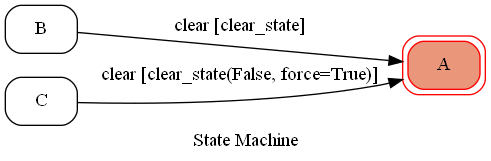 |
| 1915 |
|
| 1916 |
If the format of references does not suit your needs, you can override the static method `GraphMachine.format_references`. If you want to skip reference entirely, just let `GraphMachine.format_references` return `None`. |
| 1917 |
Also, have a look at our [example](./examples) IPython/Jupyter notebooks for a more detailed example about how to use and edit graphs. |
| 1918 |
|
| 1919 |
#### <a name="threading"></a> Threadsafe(-ish) State Machine |
| 1920 |
|
| 1921 |
In cases where event dispatching is done in threads, one can use either `LockedMachine` or `LockedHierarchicalMachine` where **function access** (!sic) is secured with reentrant locks. |
| 1922 |
This does not save you from corrupting your machine by tinkering with member variables of your model or state machine. |
| 1923 |
|
| 1924 |
```python |
| 1925 |
from transitions.extensions import LockedMachine |
| 1926 |
from threading import Thread |
| 1927 |
import time |
| 1928 |
|
| 1929 |
states = ['A', 'B', 'C'] |
| 1930 |
machine = LockedMachine(states=states, initial='A') |
| 1931 |
|
| 1932 |
# let us assume that entering B will take some time |
| 1933 |
thread = Thread(target=machine.to_B) |
| 1934 |
thread.start() |
| 1935 |
time.sleep(0.01) # thread requires some time to start |
| 1936 |
machine.to_C() # synchronized access; won't execute before thread is done |
| 1937 |
# accessing attributes directly |
| 1938 |
thread = Thread(target=machine.to_B) |
| 1939 |
thread.start() |
| 1940 |
machine.new_attrib = 42 # not synchronized! will mess with execution order |
| 1941 |
``` |
| 1942 |
|
| 1943 |
Any python context manager can be passed in via the `machine_context` keyword argument: |
| 1944 |
|
| 1945 |
```python |
| 1946 |
from transitions.extensions import LockedMachine |
| 1947 |
from threading import RLock |
| 1948 |
|
| 1949 |
states = ['A', 'B', 'C'] |
| 1950 |
|
| 1951 |
lock1 = RLock() |
| 1952 |
lock2 = RLock() |
| 1953 |
|
| 1954 |
machine = LockedMachine(states=states, initial='A', machine_context=[lock1, lock2]) |
| 1955 |
``` |
| 1956 |
|
| 1957 |
Any contexts via `machine_model` will be shared between all models registered with the `Machine`. |
| 1958 |
Per-model contexts can be added as well: |
| 1959 |
|
| 1960 |
```python |
| 1961 |
lock3 = RLock() |
| 1962 |
|
| 1963 |
machine.add_model(model, model_context=lock3) |
| 1964 |
``` |
| 1965 |
|
| 1966 |
It's important that all user-provided context managers are re-entrant since the state machine will call them multiple |
| 1967 |
times, even in the context of a single trigger invocation. |
| 1968 |
|
| 1969 |
#### <a name="async"></a> Using async callbacks |
| 1970 |
|
| 1971 |
If you are using Python 3.7 or later, you can use `AsyncMachine` to work with asynchronous callbacks. |
| 1972 |
You can mix synchronous and asynchronous callbacks if you like but this may have undesired side effects. |
| 1973 |
Note that events need to be awaited and the event loop must also be handled by you. |
| 1974 |
|
| 1975 |
```python |
| 1976 |
from transitions.extensions.asyncio import AsyncMachine |
| 1977 |
import asyncio |
| 1978 |
import time |
| 1979 |
|
| 1980 |
|
| 1981 |
class AsyncModel: |
| 1982 |
|
| 1983 |
def prepare_model(self): |
| 1984 |
print("I am synchronous.") |
| 1985 |
self.start_time = time.time() |
| 1986 |
|
| 1987 |
async def before_change(self): |
| 1988 |
print("I am asynchronous and will block now for 100 milliseconds.") |
| 1989 |
await asyncio.sleep(0.1) |
| 1990 |
print("I am done waiting.") |
| 1991 |
|
| 1992 |
def sync_before_change(self): |
| 1993 |
print("I am synchronous and will block the event loop (what I probably shouldn't)") |
| 1994 |
time.sleep(0.1) |
| 1995 |
print("I am done waiting synchronously.") |
| 1996 |
|
| 1997 |
def after_change(self): |
| 1998 |
print(f"I am synchronous again. Execution took {int((time.time() - self.start_time) * 1000)} ms.") |
| 1999 |
|
| 2000 |
|
| 2001 |
transition = dict(trigger="start", source="Start", dest="Done", prepare="prepare_model", |
| 2002 |
before=["before_change"] * 5 + ["sync_before_change"], |
| 2003 |
after="after_change") # execute before function in asynchronously 5 times |
| 2004 |
model = AsyncModel() |
| 2005 |
machine = AsyncMachine(model, states=["Start", "Done"], transitions=[transition], initial='Start') |
| 2006 |
|
| 2007 |
asyncio.get_event_loop().run_until_complete(model.start()) |
| 2008 |
# >>> I am synchronous. |
| 2009 |
# I am asynchronous and will block now for 100 milliseconds. |
| 2010 |
# I am asynchronous and will block now for 100 milliseconds. |
| 2011 |
# I am asynchronous and will block now for 100 milliseconds. |
| 2012 |
# I am asynchronous and will block now for 100 milliseconds. |
| 2013 |
# I am asynchronous and will block now for 100 milliseconds. |
| 2014 |
# I am synchronous and will block the event loop (what I probably shouldn't) |
| 2015 |
# I am done waiting synchronously. |
| 2016 |
# I am done waiting. |
| 2017 |
# I am done waiting. |
| 2018 |
# I am done waiting. |
| 2019 |
# I am done waiting. |
| 2020 |
# I am done waiting. |
| 2021 |
# I am synchronous again. Execution took 101 ms. |
| 2022 |
assert model.is_Done() |
| 2023 |
``` |
| 2024 |
|
| 2025 |
So, why do you need to use Python 3.7 or later you may ask. |
| 2026 |
Async support has been introduced earlier. |
| 2027 |
`AsyncMachine` makes use of `contextvars` to handle running callbacks when new events arrive before a transition |
| 2028 |
has been finished: |
| 2029 |
|
| 2030 |
```python |
| 2031 |
async def await_never_return(): |
| 2032 |
await asyncio.sleep(100) |
| 2033 |
raise ValueError("That took too long!") |
| 2034 |
|
| 2035 |
async def fix(): |
| 2036 |
await m2.fix() |
| 2037 |
|
| 2038 |
m1 = AsyncMachine(states=['A', 'B', 'C'], initial='A', name="m1") |
| 2039 |
m2 = AsyncMachine(states=['A', 'B', 'C'], initial='A', name="m2") |
| 2040 |
m2.add_transition(trigger='go', source='A', dest='B', before=await_never_return) |
| 2041 |
m2.add_transition(trigger='fix', source='A', dest='C') |
| 2042 |
m1.add_transition(trigger='go', source='A', dest='B', after='go') |
| 2043 |
m1.add_transition(trigger='go', source='B', dest='C', after=fix) |
| 2044 |
asyncio.get_event_loop().run_until_complete(asyncio.gather(m2.go(), m1.go())) |
| 2045 |
|
| 2046 |
assert m1.state == m2.state |
| 2047 |
``` |
| 2048 |
|
| 2049 |
This example actually illustrates two things: |
| 2050 |
First, that 'go' called in m1's transition from `A` to be `B` is not cancelled and second, calling `m2.fix()` will |
| 2051 |
halt the transition attempt of m2 from `A` to `B` by executing 'fix' from `A` to `C`. |
| 2052 |
This separation would not be possible without `contextvars`. |
| 2053 |
Note that `prepare` and `conditions` are NOT treated as ongoing transitions. |
| 2054 |
This means that after `conditions` have been evaluated, a transition is executed even though another event already happened. |
| 2055 |
Tasks will only be cancelled when run as a `before` callback or later. |
| 2056 |
|
| 2057 |
`AsyncMachine` features a model-special queue mode which can be used when `queued='model'` is passed to the constructor. |
| 2058 |
With a model-specific queue, events will only be queued when they belong to the same model. |
| 2059 |
Furthermore, a raised exception will only clear the event queue of the model that raised that exception. |
| 2060 |
For the sake of simplicity, let's assume that every event in `asyncio.gather` below is not triggered at the same time but slightly delayed: |
| 2061 |
|
| 2062 |
```python |
| 2063 |
asyncio.gather(model1.event1(), model1.event2(), model2.event1()) |
| 2064 |
# execution order with AsyncMachine(queued=True) |
| 2065 |
# model1.event1 -> model1.event2 -> model2.event1 |
| 2066 |
# execution order with AsyncMachine(queued='model') |
| 2067 |
# (model1.event1, model2.event1) -> model1.event2 |
| 2068 |
|
| 2069 |
asyncio.gather(model1.event1(), model1.error(), model1.event3(), model2.event1(), model2.event2(), model2.event3()) |
| 2070 |
# execution order with AsyncMachine(queued=True) |
| 2071 |
# model1.event1 -> model1.error |
| 2072 |
# execution order with AsyncMachine(queued='model') |
| 2073 |
# (model1.event1, model2.event1) -> (model1.error, model2.event2) -> model2.event3 |
| 2074 |
``` |
| 2075 |
|
| 2076 |
Note that queue modes must not be changed after machine construction. |
| 2077 |
|
| 2078 |
#### <a name="state-features"></a>Adding features to states |
| 2079 |
|
| 2080 |
If your superheroes need some custom behaviour, you can throw in some extra functionality by decorating machine states: |
| 2081 |
|
| 2082 |
```python |
| 2083 |
from time import sleep |
| 2084 |
from transitions import Machine |
| 2085 |
from transitions.extensions.states import add_state_features, Tags, Timeout |
| 2086 |
|
| 2087 |
|
| 2088 |
@add_state_features(Tags, Timeout) |
| 2089 |
class CustomStateMachine(Machine): |
| 2090 |
pass |
| 2091 |
|
| 2092 |
|
| 2093 |
class SocialSuperhero(object): |
| 2094 |
def __init__(self): |
| 2095 |
self.entourage = 0 |
| 2096 |
|
| 2097 |
def on_enter_waiting(self): |
| 2098 |
self.entourage += 1 |
| 2099 |
|
| 2100 |
|
| 2101 |
states = [{'name': 'preparing', 'tags': ['home', 'busy']}, |
| 2102 |
{'name': 'waiting', 'timeout': 1, 'on_timeout': 'go'}, |
| 2103 |
{'name': 'away'}] # The city needs us! |
| 2104 |
|
| 2105 |
transitions = [['done', 'preparing', 'waiting'], |
| 2106 |
['join', 'waiting', 'waiting'], # Entering Waiting again will increase our entourage |
| 2107 |
['go', 'waiting', 'away']] # Okay, let' move |
| 2108 |
|
| 2109 |
hero = SocialSuperhero() |
| 2110 |
machine = CustomStateMachine(model=hero, states=states, transitions=transitions, initial='preparing') |
| 2111 |
assert hero.state == 'preparing' # Preparing for the night shift |
| 2112 |
assert machine.get_state(hero.state).is_busy # We are at home and busy |
| 2113 |
hero.done() |
| 2114 |
assert hero.state == 'waiting' # Waiting for fellow superheroes to join us |
| 2115 |
assert hero.entourage == 1 # It's just us so far |
| 2116 |
sleep(0.7) # Waiting... |
| 2117 |
hero.join() # Weeh, we got company |
| 2118 |
sleep(0.5) # Waiting... |
| 2119 |
hero.join() # Even more company \o/ |
| 2120 |
sleep(2) # Waiting... |
| 2121 |
assert hero.state == 'away' # Impatient superhero already left the building |
| 2122 |
assert machine.get_state(hero.state).is_home is False # Yupp, not at home anymore |
| 2123 |
assert hero.entourage == 3 # At least he is not alone |
| 2124 |
``` |
| 2125 |
|
| 2126 |
Currently, transitions comes equipped with the following state features: |
| 2127 |
|
| 2128 |
- **Timeout** -- triggers an event after some time has passed |
| 2129 |
|
| 2130 |
- keyword: `timeout` (int, optional) -- if passed, an entered state will timeout after `timeout` seconds |
| 2131 |
- keyword: `on_timeout` (string/callable, optional) -- will be called when timeout time has been reached |
| 2132 |
- will raise an `AttributeError` when `timeout` is set but `on_timeout` is not |
| 2133 |
- Note: A timeout is triggered in a thread. This implies several limitations (e.g. catching Exceptions raised in timeouts). Consider an event queue for more sophisticated applications. |
| 2134 |
|
| 2135 |
- **Tags** -- adds tags to states |
| 2136 |
|
| 2137 |
- keyword: `tags` (list, optional) -- assigns tags to a state |
| 2138 |
- `State.is_<tag_name>` will return `True` when the state has been tagged with `tag_name`, else `False` |
| 2139 |
|
| 2140 |
- **Error** -- raises a `MachineError` when a state cannot be left |
| 2141 |
- inherits from `Tags` (if you use `Error` do not use `Tags`) |
| 2142 |
- keyword: `accepted` (bool, optional) -- marks a state as accepted |
| 2143 |
- alternatively the keyword `tags` can be passed, containing 'accepted' |
| 2144 |
- Note: Errors will only be raised if `auto_transitions` has been set to `False`. Otherwise every state can be exited with `to_<state>` methods. |
| 2145 |
- **Volatile** -- initialises an object every time a state is entered |
| 2146 |
- keyword: `volatile` (class, optional) -- every time the state is entered an object of type class will be assigned to the model. The attribute name is defined by `hook`. If omitted, an empty VolatileObject will be created instead |
| 2147 |
- keyword: `hook` (string, default='scope') -- The model's attribute name for the temporal object. |
| 2148 |
|
| 2149 |
You can write your own `State` extensions and add them the same way. Just note that `add_state_features` expects _Mixins_. This means your extension should always call the overridden methods `__init__`, `enter` and `exit`. Your extension may inherit from _State_ but will also work without it. |
| 2150 |
Using `@add_state_features` has a drawback which is that decorated machines cannot be pickled (more precisely, the dynamically generated `CustomState` cannot be pickled). |
| 2151 |
This might be a reason to write a dedicated custom state class instead. |
| 2152 |
Depending on the chosen state machine, your custom state class may need to provide certain state features. For instance, `HierarchicalMachine` requires your custom state to be an instance of `NestedState` (`State` is not sufficient). To inject your states you can either assign them to your `Machine`'s class attribute `state_cls` or override `Machine.create_state` in case you need some specific procedures done whenever a state is created: |
| 2153 |
|
| 2154 |
```python |
| 2155 |
from transitions import Machine, State |
| 2156 |
|
| 2157 |
class MyState(State): |
| 2158 |
pass |
| 2159 |
|
| 2160 |
class CustomMachine(Machine): |
| 2161 |
# Use MyState as state class |
| 2162 |
state_cls = MyState |
| 2163 |
|
| 2164 |
|
| 2165 |
class VerboseMachine(Machine): |
| 2166 |
|
| 2167 |
# `Machine._create_state` is a class method but we can |
| 2168 |
# override it to be an instance method |
| 2169 |
def _create_state(self, *args, **kwargs): |
| 2170 |
print("Creating a new state with machine '{0}'".format(self.name)) |
| 2171 |
return MyState(*args, **kwargs) |
| 2172 |
``` |
| 2173 |
|
| 2174 |
If you want to avoid threads in your `AsyncMachine` entirely, you can replace the `Timeout` state feature with `AsyncTimeout` from the `asyncio` extension: |
| 2175 |
|
| 2176 |
```python |
| 2177 |
import asyncio |
| 2178 |
from transitions.extensions.states import add_state_features |
| 2179 |
from transitions.extensions.asyncio import AsyncTimeout, AsyncMachine |
| 2180 |
|
| 2181 |
@add_state_features(AsyncTimeout) |
| 2182 |
class TimeoutMachine(AsyncMachine): |
| 2183 |
pass |
| 2184 |
|
| 2185 |
states = ['A', {'name': 'B', 'timeout': 0.2, 'on_timeout': 'to_C'}, 'C'] |
| 2186 |
m = TimeoutMachine(states=states, initial='A', queued=True) # see remark below |
| 2187 |
asyncio.run(asyncio.wait([m.to_B(), asyncio.sleep(0.1)])) |
| 2188 |
assert m.is_B() # timeout shouldn't be triggered |
| 2189 |
asyncio.run(asyncio.wait([m.to_B(), asyncio.sleep(0.3)])) |
| 2190 |
assert m.is_C() # now timeout should have been processed |
| 2191 |
``` |
| 2192 |
|
| 2193 |
You should consider passing `queued=True` to the `TimeoutMachine` constructor. This will make sure that events are processed sequentially and avoid asynchronous [racing conditions](https://github.com/pytransitions/transitions/issues/459) that may appear when timeout and event happen in proximity. |
| 2194 |
|
| 2195 |
#### <a name="django-support"></a> Using transitions together with Django |
| 2196 |
|
| 2197 |
You can have a look at the [FAQ](examples/Frequently%20asked%20questions.ipynb) for some inspiration or checkout `django-transitions`. |
| 2198 |
It has been developed by Christian Ledermann and is also hosted on [Github](https://github.com/PrimarySite/django-transitions). |
| 2199 |
[The documentation](https://django-transitions.readthedocs.io/en/latest/) contains some usage examples. |
| 2200 |
|
| 2201 |
### <a name="bug-reports"></a>I have a [bug report/issue/question]... |
| 2202 |
|
| 2203 |
First, congratulations! You reached the end of the documentation! |
| 2204 |
If you want to try out `transitions` before you install it, you can do that in an interactive Jupyter notebook at mybinder.org. |
| 2205 |
Just click this button 👉 [](https://mybinder.org/v2/gh/pytransitions/transitions/master?filepath=examples%2FPlayground.ipynb). |
| 2206 |
|
| 2207 |
For bug reports and other issues, please [open an issue](https://github.com/pytransitions/transitions) on GitHub. |
| 2208 |
|
| 2209 |
For usage questions, post on Stack Overflow, making sure to tag your question with the [`pytransitions` tag](https://stackoverflow.com/questions/tagged/pytransitions). Do not forget to have a look at the [extended examples](./examples)! |
| 2210 |
|
| 2211 |
For any other questions, solicitations, or large unrestricted monetary gifts, email [Tal Yarkoni](mailto:[email protected]) (initial author) and/or [Alexander Neumann](mailto:[email protected]) (current maintainer). |