| 1 |
Devices |
| 2 |
======= |
| 3 |
|
| 4 |
What is a device |
| 5 |
---------------- |
| 6 |
|
| 7 |
In NetworkManager, a device represents an object that allows some sort |
| 8 |
of network configuration; it can be a regular Linux network interface |
| 9 |
(physical as Ethernet or Wi-Fi; or virtual as a bridge or a VLAN), but |
| 10 |
it can also be an entity that does not have a link object in the |
| 11 |
kernel; examples of the latter kind are modems and OVS bridges/ports. |
| 12 |
|
| 13 |
NetworkManager automatically creates device objects at runtime based |
| 14 |
on the device found on the system. It also creates special devices, |
| 15 |
called *unrealized* devices that represent potential devices, |
| 16 |
e.g. that don't exist yet but will exist when a given connection gets |
| 17 |
activated. See the section "Unrealized devices" for more details. |
| 18 |
|
| 19 |
Each device has several properties; the most important are: |
| 20 |
|
| 21 |
- `iface`: the name of the interface. |
| 22 |
|
| 23 |
- `ifindex`: for devices backed by a kernel link, this is the kernel |
| 24 |
interface index. |
| 25 |
|
| 26 |
- `ip_ifindex`: some devices have multiple kernel link associated. In |
| 27 |
such case, `ifindex` is the index of the base link, while |
| 28 |
`ip_ifindex` is the index of the link on which IP configuration |
| 29 |
should be made. For example when activating a PPPoE connection, the |
| 30 |
device has `ifindex` referring to the Ethernet link and |
| 31 |
`ip_ifindex` to the PPP one. |
| 32 |
|
| 33 |
- `state`: the current state of the device in the device state |
| 34 |
machine, see the next sections. |
| 35 |
|
| 36 |
- `l3cfg`: the L3Cfg instance takes care of configuring IP on one |
| 37 |
ifindex. |
| 38 |
|
| 39 |
The device object also is exposed on D-Bus, with properties, methods |
| 40 |
and signals, see the `interface_info_device` structure. |
| 41 |
|
| 42 |
Activation |
| 43 |
---------- |
| 44 |
|
| 45 |
To configure a device, NetworkManager needs to activate a connection |
| 46 |
profile on it. This happens for two reasons: |
| 47 |
- it was requested by the user via the `ActivateConnection()` and |
| 48 |
`AddAndActivateConnection()` API methods, which are handled by |
| 49 |
functions `impl_manager_activate_connection()` and |
| 50 |
`impl_manager_add_and_activate_connection()`; |
| 51 |
- it is the result of an internal decision; in this case the |
| 52 |
activation is handled by `nm_manager_activate_connection()`; the |
| 53 |
reason can be: |
| 54 |
- the connection profile is activated automatically (for example, |
| 55 |
at startup) because it is configured to auto-connect; |
| 56 |
- the connection profile is being activated as a dependency of |
| 57 |
another profile; for example: |
| 58 |
- a port profile (e.g. bridge port) always depends on the |
| 59 |
corresponding controller profile (e.g. bridge); |
| 60 |
- a controller profile can be configured to automatically |
| 61 |
activate port profiles; |
| 62 |
- during a checkpoint rollback; |
| 63 |
- etc. |
| 64 |
|
| 65 |
The activation starts by first creating a `NMActiveConnection` |
| 66 |
object. This is a abstract type used to track the state of the |
| 67 |
activation on a specific device; it has two implementations: |
| 68 |
`NMActRequest` for regular devices and `NMVpnConnection` for VPNs. |
| 69 |
|
| 70 |
Two important fields of an active connection object are: |
| 71 |
|
| 72 |
- the *settings-connection*: this is a pointer to the connection |
| 73 |
being activated; it points to the connection in `NMSettings` and |
| 74 |
always reflects the latest changes in the profile; |
| 75 |
|
| 76 |
- the *applied-connection*: similar to the *settings-connection*, but |
| 77 |
this is a copy of the original *settings-connection* done at the |
| 78 |
time the activation started. During the current activation, the |
| 79 |
properties to configure are always read from this applied |
| 80 |
connection because they shouldn't change even if the profile is |
| 81 |
modified. |
| 82 |
|
| 83 |
Unrealized devices |
| 84 |
------------------ |
| 85 |
|
| 86 |
We said that to start an activation we need a profile and a |
| 87 |
device. What happens if the device doesn't already exist because it is |
| 88 |
a virtual one (such as a bridge or a vlan)? |
| 89 |
|
| 90 |
This problem is currently solved in NetworkManager by having a special |
| 91 |
kind of devices, *unrealized* devices. Those are 'potential' devices, |
| 92 |
that don't exist in kernel; they are created to represent the device |
| 93 |
for each virtual profile. Technically speaking, a device is unrealized |
| 94 |
when the `real` flag is set to zero in the device private struct. |
| 95 |
|
| 96 |
When NetworkManager decides to activate a virtual profile, the |
| 97 |
corresponding device gets realized by calling |
| 98 |
`nm_device_create_and_realize()` and then the activation proceeds as |
| 99 |
for physical devices. |
| 100 |
|
| 101 |
Object hierarchy |
| 102 |
---------------- |
| 103 |
|
| 104 |
In the NetworkManager code a device is a `NMDevice` object, which has |
| 105 |
several subclasses; each subclass represents a specific kind of device |
| 106 |
(`NMDeviceEthernet`, `NMDeviceWifi`, `NMDeviceBridge`, etc.), and can |
| 107 |
reimplement properties and methods of the superclass to customize the |
| 108 |
behavior (see `struct _NMDeviceClass`). |
| 109 |
|
| 110 |
To show how this is used in practice, let's look at function |
| 111 |
`nm_device_is_available()`, which indicates whether a device is ready |
| 112 |
to be activated. The function calls the virtual method `is_available()`: |
| 113 |
|
| 114 |
```C |
| 115 |
gboolean |
| 116 |
nm_device_is_available(NMDevice *self, NMDeviceCheckDevAvailableFlags flags) |
| 117 |
{ |
| 118 |
... |
| 119 |
return NM_DEVICE_GET_CLASS(self)->is_available(self, flags); |
| 120 |
} |
| 121 |
``` |
| 122 |
|
| 123 |
`NMDevice` has a generic implementation of that method which performs |
| 124 |
generic checks: |
| 125 |
|
| 126 |
```C |
| 127 |
static gboolean |
| 128 |
is_available(NMDevice *self, NMDeviceCheckDevAvailableFlags flags) |
| 129 |
{ |
| 130 |
NMDevicePrivate *priv = NM_DEVICE_GET_PRIVATE(self); |
| 131 |
|
| 132 |
if (priv->carrier || priv->ignore_carrier) |
| 133 |
return TRUE; |
| 134 |
... |
| 135 |
|
| 136 |
return FALSE; |
| 137 |
} |
| 138 |
``` |
| 139 |
|
| 140 |
A Ethernet device needs additional checks and so it reimplements the |
| 141 |
method to check that the MAC address is already set: |
| 142 |
|
| 143 |
```C |
| 144 |
static gboolean |
| 145 |
is_available(NMDevice *device, NMDeviceCheckDevAvailableFlags flags) |
| 146 |
{ |
| 147 |
if (!NM_DEVICE_CLASS(nm_device_ethernet_parent_class) |
| 148 |
->is_available(device, flags)) |
| 149 |
return FALSE; |
| 150 |
|
| 151 |
return !!nm_device_get_initial_hw_address(device); |
| 152 |
} |
| 153 |
``` |
| 154 |
|
| 155 |
Note how the function first chains up by calling the `NMDevice` |
| 156 |
implementation and then it performs an additional check. This pattern |
| 157 |
is heavily used in NetworkManager. |
| 158 |
|
| 159 |
Device states |
| 160 |
------------- |
| 161 |
|
| 162 |
Each device behaves according to a state machine that looks like this: |
| 163 |
|
| 164 |
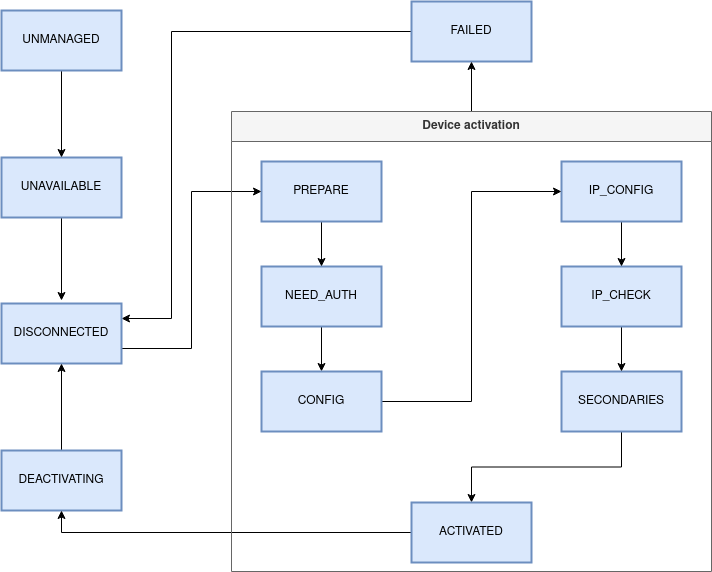 |
| 165 |
|
| 166 |
While the implementation of the state machine is done in different |
| 167 |
functions in `nm-device.c`, the core part is in `_set_state_full()`. |
| 168 |
|
| 169 |
The states are: |
| 170 |
|
| 171 |
* UNMANAGED: this is the initial state and means that the device is |
| 172 |
not managed by NetworkManager. The unmanaged state is tracked via a |
| 173 |
bitmap of flags, and the device stays in this state while at least |
| 174 |
one flag is set. See the section "Unmanaged flags" below for more |
| 175 |
details. Once all unmanaged flags are cleared, the device is ready |
| 176 |
to become UNAVAILABLE. The state transition is done in function |
| 177 |
`_set_unmanaged_flags()`, which changes the states to UNMANAGED or |
| 178 |
UNAVAILABLE depending on the value of the flags. Note that even if |
| 179 |
it's not displayed in the diagram, the UNMANAGED state can be |
| 180 |
reached by virtually every other state when a unmanaged flag |
| 181 |
becomes set. |
| 182 |
|
| 183 |
* UNAVAILABLE: the device is managed by NetworkManager, but is not |
| 184 |
available for use. Reasons may include the wireless switched off, |
| 185 |
missing firmware, no ethernet carrier, missing supplicant or modem |
| 186 |
manager, etc. When a device becomes available, it can transition to |
| 187 |
DISCONNECTED; this decision is taken in various places by |
| 188 |
scheduling a check via `nm_device_queue_recheck_available()`. |
| 189 |
|
| 190 |
* DISCONNECTED: the device can be activated, but is currently |
| 191 |
idle and not connected to a network. When entering this state from |
| 192 |
a state that belongs to the activation sequence or from |
| 193 |
FAILED/DEACTIVATING, a cleanup of previous configuration is |
| 194 |
done. If there is an activation queued, it's started; otherwise, |
| 195 |
`NMPolicy` reacts to the state change and calls |
| 196 |
`nm_policy_device_recheck_auto_activate_schedule()` to check if |
| 197 |
there a connection that can be auto-activated on the device. |
| 198 |
|
| 199 |
* PREPARE: this is the first state of an activation; in this |
| 200 |
state some initial operation are performed, such as changing the |
| 201 |
MAC address, setting physical link properties, and anything else |
| 202 |
required to connect to the requested network. |
| 203 |
|
| 204 |
This state is entered via |
| 205 |
`nm_device_activate_schedule_stage1_device_prepare()`. When |
| 206 |
finished, `nm_device_activate_schedule_stage2_device_config()` is |
| 207 |
used to transition to the CONFIG state. Those functions are |
| 208 |
re-entrant, in the sense that when a device is in a given state and |
| 209 |
needs that an operation completes (or a condition becomes true), it |
| 210 |
can wait and then invoke the same function again; in that way it |
| 211 |
re-enters the same state, where all the conditions are evaluated |
| 212 |
again and if possible the device will transition to the next state. |
| 213 |
|
| 214 |
* CONFIG: the device is connecting to the requested network. |
| 215 |
This may include operations like associating with the Wi-Fi AP, |
| 216 |
dialing the modem, connecting to the remote Bluetooth device, etc. |
| 217 |
|
| 218 |
* NEED_AUTH: the device requires more information to continue |
| 219 |
connecting to the requested network. This includes secrets like |
| 220 |
WiFi passphrases, login passwords, PIN codes, etc. |
| 221 |
|
| 222 |
* IP_CONFIG: this state is entered via |
| 223 |
`nm_device_activate_schedule_stage3_ip_config()`, and is where IP |
| 224 |
addresses and routes are assigned to the device. Function |
| 225 |
`_dev_ip_state_check()` checks that the configuration is terminated |
| 226 |
according the connection configuration; if so, it moves the device |
| 227 |
to state IP_CHECK. |
| 228 |
|
| 229 |
* IP_CHECK: in this state, NetworkManager waits that the gateway |
| 230 |
can be pinged successfully if the property |
| 231 |
`connection.gateway-ping-timeout` is set. By default this step is a |
| 232 |
no op since the property is unset. After the optional ping, the |
| 233 |
dispatcher `pre-up` event is emitted, and the device goes to |
| 234 |
SECONDARIES. |
| 235 |
|
| 236 |
* SECONDARIES: connections have a `connection.secondaries` property |
| 237 |
that specifies a list of UUID of connections of type VPN that can |
| 238 |
be activated automatically when the connection goes up. If there |
| 239 |
are any secondaries, they are activated in this stage; note that |
| 240 |
since this operation involves other devices, it is done in |
| 241 |
`NMPolicy`, upon the emission of the state change signal handled in |
| 242 |
`nm-policy.c:device_state_changed()`. After any secondaries are |
| 243 |
activated, the devices transitions to state ACTIVATED. |
| 244 |
|
| 245 |
* ACTIVATED: the device has a network connection. Upon entering this |
| 246 |
state the device emits the `up` dispatcher event. The device |
| 247 |
remains is this state until the connection is deactivated or until |
| 248 |
it fails. |
| 249 |
|
| 250 |
* DEACTIVATING: a disconnection from the current network |
| 251 |
connection was requested, and the device is cleaning up resources |
| 252 |
used for that connection. In this state the `pre-down` dispatcher |
| 253 |
event is emitted. When finished, the devices goes again to |
| 254 |
DISCONNECTED and the `down` dispatch event is fired. |
| 255 |
|
| 256 |
* FAILED: the device failed to connect to the requested network |
| 257 |
and is cleaning up the connection request. This state can be |
| 258 |
reached from any state belonging to the activation. When the |
| 259 |
cleanup is done, the device goes to DISCONNECTED. If the device was |
| 260 |
previously activated, the `down` dispatcher event is emitted. |
| 261 |
|
| 262 |
Unmanaged devices |
| 263 |
----------------- |
| 264 |
|
| 265 |
Each device has a mask of flags representing reasons why the device is |
| 266 |
unmanaged; when at least of of those flags is set, the device goes to |
| 267 |
state UNMANAGED. When all flags are cleared, the device moves to state |
| 268 |
UNAVAILABLE. The unmanaged flags are currently: |
| 269 |
|
| 270 |
- SLEEPING: the system is suspended, or networking is disabled |
| 271 |
|
| 272 |
- QUITTING: NetworkManager is shutting down. |
| 273 |
|
| 274 |
- PLATFORM_INIT: NetworkManager is waiting for udev to announce |
| 275 |
the device. Note that NetworkManager can't touch the device until |
| 276 |
then because udev might perform operations on it (such as renaming |
| 277 |
or changing the MAC). Unrealized devices (see later) have this |
| 278 |
flag set. |
| 279 |
|
| 280 |
- USER_EXPLICIT: when unmanaged by explicit user decision |
| 281 |
(e.g. via a D-Bus command). |
| 282 |
|
| 283 |
- USER_SETTINGS: when unmanaged by user decision via the |
| 284 |
settings plugin (for example `keyfile.unmanaged-devices` or |
| 285 |
ifcfg-rh's `NM_CONTROLLED=no`). Although this is |
| 286 |
user-configuration it cannot be overruled and is |
| 287 |
authoritative. That is because users may depend on dropping a |
| 288 |
ifcfg-rh file to ensure the device is unmanaged. |
| 289 |
|
| 290 |
- USER_CONF: when unmanaged by user decision via the |
| 291 |
NetworkManager.conf ("unmanaged" in the [device] |
| 292 |
section). Contrary to USER_SETTINGS, this can be overwritten via |
| 293 |
D-Bus. |
| 294 |
|
| 295 |
- BY_DEFAULT: this flag is no longer used. |
| 296 |
|
| 297 |
- USER_UDEV: unmanaged via a udev rule. |
| 298 |
|
| 299 |
- EXTERNAL_DOWN: unmanaged because the interface was not created by |
| 300 |
NetworkManager and is currently down. |
| 301 |
|
| 302 |
Note that the unmanaged flags are tracked via two variables |
| 303 |
`unmanaged_mask` and `unmanaged_flags`; in this way each flag is in |
| 304 |
practice a tri-state variable with possible values TRUE (unmanaged), |
| 305 |
FALSE (managed) and UNSET. |
| 306 |
|
| 307 |
External devices and managed-type |
| 308 |
--------------------------------- |
| 309 |
|
| 310 |
Even if a device is managed, that doesn't mean that NetworkManager is |
| 311 |
actively configuring it. When a device is created externally (for |
| 312 |
example via `ip link`) and has an IP configuration, NetworkManager |
| 313 |
creates a in-memory connection representing the configuration |
| 314 |
parameters on the interface such as IP addresses, routes, DNS, etc.; |
| 315 |
the connection appears as active but NetworkManager doesn't actually |
| 316 |
touch the interface. The external status is tracked in the |
| 317 |
`managed-type` member, which can have the following values: |
| 318 |
|
| 319 |
- EXTERNAL: the interface is not touched by NM. |
| 320 |
- ASSUME: this value is deprecated; it used to mean that NM should manage the device without fully reconfiguring it. Now, the interface is either managed on external. |
| 321 |
- FULL: the interface is fully managed. |
| 322 |
- REMOVED: the link was removed externally. |