| 1 |
# Parallel Zstandard (PZstandard) |
| 2 |
|
| 3 |
Parallel Zstandard is a Pigz-like tool for Zstandard. |
| 4 |
It provides Zstandard format compatible compression and decompression that is able to utilize multiple cores. |
| 5 |
It breaks the input up into equal sized chunks and compresses each chunk independently into a Zstandard frame. |
| 6 |
It then concatenates the frames together to produce the final compressed output. |
| 7 |
Pzstandard will write a 12 byte header for each frame that is a skippable frame in the Zstandard format, which tells PZstandard the size of the next compressed frame. |
| 8 |
PZstandard supports parallel decompression of files compressed with PZstandard. |
| 9 |
When decompressing files compressed with Zstandard, PZstandard does IO in one thread, and decompression in another. |
| 10 |
|
| 11 |
## Usage |
| 12 |
|
| 13 |
PZstandard supports the same command line interface as Zstandard, but also provides the `-p` option to specify the number of threads. |
| 14 |
Dictionary mode is not currently supported. |
| 15 |
|
| 16 |
Basic usage |
| 17 |
|
| 18 |
pzstd input-file -o output-file -p num-threads -# # Compression |
| 19 |
pzstd -d input-file -o output-file -p num-threads # Decompression |
| 20 |
|
| 21 |
PZstandard also supports piping and fifo pipes |
| 22 |
|
| 23 |
cat input-file | pzstd -p num-threads -# -c > /dev/null |
| 24 |
|
| 25 |
For more options |
| 26 |
|
| 27 |
pzstd --help |
| 28 |
|
| 29 |
PZstandard tries to pick a smart default number of threads if not specified (displayed in `pzstd --help`). |
| 30 |
If this number is not suitable, during compilation you can define `PZSTD_NUM_THREADS` to the number of threads you prefer. |
| 31 |
|
| 32 |
## Benchmarks |
| 33 |
|
| 34 |
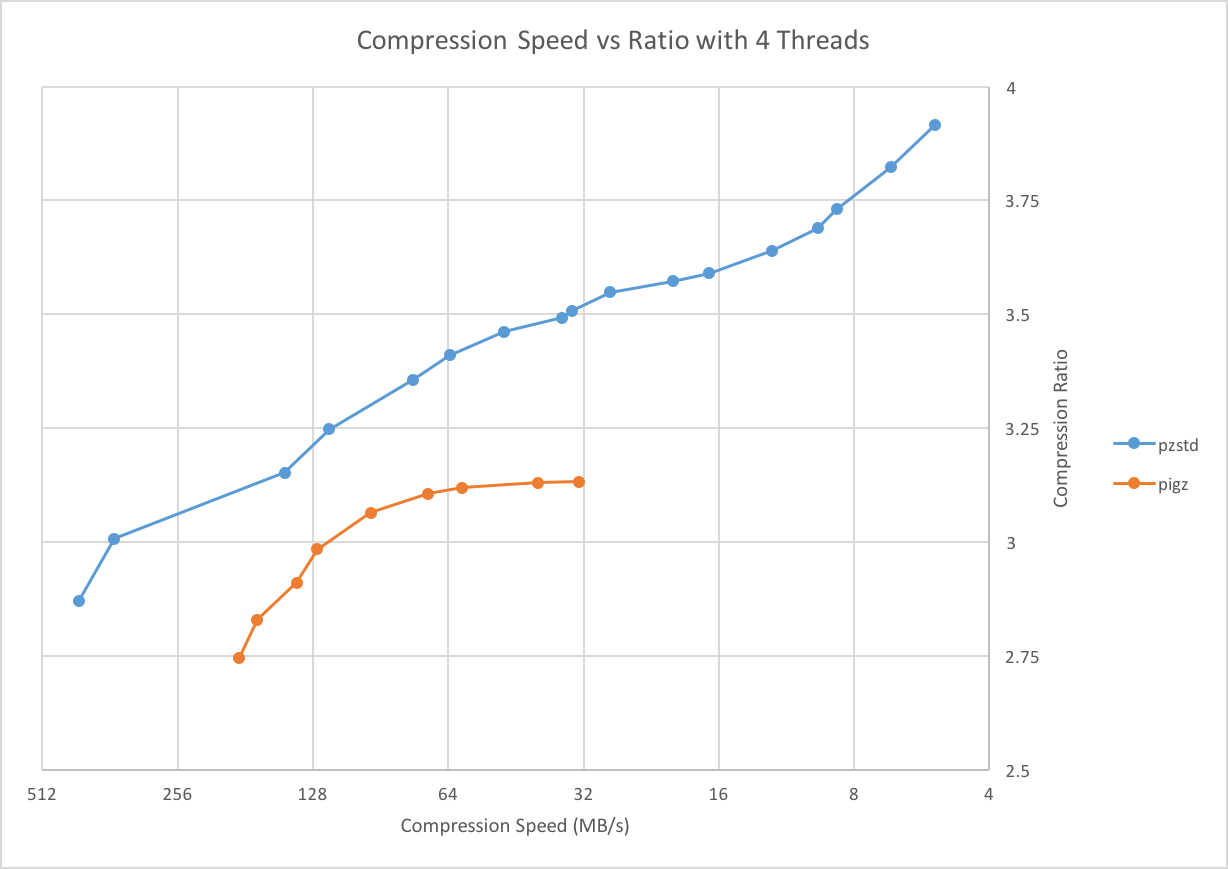
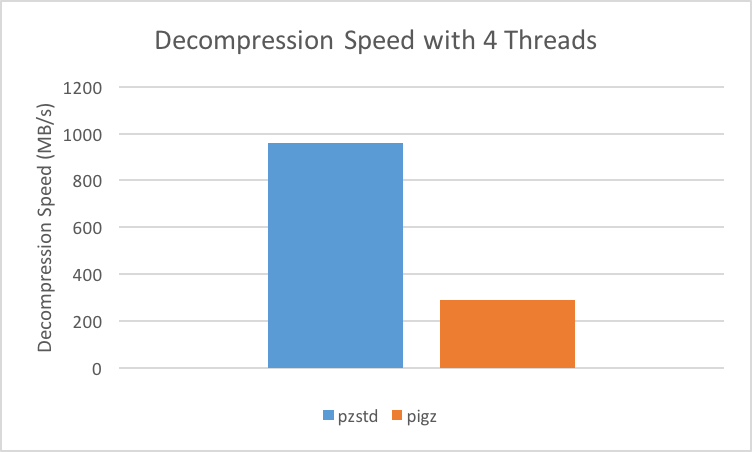
As a reference, PZstandard and Pigz were compared on an Intel Core i7 @ 3.1 GHz, each using 4 threads, with the [Silesia compression corpus](https://sun.aei.polsl.pl//~sdeor/index.php?page=silesia). |
| 35 |
|
| 36 |
Compression Speed vs Ratio with 4 Threads | Decompression Speed with 4 Threads |
| 37 |
------------------------------------------|----------------------------------- |
| 38 |
 |  |
| 39 |
|
| 40 |
The test procedure was to run each of the following commands 2 times for each compression level, and take the minimum time. |
| 41 |
|
| 42 |
time pzstd -# -p 4 -c silesia.tar > silesia.tar.zst |
| 43 |
time pzstd -d -p 4 -c silesia.tar.zst > /dev/null |
| 44 |
|
| 45 |
time pigz -# -p 4 -k -c silesia.tar > silesia.tar.gz |
| 46 |
time pigz -d -p 4 -k -c silesia.tar.gz > /dev/null |
| 47 |
|
| 48 |
PZstandard was tested using compression levels 1-19, and Pigz was tested using compression levels 1-9. |
| 49 |
Pigz cannot do parallel decompression, it simply does each of reading, decompression, and writing on separate threads. |
| 50 |
|
| 51 |
## Tests |
| 52 |
|
| 53 |
Tests require that you have [gtest](https://github.com/google/googletest) installed. |
| 54 |
Set `GTEST_INC` and `GTEST_LIB` in `Makefile` to specify the location of the gtest headers and libraries. |
| 55 |
Alternatively, run `make googletest`, which will clone googletest and build it. |
| 56 |
Run `make tests && make check` to run tests. |