| 1 |
Metadata-Version: 2.1 |
| 2 |
Name: logzero |
| 3 |
Version: 1.7.0 |
| 4 |
Summary: Robust and effective logging for Python 2 and 3 |
| 5 |
Home-page: https://github.com/metachris/logzero |
| 6 |
Author: Chris Hager |
| 7 |
Author-email: [email protected] |
| 8 |
License: MIT license |
| 9 |
Description: # logzero |
| 10 |
|
| 11 |
 |
| 12 |
[](https://logzero.readthedocs.io/en/latest/?badge=latest) |
| 13 |
[](https://pypi.python.org/pypi/logzero) |
| 14 |
[](https://anaconda.org/conda-forge/logzero) |
| 15 |
[](https://pepy.tech/project/logzero) |
| 16 |
|
| 17 |
Robust and effective logging for Python 2 and 3. |
| 18 |
|
| 19 |
 |
| 20 |
|
| 21 |
* Documentation: https://logzero.readthedocs.io |
| 22 |
* GitHub: https://github.com/metachris/logzero |
| 23 |
|
| 24 |
|
| 25 |
Features |
| 26 |
-------- |
| 27 |
|
| 28 |
* Easy logging to console and/or (rotating) file. |
| 29 |
* Provides a fully configured standard [Python logger object](https://docs.python.org/2/library/logging.html#module-level-functions>). |
| 30 |
* JSON logging (with integrated [python-json-logger](https://github.com/madzak/python-json-logger)) |
| 31 |
* Pretty formatting, including level-specific colors in the console. |
| 32 |
* No dependencies |
| 33 |
* Windows color output supported by [colorama](https://github.com/tartley/colorama) |
| 34 |
* Robust against str/bytes encoding problems, works with all kinds of character encodings and special characters. |
| 35 |
* Multiple loggers can write to the same logfile (also across multiple Python files and processes). |
| 36 |
* Global default logger with [logzero.logger](https://logzero.readthedocs.io/en/latest/#i-logzero-logger) and custom loggers with [logzero.setup_logger(..)](https://logzero.readthedocs.io/en/latest/#i-logzero-setup-logger). |
| 37 |
* Compatible with Python 2 and 3. |
| 38 |
* All contained in a [single file](https://github.com/metachris/logzero/blob/master/logzero/__init__.py). |
| 39 |
* Licensed under the MIT license. |
| 40 |
* Heavily inspired by the [Tornado web framework](https://github.com/tornadoweb/tornado). |
| 41 |
|
| 42 |
|
| 43 |
Installation: |
| 44 |
|
| 45 |
```shell |
| 46 |
python -m pip install logzero |
| 47 |
``` |
| 48 |
|
| 49 |
Example Usage |
| 50 |
------------- |
| 51 |
|
| 52 |
```python |
| 53 |
from logzero import logger |
| 54 |
|
| 55 |
logger.debug("hello") |
| 56 |
logger.info("info") |
| 57 |
logger.warning("warn") |
| 58 |
logger.error("error") |
| 59 |
|
| 60 |
# This is how you'd log an exception |
| 61 |
try: |
| 62 |
raise Exception("this is a demo exception") |
| 63 |
except Exception as e: |
| 64 |
logger.exception(e) |
| 65 |
|
| 66 |
# JSON logging |
| 67 |
import logzero |
| 68 |
logzero.json() |
| 69 |
|
| 70 |
logger.info("JSON test") |
| 71 |
|
| 72 |
# Start writing into a logfile |
| 73 |
logzero.logfile("/tmp/logzero-demo.log") |
| 74 |
|
| 75 |
# Set a minimum loglevel |
| 76 |
logzero.loglevel(logzero.WARNING) |
| 77 |
``` |
| 78 |
|
| 79 |
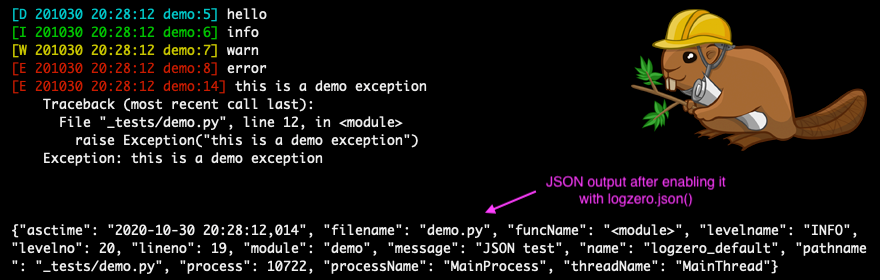
This is the output: |
| 80 |
|
| 81 |
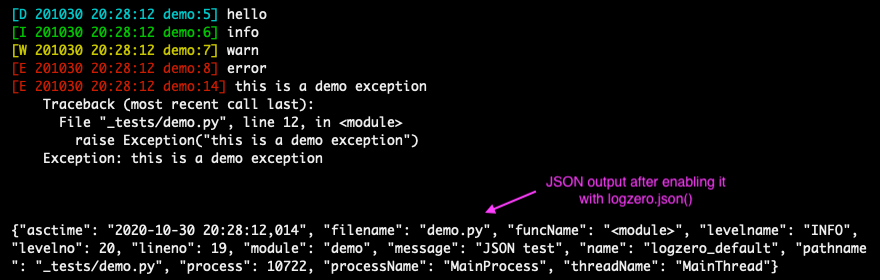 |
| 82 |
|
| 83 |
Note: You can find more examples in the documentation: https://logzero.readthedocs.io |
| 84 |
|
| 85 |
### JSON logging |
| 86 |
|
| 87 |
JSON logging can be enabled for the default logger with `logzero.json()`, or with `setup_logger(json=True)` for custom loggers: |
| 88 |
|
| 89 |
```python |
| 90 |
>>> logzero.json() |
| 91 |
>>> logger.info("test") |
| 92 |
{"asctime": "2020-10-21 10:42:45,808", "filename": "<stdin>", "funcName": "<module>", "levelname": "INFO", "levelno": 20, "lineno": 1, "module": "<stdin>", "message": "test", "name": "logzero_default", "pathname": "<stdin>", "process": 76179, "processName": "MainProcess", "threadName": "MainThread"} |
| 93 |
|
| 94 |
>>> my_logger = setup_logger(json=True) |
| 95 |
>>> my_logger.info("test") |
| 96 |
{"asctime": "2020-10-21 10:42:45,808", "filename": "<stdin>", "funcName": "<module>", "levelname": "INFO", "levelno": 20, "lineno": 1, "module": "<stdin>", "message": "test", "name": "logzero_default", "pathname": "<stdin>", "process": 76179, "processName": "MainProcess", "threadName": "MainThread"} |
| 97 |
``` |
| 98 |
|
| 99 |
The logged JSON object has these fields: |
| 100 |
|
| 101 |
```json |
| 102 |
{ |
| 103 |
"asctime": "2020-10-21 10:43:40,765", |
| 104 |
"filename": "test.py", |
| 105 |
"funcName": "test_this", |
| 106 |
"levelname": "INFO", |
| 107 |
"levelno": 20, |
| 108 |
"lineno": 9, |
| 109 |
"module": "test", |
| 110 |
"message": "info", |
| 111 |
"name": "logzero", |
| 112 |
"pathname": "_tests/test.py", |
| 113 |
"process": 76204, |
| 114 |
"processName": "MainProcess", |
| 115 |
"threadName": "MainThread" |
| 116 |
} |
| 117 |
``` |
| 118 |
|
| 119 |
Exceptions logged with `logger.exception(e)` have these additional JSON fields: |
| 120 |
|
| 121 |
```json |
| 122 |
{ |
| 123 |
"levelname": "ERROR", |
| 124 |
"levelno": 40, |
| 125 |
"message": "this is a demo exception", |
| 126 |
"exc_info": "Traceback (most recent call last):\n File \"_tests/test.py\", line 15, in test_this\n raise Exception(\"this is a demo exception\")\nException: this is a demo exception" |
| 127 |
} |
| 128 |
``` |
| 129 |
|
| 130 |
Take a look at the documentation for more information and examples: |
| 131 |
|
| 132 |
* Documentation: https://logzero.readthedocs.io. |
| 133 |
|
| 134 |
|
| 135 |
Installation |
| 136 |
------------ |
| 137 |
|
| 138 |
Install `logzero` with [pip](https://pip.pypa.io): |
| 139 |
|
| 140 |
```shell |
| 141 |
python -m pip install logzero |
| 142 |
``` |
| 143 |
|
| 144 |
Here's how you setup a virtualenv and download and run the demo: |
| 145 |
|
| 146 |
```shell |
| 147 |
# Create and activate a virtualenv in ./venv/ |
| 148 |
python3 -m venv venv |
| 149 |
. venv/bin/activate |
| 150 |
|
| 151 |
# Install logzero |
| 152 |
python -m pip install logzero |
| 153 |
|
| 154 |
# Download and run demo.py |
| 155 |
wget https://raw.githubusercontent.com/metachris/logzero/master/examples/demo.py |
| 156 |
python demo.py |
| 157 |
``` |
| 158 |
|
| 159 |
If you don't have [pip](https://pip.pypa.io) installed, this [Python installation guide](http://docs.python-guide.org/en/latest/starting/installation/) can guide |
| 160 |
you through the process. |
| 161 |
|
| 162 |
Alternatively, if you use the [Anaconda distribution](https://www.anaconda.com/download/): |
| 163 |
|
| 164 |
```shell |
| 165 |
$ conda config --add channels conda-forge |
| 166 |
$ conda install logzero |
| 167 |
``` |
| 168 |
|
| 169 |
You can also install `logzero` from the public [Github repo](https://github.com/metachris/logzero): |
| 170 |
|
| 171 |
```shell |
| 172 |
$ git clone https://github.com/metachris/logzero.git |
| 173 |
$ cd logzero |
| 174 |
$ python setup.py install |
| 175 |
``` |
| 176 |
|
| 177 |
Contributors |
| 178 |
------------ |
| 179 |
|
| 180 |
* [Chris Hager](https://github.com/metachris) |
| 181 |
* [carlodr](https://github.com/carlodri) |
| 182 |
* [Brian Lenz](https://github.com/brianlenz) |
| 183 |
* [David Martin](https://github.com/dmartin35) |
| 184 |
* [Zakaria Zajac](madzak) (creator of [python-json-logger](https://github.com/madzak/python-json-logger)) |
| 185 |
|
| 186 |
--- |
| 187 |
|
| 188 |
Development |
| 189 |
----------- |
| 190 |
|
| 191 |
**Getting started** |
| 192 |
|
| 193 |
```shell |
| 194 |
$ git clone https://github.com/metachris/logzero.git |
| 195 |
$ cd logzero |
| 196 |
|
| 197 |
# Activate virtualenv |
| 198 |
$ python3 -m venv venv |
| 199 |
$ . venv/bin/activate |
| 200 |
|
| 201 |
# Install main and dev dependencies |
| 202 |
$ pip install -e . |
| 203 |
$ pip install -r requirements_dev.txt |
| 204 |
|
| 205 |
# Run the tests |
| 206 |
$ make test |
| 207 |
|
| 208 |
# Run the linter |
| 209 |
$ make lint |
| 210 |
|
| 211 |
# Generate the docs (will auto-open in Chrome) |
| 212 |
$ make docs |
| 213 |
|
| 214 |
# You can enable watching mode to automatically rebuild on changes: |
| 215 |
$ make servedocs |
| 216 |
``` |
| 217 |
|
| 218 |
To test with Python 2.7, you can use Docker: |
| 219 |
|
| 220 |
```shell |
| 221 |
docker run --rm -it -v /Users/chris/stream/logzero:/mnt python:2.7 /bin/bash |
| 222 |
``` |
| 223 |
|
| 224 |
Now you have a shell with the current directory mounted into `/mnt/` inside the container. |
| 225 |
|
| 226 |
**Notes** |
| 227 |
|
| 228 |
* [pytest](https://docs.pytest.org/en/latest/) is the test runner |
| 229 |
* CI is run with [Github actions](https://github.com/metachris/logzero/tree/master/.github/workflows). |
| 230 |
* Download stats: https://pepy.tech/project/logzero |
| 231 |
|
| 232 |
--- |
| 233 |
|
| 234 |
Changelog |
| 235 |
--------- |
| 236 |
|
| 237 |
See the changelog here: https://github.com/metachris/logzero/blob/master/HISTORY.md |
| 238 |
|
| 239 |
|
| 240 |
Feedback |
| 241 |
-------- |
| 242 |
|
| 243 |
All kinds of feedback and contributions are welcome. |
| 244 |
|
| 245 |
* [Create an issue](https://github.com/metachris/logzero/issues/new) |
| 246 |
* Create a pull request |
| 247 |
* [@metachris](https://twitter.com/metachris) |
| 248 |
|
| 249 |
 |
| 250 |
|
| 251 |
|
| 252 |
History |
| 253 |
======= |
| 254 |
|
| 255 |
1.6.5 (2021-03-17) |
| 256 |
------------------ |
| 257 |
- Export loglevels directly (you can use eg. `logzero.DEBUG` instead of `logging.DEBUG`) |
| 258 |
- `setup_default_logger` use `backupCount` |
| 259 |
- Update dependencies |
| 260 |
- PRs: (386)[https://github.com/metachris/logzero/pull/386] |
| 261 |
|
| 262 |
|
| 263 |
1.6.3 (2020-11-15) |
| 264 |
------------------ |
| 265 |
|
| 266 |
- JSON logging with UTF-8 enabled by default ([PR 357](https://github.com/metachris/logzero/pull/357)) |
| 267 |
|
| 268 |
|
| 269 |
1.6.0 (1.6.2) (2020-10-29) |
| 270 |
-------------------------- |
| 271 |
|
| 272 |
- JSON logging support ([PR 344][]) |
| 273 |
- Ability to easily change colors ([\#82][]) |
| 274 |
- Allow creating a root logger ([\#342][]) |
| 275 |
- Bugfix: file logging with lower loglevel than stream ([PR 338][]) |
| 276 |
- Running tests with Python up to 3.9 |
| 277 |
- Dependency updates |
| 278 |
|
| 279 |
1.5.0 (2018-03-07) |
| 280 |
------------------ |
| 281 |
|
| 282 |
- `logzero.syslog(..)` ([PR 83][]) |
| 283 |
|
| 284 |
1.4.0 (2018-03-02) |
| 285 |
------------------ |
| 286 |
|
| 287 |
- Allow Disabling stderr Output ([PR 83][1]) |
| 288 |
|
| 289 |
1.3.0 (2017-07-19) |
| 290 |
------------------ |
| 291 |
|
| 292 |
- Color output now works in Windows (supported by colorama) |
| 293 |
|
| 294 |
1.2.1 (2017-07-09) |
| 295 |
------------------ |
| 296 |
|
| 297 |
- Logfiles with custom loglevels (eg. stream handler with DEBUG and |
| 298 |
file handler with ERROR). |
| 299 |
|
| 300 |
1.2.0 (2017-07-05) |
| 301 |
------------------ |
| 302 |
|
| 303 |
- Way better API for configuring the default logger with <span |
| 304 |
class="title-ref">logzero.loglevel(..)</span>, <span |
| 305 |
class="title-ref">logzero.logfile(..)</span>, etc. |
| 306 |
- Built-in rotating logfile support. |
| 307 |
|
| 308 |
``` python |
| 309 |
import logging |
| 310 |
import logzero |
| 311 |
from logzero import logger |
| 312 |
|
| 313 |
# This log message goes to the console |
| 314 |
logger.debug("hello") |
| 315 |
|
| 316 |
# Set a minimum log level |
| 317 |
logzero.loglevel(logging.INFO) |
| 318 |
|
| 319 |
# Set a logfile (all future log messages are also saved there) |
| 320 |
logzero.logfile("/tmp/logfile.log") |
| 321 |
|
| 322 |
# Set a rotating logfile (replaces the previous logfile handler) |
| 323 |
logzero.logfile("/tmp/rotating-logfile.log", maxBytes=1000000, backupCount=3) |
| 324 |
|
| 325 |
# Disable logging to a file |
| 326 |
logzero.logfile(None) |
| 327 |
|
| 328 |
# Set a custom formatter |
| 329 |
formatter = logging.Formatter('%(name)s - %(asctime)-15s - %(levelname)s: %(message)s'); |
| 330 |
logzero.formatter(formatter) |
| 331 |
|
| 332 |
# Log some variables |
| 333 |
logger.info("var1: %s, var2: %s", var1, var2) |
| 334 |
``` |
| 335 |
|
| 336 |
1.1.2 (2017-07-04) |
| 337 |
------------------ |
| 338 |
|
| 339 |
- Better reconfiguration of handlers, doesn't remove custom handlers |
| 340 |
anymore |
| 341 |
|
| 342 |
1.1.0 (2017-07-03) |
| 343 |
------------------ |
| 344 |
|
| 345 |
- Bugfix: Disabled color logging to logfile |
| 346 |
|
| 347 |
1.1.0 (2017-07-02) |
| 348 |
------------------ |
| 349 |
|
| 350 |
- Global default logger instance (<span |
| 351 |
class="title-ref">logzero.logger</span>) |
| 352 |
- Ability to reconfigure the default logger with (<span |
| 353 |
class="title-ref">logzero.setup\_default\_logger(..)</span>) |
| 354 |
- More tests |
| 355 |
- More documentation |
| 356 |
|
| 357 |
1.0.0 (2017-06-27) |
| 358 |
------------------ |
| 359 |
|
| 360 |
- Cleanup and documentation |
| 361 |
|
| 362 |
0.2.0 (2017-06-12) |
| 363 |
------------------ |
| 364 |
|
| 365 |
- Working logzero package with code and tests |
| 366 |
|
| 367 |
0.1.0 (2017-06-12) |
| 368 |
------------------ |
| 369 |
|
| 370 |
- First release on PyPI. |
| 371 |
|
| 372 |
[PR 344]: https://github.com/metachris/logzero/pull/344 |
| 373 |
[\#82]: https://github.com/metachris/logzero/issues/82 |
| 374 |
[\#342]: https://github.com/metachris/logzero/pull/342 |
| 375 |
[PR 338]: https://github.com/metachris/logzero/pull/338 |
| 376 |
[PR 83]: https://github.com/metachris/logzero/pull/84 |
| 377 |
[1]: https://github.com/metachris/logzero/pull/83 |
| 378 |
|
| 379 |
Keywords: logzero |
| 380 |
Platform: UNKNOWN |
| 381 |
Classifier: Development Status :: 5 - Production/Stable |
| 382 |
Classifier: Intended Audience :: Developers |
| 383 |
Classifier: License :: OSI Approved :: MIT License |
| 384 |
Classifier: Natural Language :: English |
| 385 |
Classifier: Programming Language :: Python :: 2 |
| 386 |
Classifier: Programming Language :: Python :: 2.6 |
| 387 |
Classifier: Programming Language :: Python :: 2.7 |
| 388 |
Classifier: Programming Language :: Python :: 3 |
| 389 |
Classifier: Programming Language :: Python :: 3.4 |
| 390 |
Classifier: Programming Language :: Python :: 3.5 |
| 391 |
Classifier: Programming Language :: Python :: 3.6 |
| 392 |
Classifier: Programming Language :: Python :: 3.7 |
| 393 |
Classifier: Programming Language :: Python :: 3.8 |
| 394 |
Classifier: Programming Language :: Python :: 3.9 |
| 395 |
Description-Content-Type: text/markdown |