| 1 |
--- |
| 2 |
kernelspec: |
| 3 |
display_name: SoS |
| 4 |
language: sos |
| 5 |
name: sos |
| 6 |
--- |
| 7 |
|
| 8 |
+++ {"Collapsed": "false", "kernel": "SoS"} |
| 9 |
|
| 10 |
# Text SOS-kernel with Jupytext |
| 11 |
|
| 12 |
## What is SOS kernel |
| 13 |
|
| 14 |
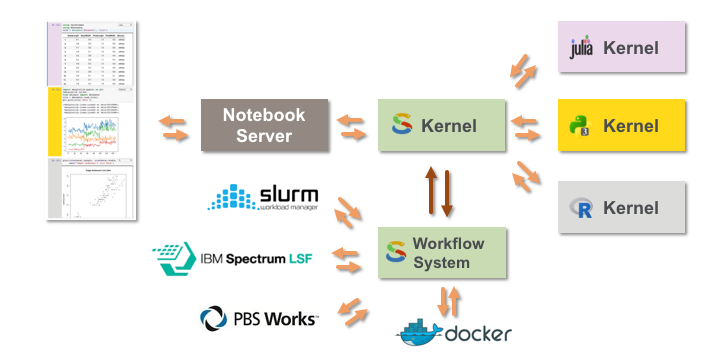
SoS consists of a ployglot notebook that allows the use of multiple kernels in one Jupyter notebook, and a workflow system that is designed for daily computational research. Basically, |
| 15 |
|
| 16 |
- SoS Polyglot Notebook is a Jupyter Notebook with a SoS kernel. |
| 17 |
- SoS Notebook serves as a super kernel to all other Jupyter kernels and allows the use of multiple kernels in one Jupyter notebook. |
| 18 |
- SoS Workflow System is a Python based workflow system that is designed to be readable, shareable, and suitable for daily data analysis. |
| 19 |
- SoS Workflow System can be used from command line or use SoS Notebook as its IDE. |
| 20 |
|
| 21 |
 |
| 22 |
|
| 23 |
### How to install SOS-kernel |
| 24 |
|
| 25 |
Please follow this [link](https://vatlab.github.io/sos-docs/running.html#Conda-installation) to setup SOS |
| 26 |
|
| 27 |
I run some issue with the latest version of R on my Mac, so I had to install an earlier version of R |
| 28 |
|
| 29 |
``` |
| 30 |
conda install -c r r=3.5.1 |
| 31 |
conda install sos-notebook jupyterlab-sos sos-papermill -c conda-forge |
| 32 |
``` |
| 33 |
|
| 34 |
## Related issue with Jupytext |
| 35 |
|
| 36 |
Jupytext works fine with Python/R kernel but converts code cells into markdown cells when using the SOS kernel. |
| 37 |
|
| 38 |
cf the image below. It is a code cell. After saving the notebook and restart it, it converted the code cell into markdown |
| 39 |
|
| 40 |
<img width="734" alt="Screenshot 2020-03-13 at 10 51 18" src="https://user-images.githubusercontent.com/33351426/76610049-9e704600-6518-11ea-861e-b4f691d1a478.png"> |
| 41 |
|
| 42 |
+++ {"Collapsed": "false", "kernel": "SoS"} |
| 43 |
|
| 44 |
## Step 1 |
| 45 |
|
| 46 |
Please, choose SOS Kernel and then, in the cell code, choose SOS (or any other kernel available), the outcome is the same. |
| 47 |
|
| 48 |
 |
| 49 |
|
| 50 |
```{code-cell} sos |
| 51 |
:Collapsed: 'false' |
| 52 |
:kernel: SoS |
| 53 |
|
| 54 |
import pandas as pd |
| 55 |
import numpy as np |
| 56 |
|
| 57 |
pd.DataFrame({ |
| 58 |
'x': np.random.random(10), |
| 59 |
'y': np.random.random(10), |
| 60 |
}) |
| 61 |
``` |
| 62 |
|
| 63 |
+++ {"Collapsed": "false", "kernel": "python3"} |
| 64 |
|
| 65 |
## Step 2 |
| 66 |
|
| 67 |
Now, pair it with Jupytex |
| 68 |
|
| 69 |
 |
| 70 |
|
| 71 |
+++ {"Collapsed": "false", "kernel": "python3"} |
| 72 |
|
| 73 |
### Step 3 |
| 74 |
|
| 75 |
Save the notebook, restart and clear all, **save**, then Shut down kernel. Close the notebook and reopen |
| 76 |
|
| 77 |
+++ {"Collapsed": "false", "kernel": "python3"} |
| 78 |
|
| 79 |
### Step 4 |
| 80 |
|
| 81 |
Reopen the notebook. Here is the outcome |
| 82 |
|
| 83 |
 |