| 1 |
--- |
| 2 |
# Copyright (C) 2009-2017 the original author(s). |
| 3 |
# |
| 4 |
# Licensed under the Apache License, Version 2.0 (the "License"); |
| 5 |
# you may not use this file except in compliance with the License. |
| 6 |
# You may obtain a copy of the License at |
| 7 |
# |
| 8 |
# http://www.apache.org/licenses/LICENSE-2.0 |
| 9 |
# |
| 10 |
# Unless required by applicable law or agreed to in writing, software |
| 11 |
# distributed under the License is distributed on an "AS IS" BASIS, |
| 12 |
# WITHOUT WARRANTIES OR CONDITIONS OF ANY KIND, either express or implied. |
| 13 |
# See the License for the specific language governing permissions and |
| 14 |
# limitations under the License. |
| 15 |
title: Jansi |
| 16 |
--- name:overview |
| 17 |
|
| 18 |
${project_slogan} |
| 19 |
|
| 20 |
--- name:content pipeline:jade |
| 21 |
|
| 22 |
.left |
| 23 |
h1 What is Jansi? |
| 24 |
.right |
| 25 |
:markdown |
| 26 |
|
| 27 |
Jansi is a small ASl 2.0 licensed Java library that allows you to use ANSI escape sequences |
| 28 |
to format your console output which works even on windows. |
| 29 |
|
| 30 |
Using jansi is easy. Before you start sending ANSI escape sequences to |
| 31 |
`System.out` make sure you run: |
| 32 |
|
| 33 |
{pygmentize::java} |
| 34 |
AnsiConsole.systemInstall(); |
| 35 |
{pygmentize} |
| 36 |
|
| 37 |
:markdown |
| 38 |
If you would rather not mess with the System.out settings, you can use the |
| 39 |
`AnsiConsole.out` PrintStream instead. For example: |
| 40 |
|
| 41 |
{pygmentize::java} |
| 42 |
AnsiConsole.out.println("Hello World"); |
| 43 |
{pygmentize} |
| 44 |
|
| 45 |
.left |
| 46 |
h1 Windows Examples |
| 47 |
.right |
| 48 |
:markdown |
| 49 |
|
| 50 |
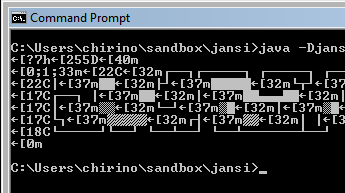
Most unix terminals support rendering ANSI escape sequences when Java |
| 51 |
sends them via `System.out` but when this is done on Windows, they |
| 52 |
don't get interpreted and you get garbage on the console similar to: |
| 53 |
|
| 54 |
 |
| 55 |
|
| 56 |
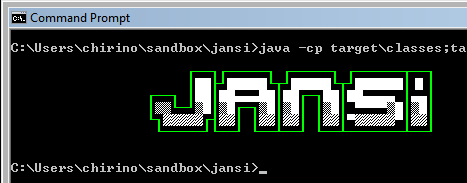
If the application uses the jansi libary, things start to look |
| 57 |
much better: |
| 58 |
|
| 59 |
 |
| 60 |
|
| 61 |
|