| 1 |
--- |
| 2 |
title: Host on Render |
| 3 |
description: Host your project on Render. |
| 4 |
categories: [] |
| 5 |
keywords: [] |
| 6 |
aliases: [/hosting-and-deployment/hosting-on-render/] |
| 7 |
--- |
| 8 |
|
| 9 |
Use these instructions to enable continuous deployment from a GitHub repository. The same general steps apply for other Git providers such as GitLab or Bitbucket. |
| 10 |
|
| 11 |
{{% include "/_common/gitignore-public.md" %}} |
| 12 |
|
| 13 |
## Prerequisites |
| 14 |
|
| 15 |
Please complete the following tasks before continuing: |
| 16 |
|
| 17 |
1. [Create](https://dashboard.render.com/register) a Render account. |
| 18 |
1. [Log in](https://dashboard.render.com/login) to your Render account. |
| 19 |
1. [Create](https://github.com/signup) a GitHub account. |
| 20 |
1. [Log in](https://github.com/login) to your GitHub account. |
| 21 |
1. [Create](https://github.com/new) a GitHub repository for your project. |
| 22 |
1. [Create](https://git-scm.com/docs/git-init) a local Git repository for your project with a [remote][] reference to your GitHub repository. |
| 23 |
1. Create a Hugo project within your local Git repository and test it with the `hugo server` command. |
| 24 |
1. Commit the changes to your local Git repository and push to your GitHub repository. |
| 25 |
|
| 26 |
## Procedure |
| 27 |
|
| 28 |
Step 1 |
| 29 |
: Create a `render.yaml` file in the root of your project, adjusting the tool versions and time zone as needed. |
| 30 |
|
| 31 |
```yaml {file="render.yaml" copy=true} |
| 32 |
services: |
| 33 |
- type: web |
| 34 |
name: hosting-render |
| 35 |
repo: https://github.com/jmooring/hosting-render |
| 36 |
runtime: static |
| 37 |
buildCommand: chmod a+x build.sh && ./build.sh |
| 38 |
staticPublishPath: public |
| 39 |
envVars: |
| 40 |
- key: DART_SASS_VERSION |
| 41 |
value: 1.104.0 |
| 42 |
- key: GO_VERSION |
| 43 |
value: 1.27.0 |
| 44 |
- key: HUGO_VERSION |
| 45 |
value: 0.166.0 |
| 46 |
- key: NODE_VERSION |
| 47 |
value: 24.20.0 |
| 48 |
- key: TZ |
| 49 |
value: Europe/Oslo |
| 50 |
``` |
| 51 |
|
| 52 |
Step 2 |
| 53 |
: Create a `build.sh` file in the root of your project. |
| 54 |
|
| 55 |
```sh {file="build.sh" copy=true} |
| 56 |
#!/usr/bin/env bash |
| 57 |
|
| 58 |
#------------------------------------------------------------------------------ |
| 59 |
# @file |
| 60 |
# Builds a Hugo project hosted on Render. |
| 61 |
# |
| 62 |
# Render automatically installs Node.js and any Node.js dependencies. |
| 63 |
#------------------------------------------------------------------------------ |
| 64 |
|
| 65 |
# Exit on error, undefined variables, or pipe failures |
| 66 |
set -euo pipefail |
| 67 |
|
| 68 |
# Set the build cache directory |
| 69 |
HUGO_CACHEDIR="${PWD}/.cache/hugo" |
| 70 |
|
| 71 |
# Perform cleanup |
| 72 |
cleanup() { |
| 73 |
if [[ -n "${build_temp_dir:-}" && -d "${build_temp_dir}" ]]; then |
| 74 |
rm -rf "${build_temp_dir}" |
| 75 |
fi |
| 76 |
} |
| 77 |
|
| 78 |
# Register the cleanup trap |
| 79 |
trap cleanup EXIT SIGINT SIGTERM |
| 80 |
|
| 81 |
main() { |
| 82 |
# Export the build cache directory |
| 83 |
export HUGO_CACHEDIR |
| 84 |
|
| 85 |
# Create a temporary directory for downloads |
| 86 |
build_temp_dir=$(mktemp -d) |
| 87 |
|
| 88 |
# Create a local tools directory |
| 89 |
mkdir -p "${HOME}/.local" |
| 90 |
|
| 91 |
# Install Dart Sass |
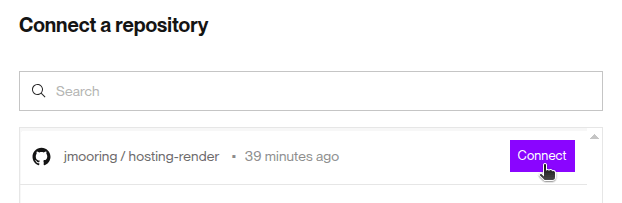
| 92 |
echo "Installing Dart Sass ${DART_SASS_VERSION}..." |
| 93 |
curl -sfL --output-dir "${build_temp_dir}" -O "https://github.com/sass/dart-sass/releases/download/${DART_SASS_VERSION}/dart-sass-${DART_SASS_VERSION}-linux-x64.tar.gz" |
| 94 |
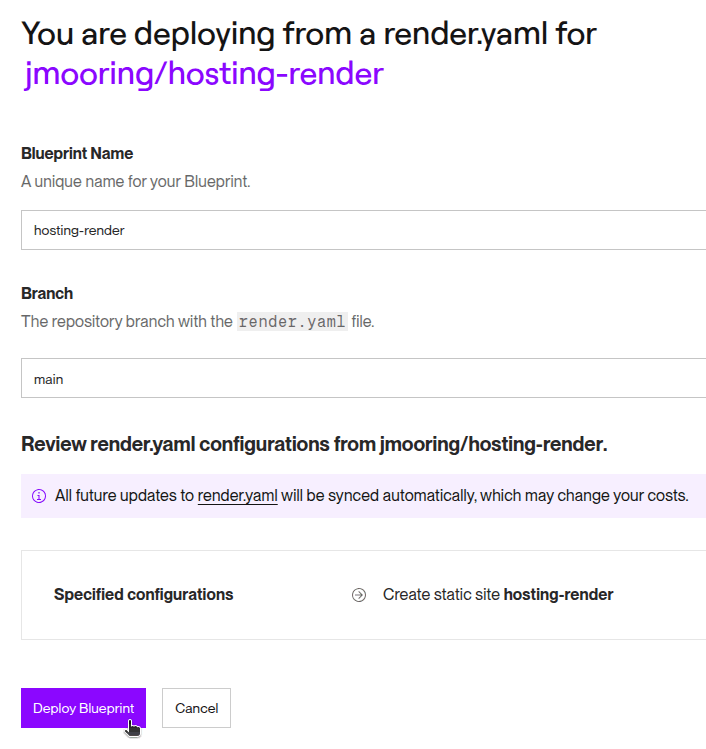
tar -C "${HOME}/.local" -xf "${build_temp_dir}/dart-sass-${DART_SASS_VERSION}-linux-x64.tar.gz" |
| 95 |
export PATH="${HOME}/.local/dart-sass:${PATH}" |
| 96 |
|
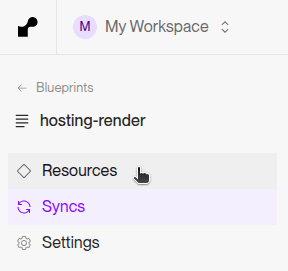
| 97 |
# Install Go |
| 98 |
if [[ -f "go.mod" ]]; then |
| 99 |
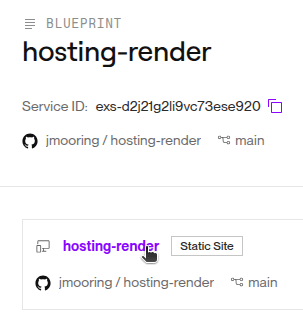
echo "Installing Go ${GO_VERSION}..." |
| 100 |
curl -sfL --output-dir "${build_temp_dir}" -O "https://go.dev/dl/go${GO_VERSION}.linux-amd64.tar.gz" |
| 101 |
tar -C "${HOME}/.local" -xf "${build_temp_dir}/go${GO_VERSION}.linux-amd64.tar.gz" |
| 102 |
export PATH="${HOME}/.local/go/bin:${PATH}" |
| 103 |
fi |
| 104 |
|
| 105 |
# Install Hugo |
| 106 |
echo "Installing Hugo ${HUGO_VERSION}..." |
| 107 |
curl -sfL --output-dir "${build_temp_dir}" -O "https://github.com/gohugoio/hugo/releases/download/v${HUGO_VERSION}/hugo_${HUGO_VERSION}_linux-amd64.tar.gz" |
| 108 |
mkdir -p "${HOME}/.local/hugo" |
| 109 |
tar -C "${HOME}/.local/hugo" -xf "${build_temp_dir}/hugo_${HUGO_VERSION}_linux-amd64.tar.gz" |
| 110 |
export PATH="${HOME}/.local/hugo:${PATH}" |
| 111 |
|
| 112 |
# Log tool versions |
| 113 |
echo "Logging tool versions..." |
| 114 |
command -v sass &> /dev/null && echo "Dart Sass: $(sass --version)" || echo "Dart Sass: not installed" |
| 115 |
command -v go &> /dev/null && echo "Go: $(go version)" || echo "Go: not installed" |
| 116 |
command -v hugo &> /dev/null && echo "Hugo: $(hugo version)" || echo "Hugo: not installed" |
| 117 |
command -v node &> /dev/null && echo "Node.js: $(node --version)" || echo "Node.js: not installed" |
| 118 |
|
| 119 |
# Configure Git |
| 120 |
echo "Configuring Git..." |
| 121 |
git config --global core.quotepath false |
| 122 |
|
| 123 |
# Fetch full Git history |
| 124 |
if [[ $(git rev-parse --is-shallow-repository) == true ]]; then |
| 125 |
echo "Fetching full Git history..." |
| 126 |
git fetch --unshallow |
| 127 |
fi |
| 128 |
|
| 129 |
# Initialize Git submodules |
| 130 |
if [[ -f .gitmodules ]]; then |
| 131 |
echo "Initializing Git submodules..." |
| 132 |
git submodule update --init --recursive |
| 133 |
fi |
| 134 |
|
| 135 |
# Build the project |
| 136 |
echo "Building the project..." |
| 137 |
hugo build --gc --minify |
| 138 |
} |
| 139 |
|
| 140 |
main "$@" |
| 141 |
``` |
| 142 |
|
| 143 |
Step 3 |
| 144 |
: In the project configuration file in the root of your local Git repository, set the location of the image cache to the [`cacheDir`][] as shown below. |
| 145 |
|
| 146 |
{{< code-toggle file=hugo copy=true >}} |
| 147 |
[caches.images] |
| 148 |
dir = ':cacheDir/images' |
| 149 |
{{< /code-toggle >}} |
| 150 |
|
| 151 |
See [configure file caches][] for more information. |
| 152 |
|
| 153 |
Step 4 |
| 154 |
: Commit the changes to your local Git repository and push to your GitHub repository. |
| 155 |
|
| 156 |
Step 5 |
| 157 |
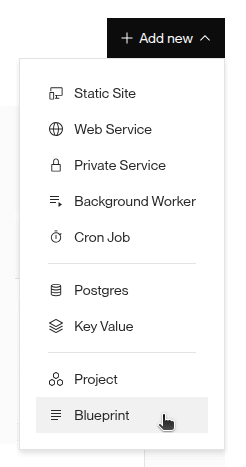
: On the Render [dashboard][], press the **Add new** button and select "Blueprint" from the drop-down menu. |
| 158 |
|
| 159 |
 |
| 160 |
|
| 161 |
Step 6 |
| 162 |
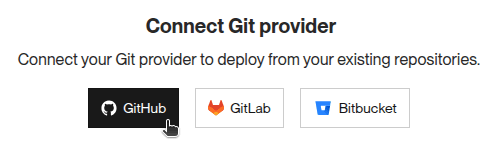
: Press the **GitHub** button to connect to your GitHub account. |
| 163 |
|
| 164 |
 |
| 165 |
|
| 166 |
Step 7 |
| 167 |
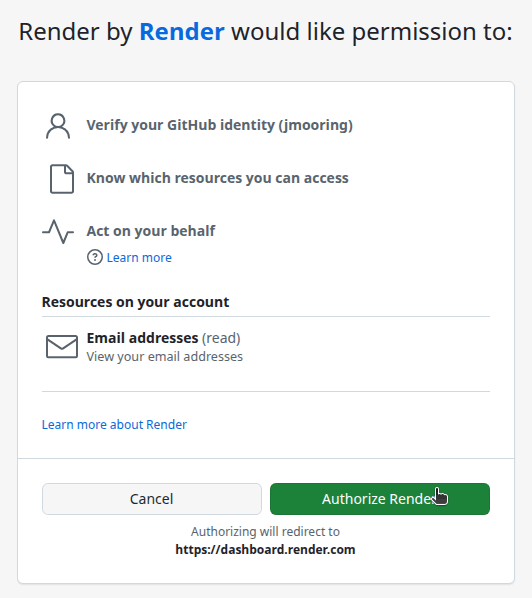
: Press the **Authorize Render** button to allow the Render application to access your GitHub account. |
| 168 |
|
| 169 |
 |
| 170 |
|
| 171 |
Step 8 |
| 172 |
: Select the GitHub account where you want to install the Render application. |
| 173 |
|
| 174 |
 |
| 175 |
|
| 176 |
Step 9 |
| 177 |
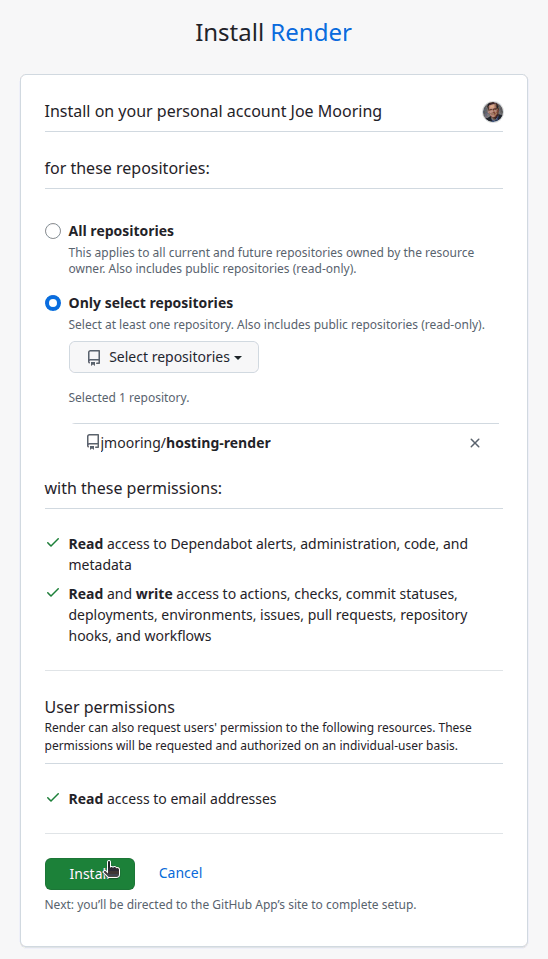
: Authorize the Render application to access all repositories or only select repositories, then press the **Install** button. |
| 178 |
|
| 179 |
 |
| 180 |
|
| 181 |
Step 10 |
| 182 |
: On the "Create a new Blueprint Instance in My Workspace" page, press the **Connect** button to the right of the name of your GitHub repository. |
| 183 |
|
| 184 |
 |
| 185 |
|
| 186 |
Step 11 |
| 187 |
: Enter a unique name for your Blueprint, then press the **Deploy Blueprint** button at the bottom of the page. |
| 188 |
|
| 189 |
 |
| 190 |
|
| 191 |
Step 12 |
| 192 |
: Wait for the site to build and deploy, then click on the "Resources" link on the left side of the page. |
| 193 |
|
| 194 |
 |
| 195 |
|
| 196 |
Step 13 |
| 197 |
: Click on the link to the static site resource. |
| 198 |
|
| 199 |
 |
| 200 |
|
| 201 |
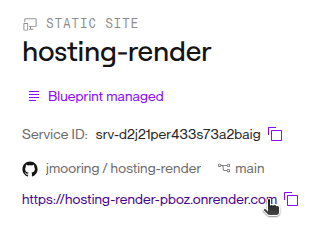
Step 14 |
| 202 |
: Click on the link to your published site. |
| 203 |
|
| 204 |
 |
| 205 |
|
| 206 |
In the future, whenever you push a change from your local Git repository, Render will rebuild and deploy your site. |
| 207 |
|
| 208 |
## Related resources |
| 209 |
|
| 210 |
For more information on hosting and managing your site with Render, consult the official documentation: |
| 211 |
|
| 212 |
- [General documentation][] |
| 213 |
- [Custom domain setup][] |
| 214 |
|
| 215 |
[Custom domain setup]: https://render.com/docs/custom-domains |
| 216 |
[General documentation]: https://render.com/docs/static-sites |
| 217 |
[`cacheDir`]: /configuration/all/#cachedir |
| 218 |
[configure file caches]: /configuration/caches/ |
| 219 |
[dashboard]: https://dashboard.render.com/ |
| 220 |
[remote]: https://git-scm.com/docs/git-remote |