| 1 |
# Discord |
| 2 |
|
| 3 |
## URL Format |
| 4 |
|
| 5 |
Your Discord Webhook-URL will look like this: |
| 6 |
|
| 7 |
!!! info "" |
| 8 |
<https://discord.com/api/webhooks/__`webhookid`__/__`token`>__ |
| 9 |
|
| 10 |
For more information about Discord webhooks, see the [official documentation](https://discord.com/developers/docs/resources/webhook). |
| 11 |
|
| 12 |
The shoutrrr service URL should look like this: |
| 13 |
|
| 14 |
!!! info "" |
| 15 |
discord://__`token`__@__`webhookid`__[?thread_id=__`threadid`__] |
| 16 |
|
| 17 |
### Thread Support |
| 18 |
|
| 19 |
To send messages to a specific thread in a Discord channel, include the `thread_id` query parameter in the service URL with the ID of the target thread. For example: |
| 20 |
|
| 21 |
!!! info "" |
| 22 |
discord://__`token`__@__`webhookid`__?thread_id=123456789 |
| 23 |
|
| 24 |
You can obtain the `thread_id` by right-clicking a thread in Discord and selecting "Copy ID" (requires Developer Mode to be enabled in Discord settings). For more details on threads, see Discord's [thread documentation](https://discord.com/developers/docs/resources/channel#thread-object). Learn how to enable Developer Mode in Discord's [support article](https://support.discord.com/hc/en-us/articles/206346498-Where-can-I-find-my-User-Server-Message-ID-). |
| 25 |
|
| 26 |
## Webhook Customization |
| 27 |
|
| 28 |
You can customize the webhook's appearance by overriding the default username and avatar that were set when creating the webhook. |
| 29 |
|
| 30 |
!!! example "Custom Username and Avatar" |
| 31 |
```bash |
| 32 |
shoutrrr send --url "discord://token@webhookid?username=MyBot&avatar=https://example.com/avatar.png" --message "Hello from custom bot!" |
| 33 |
``` |
| 34 |
|
| 35 |
## Message Content |
| 36 |
|
| 37 |
For simple text messages without embeds, Shoutrrr now uses Discord's `content` field directly, providing cleaner message formatting and better compatibility with Discord's features. |
| 38 |
|
| 39 |
!!! example "Simple Text Message" |
| 40 |
```bash |
| 41 |
shoutrrr send --url "discord://token@webhookid" --message "Hello, World!" |
| 42 |
``` |
| 43 |
|
| 44 |
This sends a plain text message using the `content` field instead of an embed. |
| 45 |
|
| 46 |
## Message Chunking |
| 47 |
|
| 48 |
### Discord API Constraints |
| 49 |
|
| 50 |
Discord limits individual messages to 2000 characters. |
| 51 |
Messages exceeding this limit are sent as separate messages without automatic merging. |
| 52 |
|
| 53 |
### Shoutrrr Implementation |
| 54 |
|
| 55 |
Shoutrrr provides additional message chunking as a feature to handle longer content. |
| 56 |
This is implemented through Shoutrrr's PartitionMessage utility and is not a Discord requirement. |
| 57 |
|
| 58 |
- __Chunk Size__: Maximum 2000 characters per message (matches Discord API limit) |
| 59 |
- __Total Size__: Maximum 6000 characters total across all chunks (Shoutrrr-specific limit) |
| 60 |
- __Max Chunks__: Up to 10 message chunks per send operation (Shoutrrr-specific limit) |
| 61 |
|
| 62 |
!!! note "" |
| 63 |
The 6000-character limit mentioned in Discord's documentation applies specifically to the total text content of embed objects, not to message chunking. |
| 64 |
|
| 65 |
When `splitLines` is enabled (default), each line of the input becomes a separate embedded item. When disabled, long messages are automatically chunked to fit within Discord's limits. |
| 66 |
|
| 67 |
!!! example "Long Message Chunking" |
| 68 |
```bash |
| 69 |
shoutrrr send --url "discord://token@webhookid?splitLines=false" --message "This is a very long message that will be automatically split into multiple chunks if it exceeds Discord's 2000 character limit per message." |
| 70 |
``` |
| 71 |
|
| 72 |
!!! note "" |
| 73 |
Message chunking only applies when `splitLines` is set to `false`. When `splitLines` is `true` (default), each line becomes a separate embed instead. |
| 74 |
|
| 75 |
## Enhanced Embeds |
| 76 |
|
| 77 |
Shoutrrr supports rich embed formatting with authors, images, thumbnails, and custom fields when using the Go library API. Embeds are automatically created when using structured message items with metadata. For detailed information about embed objects, refer to Discord's [embed documentation](https://discord.com/developers/docs/resources/channel#embed-object). |
| 78 |
|
| 79 |
!!! note "" |
| 80 |
Enhanced embed features are only available through the Go library API using `SendItems` with `MessageItem` structs containing metadata. The CLI does not support embed parameters. |
| 81 |
|
| 82 |
## File Attachments |
| 83 |
|
| 84 |
Shoutrrr supports attaching files to your Discord messages when using the Go library. Files are sent as multipart/form-data along with the message payload. See Discord's [webhook execution documentation](https://discord.com/developers/docs/resources/webhook#execute-webhook) for details on file attachments. |
| 85 |
|
| 86 |
!!! note "" |
| 87 |
File attachments require the webhook to have appropriate permissions, and files must be accessible from the system running Shoutrrr. File attachments are not supported in the CLI. |
| 88 |
|
| 89 |
--8<-- "docs/services/chat/discord/config.md" |
| 90 |
|
| 91 |
## Creating a webhook in Discord |
| 92 |
|
| 93 |
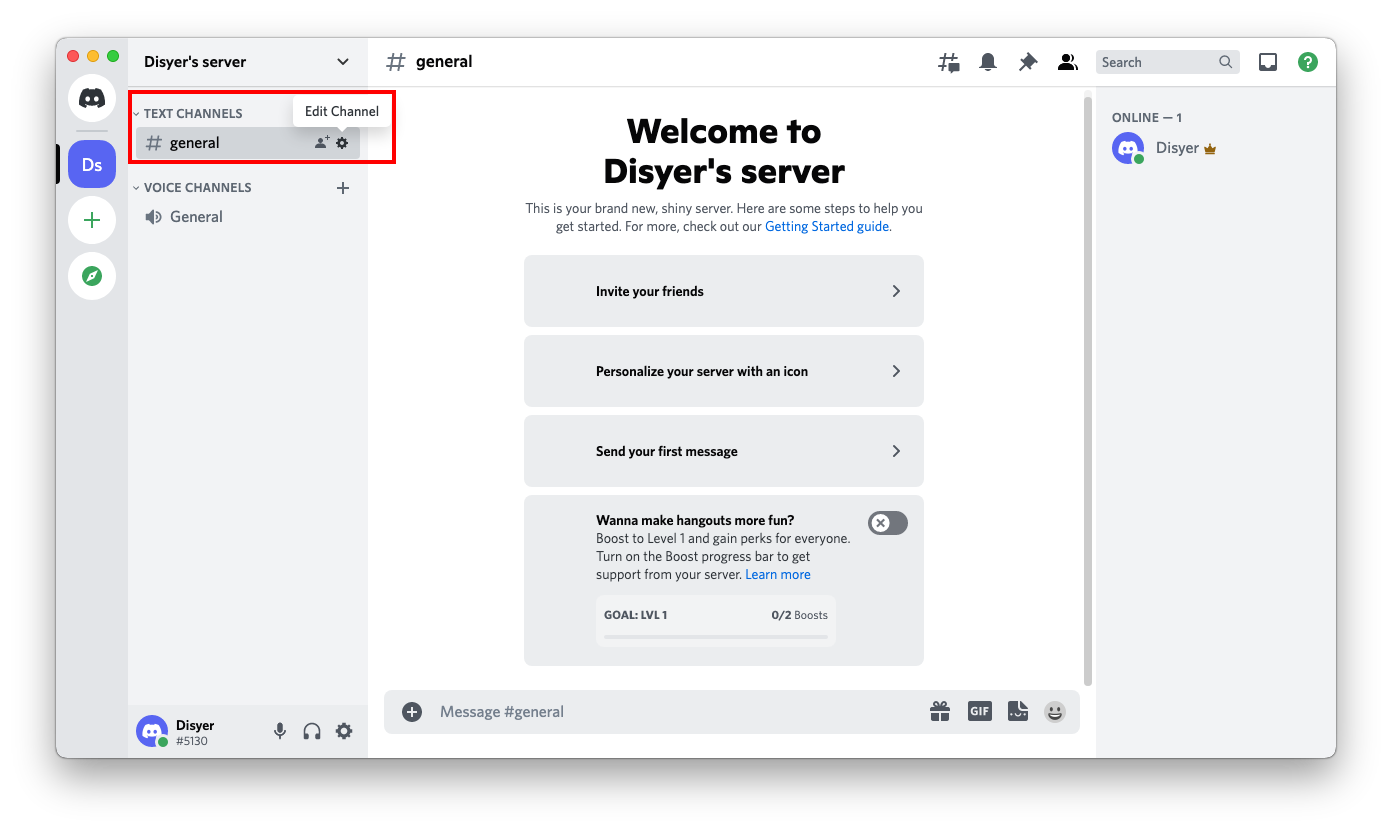
1. Open your channel settings by first clicking on the gear icon next to the name of the channel. |
| 94 |
 |
| 95 |
|
| 96 |
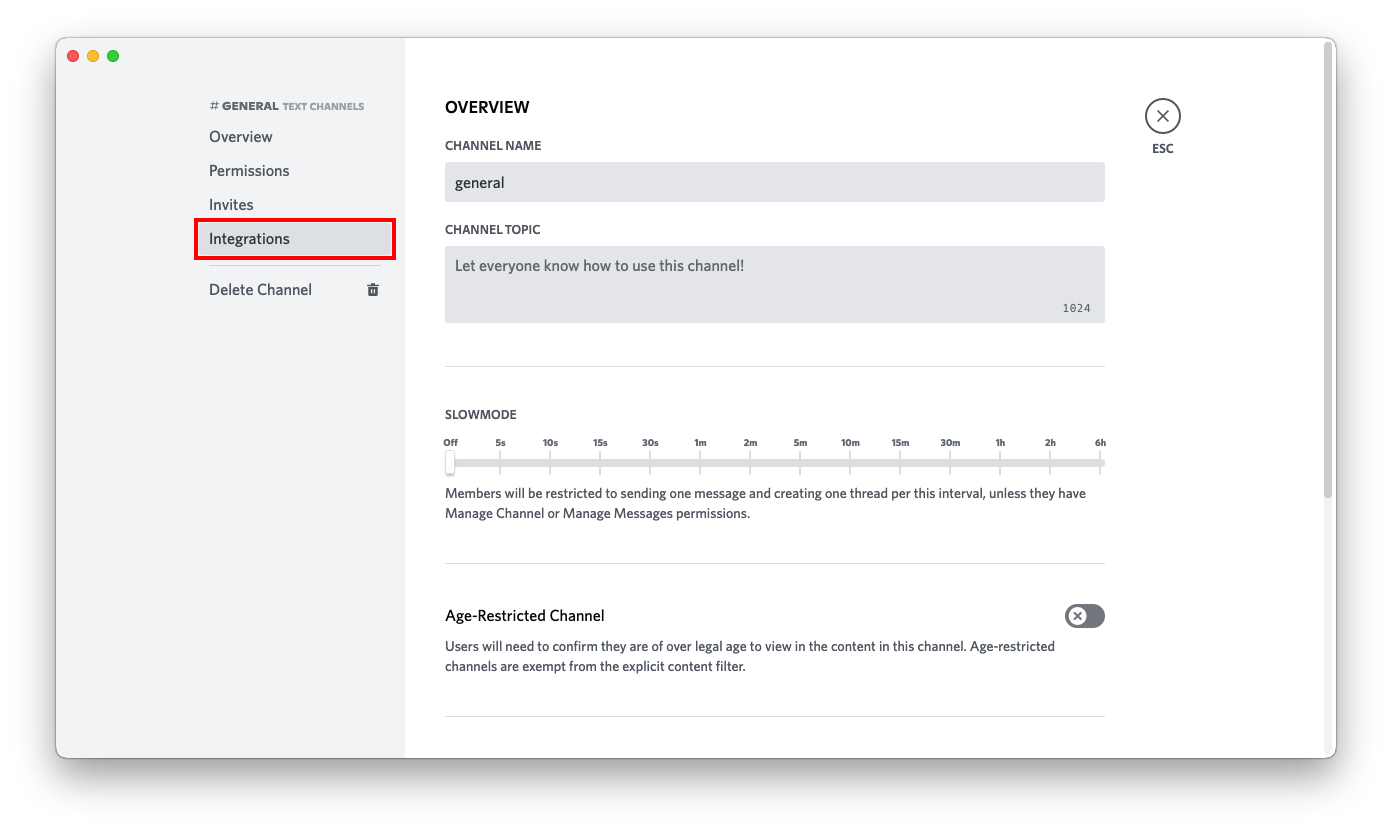
2. In the menu on the left, click on *Integrations*. |
| 97 |
 |
| 98 |
|
| 99 |
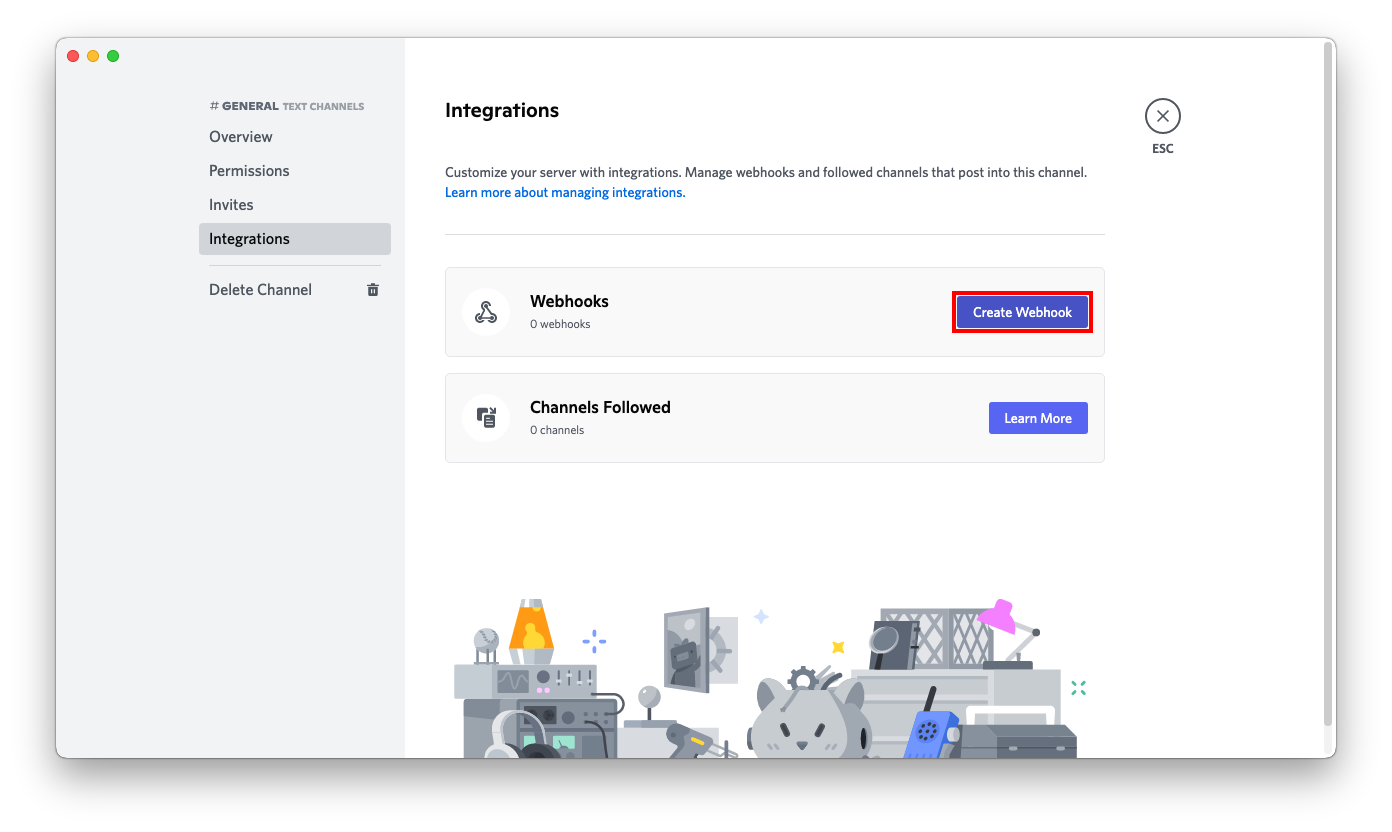
3. In the menu on the right, click on *Create Webhook*. |
| 100 |
 |
| 101 |
|
| 102 |
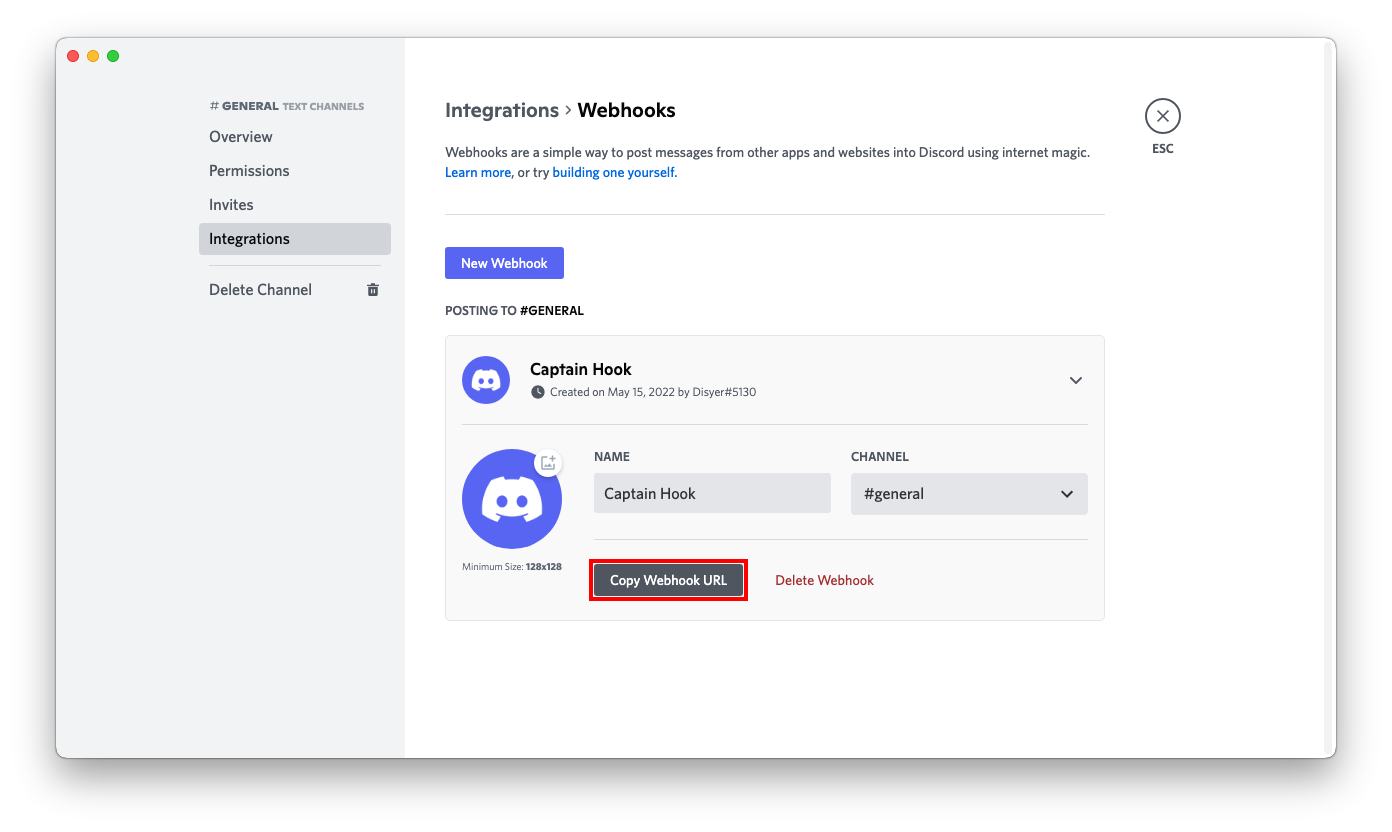
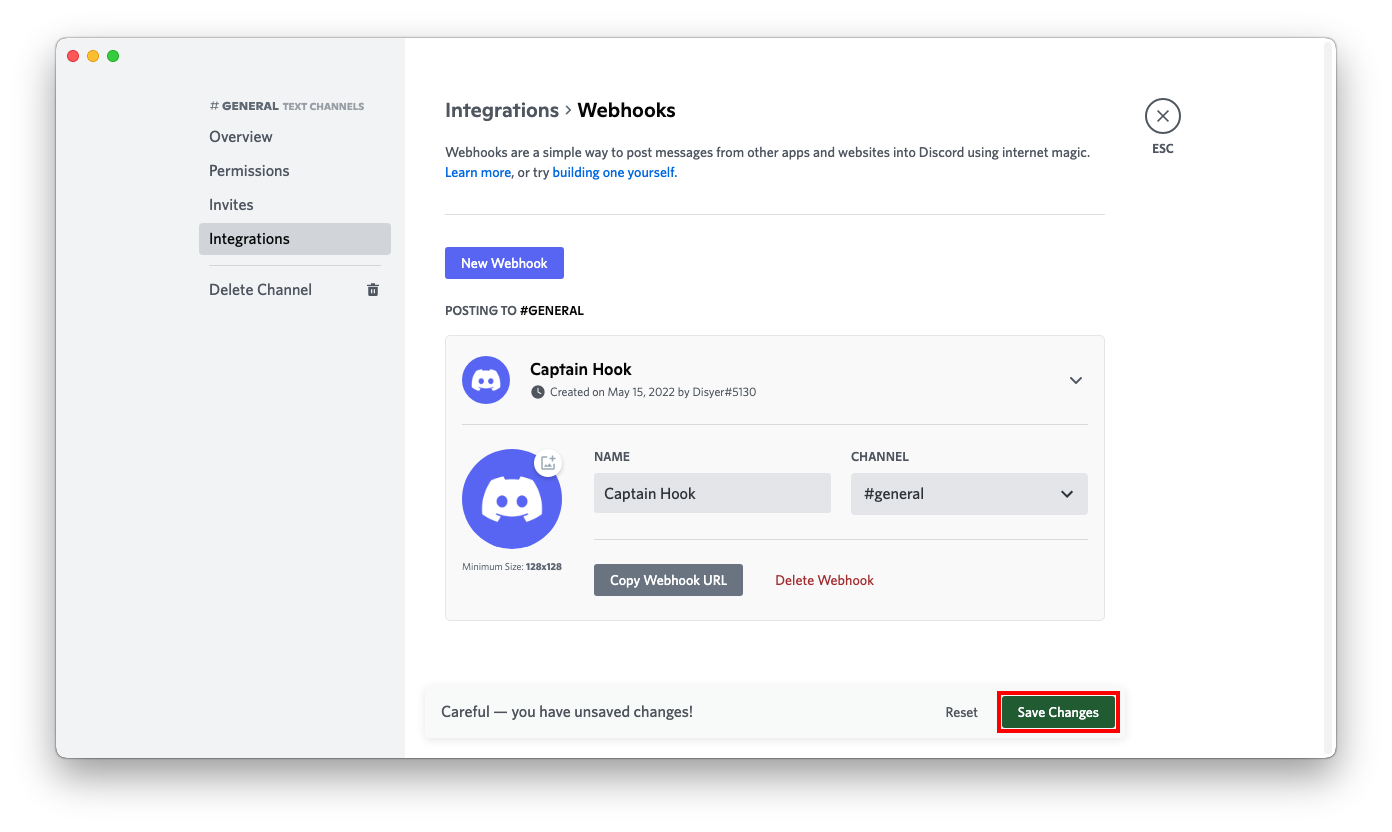
4. Set the name, channel, and icon to your liking and click the *Copy Webhook URL* button. |
| 103 |
 |
| 104 |
|
| 105 |
5. Press the *Save Changes* button. |
| 106 |
 |
| 107 |
|
| 108 |
6. Format the service URL: |
| 109 |
|
| 110 |
```url |
| 111 |
https://discord.com/api/webhooks/693853386302554172/W3dE2OZz4C13_4z_uHfDOoC7BqTW288s-z1ykqI0iJnY_HjRqMGO8Sc7YDqvf_KVKjhJ |
| 112 |
└────────────────┘ └──────────────────────────────────────────────────────────────────┘ |
| 113 |
webhook id token |
| 114 |
|
| 115 |
discord://W3dE2OZz4C13_4z_uHfDOoC7BqTW288s-z1ykqI0iJnY_HjRqMGO8Sc7YDqvf_KVKjhJ@693853386302554172?thread_id=123456789 |
| 116 |
└──────────────────────────────────────────────────────────────────┘ └────────────────┘ └─────────────────┘ |
| 117 |
token webhook id thread id |
| 118 |
``` |