| 1 |
# imgui_freetype |
| 2 |
|
| 3 |
Build font atlases using FreeType instead of stb_truetype (which is the default font rasterizer). |
| 4 |
<br>by @vuhdo, @mikesart, @ocornut. |
| 5 |
|
| 6 |
### Usage |
| 7 |
|
| 8 |
1. Get latest FreeType binaries or build yourself (under Windows you may use vcpkg with `vcpkg install freetype --triplet=x64-windows`, `vcpkg integrate install`). |
| 9 |
2. Add imgui_freetype.h/cpp alongside your project files. |
| 10 |
3. Add `#define IMGUI_ENABLE_FREETYPE` in your [imconfig.h](https://github.com/ocornut/imgui/blob/master/imconfig.h) file |
| 11 |
|
| 12 |
### About Gamma Correct Blending |
| 13 |
|
| 14 |
FreeType assumes blending in linear space rather than gamma space. |
| 15 |
See FreeType note for [FT_Render_Glyph](https://freetype.org/freetype2/docs/reference/ft2-glyph_retrieval.html#ft_render_glyph). |
| 16 |
For correct results you need to be using sRGB and convert to linear space in the pixel shader output. |
| 17 |
The default Dear ImGui styles will be impacted by this change (alpha values will need tweaking). |
| 18 |
|
| 19 |
### Testbed for toying with settings (for developers) |
| 20 |
|
| 21 |
See https://gist.github.com/ocornut/b3a9ecf13502fd818799a452969649ad |
| 22 |
|
| 23 |
### Known issues |
| 24 |
|
| 25 |
- Oversampling settings are ignored but also not so much necessary with the higher quality rendering. |
| 26 |
|
| 27 |
### Comparison |
| 28 |
|
| 29 |
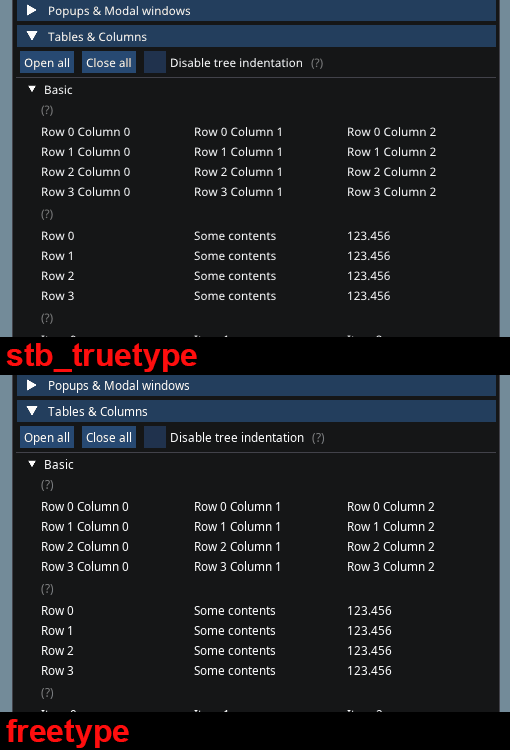
Small, thin anti-aliased fonts typically benefit a lot from FreeType's hinting: |
| 30 |
 |
| 31 |
|
| 32 |
### Colorful glyphs/emojis |
| 33 |
|
| 34 |
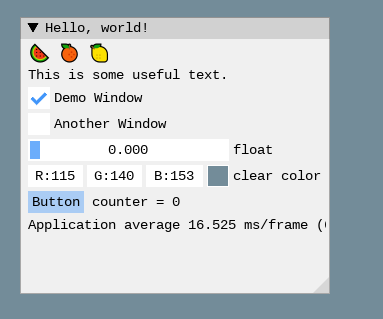
You can use the `ImGuiFreeTypeBuilderFlags_LoadColor` flag to load certain colorful glyphs. See the |
| 35 |
["Using Colorful Glyphs/Emojis"](https://github.com/ocornut/imgui/blob/master/docs/FONTS.md#using-colorful-glyphsemojis) section of FONTS.md. |
| 36 |
|
| 37 |
 |
| 38 |
|
| 39 |
### Using OpenType SVG fonts (SVGinOT) |
| 40 |
- *SVG in Open Type* is a standard by Adobe and Mozilla for color OpenType and Open Font Format fonts. It allows font creators to embed complete SVG files within a font enabling full color and even animations. |
| 41 |
- Popular fonts such as [twemoji](https://github.com/13rac1/twemoji-color-font) and fonts made with [scfbuild](https://github.com/13rac1/scfbuild) is SVGinOT. |
| 42 |
- Two alternatives are possible to render SVG fonts: use "lunasvg" or "plutosvg". plutosvg will support some more fonts (e.g. NotoColorEmoji-Regular) and may load them faster. |
| 43 |
|
| 44 |
#### Using lunasvg |
| 45 |
Requires: [lunasvg](https://github.com/sammycage/lunasvg) v2.3.2 and above |
| 46 |
- Add `#define IMGUI_ENABLE_FREETYPE_LUNASVG` in your `imconfig.h`. |
| 47 |
- Get latest lunasvg binaries or build yourself. Under Windows you may use vcpkg with: `vcpkg install lunasvg --triplet=x64-windows`. |
| 48 |
|
| 49 |
#### Using plutosvg (and plutovg) |
| 50 |
- Add `#define IMGUI_ENABLE_FREETYPE_PLUTOSVG` in your `imconfig.h`. |
| 51 |
- Get latest plutosvg binaries or build yourself. Under Windows you may use vcpkg with: `vcpkg install plutosvg --triplet=x64-windows`. Alternatively, if you build imgui from vcpkg, you just need to enable the plutosvg feature: `vcpkg install imgui[plutosvg] --triplet=x64-windows` |
| 52 |
- If you prefer to build plutosvg manually: |
| 53 |
- Compilation hints for plutovg: Compile all source files in `plutovg/source/*.c` + Add include directory: `plutovg/include` + `plutovg/stb` |
| 54 |
- Compilation hints for plutosvg: Compile `plutosvg/source/plutosvg.c` + Add include directory: `plutosvg/source` + Add define: `PLUTOSVG_HAS_FREETYPE` + Link with: plutovg, freetype |