| 1 |
_(You may browse this at https://github.com/ocornut/imgui/blob/master/docs/FONTS.md or view this file with any Markdown viewer)_ |
| 2 |
|
| 3 |
## Dear ImGui: Using Fonts |
| 4 |
|
| 5 |
The code in imgui.cpp embeds a copy of [ProggyClean.ttf](http://proggyfonts.net) (by Tristan Grimmer), |
| 6 |
a 13 pixels high, pixel-perfect font used by default. We embed it in the source code so you can use Dear ImGui without any file system access. ProggyClean does not scale smoothly, therefore it is recommended that you load your own file when using Dear ImGui in an application aiming to look nice and wanting to support multiple resolutions. |
| 7 |
|
| 8 |
You may also load external .TTF/.OTF files. |
| 9 |
In the [misc/fonts/](https://github.com/ocornut/imgui/tree/master/misc/fonts) folder you can find a few suggested fonts, provided as a convenience. |
| 10 |
|
| 11 |
**Also read the FAQ:** https://www.dearimgui.com/faq (there is a Fonts section!) |
| 12 |
|
| 13 |
## Index |
| 14 |
- [Troubleshooting](#troubleshooting) |
| 15 |
- [New! Dynamic Fonts system in 1.92 (June 2025)](#new-dynamic-fonts-system-in-192-june-2025) |
| 16 |
- [How should I handle DPI in my application?](#how-should-i-handle-dpi-in-my-application) |
| 17 |
- [Fonts Loading Instructions](#fonts-loading-instructions) |
| 18 |
- [Loading Font Data from Memory](#loading-font-data-from-memory) |
| 19 |
- [Loading Font Data Embedded In Source Code](#loading-font-data-embedded-in-source-code) |
| 20 |
- [Using Icon Fonts](#using-icon-fonts) |
| 21 |
- [Excluding Overlapping Ranges](#excluding-overlapping-ranges) |
| 22 |
- [Using FreeType Rasterizer (imgui_freetype)](#using-freetype-rasterizer-imgui_freetype) |
| 23 |
- [Using Colorful Glyphs/Emojis](#using-colorful-glyphsemojis) |
| 24 |
- [Using Custom Glyph Ranges](#using-custom-glyph-ranges) |
| 25 |
- [Using Custom Colorful Icons](#using-custom-colorful-icons) |
| 26 |
- [About Filenames](#about-filenames) |
| 27 |
- [About UTF-8 Encoding](#about-utf-8-encoding) |
| 28 |
- [Debug Tools](#debug-tools) |
| 29 |
- [Credits/Licenses For Fonts Included In Repository](#creditslicenses-for-fonts-included-in-repository) |
| 30 |
- [Font Links](#font-links) |
| 31 |
|
| 32 |
--------------------------------------- |
| 33 |
|
| 34 |
## Troubleshooting |
| 35 |
|
| 36 |
**A vast majority of font and text related issues encountered comes from 4 things:** |
| 37 |
|
| 38 |
### (1) Invalid filename due to use of `\` or unexpected working directory. |
| 39 |
|
| 40 |
See [About Filenames](#about-filenames). AddFontXXX() functions should assert if the filename is incorrect. |
| 41 |
|
| 42 |
### (2) Invalid UTF-8 encoding of your non-ASCII strings. |
| 43 |
|
| 44 |
See [About UTF-8 Encoding](#about-utf-8-encoding). Use the encoding viewer to confirm encoding of string literal in your source code is correct. |
| 45 |
|
| 46 |
### (3) Missing glyph ranges. |
| 47 |
|
| 48 |
🆕 **Since 1.92, with an up to date backend: specifying glyph ranges is unnecessary.** |
| 49 |
|
| 50 |
⏪ Before 1.92: you need to load a font with explicit glyph ranges if you want to use non-ASCII characters. See [Fonts Loading Instructions](#fonts-loading-instructions). Use [Debug Tools](#debug-tools) confirm loaded fonts and loaded glyph ranges. |
| 51 |
|
| 52 |
This was a previous constraint of Dear ImGui (lifted in 1.92): when loading a font you need to specify which characters glyphs to load. |
| 53 |
All loaded fonts glyphs are rendered into a single texture atlas ahead of time. Calling either of `io.Fonts->GetTexDataAsAlpha8()`, `io.Fonts->GetTexDataAsRGBA32()` or `io.Fonts->Build()` will build the atlas. This is generally called by the Renderer backend, e.g. `ImGui_ImplDX11_NewFrame()` calls it. **If you use custom glyphs ranges, make sure the array is persistent** and available during the calls to `GetTexDataAsAlpha8()/GetTexDataAsRGBA32()/Build()`. |
| 54 |
|
| 55 |
### (4) Font atlas texture fails to upload to GPU. |
| 56 |
|
| 57 |
🆕 **Since 1.92, with an up to date backend: atlas is built incrementally and dynamically resized, this is less likely to happen** |
| 58 |
|
| 59 |
:rewind: This is often of byproduct of point 3. If you have large number of glyphs or multiple fonts, the texture may become too big for your graphics API. **The typical result of failing to upload a texture is if every glyph or everything appears as empty white rectangles.** Mind the fact that some graphics drivers have texture size limitation. If you are building a PC application, mind the fact that your users may use hardware with lower limitations than yours. |
| 60 |
|
| 61 |
 |
| 62 |
|
| 63 |
Some solutions: |
| 64 |
- You may reduce oversampling, e.g. `font_config.OversampleH = 1`, this will half your texture size for a quality loss. |
| 65 |
Note that while OversampleH = 2 looks visibly very close to 3 in most situations, with OversampleH = 1 the quality drop will be noticeable. Read about oversampling [here](https://github.com/nothings/stb/blob/master/tests/oversample). |
| 66 |
- Reduce glyphs ranges by calculating them from source localization data. |
| 67 |
You can use the `ImFontGlyphRangesBuilder` for this purpose and rebuilding your atlas between frames when new characters are needed. This will be the biggest win! |
| 68 |
- Set `io.Fonts.Flags |= ImFontAtlasFlags_NoPowerOfTwoHeight;` to disable rounding the texture height to the next power of two. |
| 69 |
|
| 70 |
##### [Return to Index](#index) |
| 71 |
|
| 72 |
--------------------------------------- |
| 73 |
|
| 74 |
## New! Dynamic Fonts system in 1.92 (June 2025) |
| 75 |
|
| 76 |
v1.92 introduces a newer, dynamic font system. It requires backend to support the `ImGuiBackendFlags_HasTextures` feature: |
| 77 |
- Users of icons, Asian and non-English languages do not need to pre-build all glyphs ahead of time. Saving on loading time, memory, and also reducing issues with missing glyphs. Specifying glyph ranges is not needed anymore. |
| 78 |
- `PushFont(NULL, new_size)` may be used anytime to change font size. |
| 79 |
- Packing custom rectangles is more convenient as pixels may be written to immediately. |
| 80 |
- Any update to fonts previously required backend specific calls to re-upload the texture, and said calls were not portable across backends. It is now possible to scale fonts etc. in a way that doesn't require you to make backend-specific calls. |
| 81 |
- It is possible to plug a custom loader/backend to any font source. |
| 82 |
|
| 83 |
See [#8465](https://github.com/ocornut/imgui/issues/8465) for more details. |
| 84 |
|
| 85 |
|
| 86 |
##### [Return to Index](#index) |
| 87 |
|
| 88 |
--------------------------------------- |
| 89 |
|
| 90 |
## How should I handle DPI in my application? |
| 91 |
|
| 92 |
See [FAQ entry](https://github.com/ocornut/imgui/blob/master/docs/FAQ.md#q-how-should-i-handle-dpi-in-my-application). |
| 93 |
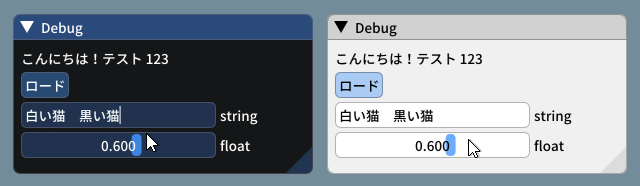
|
| 94 |
##### [Return to Index](#index) |
| 95 |
|
| 96 |
--------------------------------------- |
| 97 |
|
| 98 |
## Fonts Loading Instructions |
| 99 |
|
| 100 |
**Load default font:** |
| 101 |
```cpp |
| 102 |
ImGuiIO& io = ImGui::GetIO(); |
| 103 |
io.Fonts->AddFontDefault(); |
| 104 |
``` |
| 105 |
|
| 106 |
**Load .TTF/.OTF file with:** |
| 107 |
|
| 108 |
🆕 **Since 1.92, with an up to date backend: passing a size is not necessary** |
| 109 |
```cpp |
| 110 |
ImGuiIO& io = ImGui::GetIO(); |
| 111 |
io.Fonts->AddFontFromFileTTF("font.ttf"); |
| 112 |
``` |
| 113 |
:rewind: **Before 1.92, or without an up to date backend:** |
| 114 |
```cpp |
| 115 |
ImGuiIO& io = ImGui::GetIO(); |
| 116 |
io.Fonts->AddFontFromFileTTF("font.ttf", size_pixels); |
| 117 |
``` |
| 118 |
If you get an assert stating "Could not load font file!", your font filename is likely incorrect. Read [About filenames](#about-filenames) carefully. |
| 119 |
|
| 120 |
**Load multiple fonts:** |
| 121 |
```cpp |
| 122 |
// Init |
| 123 |
ImGuiIO& io = ImGui::GetIO(); |
| 124 |
ImFont* font1 = io.Fonts->AddFontFromFileTTF("font.ttf",); |
| 125 |
ImFont* font2 = io.Fonts->AddFontFromFileTTF("anotherfont.otf"); |
| 126 |
``` |
| 127 |
|
| 128 |
In your application loop, select which font to use: |
| 129 |
```cpp |
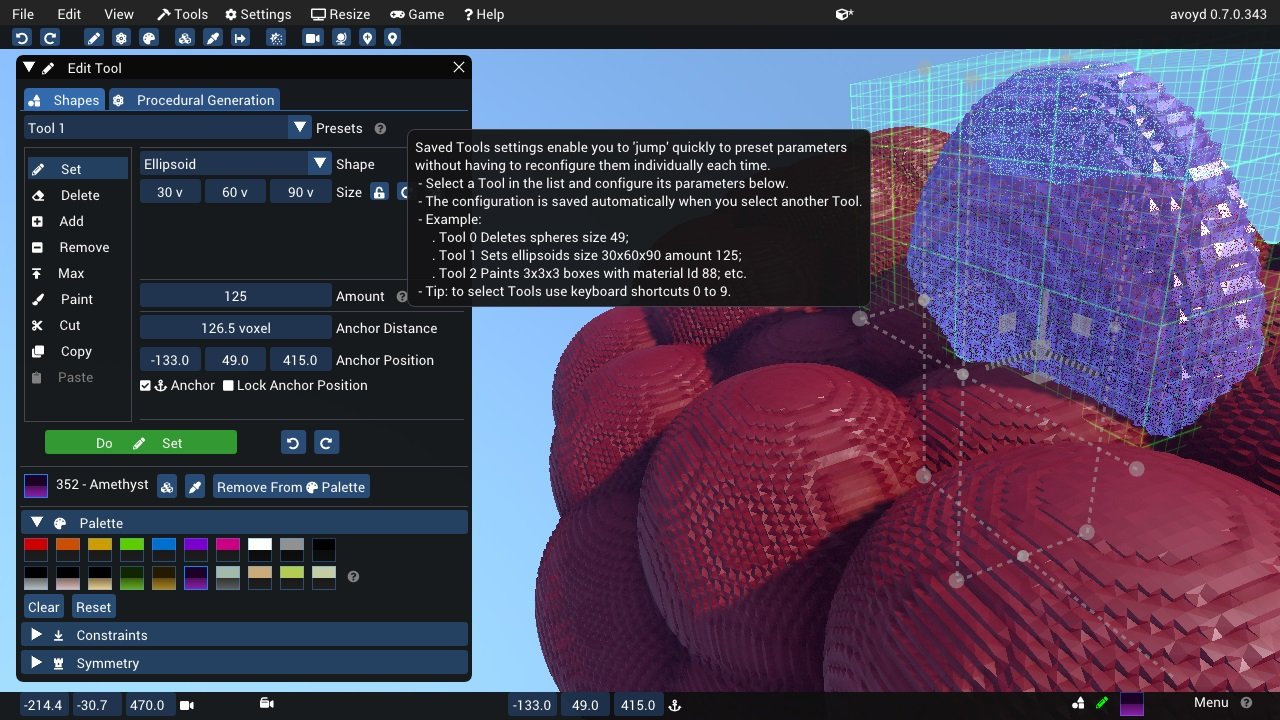
| 130 |
ImGui::Text("Hello"); // use the default font (which is the first loaded font) |
| 131 |
ImGui::PushFont(font2, 0.0f); // change font, keep current size |
| 132 |
ImGui::Text("Hello with another font"); |
| 133 |
ImGui::PopFont(); |
| 134 |
``` |
| 135 |
|
| 136 |
**For advanced options create a ImFontConfig structure and pass it to the AddFont() function (it will be copied internally):** |
| 137 |
```cpp |
| 138 |
ImFontConfig config; |
| 139 |
config.OversampleH = 1.0f; |
| 140 |
ImFont* font = io.Fonts->AddFontFromFileTTF("font.ttf", size_pixels, &config); |
| 141 |
``` |
| 142 |
|
| 143 |
**Combine multiple fonts into one:** |
| 144 |
|
| 145 |
🆕 **Since 1.92, with an up to date backend: specifying glyph ranges is unnecessary.** |
| 146 |
```cpp |
| 147 |
// Load a first font |
| 148 |
ImFont* font = io.Fonts->AddFontDefault(); |
| 149 |
ImFontConfig config; |
| 150 |
config.MergeMode = true; |
| 151 |
io.Fonts->AddFontFromFileTTF("DroidSans.ttf", 0.0f, &config); // Merge into first font to add e.g. Asian characters |
| 152 |
io.Fonts->AddFontFromFileTTF("fontawesome-webfont.ttf", 0.0f, &config); // Merge into first font to add Icons |
| 153 |
``` |
| 154 |
:rewind: **Before 1.92, or without an up to date backend:** |
| 155 |
```cpp |
| 156 |
// Load a first font |
| 157 |
ImFont* font = io.Fonts->AddFontDefault(); |
| 158 |
|
| 159 |
// Add character ranges and merge into the previous font |
| 160 |
// The ranges array is not copied by the AddFont* functions and is used lazily |
| 161 |
// so ensure it is available at the time of building or calling GetTexDataAsRGBA32(). |
| 162 |
static const ImWchar icons_ranges[] = { 0xf000, 0xf3ff, 0 }; // Will not be copied by AddFont* so keep in scope. |
| 163 |
ImFontConfig config; |
| 164 |
config.MergeMode = true; |
| 165 |
io.Fonts->AddFontFromFileTTF("DroidSans.ttf", 18.0f, &config, io.Fonts->GetGlyphRangesJapanese()); // Merge into first font |
| 166 |
io.Fonts->AddFontFromFileTTF("fontawesome-webfont.ttf", 18.0f, &config, icons_ranges); // Merge into first font |
| 167 |
io.Fonts->Build(); |
| 168 |
``` |
| 169 |
|
| 170 |
**Add a fourth parameter to bake specific font ranges only:** |
| 171 |
|
| 172 |
🆕 **Since 1.92, with an up to date backend: specifying glyph ranges is unnecessary. All the GetGlyphRangesXXX() functions are marked obsolete.** |
| 173 |
```cpp |
| 174 |
// Basic Latin, Extended Latin |
| 175 |
io.Fonts->AddFontFromFileTTF("font.ttf", size_pixels, nullptr, io.Fonts->GetGlyphRangesDefault()); |
| 176 |
|
| 177 |
// Default + Selection of 2500 Ideographs used by Simplified Chinese |
| 178 |
io.Fonts->AddFontFromFileTTF("font.ttf", size_pixels, nullptr, io.Fonts->GetGlyphRangesChineseSimplifiedCommon()); |
| 179 |
|
| 180 |
// Default + Hiragana, Katakana, Half-Width, Selection of 1946 Ideographs |
| 181 |
io.Fonts->AddFontFromFileTTF("font.ttf", size_pixels, nullptr, io.Fonts->GetGlyphRangesJapanese()); |
| 182 |
``` |
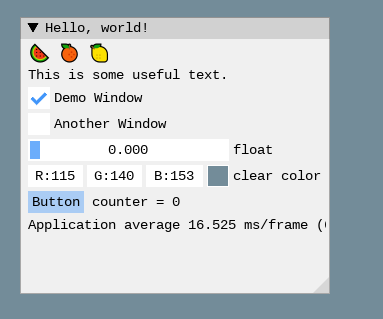
| 183 |
See [Using Custom Glyph Ranges](#using-custom-glyph-ranges) section to create your own ranges. |
| 184 |
|
| 185 |
**Example loading and using a Japanese font:** |
| 186 |
|
| 187 |
🆕 **Since 1.92, with an up to date backend:** |
| 188 |
```cpp |
| 189 |
ImGuiIO& io = ImGui::GetIO(); |
| 190 |
io.Fonts->AddFontFromFileTTF("NotoSansCJKjp-Medium.otf"); |
| 191 |
``` |
| 192 |
|
| 193 |
:rewind: **Before 1.92, or without an up to date backend:** |
| 194 |
```cpp |
| 195 |
ImGuiIO& io = ImGui::GetIO(); |
| 196 |
io.Fonts->AddFontFromFileTTF("NotoSansCJKjp-Medium.otf", 20.0f, nullptr, io.Fonts->GetGlyphRangesJapanese()); |
| 197 |
``` |
| 198 |
|
| 199 |
```cpp |
| 200 |
ImGui::Text(u8"こんにちは!テスト %d", 123); |
| 201 |
if (ImGui::Button(u8"ロード")) |
| 202 |
{ |
| 203 |
// do stuff |
| 204 |
} |
| 205 |
ImGui::InputText("string", buf, IM_ARRAYSIZE(buf)); |
| 206 |
ImGui::SliderFloat("float", &f, 0.0f, 1.0f); |
| 207 |
``` |
| 208 |
|
| 209 |
 |
| 210 |
<br>_(settings: Dark style (left), Light style (right) / Font: NotoSansCJKjp-Medium, 20px / Rounding: 5)_ |
| 211 |
|
| 212 |
##### [Return to Index](#index) |
| 213 |
|
| 214 |
--------------------------------------- |
| 215 |
|
| 216 |
## Loading Font Data from Memory |
| 217 |
|
| 218 |
```cpp |
| 219 |
ImFont* font = io.Fonts->AddFontFromMemoryTTF(data, data_size, size_pixels, ...); |
| 220 |
``` |
| 221 |
|
| 222 |
IMPORTANT: `AddFontFromMemoryTTF()` by default transfer ownership of the data buffer to the font atlas, which will attempt to free it on destruction. |
| 223 |
This was to avoid an unnecessary copy, and is perhaps not a good API (a future version will redesign it). |
| 224 |
If you want to keep ownership of the data and free it yourself, you need to clear the `FontDataOwnedByAtlas` field: |
| 225 |
|
| 226 |
```cpp |
| 227 |
ImFontConfig font_cfg; |
| 228 |
font_cfg.FontDataOwnedByAtlas = false; |
| 229 |
ImFont* font = io.Fonts->AddFontFromMemoryTTF(data, data_size, size_pixels, &font_cfg); |
| 230 |
``` |
| 231 |
|
| 232 |
##### [Return to Index](#index) |
| 233 |
|
| 234 |
--------------------------------------- |
| 235 |
|
| 236 |
## Loading Font Data Embedded In Source Code |
| 237 |
|
| 238 |
- Compile and use [binary_to_compressed_c.cpp](https://github.com/ocornut/imgui/blob/master/misc/fonts/binary_to_compressed_c.cpp) to create a compressed C style array that you can embed in source code. |
| 239 |
- See the documentation in [binary_to_compressed_c.cpp](https://github.com/ocornut/imgui/blob/master/misc/fonts/binary_to_compressed_c.cpp) for instructions on how to use the tool. |
| 240 |
- You may find a precompiled version binary_to_compressed_c.exe for Windows inside the demo binaries package (see [README](https://github.com/ocornut/imgui/blob/master/docs/README.md)). |
| 241 |
- The tool can optionally output Base85 encoding to reduce the size of _source code_ but the read-only arrays in the actual binary will be about 20% bigger. |
| 242 |
|
| 243 |
Then load the font with: |
| 244 |
```cpp |
| 245 |
ImFont* font = io.Fonts->AddFontFromMemoryCompressedTTF(compressed_data, compressed_data_size, size_pixels, ...); |
| 246 |
``` |
| 247 |
or |
| 248 |
```cpp |
| 249 |
ImFont* font = io.Fonts->AddFontFromMemoryCompressedBase85TTF(compressed_data_base85, size_pixels, ...); |
| 250 |
``` |
| 251 |
|
| 252 |
##### [Return to Index](#index) |
| 253 |
|
| 254 |
--------------------------------------- |
| 255 |
|
| 256 |
## Using Icon Fonts |
| 257 |
|
| 258 |
Using an icon font (such as [FontAwesome](http://fontawesome.io) or [OpenFontIcons](https://github.com/traverseda/OpenFontIcons)) is an easy and practical way to use icons in your Dear ImGui application. |
| 259 |
A common pattern is to merge the icon font within your main font, so you can embed icons directly from your strings without having to change fonts back and forth. |
| 260 |
|
| 261 |
To refer to the icon UTF-8 codepoints from your C++ code, you may use those headers files created by Juliette Foucaut: https://github.com/juliettef/IconFontCppHeaders. |
| 262 |
|
| 263 |
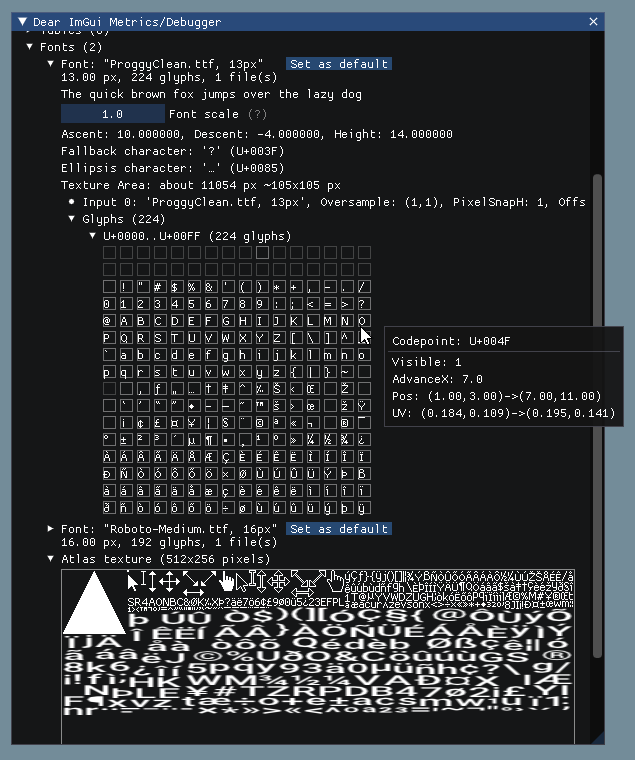
So you can use `ICON_FA_SEARCH` as a string that will render as a "Search" icon. |
| 264 |
|
| 265 |
🆕 **Since 1.92, with an up to date backend: specifying glyph ranges is unnecessary. You can omit this parameter.** |
| 266 |
Example Setup: |
| 267 |
```cpp |
| 268 |
// Merge icons into default tool font |
| 269 |
#include "IconsFontAwesome.h" |
| 270 |
ImGuiIO& io = ImGui::GetIO(); |
| 271 |
io.Fonts->AddFontDefault(); |
| 272 |
ImFontConfig config; |
| 273 |
config.MergeMode = true; |
| 274 |
config.GlyphMinAdvanceX = 13.0f; // Use if you want to make the icon monospaced |
| 275 |
io.Fonts->AddFontFromFileTTF("fonts/fontawesome-webfont.ttf", 13.0f, &config); |
| 276 |
``` |
| 277 |
:rewind: **Before 1.92:** |
| 278 |
```cpp |
| 279 |
// Merge icons into default tool font |
| 280 |
#include "IconsFontAwesome.h" |
| 281 |
ImGuiIO& io = ImGui::GetIO(); |
| 282 |
io.Fonts->AddFontDefault(); |
| 283 |
|
| 284 |
ImFontConfig config; |
| 285 |
config.MergeMode = true; |
| 286 |
config.GlyphMinAdvanceX = 13.0f; // Use if you want to make the icon monospaced |
| 287 |
static const ImWchar icon_ranges[] = { ICON_MIN_FA, ICON_MAX_FA, 0 }; |
| 288 |
io.Fonts->AddFontFromFileTTF("fonts/fontawesome-webfont.ttf", 13.0f, &config, icon_ranges); |
| 289 |
``` |
| 290 |
Example Usage: |
| 291 |
```cpp |
| 292 |
// Usage, e.g. |
| 293 |
ImGui::Text("%s among %d items", ICON_FA_SEARCH, count); |
| 294 |
ImGui::Button(ICON_FA_SEARCH " Search"); |
| 295 |
// C string _literals_ can be concatenated at compilation time, e.g. "hello" " world" |
| 296 |
// ICON_FA_SEARCH is defined as a string literal so this is the same as "A" "B" becoming "AB" |
| 297 |
``` |
| 298 |
See Links below for other icons fonts and related tools. |
| 299 |
|
| 300 |
**Monospace Icons?** |
| 301 |
|
| 302 |
To make your icon look more monospace and facilitate alignment, you may want to set the `ImFontConfig::GlyphMinAdvanceX` value when loading an icon font. |
| 303 |
If you `GlyphMinAdvanceX` you need to pass a `font_size` to `AddFontXXX()` calls, as the MinAdvanceX value will be specified for the given size and scaled otherwise. |
| 304 |
|
| 305 |
**Screenshot** |
| 306 |
|
| 307 |
Here's an application using icons ("Avoyd", https://www.avoyd.com): |
| 308 |
 |
| 309 |
|
| 310 |
##### [Return to Index](#index) |
| 311 |
|
| 312 |
--------------------------------------- |
| 313 |
|
| 314 |
### Excluding Overlapping Ranges |
| 315 |
|
| 316 |
🆕 **Since 1.92, with an up to date backend: glyphs ranges are ignored**: when loading a glyph, input fonts in the merge list are queried in order. The first font which has the glyph loads it. |
| 317 |
<BR>‼️ **If you are merging several fonts, you may have undesirable overlapping ranges.** You can use `ImFontConfig::GlyphExcludeRanges[] `to specify ranges to ignore in a given Input. |
| 318 |
|
| 319 |
```cpp |
| 320 |
// Add Font Source 1 but ignore ICON_MIN_FA..ICON_MAX_FA range |
| 321 |
static ImWchar exclude_ranges[] = { ICON_MIN_FA, ICON_MAX_FA, 0 }; |
| 322 |
ImFontConfig cfg1; |
| 323 |
cfg1.GlyphExcludeRanges = exclude_ranges; |
| 324 |
io.Fonts->AddFontFromFileTTF("segoeui.ttf", 0.0f, &cfg1); |
| 325 |
|
| 326 |
// Add Font Source 2, which expects to use the range above |
| 327 |
ImFontConfig cfg2; |
| 328 |
cfg2.MergeMode = true; |
| 329 |
io.Fonts->AddFontFromFileTTF("FontAwesome4.ttf", 0.0f, &cfg2); |
| 330 |
``` |
| 331 |
Another (silly) example: |
| 332 |
```cpp |
| 333 |
// Remove 'A'-'Z' from first font |
| 334 |
static ImWchar exclude_ranges[] = { 'A', 'Z', 0 }; |
| 335 |
ImFontConfig cfg1; |
| 336 |
cfg1.GlyphExcludeRanges = exclude_ranges; |
| 337 |
io.Fonts->AddFontFromFileTTF("segoeui.ttf", 0.0f, &cfg1); |
| 338 |
|
| 339 |
// Load another font to fill the gaps |
| 340 |
ImFontConfig cfg2; |
| 341 |
cfg2.MergeMode = true; |
| 342 |
io.Fonts->AddFontFromFileTTF("Roboto-Medium.ttf", 0.0f, &cfg2); |
| 343 |
``` |
| 344 |
 |
| 345 |
|
| 346 |
You can use `Metrics/Debugger->Fonts->Font->Input Glyphs Overlap Detection Tool` to see list of glyphs available in multiple font sources. This can facilitate understanding which font input is providing which glyph. |
| 347 |
|
| 348 |
##### [Return to Index](#index) |
| 349 |
|
| 350 |
--------------------------------------- |
| 351 |
|
| 352 |
## Using FreeType Rasterizer (imgui_freetype) |
| 353 |
|
| 354 |
- Dear ImGui uses [stb_truetype.h](https://github.com/nothings/stb/) to rasterize fonts (with optional oversampling). This technique and its implementation are not ideal for fonts rendered at small sizes, which may appear a little blurry or hard to read. |
| 355 |
- You can however use `imgui_freetype.cpp` from the [misc/freetype/](https://github.com/ocornut/imgui/tree/master/misc/freetype) folder. Compile with this file and add `#define IMGUI_ENABLE_FREETYPE` to your imconfig.h file or build system to automatically activate it. |
| 356 |
- FreeType supports auto-hinting which tends to improve the readability of small fonts. It makes a big difference especially at smaller resolutions. |
| 357 |
- Read documentation in the [misc/freetype/](https://github.com/ocornut/imgui/tree/master/misc/freetype) folder. |
| 358 |
- Correct sRGB space blending will have an important effect on your font rendering quality. |
| 359 |
|
| 360 |
##### [Return to Index](#index) |
| 361 |
|
| 362 |
--------------------------------------- |
| 363 |
|
| 364 |
## Using Colorful Glyphs/Emojis |
| 365 |
|
| 366 |
- Rendering of colored emojis is supported by imgui_freetype with FreeType 2.10+. |
| 367 |
- You will need to load fonts with the `ImGuiFreeTypeBuilderFlags_LoadColor` flag. |
| 368 |
- Emojis are frequently encoded in upper Unicode layers (character codes >0x10000) and will need dear imgui compiled with `IMGUI_USE_WCHAR32`. |
| 369 |
- Not all types of color fonts are supported by FreeType at the moment. |
| 370 |
- Stateful Unicode features such as skin tone modifiers are not supported by the text renderer. |
| 371 |
|
| 372 |
 |
| 373 |
|
| 374 |
```cpp |
| 375 |
io.Fonts->AddFontFromFileTTF("../../../imgui_dev/data/fonts/NotoSans-Regular.ttf", 16.0f); |
| 376 |
static ImWchar ranges[] = { 0x1, 0x1FFFF, 0 }; |
| 377 |
static ImFontConfig cfg; |
| 378 |
cfg.MergeMode = true; |
| 379 |
cfg.FontLoaderFlags |= ImGuiFreeTypeLoaderFlags_LoadColor; |
| 380 |
io.Fonts->AddFontFromFileTTF("C:\\Windows\\Fonts\\seguiemj.ttf", 16.0f, &cfg); |
| 381 |
``` |
| 382 |
|
| 383 |
##### [Return to Index](#index) |
| 384 |
|
| 385 |
--------------------------------------- |
| 386 |
|
| 387 |
## Using Custom Glyph Ranges |
| 388 |
|
| 389 |
🆕 **Since 1.92, with an up to date backend: specifying glyph ranges is unnecessary. Therefore this is not really useful any more.** |
| 390 |
|
| 391 |
:rewind: You can use the `ImFontGlyphRangesBuilder` helper to create glyph ranges based on text input. For example: for a game where your script is known, if you can feed your entire script to it and only build the characters the game needs. |
| 392 |
```cpp |
| 393 |
ImVector<ImWchar> ranges; |
| 394 |
ImFontGlyphRangesBuilder builder; |
| 395 |
builder.AddText("Hello world"); // Add a string (here "Hello world" contains 7 unique characters) |
| 396 |
builder.AddChar(0x7262); // Add a specific character |
| 397 |
builder.AddRanges(io.Fonts->GetGlyphRangesJapanese()); // Add one of the default ranges |
| 398 |
builder.BuildRanges(&ranges); // Build the final result (ordered ranges with all the unique characters submitted) |
| 399 |
|
| 400 |
io.Fonts->AddFontFromFileTTF("myfontfile.ttf", size_in_pixels, nullptr, ranges.Data); |
| 401 |
io.Fonts->Build(); // Build the atlas while 'ranges' is still in scope and not deleted. |
| 402 |
``` |
| 403 |
|
| 404 |
##### [Return to Index](#index) |
| 405 |
|
| 406 |
--------------------------------------- |
| 407 |
|
| 408 |
## Using Custom Colorful Icons |
| 409 |
|
| 410 |
🆕 **Since 1.92, with an up to date backend: this system has been revamped.** |
| 411 |
|
| 412 |
TL;DR; With the new system, it is recommended that you create a custom `ImFontLoader` and register your fonts with it. |
| 413 |
`AddCustomRectFontGlyph()` has been obsoleted because its API does not make much sense with resizable fonts. |
| 414 |
|
| 415 |
You can ask questions in [#8466](https://github.com/ocornut/imgui/issues/8466). |
| 416 |
|
| 417 |
:rewind: **Before 1.92:** |
| 418 |
|
| 419 |
As an alternative to rendering colorful glyphs using imgui_freetype with `ImGuiFreeTypeBuilderFlags_LoadColor`, you may allocate your own space in the texture atlas and write yourself into it. **(This is a BETA api, use if you are familiar with dear imgui and with your rendering backend)** |
| 420 |
|
| 421 |
- You can use the `ImFontAtlas::AddCustomRect()` and `ImFontAtlas::AddCustomRectFontGlyph()` api to register rectangles that will be packed into the font atlas texture. Register them before building the atlas, then call Build()`. |
| 422 |
- You can then use `ImFontAtlas::GetCustomRect(int)` to query the position/size of your rectangle within the texture, and blit/copy any graphics data of your choice into those rectangles. |
| 423 |
- This API is beta because it is likely to change in order to support multi-dpi (multiple viewports on multiple monitors with varying DPI scale). |
| 424 |
|
| 425 |
#### Pseudo-code: |
| 426 |
```cpp |
| 427 |
// Add font, then register two custom 13x13 rectangles mapped to glyph 'a' and 'b' of this font |
| 428 |
ImFont* font = io.Fonts->AddFontDefault(); |
| 429 |
int rect_ids[2]; |
| 430 |
rect_ids[0] = io.Fonts->AddCustomRectFontGlyph(font, 'a', 13, 13, 13+1); |
| 431 |
rect_ids[1] = io.Fonts->AddCustomRectFontGlyph(font, 'b', 13, 13, 13+1); |
| 432 |
|
| 433 |
// Build atlas |
| 434 |
io.Fonts->Build(); |
| 435 |
|
| 436 |
// Retrieve texture in RGBA format |
| 437 |
unsigned char* tex_pixels = nullptr; |
| 438 |
int tex_width, tex_height; |
| 439 |
io.Fonts->GetTexDataAsRGBA32(&tex_pixels, &tex_width, &tex_height); |
| 440 |
|
| 441 |
for (int rect_n = 0; rect_n < IM_ARRAYSIZE(rect_ids); rect_n++) |
| 442 |
if (const ImTextureRect* rect = io.Fonts->GetCustomRect(rect_ids[rect_n])) |
| 443 |
{ |
| 444 |
// Fill the custom rectangle with red pixels (in reality you would draw/copy your bitmap data here!) |
| 445 |
for (int y = 0; y < rect->Height; y++) |
| 446 |
{ |
| 447 |
ImU32* p = (ImU32*)tex_pixels + (rect->Y + y) * tex_width + (rect->X); |
| 448 |
for (int x = rect->Width; x > 0; x--) |
| 449 |
*p++ = IM_COL32(255, 0, 0, 255); |
| 450 |
} |
| 451 |
} |
| 452 |
``` |
| 453 |
|
| 454 |
##### [Return to Index](#index) |
| 455 |
|
| 456 |
--------------------------------------- |
| 457 |
|
| 458 |
## About Filenames |
| 459 |
|
| 460 |
**Please note that many new C/C++ users have issues loading their files _because the filename they provide is wrong_ due to incorrect assumption of what is the current directory.** |
| 461 |
|
| 462 |
Two things to watch for: |
| 463 |
|
| 464 |
(1) In C/C++ and most programming languages if you want to use a backslash `\` within a string literal, you need to write it double backslash `\\`. At it happens, Windows uses backslashes as a path separator, so be mindful. |
| 465 |
```cpp |
| 466 |
io.Fonts->AddFontFromFileTTF("MyFiles\MyImage01.jpg", ...); // This is INCORRECT!! |
| 467 |
io.Fonts->AddFontFromFileTTF("MyFiles\\MyImage01.jpg", ...); // This is CORRECT |
| 468 |
``` |
| 469 |
In some situations, you may also use `/` path separator under Windows. |
| 470 |
|
| 471 |
(2) Make sure your IDE/debugger settings starts your executable from the right working (current) directory. In Visual Studio you can change your working directory in project `Properties > General > Debugging > Working Directory`. People assume that their execution will start from the root folder of the project, where by default it often starts from the folder where object or executable files are stored. |
| 472 |
```cpp |
| 473 |
io.Fonts->AddFontFromFileTTF("MyImage01.jpg", ...); // Relative filename depends on your Working Directory when running your program! |
| 474 |
io.Fonts->AddFontFromFileTTF("../MyImage01.jpg", ...); // Load from the parent folder of your Working Directory |
| 475 |
``` |
| 476 |
##### [Return to Index](#index) |
| 477 |
|
| 478 |
--------------------------------------- |
| 479 |
|
| 480 |
## About UTF-8 Encoding |
| 481 |
|
| 482 |
**For non-ASCII characters display, a common user issue is not passing correctly UTF-8 encoded strings.** |
| 483 |
|
| 484 |
(1) We provide a function `ImGui::DebugTextEncoding(const char* text)` which you can call to verify the content of your UTF-8 strings. |
| 485 |
This is a convenient way to confirm that your encoding is correct. |
| 486 |
|
| 487 |
```cpp |
| 488 |
ImGui::SeparatorText("CORRECT"); |
| 489 |
ImGui::DebugTextEncoding(u8"こんにちは"); |
| 490 |
|
| 491 |
ImGui::SeparatorText("INCORRECT"); |
| 492 |
ImGui::DebugTextEncoding("こんにちは"); |
| 493 |
``` |
| 494 |
 |
| 495 |
|
| 496 |
You can also find this tool under `Metrics/Debuggers->Tools->UTF-8 Encoding viewer` if you want to paste from clipboard, but this won't validate the UTF-8 encoding done by your compiler. |
| 497 |
|
| 498 |
(2) To encode in UTF-8: |
| 499 |
|
| 500 |
There are also compiler-specific ways to enforce UTF-8 encoding by default: |
| 501 |
|
| 502 |
- Visual Studio compiler: `/utf-8` command-line flag. |
| 503 |
- Visual Studio compiler: `#pragma execution_character_set("utf-8")` inside your code. |
| 504 |
- Since May 2023 we have changed the Visual Studio projects of all our examples to use `/utf-8` ([see commit](https://github.com/ocornut/imgui/commit/513af1efc9080857bbd10000d98f98f2a0c96803)). |
| 505 |
|
| 506 |
Or, since C++11, you can use the `u8"my text"` syntax to encode literal strings as UTF-8. e.g.: |
| 507 |
```cpp |
| 508 |
ImGui::Text(u8"hello"); |
| 509 |
ImGui::Text(u8"こんにちは"); // this will always be encoded as UTF-8 |
| 510 |
ImGui::Text("こんにちは"); // the encoding of this is depending on compiler settings/flags and may be incorrect. |
| 511 |
``` |
| 512 |
|
| 513 |
Since C++20, because the C++ committee hate its users, they decided to change the `u8""` syntax to not return `const char*` but a new type `const char8_t*` which doesn't cast to `const char*`. |
| 514 |
Because of type usage of `u8""` in C++20 is a little more tedious: |
| 515 |
```cpp |
| 516 |
ImGui::Text((const char*)u8"こんにちは"); |
| 517 |
``` |
| 518 |
However, you can disable this behavior completely using the compiler option [`/Zc:char8_t-`](https://learn.microsoft.com/en-us/cpp/build/reference/zc-char8-t?view=msvc-170) for MSVC and [`-fno-char8_t`](https://www.open-std.org/jtc1/sc22/wg21/docs/papers/2019/p1423r3.html) for Clang and GCC. |
| 519 |
##### [Return to Index](#index) |
| 520 |
|
| 521 |
--------------------------------------- |
| 522 |
|
| 523 |
## Debug Tools |
| 524 |
|
| 525 |
#### Metrics/Debugger->Fonts |
| 526 |
You can use the `Metrics/Debugger` window (available in `Demo>Tools`) to browse your fonts and understand what's going on if you have an issue. You can also reach it in `Demo->Tools->Style Editor->Fonts`. The same information are also available in the Style Editor under Fonts. |
| 527 |
|
| 528 |
 |
| 529 |
|
| 530 |
#### UTF-8 Encoding Viewer** |
| 531 |
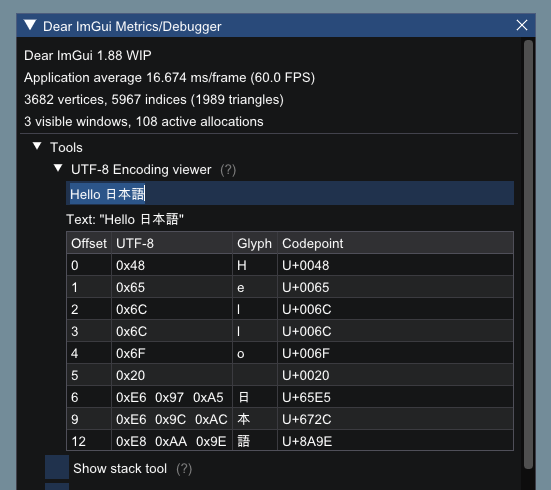
You can use the `UTF-8 Encoding viewer` in `Metrics/Debugger` to verify the content of your UTF-8 strings. From C/C++ code, you can call `ImGui::DebugTextEncoding("my string");` function to verify that your UTF-8 encoding is correct. |
| 532 |
|
| 533 |
 |
| 534 |
|
| 535 |
##### [Return to Index](#index) |
| 536 |
|
| 537 |
--------------------------------------- |
| 538 |
|
| 539 |
## Credits/Licenses For Fonts Included In Repository |
| 540 |
|
| 541 |
Some fonts files are available in the `misc/fonts/` folder: |
| 542 |
|
| 543 |
**Roboto-Medium.ttf**, by Christian Robetson |
| 544 |
<br>Apache License 2.0 |
| 545 |
<br>https://fonts.google.com/specimen/Roboto |
| 546 |
|
| 547 |
**Cousine-Regular.ttf**, by Steve Matteson |
| 548 |
<br>Digitized data copyright (c) 2010 Google Corporation. |
| 549 |
<br>Licensed under the SIL Open Font License, Version 1.1 |
| 550 |
<br>https://fonts.google.com/specimen/Cousine |
| 551 |
|
| 552 |
**DroidSans.ttf**, by Steve Matteson |
| 553 |
<br>Apache License 2.0 |
| 554 |
<br>https://www.fontsquirrel.com/fonts/droid-sans |
| 555 |
|
| 556 |
**ProggyClean.ttf**, by Tristan Grimmer |
| 557 |
<br>MIT License |
| 558 |
<br>(recommended loading setting: Size = 13.0, GlyphOffset.y = +1) |
| 559 |
<br>http://www.proggyfonts.net/ |
| 560 |
|
| 561 |
**ProggyTiny.ttf**, by Tristan Grimmer |
| 562 |
<br>MIT License |
| 563 |
<br>(recommended loading setting: Size = 10.0, GlyphOffset.y = +1) |
| 564 |
<br>http://www.proggyfonts.net/ |
| 565 |
|
| 566 |
**Karla-Regular.ttf**, by Jonathan Pinhorn |
| 567 |
<br>SIL OPEN FONT LICENSE Version 1.1 |
| 568 |
|
| 569 |
##### [Return to Index](#index) |
| 570 |
|
| 571 |
## Font Links |
| 572 |
|
| 573 |
#### ICON FONTS |
| 574 |
|
| 575 |
- C/C++ header for icon fonts (#define with code points to use in source code string literals) https://github.com/juliettef/IconFontCppHeaders |
| 576 |
- FontAwesome https://fortawesome.github.io/Font-Awesome |
| 577 |
- OpenFontIcons https://github.com/traverseda/OpenFontIcons |
| 578 |
- Google Icon Fonts https://design.google.com/icons/ |
| 579 |
- Kenney Icon Font (Game Controller Icons) https://github.com/nicodinh/kenney-icon-font |
| 580 |
- IcoMoon - Custom Icon font builder https://icomoon.io/app |
| 581 |
|
| 582 |
#### REGULAR FONTS |
| 583 |
|
| 584 |
- Google Noto Fonts (worldwide languages) https://www.google.com/get/noto/ |
| 585 |
- Open Sans Fonts https://fonts.google.com/specimen/Open+Sans |
| 586 |
- (Japanese) M+ fonts by Coji Morishita http://mplus-fonts.sourceforge.jp/mplus-outline-fonts/index-en.html |
| 587 |
|
| 588 |
#### MONOSPACE FONTS |
| 589 |
|
| 590 |
Pixel Perfect: |
| 591 |
- Proggy Fonts, by Tristan Grimmer http://www.proggyfonts.net or http://upperboundsinteractive.com/fonts.php |
| 592 |
- Sweet16, Sweet16 Mono, by Martin Sedlak (Latin + Supplemental + Extended A) https://github.com/kmar/Sweet16Font (also include an .inl file to use directly in dear imgui.) |
| 593 |
|
| 594 |
Regular: |
| 595 |
- Google Noto Mono Fonts https://www.google.com/get/noto/ |
| 596 |
- Typefaces for source code beautification https://github.com/chrissimpkins/codeface |
| 597 |
- Programmation fonts http://s9w.github.io/font_compare/ |
| 598 |
- Inconsolata http://www.levien.com/type/myfonts/inconsolata.html |
| 599 |
- Adobe Source Code Pro: Monospaced font family for ui & coding environments https://github.com/adobe-fonts/source-code-pro |
| 600 |
- Monospace/Fixed Width Programmer's Fonts http://www.lowing.org/fonts/ |
| 601 |
|
| 602 |
Or use Arial Unicode or other Unicode fonts provided with Windows for full characters coverage (not sure of their licensing). |
| 603 |
|
| 604 |
##### [Return to Index](#index) |