| 1 |
# user systems |
| 2 |
|
| 3 |
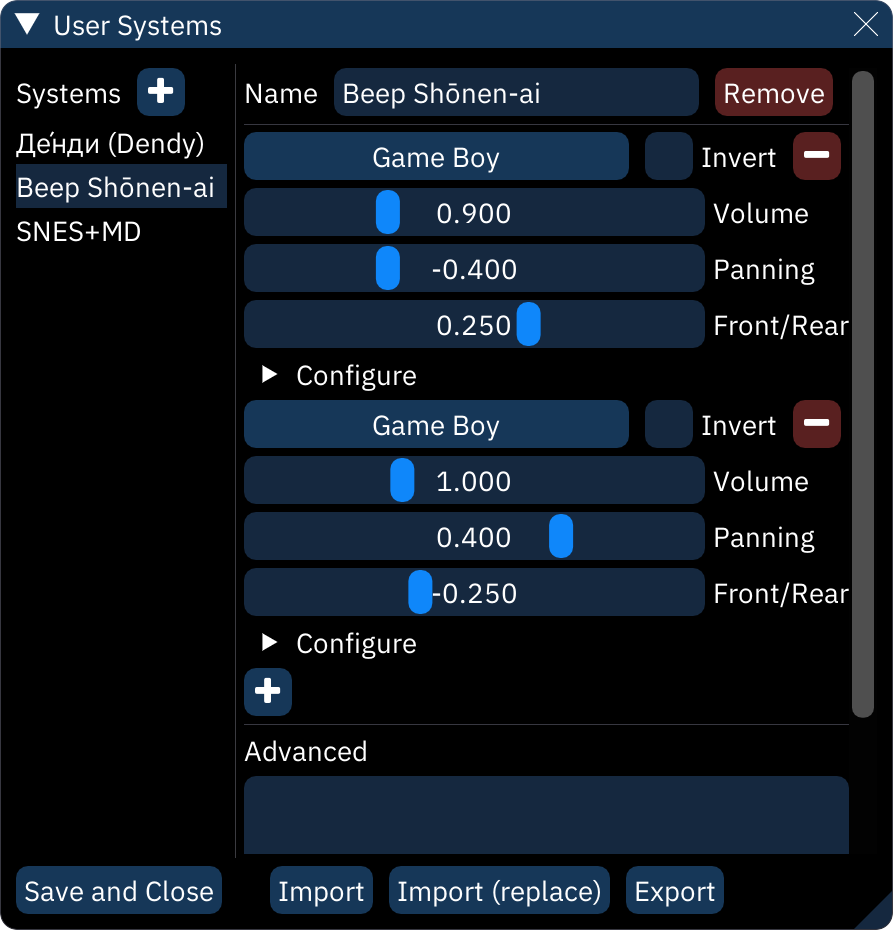
combinations of chips and chip configurations can be stored as **user systems** – presets that are easily accessed when starting a new song. |
| 4 |
|
| 5 |
 |
| 6 |
|
| 7 |
the `+` button at the top of the **Systems** list will add a new system. |
| 8 |
|
| 9 |
next to the **Name** field, the **Remove** button removes the current system from the list. |
| 10 |
|
| 11 |
chip configuration is exactly as in the [chip manager](chip-manager.md) window. |
| 12 |
|
| 13 |
the **Advanced** field stores additional settings that are set when a new song is started. these are listed in "option=value" format, one per line. |
| 14 |
- `tickRate`: sets tick rate. |
| 15 |
- `chanMask`: sets which channels to hide. written as a comma-separated list of integers |
| 16 |
|
| 17 |
**Save and Close**: as it says. |
| 18 |
|
| 19 |
**Import**: opens a dialog to select a `.cfgu` file, then adds its systems to the list. |
| 20 |
|
| 21 |
**Import (replace)**: opens a similar dialog, then clears the existing systems list and replaces it with the imported one. |
| 22 |
|
| 23 |
**Export**: stores the current list of systems in a selected `.cfgu` file. |