| 1 |
# pattern manager |
| 2 |
|
| 3 |
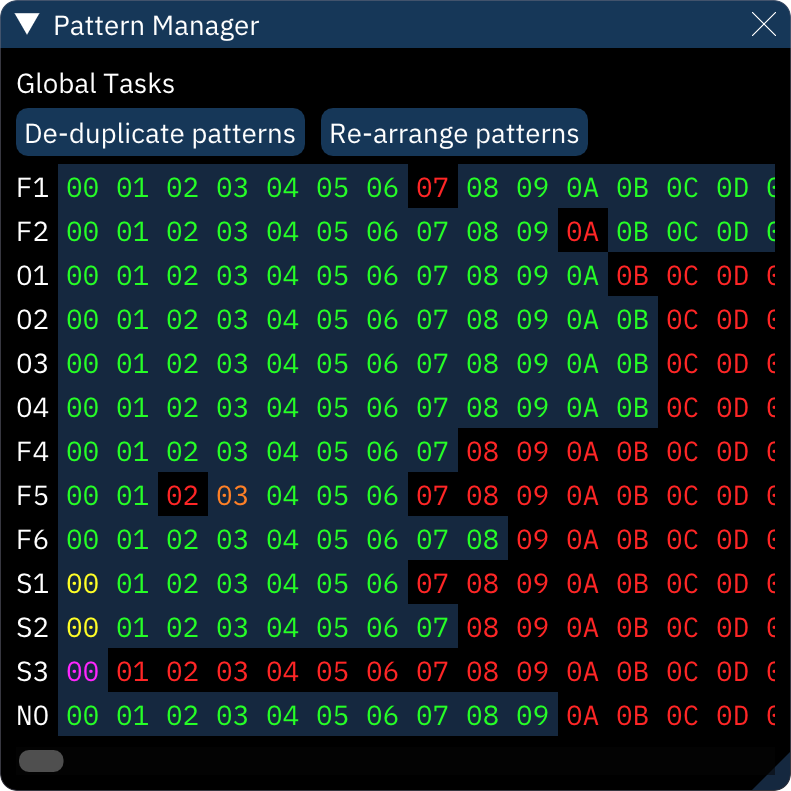
the pattern manager is useful for cleaning up stray patterns and as an overview of pattern usage. |
| 4 |
|
| 5 |
 |
| 6 |
|
| 7 |
**De-duplicate patterns** looks for matching patterns, eliminates all but the first instance, and changes all references in the order list to match. |
| 8 |
|
| 9 |
**Re-arrange patterns** renumbers patterns to be in sequence, along with changing all references in the order list to match. |
| 10 |
|
| 11 |
**Sort orders** renumbers orders and re-arranges patterns so that they are in order. |
| 12 |
|
| 13 |
**Make patterns unique** will clone all patterns that have been used more than once. |
| 14 |
|
| 15 |
the pattern grid shows each channel and all its patterns. these are color-coded to show how much they're used in the song; these colors can be changed in Settings. |
| 16 |
|
| 17 |
| default color | name in Settings | meaning | |
| 18 |
| --- | --- | --- | |
| 19 |
| grey | Unallocated | pattern doesn't exist yet | |
| 20 |
| red | Unused | exists but isn't in order list | |
| 21 |
| green | Used | used only once in order list | |
| 22 |
| yellow | Overused | used multiple times | |
| 23 |
| orange | Really overused | used in half or more orders | |
| 24 |
| magenta | Combo Breaker | the only used pattern in this channel! | |
| 25 |
|
| 26 |
right-clicking a pattern will permanently delete it. |