| 1 |
# oscilloscope (per-channel) |
| 2 |
|
| 3 |
the "Oscilloscope (per-channel)" window displays several oscilloscope views (one per channel). |
| 4 |
|
| 5 |
 |
| 6 |
|
| 7 |
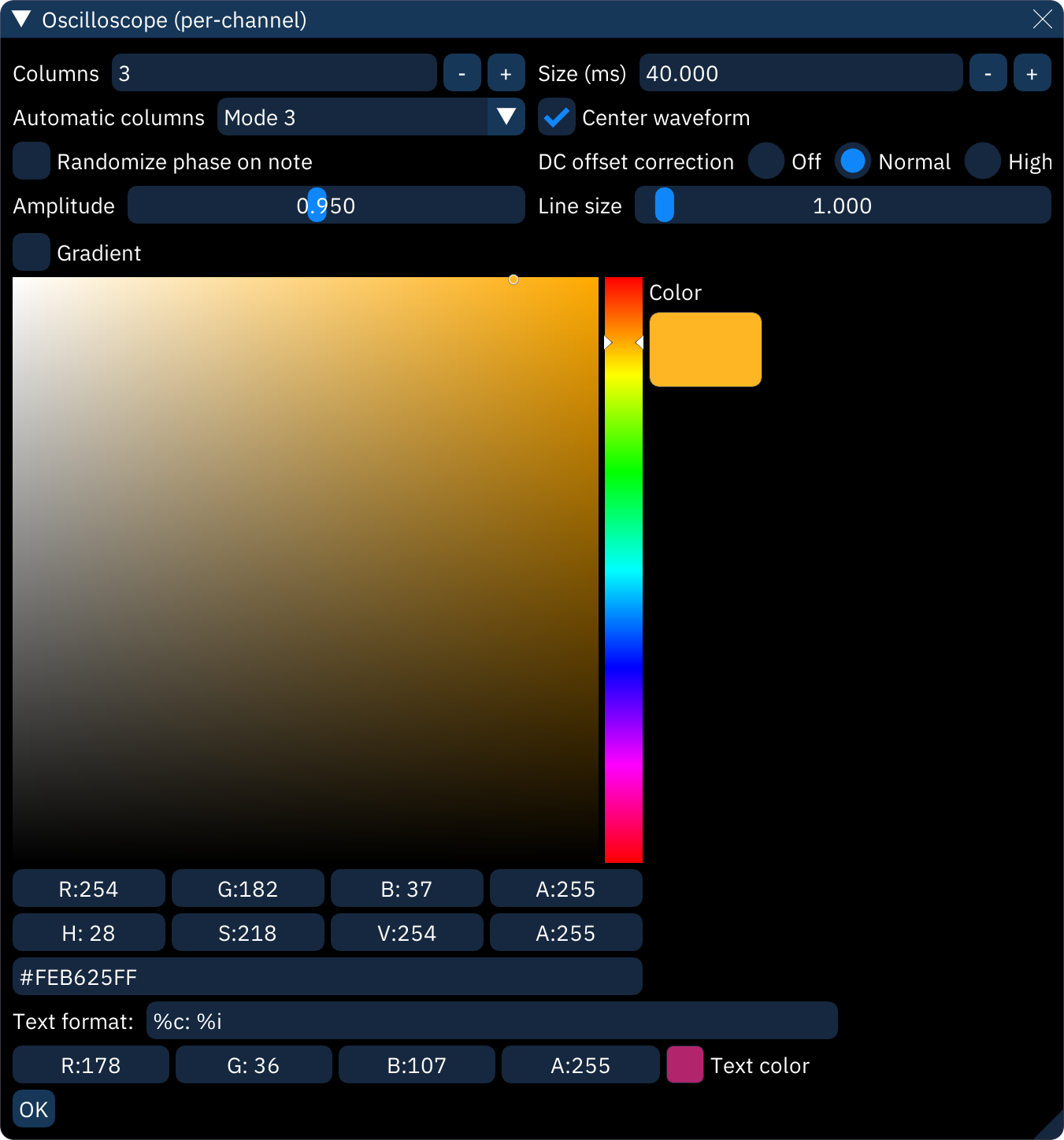
right-clicking the view will display the configuration view shown above: |
| 8 |
- **Columns**: sets the amount of columns for the oscilloscope views. |
| 9 |
- **Size (ms)**: sets how much of a channel's output is captured for the oscilloscope view. |
| 10 |
- **Automatic columns**: sets the number of columns based on the number of channels. |
| 11 |
- **Off**: use the Columns setting. |
| 12 |
- **Mode 1**: always fewer columns than rows. |
| 13 |
- **Mode 2**: bias slightly toward more columns. |
| 14 |
- **Mode 3**: always more columns than rows. |
| 15 |
- **Center waveform**: when enabled, the displayed waveforms will be centered horizontally using an auto-correlation algorithm. |
| 16 |
- **Randomize phase on note** |
| 17 |
- **DC offset correction**: controls the algorithm that centers the waveform vertically. |
| 18 |
- **Off** |
| 19 |
- **Normal** |
| 20 |
- **High** |
| 21 |
- **Amplitude**: scales amplitude for all oscilloscope views. |
| 22 |
- **Line size**: controls line thickness. |
| 23 |
- **Gradient**: this allows you to use a gradient for determining the waveforms' colors instead of a single color. see the gradient section for more information. |
| 24 |
- if this option is off, a color selector will be displayed. right-click on it for some options: |
| 25 |
- select between the square selector and the color wheel selector. |
| 26 |
- **Alpha bar**: display an opacity bar. |
| 27 |
- **Text format**: this allows you to display some text on each oscilloscope view. the following codes may be used: |
| 28 |
- `%c`: channel name |
| 29 |
- `%C`: channel short name |
| 30 |
- `%d`: channel number (starting from 0) |
| 31 |
- `%D`: channel number (starting from 1) |
| 32 |
- `%n`: channel note |
| 33 |
- `%i`: instrument name |
| 34 |
- `%I`: instrument number (decimal) |
| 35 |
- `%x`: instrument number (hex) |
| 36 |
- `%s`: chip name |
| 37 |
- `%p`: chip part number |
| 38 |
- `%S`: chip ID |
| 39 |
- `%v`: volume (decimal) |
| 40 |
- `%V`: volume (percentage) |
| 41 |
- `%b`: volume (hex) |
| 42 |
- `%l`: new line |
| 43 |
- `%%`: percent sign |
| 44 |
|
| 45 |
click on OK to return to the main view. |
| 46 |
|
| 47 |
## gradient |
| 48 |
|
| 49 |
 |
| 50 |
|
| 51 |
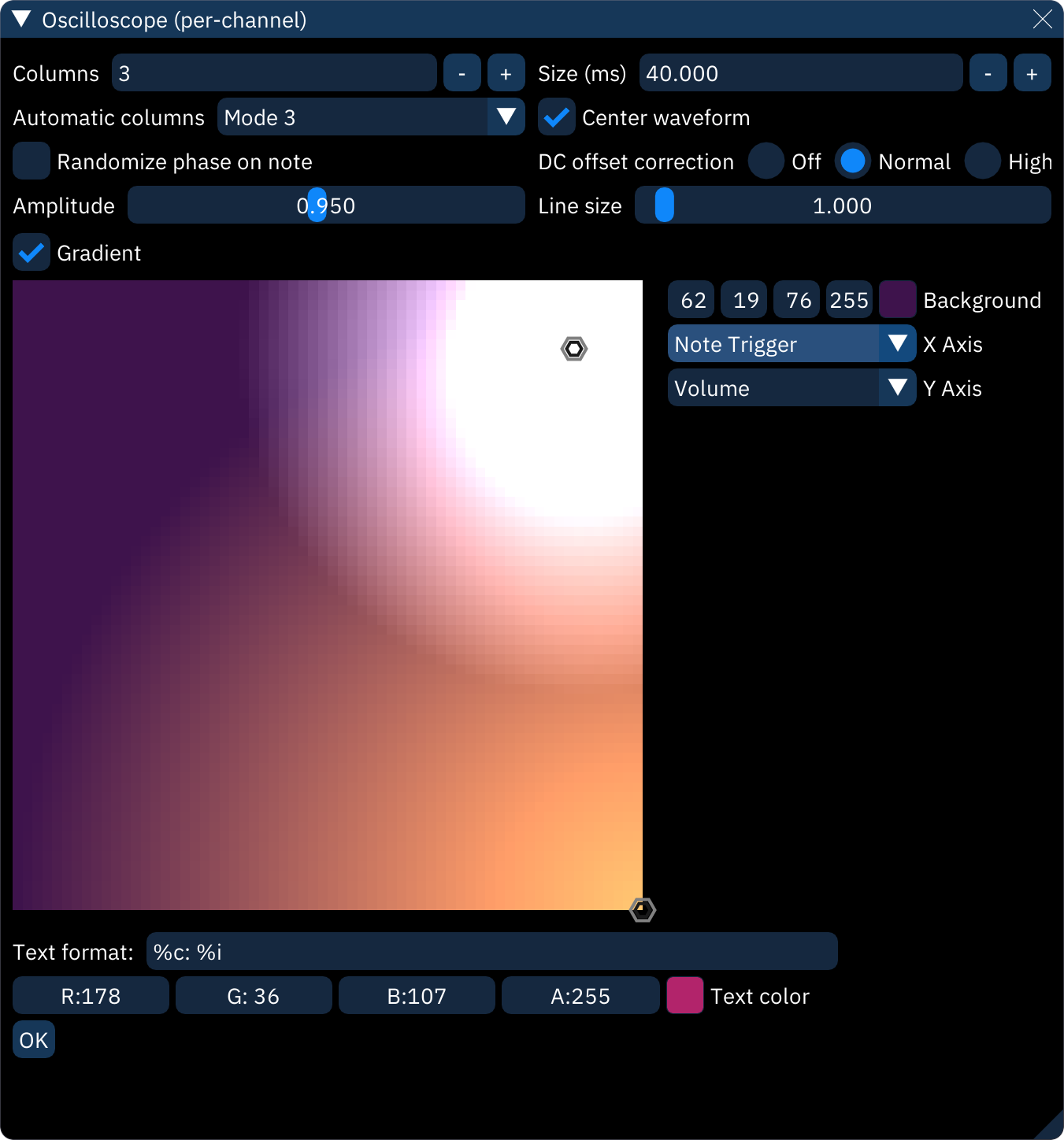
when enabling the Gradient setting, a gradient view is displayed in where circular "points" can be placed. |
| 52 |
each point adds a color spot. |
| 53 |
the resulting image is used to look up the waveform's color as determined by each axis. |
| 54 |
|
| 55 |
- right-click to place a point. |
| 56 |
- left-click on a point to change its color: |
| 57 |
- a color picker is displayed, alongside two settings. |
| 58 |
- **Distance**: the size of the circle. |
| 59 |
- **Spread**: the size of the solid center of the circle. increasing it fills more of the circle with the color. |
| 60 |
- middle-click on a point to delete it. |
| 61 |
|
| 62 |
- **Background**: sets the gradient's background color. |
| 63 |
- **X Axis**: determines what the horizontal axis maps to. |
| 64 |
- **Y Axis**: determines what the vertical axis maps to. these can be set to the following: |
| 65 |
- **None (0%)**: always left or bottom |
| 66 |
- **None (50%)**: always center |
| 67 |
- **None (100%)**: always right or top |
| 68 |
- **Frequency**: changes color with frequency |
| 69 |
- **Volume**: changes color with volume |
| 70 |
- **Channel**: changes color based on channel number (first channel is 0% and last is 100%) |
| 71 |
- **Brightness**: currently does nothing |
| 72 |
- **Note Trigger**: changes color when a new note is played |