| 1 |
# settings |
| 2 |
|
| 3 |
the Settings window allows you to change Furnace settings. |
| 4 |
|
| 5 |
settings are saved when clicking the **OK** or **Apply** buttons at the bottom of the window, and when closing the program. several backups are kept in the Furnace settings directory. |
| 6 |
|
| 7 |
|
| 8 |
## General |
| 9 |
|
| 10 |
### Program |
| 11 |
|
| 12 |
- **Language**: select the language used for the interface. some languages are incomplete, and are listed with their approximate completion percentage. |
| 13 |
- **Render backend**: changing this may help with performance or compatibility issues. the available render backends are: |
| 14 |
- SDL Renderer: this was the only available render backend prior to the addition of dedicated OpenGL/DirectX backends in 0.6. default on macOS. |
| 15 |
- it is slower than the other backends. |
| 16 |
- DirectX 11: works with the majority of graphics chips/cards and is optimized specifically for Windows. |
| 17 |
- DirectX 9: use if your hardware is incompatible with DirectX 11. |
| 18 |
- OpenGL 3.0: works with the majority of graphics chips/cards (from 2010 onwards). default on Linux. |
| 19 |
- OpenGL 2.0: use if you have a card without OpenGL 3.0 support. |
| 20 |
- OpenGL 1.1: use if your card doesn't even support OpenGL 2.0. |
| 21 |
- Software: this is a last resort backend which renders the interface in software. very slow! |
| 22 |
- **Advanced render backend settings**: only applicable with some render backends. |
| 23 |
- **Render driver**: this setting only appears when using the SDL Renderer backend. it allows you to select an SDL render driver. |
| 24 |
- OpenGL settings: these only appear when using an OpenGL backend, and should only be adjusted if the display is incorrect. |
| 25 |
- **VSync**: synchronizes rendering to VBlank and eliminates tearing. |
| 26 |
- **Frame rate limit**: allows you to set a frame rate limit (in frames per second). |
| 27 |
- only has effect when VSync is off or not available (e.g. software rendering or force-disabled on driver settings). |
| 28 |
- **Display render time**: displays frame rate and frame render time at the right side of the menu bar. |
| 29 |
- **Late render clear**: this option is only useful when using old versions of Mesa drivers. it force-waits for VBlank by clearing after present, reducing latency. |
| 30 |
- **Power-saving mode**: saves power by lowering the frame rate to 2fps when idle. |
| 31 |
- may cause issues under Mesa drivers! |
| 32 |
- **Disable threaded input (restart after changing!)**: processes key presses for note preview on a separate thread (on supported platforms), which reduces latency. |
| 33 |
- **Enable event delay**: may cause issues with high-polling-rate mice when previewing notes. |
| 34 |
- **Per-channel oscilloscope threads**: runs the per-channel oscilloscope in separate threads for a performance boost when there are lots of channels. |
| 35 |
- **Oscilloscope rendering engine**: allows you to select between the following rendering engines for oscilloscope views (master and per-channel): |
| 36 |
- **ImGui line plot**: the default engine. uses Dear ImGui line plotting functions for rendering. |
| 37 |
- **GLSL**: uses OpenGL shaders for rendering. higher quality, but very GPU-intensive! only available in OpenGL 3.0 backend. |
| 38 |
|
| 39 |
### File |
| 40 |
|
| 41 |
- **Use system file picker**: uses native OS file dialog instead of Furnace's. |
| 42 |
- **Number of recent files**: number of files that will be remembered in the _open recent..._ menu. |
| 43 |
- **Compress when saving**: uses zlib to compress saved songs. |
| 44 |
- **Save unused patterns**: stores unused patterns in a saved song. |
| 45 |
- **Use new pattern format when saving**: stores patterns in the new, optimized and smaller format. only disable if you need to work with older versions of Furnace. |
| 46 |
- **Don't apply compatibility flags when loading .dmf**: does exactly what the option says. your .dmf songs may not play correctly after enabled. |
| 47 |
- **Play after opening song:** |
| 48 |
- No |
| 49 |
- Only if already playing |
| 50 |
- Yes |
| 51 |
- **Audio export loop/fade out time:** |
| 52 |
- **Set to these values on start-up:** |
| 53 |
- **Loops**: number of additional times to play through `0Bxx` song loop. |
| 54 |
- **Fade out (seconds)**: length of fade out after final loop. |
| 55 |
- **Remember last values** |
| 56 |
- **Store instrument name in .fui**: when enabled, saving an instrument will store its name. this may increase file size. |
| 57 |
- **Load instrument name from .fui**: when enabled, loading an instrument will use the stored name (if present). otherwise, it will use the file name. |
| 58 |
- **Auto-fill file name when saving**: pre-fill the file name field when saving or exporting. |
| 59 |
- when saving a module, the existing file name will be auto-filled. |
| 60 |
- when saving an instrument or sample, its name will be auto-filled. |
| 61 |
|
| 62 |
### New Song |
| 63 |
|
| 64 |
- **Initial system**: the system of chips loaded on starting Furnace. |
| 65 |
- **Current system**: sets current chips as default. |
| 66 |
- **Randomize**: sets default to a random system. |
| 67 |
- this will not choose a random system at each start. |
| 68 |
- **Reset to defaults**: sets default to "Sega Genesis/Mega Drive". |
| 69 |
- **Name**: name for the default system. may be set to any text. |
| 70 |
- **Configure**: same as in the [chip manager](../8-advanced/chip-manager.md) and [mixer](../8-advanced/mixer.md). |
| 71 |
- **When creating new song**: |
| 72 |
- **Display system preset selector** |
| 73 |
- **Start with initial system** |
| 74 |
- **Default author name** |
| 75 |
|
| 76 |
### Start-up |
| 77 |
|
| 78 |
- **Play intro on start-up:** |
| 79 |
- **No**: skips intro entirely. |
| 80 |
- **Short**: shows silent title screen briefly. |
| 81 |
- **Full (short when loading song)**: shows animated musical intro unless started with a song (command line, double-clicking a .fur file, etc.) |
| 82 |
- **Full (always)**: always shows animated musical intro. |
| 83 |
- **Disable fade-in during start-up** |
| 84 |
|
| 85 |
### Behavior |
| 86 |
|
| 87 |
- **New instruments are blank**: when enabled, adding FM instruments will make them blank (rather than loading the default one). |
| 88 |
|
| 89 |
### Configuration |
| 90 |
- **Import**: select an exported `.ini` config file to overwrite current settings. |
| 91 |
- **Export**: select an `.ini` file to save current settings. |
| 92 |
- **Factory Reset**: resets all settings to default and purges settings backups. |
| 93 |
|
| 94 |
### Import |
| 95 |
|
| 96 |
- **Use OPL3 instead of OPL2 for S3M import**: changes which system is used for the import of S3M files that contain FM channels. |
| 97 |
|
| 98 |
## Audio |
| 99 |
|
| 100 |
### Output |
| 101 |
|
| 102 |
- **Backend**: selects a different backend for audio output. |
| 103 |
- SDL: the default one. |
| 104 |
- JACK: the JACK Audio Connection Kit (low-latency audio server). only appears on Linux, or MacOS compiled with JACK support. |
| 105 |
- PortAudio: this may or may not perform better than the SDL backend. |
| 106 |
- **Driver**: select a different audio driver if you're having problems with the default one. |
| 107 |
- only appears when Backend is SDL. |
| 108 |
- **Device**: audio device for playback. |
| 109 |
- if using PortAudio backend, devices will be prefixed with the audio API that PortAudio is going to use: |
| 110 |
- Windows WASAPI: a modern audio API available on Windows Vista and later, featuring an (optional) Exclusive Mode. be noted that your buffer size setting may be ignored. |
| 111 |
- Windows WDM-KS: low-latency, direct to hardware output mechanism. may not work all the time and prevents your audio device from being used for anything else! |
| 112 |
- Windows DirectSound: this is the worst choice. best to move on. |
| 113 |
- MME: an old audio API. doesn't have Exclusive Mode. |
| 114 |
- Core Audio: the only choice in macOS. |
| 115 |
- ALSA: low-level audio output on Linux. may prevent other applications from using your audio device. |
| 116 |
- **Sample rate**: audio output rate. |
| 117 |
- a lower rate decreases quality and isn't really beneficial. |
| 118 |
- if using PortAudio backend, be careful about this value. |
| 119 |
- **Outputs**: number of audio outputs created, up to 16. default is 2 (stereo). |
| 120 |
- **Buffer size**: size of buffer in both samples and milliseconds. |
| 121 |
- setting this to a low value may cause stuttering/glitches in playback (known as "underruns" or "xruns"). |
| 122 |
- setting this to a high value increases latency. |
| 123 |
- **Exclusive mode**: enables Exclusive Mode, which may offer latency improvements. |
| 124 |
- only available on WASAPI devices in the PortAudio backend! |
| 125 |
- **Low-latency mode**: reduces latency by running the engine faster than the tick rate. useful for live playback/jam mode. |
| 126 |
- only enable if your buffer size is small (10ms or less). |
| 127 |
- **Force mono audio**: use if you're unable to hear stereo audio (e.g. single speaker or hearing loss in one ear). |
| 128 |
- **want:** displays requested audio configuration. |
| 129 |
- **got:** displays actual audio configuration returned by audio backend. |
| 130 |
|
| 131 |
### Mixing |
| 132 |
|
| 133 |
- **Quality**: selects quality of resampling. low quality reduces CPU load by a small amount. |
| 134 |
- **Software clipping**: clips output to nominal range (-1.0 to 1.0) before passing it to the audio device. |
| 135 |
- this avoids activating Windows' built-in limiter. |
| 136 |
- this option shall be enabled when using PortAudio backend with a DirectSound device. |
| 137 |
- **DC offset correction**: apply a filter to remove DC bias, where the output is overall above or below zero. default is on. |
| 138 |
|
| 139 |
### Metronome |
| 140 |
|
| 141 |
- **Volume**: sets volume of metronome. |
| 142 |
|
| 143 |
### Sample preview |
| 144 |
|
| 145 |
- **Volume**: sets volume of sample preview. |
| 146 |
|
| 147 |
## MIDI |
| 148 |
|
| 149 |
### MIDI input |
| 150 |
|
| 151 |
- **MIDI input**: input device. |
| 152 |
- **Rescan MIDI devices**: repopulates list with all currently connected MIDI devices. useful if a device is connected while Furnace is running. |
| 153 |
- **Note input**: enables note input. disable if you intend to use this device only for binding actions. |
| 154 |
- **Velocity input**: enables velocity input when entering notes in the pattern. |
| 155 |
- **Map MIDI channels to direct channels**: when enabled, notes from MIDI channels will be mapped to channels rather than the cursor position. |
| 156 |
- **Program change pass-through**: when enabled, program change events are sent to each channel as instrument change commands. |
| 157 |
- this option is only available when the previous one is enabled. |
| 158 |
- **Map Yamaha FM voice data to instruments**: when enabled, Furnace will listen for any transmitted Yamaha SysEx patches. |
| 159 |
- this option is only useful if you have a Yamaha FM synthesizer (e.g. TX81Z). |
| 160 |
- selecting a voice or using the "Voice Transmit?" option will send a patch, and Furnace will create a new instrument with its data. |
| 161 |
- this may also be triggered by clicking on "Receive from TX81Z" in the instrument editor (OPZ only). |
| 162 |
- **Program change is instrument selection**: changes the current instrument when a program change event is received. |
| 163 |
- this option is not available when "Program change pass-through" is enabled. |
| 164 |
- **Value input style**: changes the way values are entered when the pattern cursor is not in the Note column. the following styles are available: |
| 165 |
- **Disabled/custom**: no value input through MIDI. |
| 166 |
- **Two octaves (0 is C-4, F is D#5)**: maps keys in two octaves to single nibble input. the layout is: |
| 167 |
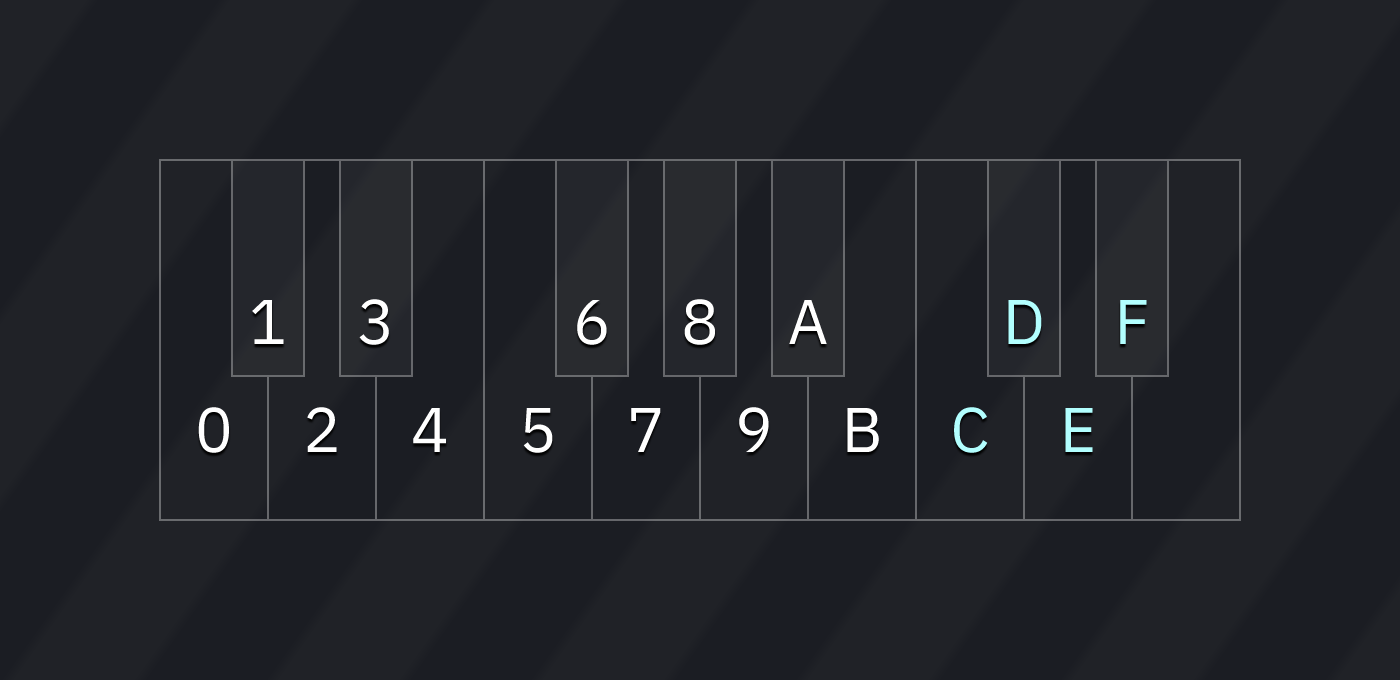 |
| 168 |
- **Raw (note number is value)**: the note number becomes the input value. not useful if you want to input anything above 7F. |
| 169 |
- **Two octaves alternate (lower keys are 0-9, upper keys are A-F)**: maps keys in two octaves, but with a different layout: |
| 170 |
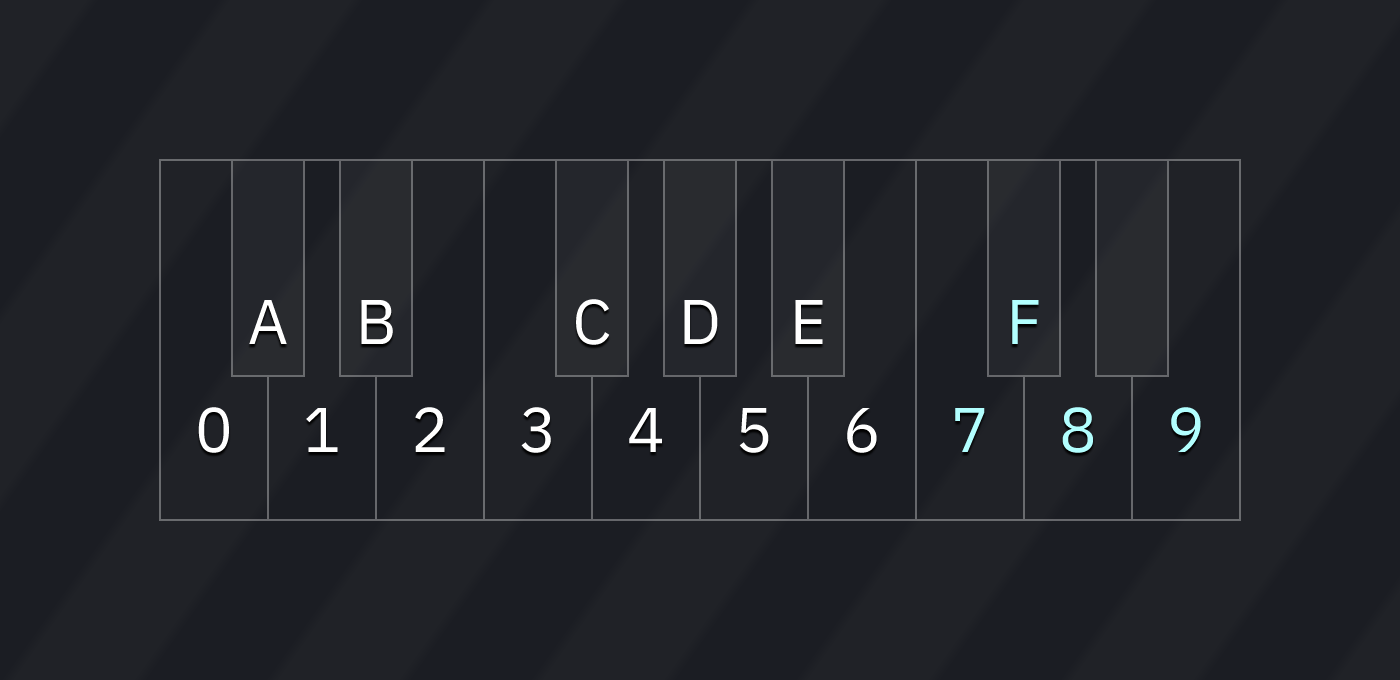 |
| 171 |
- **Use dual control change (one for each nibble)**: maps two control change events to the nibbles of a value. |
| 172 |
- **CC of upper nibble**: select the CC number that will change the upper nibble. |
| 173 |
- **CC of lower nibble**: select the CC number that will change the lower nibble. |
| 174 |
- **Use 14-bit control change**: maps two control change events that together form a single 14-bit CC. some MIDI controllers do these. |
| 175 |
- **MSB CC**: select the CC containing the upper portion of the control. |
| 176 |
- **LSB CC**: select the CC containing the lower portion of the control. |
| 177 |
- **Use single control change**: maps one control change event. not useful if you want to input odd numbers. |
| 178 |
- **Control**: select the CC number that will change the value. |
| 179 |
- **Per-column control change**: when enabled, you can map several control change events to a channel's columns. |
| 180 |
- **Volume curve**: adjust the velocity to volume curve. |
| 181 |
- the default is 2.0, which matches General MIDI standard. |
| 182 |
- **Actions**: this allows you to bind note input and control change events to actions. |
| 183 |
- **`+`** button: adds a new action. |
| 184 |
- window-with-arrow button: new action with learning! press a button or move a slider/knob/something on your device. |
| 185 |
- each action has the following: |
| 186 |
- **Type**: type of event. |
| 187 |
- **Channel**: channel of event. |
| 188 |
- **Note/Control**: the note/control change number. |
| 189 |
- **Velocity/Value**: the velocity or control value |
| 190 |
- **Action**: the GUI action to perform. |
| 191 |
- **Learn**: after clicking on this button, do something in your MIDI device and Furnace will map that to this action. |
| 192 |
- **Remove**: remove this action. |
| 193 |
|
| 194 |
### MIDI output |
| 195 |
|
| 196 |
- **MIDI output**: output device. |
| 197 |
- **Output mode:** |
| 198 |
- **Off (use for TX81Z)**: don't output anything. use if you plan to use Furnace as sync master, or the "Receive from TX81Z" button in the OPZ instrument editor. |
| 199 |
- **Melodic**: output MIDI events. |
| 200 |
- **Send Program Change**: output program change events when instrument change commands occur. |
| 201 |
- **Send MIDI clock**: output MIDI beat clock. |
| 202 |
- **Send MIDI timecode**: output MIDI timecode. |
| 203 |
- **Timecode frame rate**: sets the timing standard used for MIDI timecode. |
| 204 |
- **Closest to Tick Rate**: automatically sets the rate based on the song's Tick Rate. |
| 205 |
- **Film (24fps)**: output at 24 codes per second. |
| 206 |
- **PAL (25fps)**: output at 25 codes per second. |
| 207 |
- **NTSC drop (29.97fps)**: output at ~29.97 codes per second, skipping frames 0 and 1 of each minute that doesn't divide by 10. |
| 208 |
- **NTSC non-drop (30fps)**: output at 30 codes per second. |
| 209 |
|
| 210 |
## Emulation |
| 211 |
|
| 212 |
### Cores |
| 213 |
|
| 214 |
- **Playback Core(s)**: core(s) to use for playback. |
| 215 |
- **Render Core(s)**: core(s) to use when exporting audio. |
| 216 |
|
| 217 |
all of these are covered in the [guide to choosing emulation cores](../9-guides/emulation-cores.md). |
| 218 |
|
| 219 |
### Quality |
| 220 |
|
| 221 |
some chips have output quality settings. these may be used to increase quality or lower CPU usage. |
| 222 |
|
| 223 |
the available quality settings are: |
| 224 |
|
| 225 |
- Lower: fastest but worst quality. |
| 226 |
- Low |
| 227 |
- Medium |
| 228 |
- High: the default quality. |
| 229 |
- Ultra |
| 230 |
- Ultimate: highest available quality. may be very CPU heavy! |
| 231 |
|
| 232 |
### Other |
| 233 |
|
| 234 |
- **PC Speaker strategy**: this is covered in the [PC speaker page](../7-systems/pcspkr.md). |
| 235 |
|
| 236 |
## Keyboard |
| 237 |
|
| 238 |
### Keyboard |
| 239 |
|
| 240 |
- **Import**: imports keyboard layout in `.cfgk` format. |
| 241 |
- **Export**: exports keyboard layout in `.cfgk` format. |
| 242 |
- **Reset defaults**: resets all keybinds to default values. |
| 243 |
|
| 244 |
a list of keybinds is displayed. |
| 245 |
- click on a keybind. then enter a key or key combination to change it. |
| 246 |
- right-click to clear the keybind. |
| 247 |
- the full list is in the [keyboard](keyboard.md) page. |
| 248 |
|
| 249 |
#### note input |
| 250 |
|
| 251 |
the settings for note input keybinds operate differently. each entry in the list of keybinds is made of the following: |
| 252 |
- **Key**: key assignment. |
| 253 |
- **Type**: type of note input. left-click cycles through "Note", "Note off", "Note release", and "Macro release". |
| 254 |
- note: the list is sorted by type. on changing a key's type, it will instantly move to its new sorting position! |
| 255 |
- **Value**: number of semitones above C at the current octave. only appears for note type binds. |
| 256 |
- **Remove**: removes the keybind from the list. |
| 257 |
|
| 258 |
below all the binds, select a key from the dropdown list to add it. it will appear at or near the top of the list as a note with value 0. |
| 259 |
|
| 260 |
## Interface |
| 261 |
|
| 262 |
### Layout |
| 263 |
|
| 264 |
- **Workspace layout** |
| 265 |
- **Import**: reads a .ini layout file. |
| 266 |
- **Export**: writes current layout to a .ini file. |
| 267 |
- **Reset**: resets layout to default. |
| 268 |
- **Allow docking editors**: when enabled, you'll be able to dock instrument/wave/sample editors. |
| 269 |
- **Remember window position**: remembers the window's last position on start-up. |
| 270 |
- **Only allow window movement when clicking on title bar** |
| 271 |
- **Center pop-up windows** |
| 272 |
- **Play/edit controls layout:** |
| 273 |
- **Classic** |
| 274 |
- **Compact** |
| 275 |
- **Compact (vertical)** |
| 276 |
- **Split** |
| 277 |
- **Position of buttons in Orders:** |
| 278 |
- **Top** |
| 279 |
- **Left** |
| 280 |
- **Right** |
| 281 |
|
| 282 |
### Mouse |
| 283 |
|
| 284 |
- **Double-click time (seconds)**: maximum time between mouse clicks to recognize them as a double-click. |
| 285 |
- **Don't raise pattern editor on click** |
| 286 |
- **Focus pattern editor when selecting instrument** |
| 287 |
- **Draggable instruments/samples/waves:** allow dragging and dropping assets within their lists to reorder them. |
| 288 |
- **Note preview behavior:** allows you to disable note preview when entering notes in the pattern. |
| 289 |
- **Never**: don't preview notes at all. |
| 290 |
- **When cursor is in Note column**: only when the cursor is in the Note column |
| 291 |
- **When cursor is in Note column or not in edit mode**: erm... yeah. |
| 292 |
- **Always**: always preview notes. |
| 293 |
- **Allow dragging selection:** |
| 294 |
- **No**: don't allow drag-and-drop. |
| 295 |
- **Yes**: allow drag-and-drop. |
| 296 |
- **Yes (while holding Ctrl only)**: allow drag-and-drop but only when holding Control (Command on macOS). |
| 297 |
- **Toggle channel solo on:** selects which interactions with a channel header will toggle solo for that channel. |
| 298 |
- **Right-click or double click** |
| 299 |
- **Right-click** |
| 300 |
- **Double-click** |
| 301 |
- **Modifier for alternate wheel-scrolling (vertical/zoom/slider-input)**: selects which key to hold for alternate scrolling of interface elements that support it. |
| 302 |
- **Ctrl or Meta/Cmd** |
| 303 |
- **Ctrl** |
| 304 |
- **Meta/Cmd** |
| 305 |
- **Alt** |
| 306 |
- **Double click selects entire column**: when enabled, double clicking on a cell of the pattern will select the entire column. |
| 307 |
|
| 308 |
### Cursor behavior |
| 309 |
|
| 310 |
- **Insert pushes entire channel row**: when enabled, pressing Insert will push the entire channel rather than the column at the cursor position. |
| 311 |
- **Pull delete affects entire channel row**: when enabled, pull deleting (Backspace by default) will pull the entire channel rather than the column at the cursor position. |
| 312 |
- **Push value when overwriting instead of clearing it**: in the order list and pattern editors, typing into an already-filled value will shift digits instead of starting fresh. for example: |
| 313 |
- if off: moving the cursor onto the value `A5` and typing a "B" results in `0B`. |
| 314 |
- if on: moving the cursor onto the value `A5` and typing a "B" results in `5B`. |
| 315 |
- **Keyboard note/value input repeat (hold key to input continuously)** |
| 316 |
- **Effect input behavior:** |
| 317 |
- **Move down**: after entering an effect (or effect value), the cursor moves down. |
| 318 |
- **Move to effect value (otherwise move down)**: after entering an effect, the cursor moves to its value. if entering a value, the cursor moves down. |
| 319 |
- **Move to effect value/next effect and wrap around**: after entering an effect or effect value, the cursor moves right. if it was on the last column, it jumps back to the first effect. |
| 320 |
- **Delete effect value when deleting effect**: if enabled, deleting effect will also delete its value. |
| 321 |
- **Change current instrument when changing instrument column (absorb)**: if enabled, typing on the instrument column will also select the instrument you've typed. |
| 322 |
- **Remove instrument value when inserting note off/release**: if enabled, inserting a note off or release on a row that has instrument value will remove the instrument value. |
| 323 |
- **Remove volume value when inserting note off/release**: same as above, but for volume. |
| 324 |
|
| 325 |
### Cursor movement |
| 326 |
|
| 327 |
- **Wrap horizontally:** selects what to do when the cursor hits horizontal boundaries. |
| 328 |
- **No**: don't wrap the cursor. |
| 329 |
- **Yes**: wrap the cursor. |
| 330 |
- **Yes, and move to next/prev row**: wrap the cursor and move it to the other row. |
| 331 |
- **Wrap vertically:** selects what to do when the cursor hits vertical boundaries. |
| 332 |
- **No**: don't wrap the cursor. |
| 333 |
- **Yes**: wrap the cursor. |
| 334 |
- **Yes, and move to next/prev pattern**: wrap the cursor and go to the next/previous order. |
| 335 |
- **Yes, and move to next/prev pattern (wrap around)**: same as the previous option, but also wraps around the song. |
| 336 |
- **Cursor movement keys behavior:** allows you to select how much will the cursor move by when pressing cursor movement keys. |
| 337 |
- **Move by one**: guess. |
| 338 |
- **Move by Edit Step**: guess. |
| 339 |
- **Move cursor by edit step on delete**: when deleting, moves the cursor by Edit Step. |
| 340 |
- **Move cursor by edit step on insert (push)**: when inserting, moves the cursor by Edit Step. |
| 341 |
- **Move cursor up on backspace-delete**: when pull deleting (Backspace by default), moves cursor up. |
| 342 |
- **Move cursor to end of clipboard content when pasting**: allows you to choose what happens after pasting. |
| 343 |
- if on, the cursor will move to the end of the clipboard content. |
| 344 |
- if off, the cursor won't move. |
| 345 |
|
| 346 |
### Scrolling |
| 347 |
|
| 348 |
- **Change order when scrolling outside of pattern bounds**: |
| 349 |
- **No**: the pattern edit cursor will stay locked within the current order. |
| 350 |
- **Yes**: moving the cursor past the edge of the previous or next order will move to that order, but not past the start or end of a song. |
| 351 |
- **Yes, and wrap around song**: as above, but will wrap from song end to start. |
| 352 |
- **Cursor follows current order when moving it** |
| 353 |
- applies when playback is stopped. |
| 354 |
- **Don't scroll when moving cursor** |
| 355 |
- **Move cursor with scroll wheel** |
| 356 |
- **No** |
| 357 |
- **Yes** |
| 358 |
- **Inverted** |
| 359 |
- **How many steps to move with each scroll wheel step?**: only appears when "Move cursor with scroll wheel" is set to "Yes" or "Inverted". |
| 360 |
- **One** |
| 361 |
- **Edit Step** |
| 362 |
- **Coarse Step** |
| 363 |
|
| 364 |
### Assets |
| 365 |
|
| 366 |
- **Display instrument type menu when adding instrument** |
| 367 |
- if turned off, the menu can still be opened by right-clicking the add button. |
| 368 |
- **Select asset after opening one** |
| 369 |
|
| 370 |
## Appearance |
| 371 |
|
| 372 |
### Scaling |
| 373 |
|
| 374 |
- **Automatic UI scaling factor**: automatically matches the OS's UI scaling. |
| 375 |
- **UI scaling factor**: only appears if "Automatic UI scaling factor" is off. |
| 376 |
- **Icon size** |
| 377 |
|
| 378 |
### Text |
| 379 |
|
| 380 |
- **Font renderer**: this allows you to select which font renderer library to use. there are two choices: |
| 381 |
- **stb_truetype**: the original font renderer used in Furnace 0.6 and before. |
| 382 |
- **FreeType**: this font renderer has support for more font formats and provides more settings. introduced in Furnace 0.6.1. |
| 383 |
- **Main font**: font for the user interface. |
| 384 |
- **Header font**: font for section headers. |
| 385 |
- **Pattern font** font for the pattern view, the order list, and related. |
| 386 |
- if "Custom...", a file path selector will appear. |
| 387 |
- **Size**: font size. |
| 388 |
#### FreeType-specific settings |
| 389 |
- **Anti-aliased fonts**: when enabled, fonts will be rendered smooth. |
| 390 |
- **Support bitmap fonts**: this option allows you to enable the loading of bitmap fonts. |
| 391 |
- be noted that this may force non-bitmap fonts to undesired sizes! |
| 392 |
- **Hinting**: this option allows you to define how crisp fonts are rendered. |
| 393 |
- **Off**: disable font hinting. at small sizes, fonts may be blurry. |
| 394 |
- **Slight**: enable slight font hinting. |
| 395 |
- **Normal**: enable font hinting. |
| 396 |
- **Full**: enable harsh font hinting. fonts may look ugly/distorted to some people. |
| 397 |
- **Auto-hinter**: some fonts contain hinting data, but some don't. this allows you to select what happens. |
| 398 |
- **Disable**: only rely upon font hinting data. |
| 399 |
- **Enable**: prefer font hinting data if present. |
| 400 |
- **Force**: ignore font hinting data. |
| 401 |
#### non-specific settings |
| 402 |
- **Oversample**: renders the font internally at higher resolution for visual quality. |
| 403 |
- higher settings use more video memory. |
| 404 |
- for pixel or bitmap fonts, set this to **1x**. |
| 405 |
- **Load fallback font**: load an extra font that contains nearly all characters that can be used, in case the selected fonts lack them. uses much video memory |
| 406 |
- **Load fallback font (pattern)**: as "Load fallback font" above but for the pattern font. |
| 407 |
- **Display Japanese characters**, **Display Chinese (Simplified) characters**, **Display Chinese (Traditional) characters** and **Display Korean characters**: only toggle these options if you have enough graphics memory. |
| 408 |
- these are a temporary solution until dynamic font atlas is implemented in Dear ImGui. |
| 409 |
|
| 410 |
### Program |
| 411 |
|
| 412 |
- **Title bar:** |
| 413 |
- **Furnace** |
| 414 |
- **Song Name - Furnace** |
| 415 |
- **file_name.fur - Furnace** |
| 416 |
- **/path/to/file.fur - Furnace** |
| 417 |
- **Display system name on title bar** |
| 418 |
- **Display chip names instead of "multi-system" in title bar** |
| 419 |
- **Status bar:** |
| 420 |
- **Cursor details** |
| 421 |
- **File path** |
| 422 |
- **Cursor details or file path** |
| 423 |
- **Nothing** |
| 424 |
- **Display playback status when playing**: display playback time and current location in the menu bar. |
| 425 |
- **Export options layout:** |
| 426 |
- **Sub-menus in File menu**: export options appear in the File menu as sub-menus. |
| 427 |
- **Modal window with tabs**: a single "export..." option that opens a dialog with export options. this is the default. |
| 428 |
- **Modal windows with options in File menu**: like Sub-menus in File menu, but instead of being sub-menus, selecting one opens a dialog with export settings. |
| 429 |
- **Capitalize menu bar** |
| 430 |
- **Display add/configure/change/remove chip menus in File menu**: if enabled, the "manage chips" item in the file menu is split into the four listed items for quick access. |
| 431 |
|
| 432 |
### Orders |
| 433 |
|
| 434 |
- **Highlight channel at cursor in Orders** |
| 435 |
- **Orders row number format:** |
| 436 |
- **Decimal** |
| 437 |
- **Hexadecimal** |
| 438 |
|
| 439 |
### Pattern |
| 440 |
|
| 441 |
- **Center pattern view**: centers pattern horizontally in view. |
| 442 |
- **Overflow pattern highlights** |
| 443 |
- **Display previous/next pattern** |
| 444 |
- **Pattern row number format:** |
| 445 |
- **Decimal** |
| 446 |
- **Hexadecimal** |
| 447 |
- **Pattern view labels:** |
| 448 |
- **Note off (3-char)**: default is `OFF` |
| 449 |
- **Note release (3-char)**: default is `===`. |
| 450 |
- **Macro release (3-char)**: default is `REL`. |
| 451 |
- **Empty field (3-char)**: default is `...`. |
| 452 |
- **Empty field (2-char)**: default is `..`. |
| 453 |
- **Pattern view spacing after:** number of pixels of space between columns. |
| 454 |
- **Note** |
| 455 |
- **Instrument** |
| 456 |
- **Volume** |
| 457 |
- **Effect** |
| 458 |
- **Effect value** |
| 459 |
- **Single-digit effects for 00-0F** |
| 460 |
- **Use flats instead of sharps** |
| 461 |
- **Use German notation**: display `B` notes as `H`, and `A#` notes as `B`. |
| 462 |
|
| 463 |
### Channel |
| 464 |
|
| 465 |
- **Channel style:** sets the appearance of channel headers in pattern view. |
| 466 |
- **Classic** |
| 467 |
- **Line** |
| 468 |
- **Round** |
| 469 |
- **Split button** |
| 470 |
- **Square border** |
| 471 |
- **Round border** |
| 472 |
- **Channel volume bar:** |
| 473 |
- **None** |
| 474 |
- **Simple** |
| 475 |
- **Stereo** |
| 476 |
- **Real** |
| 477 |
- **Real (stereo)** |
| 478 |
- **Channel feedback style:** |
| 479 |
- **Off** |
| 480 |
- **Note** |
| 481 |
- **Volume** |
| 482 |
- **Active** |
| 483 |
- **Channel font:** |
| 484 |
- **Regular** |
| 485 |
- **Monospace** |
| 486 |
- **Center channel name** |
| 487 |
- **Channel colors:** |
| 488 |
- **Single** |
| 489 |
- **Channel type** |
| 490 |
- **Instrument type** |
| 491 |
- **Channel name colors:** |
| 492 |
- **Single** |
| 493 |
- **Channel type** |
| 494 |
- **Instrument type** |
| 495 |
|
| 496 |
### Assets |
| 497 |
|
| 498 |
- **Unified instrument/wavetable/sample list**: combines all three types of assets into one list. |
| 499 |
- the buttons act as appropriate to the currently selected asset or header. |
| 500 |
- **Horizontal instrument/wavetable list**: when there are more instruments/wavetables than there is room to display them... |
| 501 |
- if on, scroll horizontally through multiple columns. |
| 502 |
- if off, scroll vertically in one long column. |
| 503 |
- only appears if "Unified instrument/wavetable/sample list" is off. |
| 504 |
- **Instrument list icon style:** |
| 505 |
- **None** |
| 506 |
- **Graphical icons** |
| 507 |
- **Letter icons** |
| 508 |
- **Colorize instrument editor using instrument type** |
| 509 |
|
| 510 |
### Macro Editor |
| 511 |
|
| 512 |
- **Macro editor layout:** |
| 513 |
- **Unified** |
| 514 |
- **Grid** |
| 515 |
- **Single (with list)** |
| 516 |
- **Use classic macro editor vertical slider** |
| 517 |
- **Macro step size/horizontal zoom:** |
| 518 |
- **Manual** |
| 519 |
- **Automatic per macro** |
| 520 |
- **Automatic (use longest macro)** |
| 521 |
|
| 522 |
### Wave Editor |
| 523 |
|
| 524 |
- **Use compact wave editor** |
| 525 |
|
| 526 |
### FM Editor |
| 527 |
|
| 528 |
- **FM parameter names:** |
| 529 |
- **Friendly** |
| 530 |
- **Technical** |
| 531 |
- **Technical (alternate)** |
| 532 |
- **Use standard OPL waveform names** |
| 533 |
- **FM parameter editor layout:** |
| 534 |
- **Modern** |
| 535 |
- **Compact (2x2, classic)** |
| 536 |
- **Compact (1x4)** |
| 537 |
- **Compact (4x1)** |
| 538 |
- **Alternate (2x2)** |
| 539 |
- **Alternate (1x4)** |
| 540 |
- **Alternate (4x1)** |
| 541 |
- **Position of Sustain in FM editor:** |
| 542 |
- **Between Decay and Sustain Rate** |
| 543 |
- **After Release Rate** |
| 544 |
- **After Release Rate, after spacing** |
| 545 |
- **After TL** |
| 546 |
- **Use separate colors for carriers/modulators in FM editor** |
| 547 |
- **Unsigned FM detune values**: uses the internal representation of detune values, such that detune amounts of -1, -2, and -3 are shown as 5, 6, and 7. |
| 548 |
|
| 549 |
### Memory Composition |
| 550 |
|
| 551 |
- **Chip memory usage unit:** unit for displaying memory usage in the Memory Composition window. |
| 552 |
- **Bytes** |
| 553 |
- **Kilobytes** |
| 554 |
|
| 555 |
### Oscilloscope |
| 556 |
|
| 557 |
- **Rounded corners** |
| 558 |
- **Border** |
| 559 |
- **Mono**: displays a single monaural waveform of all sound mixed together. |
| 560 |
- if turned off, waves will be drawn on top of each other for each output channel. |
| 561 |
- all colors are configurable via _Settings > Color > Color scheme > Oscilloscope > Wave (non-mono)._ |
| 562 |
- **Anti-aliased**: smoothes the lines of the waveform. |
| 563 |
- slight performance cost and slightly buggy. |
| 564 |
- **Fill entire window**: removes the gap between the waveform and the edge of the window. |
| 565 |
- **Waveform goes out of bounds**: allows the waveform to draw past the top and bottom of the oscilloscope. |
| 566 |
- **Line size**: line thickness. |
| 567 |
- **Per-channel oscilloscope threads**: number of CPU threads allocated to handle individual oscilloscopes. a reasonable setting is the total number of available cores minus two. |
| 568 |
- **Oscilloscope rendering engine**: chooses which line-drawing method to use. |
| 569 |
- **ImGui line plot**: use the UI's native rendering method. default. |
| 570 |
- **GLSL (if available)**: render using shaders that run on the graphics card. only available when using the OpenGL 3.0 render backend. |
| 571 |
|
| 572 |
### Song Comments |
| 573 |
|
| 574 |
- **Wrap text**: visually breaks long lines at the width of the text box. does not affect the text itself. |
| 575 |
|
| 576 |
### Windows |
| 577 |
|
| 578 |
- **Rounded window corners** |
| 579 |
- **Rounded buttons** |
| 580 |
- **Rounded menu corners** |
| 581 |
- **Rounded tabs** |
| 582 |
- **Rounded scrollbars** |
| 583 |
- **Borders around widgets**: draws borders on buttons, checkboxes, text widgets, and the like. |
| 584 |
|
| 585 |
## Color |
| 586 |
|
| 587 |
### Color scheme |
| 588 |
|
| 589 |
- **Import** |
| 590 |
- **Export** |
| 591 |
- **Reset defaults** |
| 592 |
- **Guru mode**: exposes all color options (instead of accent colors). |
| 593 |
- **Interface** |
| 594 |
- **Frame shading**: applies a gradient effect to buttons and input boxes. |
| 595 |
- **Color scheme type:** |
| 596 |
- **Dark** |
| 597 |
- **Light** |
| 598 |
- **Accent colors**: select main interface colors. |
| 599 |
- **Primary** |
| 600 |
- **Secondary** |
| 601 |
- several more categories... |
| 602 |
|
| 603 |
## Backup |
| 604 |
|
| 605 |
### Configuration |
| 606 |
|
| 607 |
- **Enable backup system**: turn on automatic backups of the current open file. |
| 608 |
- **Interval (in seconds)**: time between automatic backups. |
| 609 |
- **Backups per file**: maximum number of backups to store for each file. oldest backups are deleted first. |
| 610 |
|
| 611 |
### Backup Management |
| 612 |
|
| 613 |
- **Purge before**: |
| 614 |
- **Go**: purge all backups from before the selected date. |
| 615 |
- total space used by all backups: |
| 616 |
- **Refresh**: recalculate space. |
| 617 |
- **Delete All**: purge all backups. |