| 1 |
# play/edit controls |
| 2 |
|
| 3 |
the "Play/Edit Controls" are used to control playback and change parameters of the pattern view. |
| 4 |
|
| 5 |
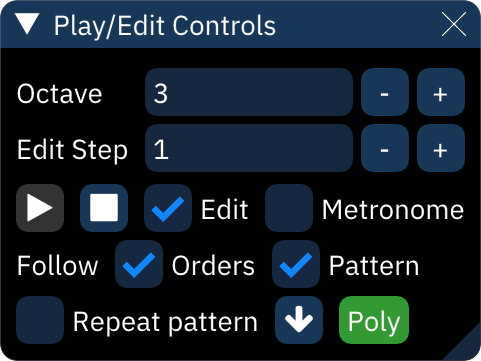
-  **Play**: plays from cursor position. |
| 6 |
-  **Stop**: stops all playback. |
| 7 |
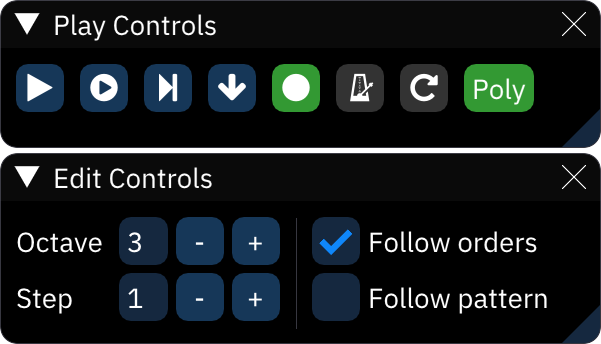
-  **Play from the beginning of this pattern**: plays from the start of current pattern. |
| 8 |
-  **Repeat from the beginning of this pattern**: repeats current pattern from its start. |
| 9 |
-  **Step one row**: plays only the row at cursor position and moves down one. |
| 10 |
-  **Edit**: toggles edit mode. when turned off, you won't be able to enter notes. |
| 11 |
-  **Metronome**: toggles the metronome, which only works during playback. |
| 12 |
-  **Repeat pattern**: toggles pattern repeat. during playback while this is on, the current pattern will play over and over instead of following the order list. |
| 13 |
- **Poly**: turns on polyphony for previewing notes. toggles to **Mono** for monophony (one note at a time only). |
| 14 |
- **Octave**: sets current input octave. |
| 15 |
- **Step**: sets edit step. if this is 1, entering a note or effect will move to the next row. if this is a larger number, rows will be skipped. if this is 0, the cursor will stay in place. |
| 16 |
- if clicked, Step becomes **Coarse**, which sets the number of rows moved with `PgUp`, `PgDn`, and related movement shortcuts. clicking again will revert it to Step. |
| 17 |
- **Follow orders**: if on, the selected order in the orders window will follow the song during playback. |
| 18 |
- **Follow pattern**: if on, the cursor will follow playback and the song will scroll by as it plays. |
| 19 |
|
| 20 |
## layouts |
| 21 |
|
| 22 |
the layout can be changed in Settings > Appearance to one of these: |
| 23 |
|
| 24 |
### classic |
| 25 |
|
| 26 |
 |
| 27 |
|
| 28 |
### compact |
| 29 |
|
| 30 |
 |
| 31 |
|
| 32 |
### compact (vertical) |
| 33 |
|
| 34 |
 |
| 35 |
|
| 36 |
### split |
| 37 |
|
| 38 |
 |