| 1 |
# orders |
| 2 |
|
| 3 |
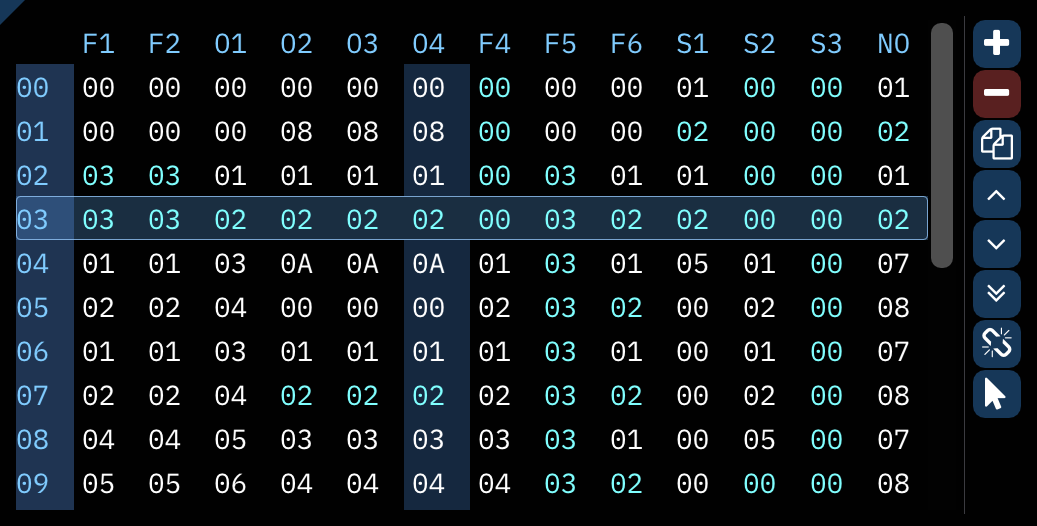
this window displays the order list. a spreadsheet that contains the order of patterns that will play, from top to bottom. |
| 4 |
|
| 5 |
 |
| 6 |
|
| 7 |
along the top are the available channels. their abbreviations can be set in the [channels window](../8-advanced/channels.md). the highlighted channel follows the channel the pattern view cursor is in. |
| 8 |
|
| 9 |
along the left are the order numbers. the highlighted row follows the order the pattern view cursor is in. |
| 10 |
|
| 11 |
each entry in the table is the pattern that will play during that order. these can be changed according to the order edit mode. |
| 12 |
|
| 13 |
hovering over a pattern number will pop up a tooltip showing the name of that pattern, if it has one. |
| 14 |
|
| 15 |
the buttons are: |
| 16 |
- **Add new order**: adds a new order. |
| 17 |
- **Remove order**: removes the currently selected order. |
| 18 |
- **Duplicate order**: adds a new order with patterns matching the selected one directly below it. |
| 19 |
- right-click to "deep clone"; this copies all patterns involved to new ones. |
| 20 |
- **Move order up**: swaps the selected order with the one above it. |
| 21 |
- **Move order down**: swaps the selected order with the one below it. |
| 22 |
- **Duplicate order at end of song**: same as "Duplicate order" except the new order is added at the bottom of the list. |
| 23 |
- **Order change mode**: selects how much of the order will change with an edit. only applies if "Order edit mode" is set to "Click to change". |
| 24 |
- **one**: only current channel's pattern will change. |
| 25 |
- **entire row**: all patterns in the order will change. |
| 26 |
- **Order edit mode**: selects the method of changing orders. |
| 27 |
- **Click to change**: a click will add one to the pattern number. a right-click will subtract one. |
| 28 |
- **Select and type (don't scroll)**: select a pattern number and type. |
| 29 |
- **Select and type (scroll horizontally)**: as above, but after entering two digits, the cursor moves to the next channel. |
| 30 |
- **Select and type (scroll vertically)**: as above, but after entering two digits, the cursor moves to the next order. |