| 1 |
# Furnace (chiptune tracker) |
| 2 |
|
| 3 |
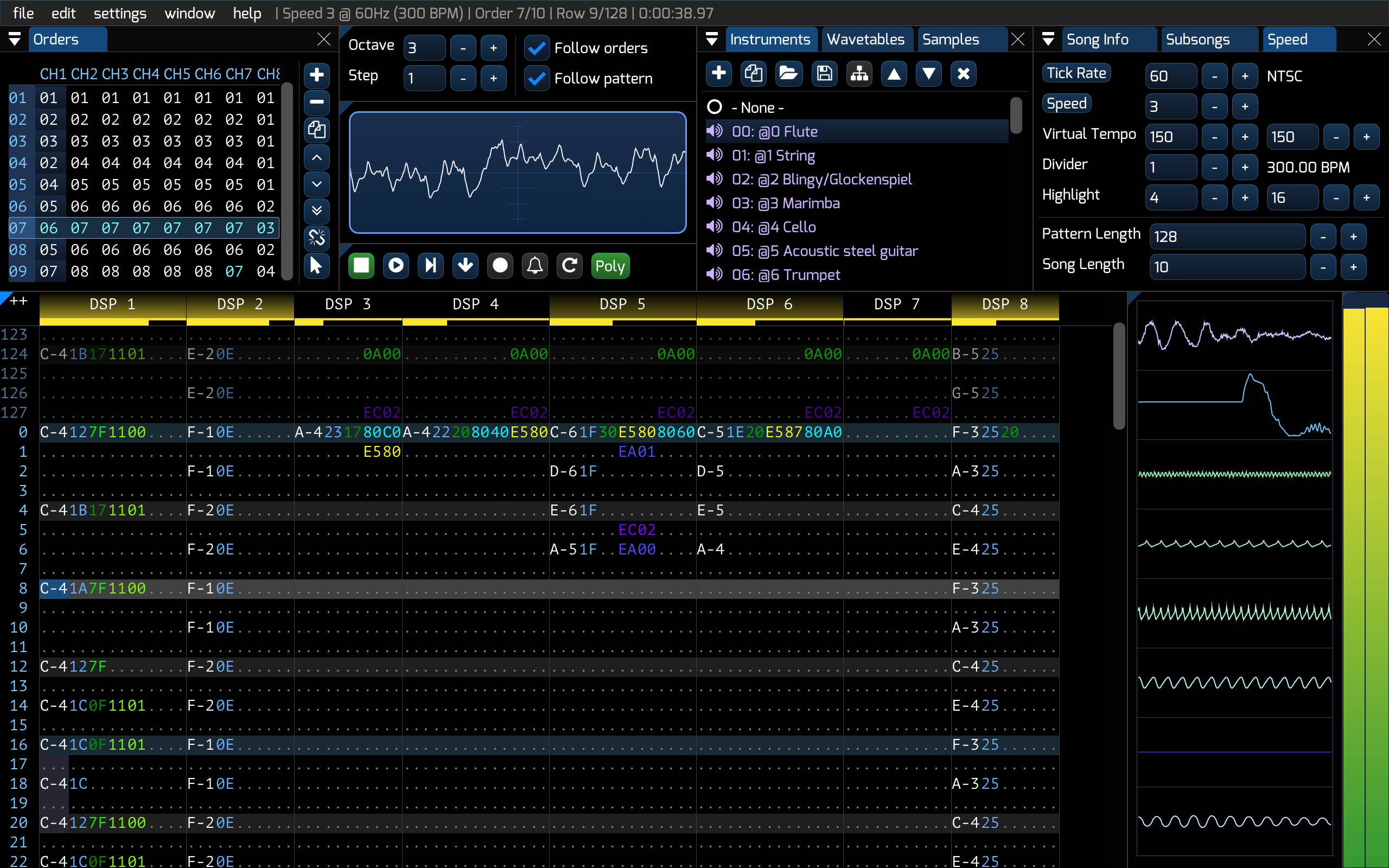 |
| 4 |
|
| 5 |
the biggest multi-system chiptune tracker ever made! |
| 6 |
|
| 7 |
[mini-site](https://tildearrow.org/furnace/) | [downloads](#downloads) | [installation](#installation) | [Unix/Linux packages](#packages) |
| 8 |
|
| 9 |
[documentation/discussion/help](#quick-references) | [developer info](#developer-info) |
| 10 |
|
| 11 |
--- |
| 12 |
## downloads |
| 13 |
|
| 14 |
check out the [Releases](https://github.com/tildearrow/furnace/releases) page. available for Windows, macOS and Linux. |
| 15 |
|
| 16 |
for other operating systems, you may [build the source](#developer-info). |
| 17 |
|
| 18 |
[see here](https://nightly.link/tildearrow/furnace/workflows/build/master) for the latest unstable build. |
| 19 |
|
| 20 |
## installation |
| 21 |
|
| 22 |
- **Windows:** extract the .zip into a new directory for Furnace (or one you've created before). make a shortcut for `furnace.exe` if you wish. |
| 23 |
- **macOS:** drag `Furnace` into the Applications directory (or the folder of your choice). drag everything else into a separate directory. |
| 24 |
- when opening Furnace for the first time, make sure to right-click the Furnace app icon and then select Open. |
| 25 |
- **Linux/other:** instructions should be similar to Windows, unless you decide to install using your package manager (see [Unix/Linux packages](#packages)). |
| 26 |
|
| 27 |
## features |
| 28 |
|
| 29 |
- a large selection of sound chips: |
| 30 |
- Yamaha FM chips: |
| 31 |
- YM2151 (OPM) |
| 32 |
- YM2203 (OPN) |
| 33 |
- YM2413 (OPLL) |
| 34 |
- YM2414 (OPZ) used in Yamaha TX81Z |
| 35 |
- YM2608 (OPNA) used in PC-98 |
| 36 |
- YM2610 (OPNB) used in Neo Geo |
| 37 |
- YM2610B (OPNB2) |
| 38 |
- YM2612 (OPN2) used in Sega Genesis and FM Towns |
| 39 |
- YM3526 (OPL) used in C64 Sound Expander |
| 40 |
- YM3812 (OPL2) |
| 41 |
- YMF262 (OPL3) with full 4-op support! |
| 42 |
- YMF278 (OPL4) including sample channels |
| 43 |
- Y8950 (OPL with ADPCM) |
| 44 |
- ESS ESFM (like OPL3 but with more features) |
| 45 |
- square wave chips: |
| 46 |
- AY-3-8910/YM2149(F) used in several computers and game consoles |
| 47 |
- Commodore VIC used in the VIC-20 |
| 48 |
- Microchip AY8930 |
| 49 |
- TI SN76489 used in Sega Master System, BBC Micro, and many others |
| 50 |
- PC Speaker |
| 51 |
- Philips SAA1099 used in SAM Coupé |
| 52 |
- OKI MSM5232 used in some arcade boards |
| 53 |
- sample chips: |
| 54 |
- SNES |
| 55 |
- Amiga |
| 56 |
- SegaPCM - all 16 channels |
| 57 |
- Capcom QSound |
| 58 |
- Yamaha YMZ280B (PCMD8) |
| 59 |
- Ricoh RF5C68 used in Sega CD and FM Towns |
| 60 |
- OKI MSM6258 and MSM6295 |
| 61 |
- Konami K007232 |
| 62 |
- Konami K053260 |
| 63 |
- Irem GA20 |
| 64 |
- Ensoniq ES5506 |
| 65 |
- Namco C140 |
| 66 |
- Namco C219 |
| 67 |
- wavetable chips: |
| 68 |
- HuC6280 used in PC Engine |
| 69 |
- Konami Bubble System WSG |
| 70 |
- Konami SCC/SCC+ |
| 71 |
- Namco arcade chips (WSG/C15/C30) |
| 72 |
- WonderSwan |
| 73 |
- Seta/Allumer X1-010 |
| 74 |
- Sharp SM8521 used in Tiger Game.com |
| 75 |
- NES (Ricoh 2A03/2A07), with additional expansion sound support: |
| 76 |
- Konami VRC6 |
| 77 |
- Konami VRC7 |
| 78 |
- MMC5 |
| 79 |
- Famicom Disk System |
| 80 |
- Sunsoft 5B |
| 81 |
- Namco 163 |
| 82 |
- Family Noraebang (OPLL) |
| 83 |
- SID (6581/8580) used in Commodore 64 |
| 84 |
- Mikey used in Atari Lynx |
| 85 |
- ZX Spectrum beeper |
| 86 |
- SFX-like engine |
| 87 |
- QuadTone engine |
| 88 |
- Pokémon Mini |
| 89 |
- Commodore PET |
| 90 |
- TED used in Commodore Plus/4 |
| 91 |
- Casio PV-1000 |
| 92 |
- TIA used in Atari 2600 |
| 93 |
- including software tuning engine (TIunA) |
| 94 |
- POKEY used in Atari 8-bit computers |
| 95 |
- **Game Boy** |
| 96 |
- including software envelopes (zombie mode) |
| 97 |
- Virtual Boy |
| 98 |
- Game Boy Advance |
| 99 |
- DMA (direct memory access) two channel mode |
| 100 |
- MinMod software driver by Natt Akuma |
| 101 |
- Nintendo DS |
| 102 |
- Watara Supervision |
| 103 |
- modern/fantasy: |
| 104 |
- Commander X16 VERA |
| 105 |
- tildearrow Sound Unit |
| 106 |
- PowerNoise |
| 107 |
- Bifurcator |
| 108 |
- SID2 |
| 109 |
- SID3 |
| 110 |
- Generic PCM DAC |
| 111 |
- mix and match sound chips! |
| 112 |
- over 200 ready to use presets from computers, game consoles and arcade boards... |
| 113 |
- ...or create your own presets - up to 32 chips or a total of 128 channels! |
| 114 |
- modular layout that you may adapt to your needs |
| 115 |
- DefleMask compatibility |
| 116 |
- loads .dmf modules from all versions (beta 1 to 1.2.0) |
| 117 |
- saves .dmf modules - both modern and legacy |
| 118 |
- Furnace doubles as a module downgrader |
| 119 |
- loads/saves .dmp instruments and .dmw wavetables as well |
| 120 |
- clean-room design (guesswork and ABX tests only, no decompilation involved) |
| 121 |
- some bug/quirk implementation for increased playback accuracy through compatibility flags |
| 122 |
- many export types: |
| 123 |
- VGM export |
| 124 |
- ZSM export for Commander X16 |
| 125 |
- TIunA export for Atari 2600 |
| 126 |
- SAP type R export for POKEY (playable by Altirra and [lzss-sap](https://github.com/dmsc/lzss-sap)) |
| 127 |
- audio file export - entire song, per chip or per channel |
| 128 |
- quality emulation cores (Nuked, MAME, SameBoy, Mednafen PCE, NSFplay, puNES, reSID, Stella, SAASound, vgsound_emu and ymfm) |
| 129 |
- wavetable synthesizer |
| 130 |
- available on wavetable chips |
| 131 |
- create complex sounds with ease - provide up to two wavetables, select an effect and let go! |
| 132 |
- MIDI input support |
| 133 |
- additional features: |
| 134 |
- FM macros! |
| 135 |
- negative octaves |
| 136 |
- advanced arp macros |
| 137 |
- arbitrary pitch samples |
| 138 |
- sample loop points |
| 139 |
- SSG envelopes and ADPCM-B in Neo Geo |
| 140 |
- pitchable OPLL drums |
| 141 |
- full duty/cutoff range in C64 |
| 142 |
- optional PCM channel in C64 |
| 143 |
- full 16-channel SegaPCM |
| 144 |
- ability to change tempo mid-song |
| 145 |
- decimal tempo/tick rate |
| 146 |
- multiple sub-songs in a module |
| 147 |
- per-channel oscilloscope with waveform centering |
| 148 |
- built-in sample editor |
| 149 |
- chip mixing settings |
| 150 |
- built-in visualizer in pattern view |
| 151 |
- open-source under GPLv2 or later. |
| 152 |
|
| 153 |
--- |
| 154 |
|
| 155 |
# quick references |
| 156 |
|
| 157 |
- **help**: |
| 158 |
- new to Furnace? check out the [quick start guide](doc/1-intro/quickstart.md). |
| 159 |
- [documentation](doc/README.md). |
| 160 |
- [frequently asked questions (FAQ)](doc/1-intro/faq.md). |
| 161 |
- **discussion**: see the [Discussions](https://github.com/tildearrow/furnace/discussions) section, or the [Discord](https://discord.gg/QhA26dXD23). |
| 162 |
- these are the only **official** discussion channels for Furnace. **any other places are not official and not managed by me (tildearrow).** |
| 163 |
- no, there isn't an official Furnace Facebook group. the one that seemingly exists isn't mine. |
| 164 |
|
| 165 |
## packages |
| 166 |
|
| 167 |
[](https://repology.org/project/furnace/versions) |
| 168 |
|
| 169 |
some people have provided packages for Unix/Unix-like distributions. here's a list. |
| 170 |
|
| 171 |
- **Flatpak**: yes! Furnace is now available on [Flathub](https://flathub.org/apps/org.tildearrow.furnace) thanks to ColinKinloch. |
| 172 |
- **Arch Linux**: [furnace](https://archlinux.org/packages/extra/x86_64/furnace/) is in the official repositories. |
| 173 |
- **Chimera Linux**: [furnace](https://pkgs.chimera-linux.org/package/current/contrib/x86_64/furnace) is in the contrib repository. |
| 174 |
- **FreeBSD**: [a package in ports](https://www.freshports.org/audio/furnace/) is available courtesy of ehaupt. |
| 175 |
- **Nix**: [package](https://search.nixos.org/packages?channel=unstable&show=furnace&from=0&size=50&sort=relevance&type=packages&query=furnace) thanks to OPNA2608. |
| 176 |
- **openSUSE**: [a package](https://software.opensuse.org/package/furnace) is available, courtesy of fpesari. |
| 177 |
- **Void Linux**: [furnace](https://github.com/void-linux/void-packages/tree/master/srcpkgs/furnace) is available in the official repository. |
| 178 |
|
| 179 |
--- |
| 180 |
# unstable builds |
| 181 |
|
| 182 |
[](https://github.com/tildearrow/furnace/actions/workflows/build.yml) |
| 183 |
|
| 184 |
if you can't download these artifacts (because GitHub requires you to be logged in), [go here](https://nightly.link/tildearrow/furnace/workflows/build/master) instead. |
| 185 |
|
| 186 |
# developer info |
| 187 |
|
| 188 |
the following section will teach you how to build Furnace from its source code. |
| 189 |
|
| 190 |
## dependencies |
| 191 |
|
| 192 |
these are the things you'll need to build Furnace: |
| 193 |
|
| 194 |
- CMake |
| 195 |
- Git (for cloning the repository) |
| 196 |
- a C/C++ compiler (e.g. Visual Studio or MinGW on Windows, Xcode (the command-line tools are enough) on macOS or GCC on Linux) |
| 197 |
|
| 198 |
read the sections below for information on how to set these up. |
| 199 |
|
| 200 |
## development environment setup (Windows) |
| 201 |
|
| 202 |
this little section will teach you how to get either Visual Studio or MinGW ready for building Furnace. |
| 203 |
|
| 204 |
### MinGW through MSYS2 |
| 205 |
|
| 206 |
I recommend you to use this because the compiler produces faster builds and it doesn't use a lot of disk space. |
| 207 |
there's some command line-fu in here, so I hope you're prepared. |
| 208 |
|
| 209 |
install it through [MSYS2](https://www.msys2.org/), a Linux-like environment for Windows. |
| 210 |
follow the guide **up to step 4**. **do NOT start MSYS2 from the installer** as this will start the wrong environment and prevent you from going further. |
| 211 |
|
| 212 |
MSYS2 provides a variety of environments, but we'll work with the MINGW64 one.<br/> |
| 213 |
these environments can be found in the Start menu, in a folder MSYS2 has created for you.<br/> |
| 214 |
don't "run MSYS2 now". go to the Start menu and launch MSYS2 with the MINGW64 environment (blue icon).<br/> |
| 215 |
**it is extremely important that you use this environment**. the one that MSYS2 starts with by default (UCRT64) is NOT suitable for this task and will NOT work. |
| 216 |
|
| 217 |
we'll install a couple packages, including GCC, CMake, Git and Ninja. |
| 218 |
type the following in the MSYS2 console, and then press Enter. |
| 219 |
|
| 220 |
``` |
| 221 |
pacman -S mingw-w64-x86_64-cmake mingw-w64-x86_64-ninja mingw-w64-x86_64-gcc git |
| 222 |
``` |
| 223 |
|
| 224 |
when prompted to, type Y and press Enter again. |
| 225 |
|
| 226 |
proceed to the "getting the source" section. |
| 227 |
|
| 228 |
if it says UCRT64 anywhere in the console, YOU ARE IN THE WRONG ENVIRONMENT! if so quit MSYS2 NOW and start the MINGW64 environment. |
| 229 |
|
| 230 |
### Visual Studio (the real one) |
| 231 |
|
| 232 |
if you are patient enough, can stand 50GB of stuff and want the Microsoft experience, you may install [Visual Studio](https://visualstudio.microsoft.com) (no, not "Code"... that's just a text editor with IDE features). it is an easy-to-use IDE and compiler that comes in both free and paid versions. |
| 233 |
|
| 234 |
the installer also lets you install Git and CMake. Visual Studio integrates nicely with these. |
| 235 |
however I recommend you install Git standalone so you can clone the repo correctly. |
| 236 |
|
| 237 |
## development environment setup (macOS) |
| 238 |
|
| 239 |
install the Xcode command line tools. open a Terminal and type: |
| 240 |
|
| 241 |
``` |
| 242 |
xcode-select --install |
| 243 |
``` |
| 244 |
|
| 245 |
if you would like to, and are able to use the App Store, feel free to get Xcode instead. |
| 246 |
|
| 247 |
## development environment setup (Linux/Unix-like) |
| 248 |
|
| 249 |
get GCC, Git and CMake through your package manager. |
| 250 |
|
| 251 |
you may also need the following dependencies: |
| 252 |
|
| 253 |
- libpulse |
| 254 |
- libx11 |
| 255 |
- libasound |
| 256 |
- libGL |
| 257 |
- JACK (optional) |
| 258 |
- any other libraries which may be used by SDL |
| 259 |
|
| 260 |
some Linux distributions (e.g. Ubuntu or openSUSE) will require you to install the `-dev`/`-devel` versions of these. |
| 261 |
|
| 262 |
having libintl is recommended for locale support, but if it isn't present, Furnace will use its own implementation. |
| 263 |
|
| 264 |
## getting the source |
| 265 |
|
| 266 |
type the following on a terminal/console: (make sure Git is installed) |
| 267 |
|
| 268 |
``` |
| 269 |
git clone --recursive https://github.com/tildearrow/furnace.git |
| 270 |
cd furnace |
| 271 |
``` |
| 272 |
|
| 273 |
(the `--recursive` parameter ensures submodules are fetched as well) |
| 274 |
|
| 275 |
**NOTE: do not download the project's source as a .zip or .tar.gz as these do not include the project's submodules which are necessary to proceed with building. please use Git instead as shown in this section.** |
| 276 |
|
| 277 |
## compilation |
| 278 |
|
| 279 |
### Windows using MSVC/Visual Studio |
| 280 |
|
| 281 |
if you've downloaded the entirety of Visual Studio, including the IDE: |
| 282 |
|
| 283 |
#### let Visual Studio do the work for you |
| 284 |
|
| 285 |
make sure you installed CMake through the Visual Studio installer. |
| 286 |
just open the CMake project and you're good to go. |
| 287 |
|
| 288 |
#### nah, leave it to me instead |
| 289 |
|
| 290 |
make sure CMake is installed. `cd` to the Furnace directory and then: |
| 291 |
|
| 292 |
``` |
| 293 |
mkdir build |
| 294 |
cd build |
| 295 |
cmake -G "Visual Studio 17 2022" .. |
| 296 |
``` |
| 297 |
|
| 298 |
then open the solution file in Visual Studio and build. |
| 299 |
|
| 300 |
### Windows using MSVC/Visual Studio (command line tools only) |
| 301 |
|
| 302 |
open a developer tools command prompt, and run CMake as described in the previous section. |
| 303 |
|
| 304 |
afterwards, build Furnace by using: |
| 305 |
|
| 306 |
``` |
| 307 |
msbuild ALL_BUILD.vcxproj |
| 308 |
``` |
| 309 |
|
| 310 |
### Windows using MinGW (through MSYS2) |
| 311 |
|
| 312 |
open the MSYS2 MINGW64 environment. `cd` to the Furnace directory and then do: |
| 313 |
|
| 314 |
``` |
| 315 |
mkdir build |
| 316 |
cd build |
| 317 |
cmake .. |
| 318 |
ninja |
| 319 |
``` |
| 320 |
|
| 321 |
### macOS, Linux and other Unix/Unix-like |
| 322 |
|
| 323 |
the process is straightforward. |
| 324 |
|
| 325 |
``` |
| 326 |
mkdir build |
| 327 |
cd build |
| 328 |
cmake .. |
| 329 |
make |
| 330 |
``` |
| 331 |
|
| 332 |
#### I like Xcode |
| 333 |
|
| 334 |
on macOS you may do the following instead: |
| 335 |
|
| 336 |
``` |
| 337 |
mkdir build |
| 338 |
cd build |
| 339 |
cmake -G Xcode .. |
| 340 |
``` |
| 341 |
|
| 342 |
...and then load the project on Xcode or type `xcodebuild`. |
| 343 |
|
| 344 |
### notes |
| 345 |
|
| 346 |
once you've created the build directory with `mkdir`, you don't have to do that again. just `cd` to it when you want to build Furnace. |
| 347 |
|
| 348 |
once you've run CMake successfully, you don't have to run it again every time you make a change. just run `make`, `ninja`, `xcodebuild` or `msbuild`. |
| 349 |
|
| 350 |
## CMake options |
| 351 |
|
| 352 |
to add an option from the command-line, add it before the two dots: `-D<NAME>=<VALUE>` |
| 353 |
Example: `cmake -DBUILD_GUI=OFF -DWARNINGS_ARE_ERRORS=ON ..` |
| 354 |
|
| 355 |
Available options: |
| 356 |
|
| 357 |
| Name |Default| Description |
| 358 |
| :---------------------------: | :---: | --------------------------------------------------------------------------------------------- |
| 359 |
| `BUILD_GUI` | `ON` | Build the tracker (disable to build only a headless player) |
| 360 |
| `WITH_LOCALE` | `ON` | Enable language support |
| 361 |
| `USE_RTMIDI` | `ON` | Build with MIDI support using RtMidi |
| 362 |
| `USE_SDL2` | `ON` | Build with SDL2 (required to build with GUI) |
| 363 |
| `USE_SNDFILE` | `ON` | Build with libsndfile (required in order to work with audio files) |
| 364 |
| `USE_BACKWARD` | `ON` | Use backward-cpp to print a backtrace on crash/abort |
| 365 |
| `USE_FREETYPE` | `OFF` | Build with FreeType support |
| 366 |
| `USE_MOMO` | auto¹ | Build a libintl implementation instead of using the system one |
| 367 |
| `WITH_JACK` | auto² | Whether to build with JACK support. Auto-detects if JACK is available |
| 368 |
| `WITH_PORTAUDIO` | `ON` | Whether to build with PortAudio. |
| 369 |
| `SYSTEM_FFTW` | `OFF` | Use a system-installed version of FFTW instead of the vendored one |
| 370 |
| `SYSTEM_FMT` | `OFF` | Use a system-installed version of fmt instead of the vendored one |
| 371 |
| `SYSTEM_LIBSNDFILE` | `OFF` | Use a system-installed version of libsndfile instead of the vendored one |
| 372 |
| `SYSTEM_RTMIDI` | `OFF` | Use a system-installed version of RtMidi instead of the vendored one |
| 373 |
| `SYSTEM_ZLIB` | `OFF` | Use a system-installed version of zlib instead of the vendored one |
| 374 |
| `SYSTEM_SDL2` | `OFF` | Use a system-installed version of SDL2 instead of the vendored one |
| 375 |
| `SYSTEM_FREETYPE` | `OFF` | Use a system-installed version of FreeType instead of the vendored one |
| 376 |
| `SUPPORT_XP` | `OFF` | Build a Windows XP-compatible binary |
| 377 |
| `WARNINGS_ARE_ERRORS` | `OFF`³| Whether warnings in furnace's C++ code should be treated as errors |
| 378 |
| `WITH_DEMOS` | `OFF` | Install demo songs on `make install` |
| 379 |
| `WITH_INSTRUMENTS` | `ON` | Install demo instruments on `make install` |
| 380 |
| `WITH_WAVETABLES` | `ON` | Install wavetables on `make install` |
| 381 |
| `SHOW_OPEN_ASSETS_MENU_ENTRY` | `OFF` | Show option to open built-in assets directory (on supported platforms) |
| 382 |
| `CONSOLE_SUBSYSTEM` | `OFF` | Build with subsystem set to Console on Windows |
| 383 |
| `FORCE_APPLE_BIN` | `OFF` | Enable installation of binaries (when doing `make install`) to PREFIX/bin on Apple platforms |
| 384 |
|
| 385 |
(¹) enabled by default if both libintl and setlocale aren't present (MSVC and Android), or on macOS |
| 386 |
|
| 387 |
(²) `ON` if system-installed JACK detected, otherwise `OFF` |
| 388 |
|
| 389 |
(³) but consider enabling this and reporting any errors that arise from it! |
| 390 |
|
| 391 |
## troubleshooting |
| 392 |
|
| 393 |
sometimes things go wrong and you can't proceed any further. |
| 394 |
|
| 395 |
this guide may help you in that case. |
| 396 |
|
| 397 |
### "command not found", "not a valid command", and similar |
| 398 |
|
| 399 |
either you forgot to install something, it's not in your PATH or **you are using the wrong environment**. |
| 400 |
|
| 401 |
#### compiler |
| 402 |
|
| 403 |
if building with the Visual Studio command line tools, make sure you have started the native tools command prompt. [Microsoft has a guide here](https://learn.microsoft.com/en-us/cpp/build/how-to-enable-a-64-bit-visual-cpp-toolset-on-the-command-line?view=msvc-170). |
| 404 |
|
| 405 |
|
| 406 |
if building with MinGW, make sure you have started the MSYS2 MINGW64 environment (not the UCRT64 one!). |
| 407 |
|
| 408 |
#### CMake or Git |
| 409 |
|
| 410 |
did you install these? |
| 411 |
|
| 412 |
if you installed them through Visual Studio or MinGW, you may have to set the environment as I described above. |
| 413 |
|
| 414 |
### CMake errors |
| 415 |
|
| 416 |
#### No source or binary directory provided |
| 417 |
|
| 418 |
the two dots after the `cmake` command are important. it tells CMake where the CMakeLists.txt file is at (two dots mean "parent directory", which makes sense since we are in the `build` directory inside the Furnace repo). |
| 419 |
|
| 420 |
read the compilation guide again. |
| 421 |
|
| 422 |
#### add\_subdirectory missing |
| 423 |
|
| 424 |
if it says something about a missing directory in `extern`, then either: |
| 425 |
|
| 426 |
1. you didn't set up submodules, or |
| 427 |
2. you downloaded the source as a .zip or .tar.gz. don't do this. |
| 428 |
|
| 429 |
if 1, you may run `git submodule update --init --recursive`. this will initialize submodules. |
| 430 |
|
| 431 |
if 2, clone this repo. |
| 432 |
|
| 433 |
#### NMake Makefiles |
| 434 |
|
| 435 |
if CMake says something about NMake, then it means it couldn't find Visual Studio, or it didn't feel like finding Visual Studio. |
| 436 |
|
| 437 |
try running CMake again but tell it to use the Visual Studio generator (`-G "Visual Studio 17 2022"`). type `cmake --help` for a list of generators. |
| 438 |
|
| 439 |
#### CMake was unable to find a build program |
| 440 |
|
| 441 |
if you are on Windows, don't run CMake standalone unless you have Visual Studio or a compiler installed. |
| 442 |
|
| 443 |
if you are in the MSYS2 MINGW64 environment, make sure you installed `mingw-w64-x86_64-cmake` instead of `cmake`. restart the environment after doing so. |
| 444 |
if you are not, exit and start the MINGW64 environment (not the UCRT64 one!). read the guide! |
| 445 |
|
| 446 |
if you are not using Windows then you probably haven't set your development environment up correctly. read the guide again. |
| 447 |
|
| 448 |
#### Does not match the generator used previously |
| 449 |
|
| 450 |
yeah I know you probably hit this error right now. delete the build directory (or just CMakeCache.txt and CMakeFiles) and try again. |
| 451 |
|
| 452 |
#### The C compiler is not able to compile a simple test program |
| 453 |
|
| 454 |
something is really wrong, or you are trying to use a compiler outside of an environment. |
| 455 |
launch the appropriate environment and try again. |
| 456 |
|
| 457 |
if you are using MSYS2, make sure you have launched the MINGW64 environment. do **not** install `gcc`! instead, install `mingw-w64-x86_64-gcc`. |
| 458 |
|
| 459 |
#### ALSA API requested but no ALSA dev libraries found |
| 460 |
|
| 461 |
if you are on Windows, using MSYS2, then you most likely disregarded the guide and are attempting to build in the UCRT64 environment. don't do that! |
| 462 |
|
| 463 |
get out of the UCRT64 environment and start the MINGW64 one. |
| 464 |
|
| 465 |
however, if you already are in the MINGW64 environment, then make sure you installed `mingw-w64-x86_64-cmake` instead of `cmake`. restart the environment after doing so. |
| 466 |
|
| 467 |
otherwise, install the ALSA development libraries (libasound-dev or something like that). |
| 468 |
|
| 469 |
also make sure you've installed the rest of dependencies so you don't hit one of the errors below... |
| 470 |
|
| 471 |
#### Compatibility with CMake < 3.5 has been removed from CMake |
| 472 |
|
| 473 |
immediately report this issue. |
| 474 |
patch out every CMakeLists.txt and change the cmake\_minimum\_required() to comply for now. |
| 475 |
|
| 476 |
### Furnace errors |
| 477 |
|
| 478 |
#### The code execution cannot proceed because libintl-8.dll was not found |
| 479 |
|
| 480 |
this is because sadly libintl (what we use for language support) only exists as a dynamic library (a .dll) on Windows. run CMake again with `-DUSE_MOMO=ON` and then build to fix it. |
| 481 |
|
| 482 |
#### x11 not available/SDL not configured with OpenGL/GLX support |
| 483 |
|
| 484 |
make sure you have installed the Mesa and X11 development libraries. use your package manager to do so. |
| 485 |
re-build Furnace afterwards. |
| 486 |
|
| 487 |
## console usage |
| 488 |
|
| 489 |
(note: if on Windows, type `furnace.exe` instead, or `Debug\furnace.exe` on MSVC) |
| 490 |
|
| 491 |
``` |
| 492 |
./furnace |
| 493 |
``` |
| 494 |
|
| 495 |
this opens the program. |
| 496 |
|
| 497 |
``` |
| 498 |
./furnace -console <file> |
| 499 |
``` |
| 500 |
|
| 501 |
this will play a compatible file. |
| 502 |
|
| 503 |
``` |
| 504 |
./furnace -console -view commands <file> |
| 505 |
``` |
| 506 |
|
| 507 |
this will play a compatible file and enable the commands view. |
| 508 |
|
| 509 |
**note that console mode may not work correctly on Windows. you may have to quit using the Task Manager.** |
| 510 |
|
| 511 |
--- |
| 512 |
|
| 513 |
# footnotes |
| 514 |
|
| 515 |
copyright (C) 2021-2025 tildearrow and contributors. |
| 516 |
|
| 517 |
This program is free software; you can redistribute it and/or modify it under the terms of the GNU General Public License as published by the Free Software Foundation; either version 2 of the License, or (at your option) any later version. |
| 518 |
|
| 519 |
This program is distributed in the hope that it will be useful, but WITHOUT ANY WARRANTY; without even the implied warranty of MERCHANTABILITY or FITNESS FOR A PARTICULAR PURPOSE. See the GNU General Public License for more details. |
| 520 |
|
| 521 |
You should have received a copy of the GNU General Public License along with this program; if not, write to the Free Software Foundation, Inc., 51 Franklin Street, Fifth Floor, Boston, MA 02110-1301 USA. |
| 522 |
|
| 523 |
|
| 524 |
Furnace is NOT affiliated with Delek or DefleMask in any form, regardless of its ability to load and save the .dmf, .dmp and .dmw file formats. |
| 525 |
additionally, Furnace does not intend to replace DefleMask, nor any other program. |