| 1 |
# Communication layer for the new WebUI |
| 2 |
|
| 3 |
** DESIGN STAGE** |
| 4 |
|
| 5 |
## Overview |
| 6 |
|
| 7 |
Currently, the new WebUI uses dummy data to simulate the data being retrieved or modified, as a temporal |
| 8 |
solution to help the development of the UI components. As the Front End is more consolidated now, it |
| 9 |
becomes evident that we need to start using real data in the application to get the full range of features, |
| 10 |
testing, and a more realistic feel. |
| 11 |
|
| 12 |
The communication layer is used to allow the new webUI to execute API commands and perform CRUD |
| 13 |
operations (Create, Read, Update, and Delete). These operations will manage the data from the |
| 14 |
underlying IPA server, and hand then over back to the WebUI. |
| 15 |
|
| 16 |
## Use Cases |
| 17 |
|
| 18 |
The communication layer is necessary to provide users a way to access and manage API server data |
| 19 |
from the new WebUI, thus replicating the same behavior as in the old WebUI. |
| 20 |
|
| 21 |
## General considerations |
| 22 |
|
| 23 |
### React in a nutshell |
| 24 |
|
| 25 |
The new WebUI uses React in the Front End side to render the UI elements through components. Those |
| 26 |
are independent and reusable bits of code that serve the same purpose as JavaScript functions, but work |
| 27 |
in isolation and return HTML through JSX. In the context of the WebUI, a component can refer to a specific |
| 28 |
page (e.g., 'Active users'), a reusable layout for the UI, or any bit of isolated functionality. Components |
| 29 |
can be functional or class-based (being the first one the most extended type to use nowadays) and |
| 30 |
can consume other components to enhance and expand its functionality. |
| 31 |
|
| 32 |
Inside the components, it is possible to manage different properties by using the |
| 33 |
[React Hooks](https://react.dev/reference/react): functions that let you "hook into" React `state` and |
| 34 |
lifecycle features from function components. All hooks start with the reserved prefix `use` and it is |
| 35 |
possible to use already-built hooks and create custom ones. A very useful hook to define and update |
| 36 |
states in components (the ones that will manage the internal "variables") is `useState`. Also, the |
| 37 |
states can be shared to other components to use the same value in different contexts of functionality. |
| 38 |
There are two ways of propagating states: |
| 39 |
|
| 40 |
- Via `props`: The most common way to do it. The `prop` is passed from the parent component to the children |
| 41 |
as property in a JSX tag. Due to the limited reach of this method, this can can be inconvenient if you |
| 42 |
have to pass the props through many components that will not use it. More information about this approach |
| 43 |
[here](https://beta.reactjs.org/learn/passing-props-to-a-component). |
| 44 |
- By using other tools, such as [Context](https://beta.reactjs.org/learn/passing-data-deeply-with-context) |
| 45 |
or [Redux Toolkit](https://redux-toolkit.js.org/). These allow sharing data deeply without passing explicitely |
| 46 |
information through `props`, making it globally accessible from any component. The **new WebUI is using Redux |
| 47 |
Toolkit** because it provides a set of extra functionality and tools that Context does not have (see the |
| 48 |
'Differences between Redux Toolkit and Context' section). |
| 49 |
|
| 50 |
### Redux Toolkit |
| 51 |
|
| 52 |
[Redux Toolkit](https://redux-toolkit.js.org/) manages the "global" state logic through the `store`, a |
| 53 |
file that contains the different `reducers` (`slices` of code where a specific subset of global variables can |
| 54 |
be defined, initialized, and managed). When a `reducer` is created, it has to be referenced in the `store` so |
| 55 |
that any component in the project can use it. |
| 56 |
|
| 57 |
### Differences between Redux Toolkit and Context |
| 58 |
|
| 59 |
- Integration with React applications: Context is a light-weight solution that ships with React while |
| 60 |
Redux toolkit is an external package that requires additional installation, driving up the final bundle size. |
| 61 |
- Setup: Context requires [minimal setup](https://react.dev/learn/passing-data-deeply-with-context) |
| 62 |
(create the `Context` and use it via `useContext` hook). Redux Toolkit requires |
| 63 |
[more steps](https://redux-toolkit.js.org/tutorials/quick-start#usage-summary) to integrate it with |
| 64 |
a React application (create a `store`, provide it to React parent component, create a `slice`, add its |
| 65 |
`reducers` to the `store`, and use them from any component via hooks). |
| 66 |
- Expand the functionality: Adding new contexts will require to create them from scratch. With Redux Toolkit is easier |
| 67 |
to add new data or actions to the same `slice` after the initial setup (for new `slices`, those just need to be |
| 68 |
created and added into the `store`). |
| 69 |
- Mutability of the data: Context works well to manage static data that is not refreshed or updated very often, |
| 70 |
while Redux Toolkit works well with both static and dynamic data. |
| 71 |
- Maintainability: Context is normally aimed for small and simple applications. Redux Toolkit provides better support |
| 72 |
for troubleshooting and testing large and complex applications. |
| 73 |
- Ease of development: It will entirely depend on what is being implemented. Building an app with global state |
| 74 |
management will require similar lines of code independently whether Redux Toolkit or Context has been used (both require to |
| 75 |
subscribe to the state in order to re-render the components and both require a place to manage the state). The same |
| 76 |
applies when it comes to share states with nested components. |
| 77 |
- Debugging: Is harder for Context to debug highly nested React component structures (even when using the Dev Tool), |
| 78 |
while Redux can rely on the [Redux Dev Tools](https://github.com/reduxjs/redux-devtools/tree/main/extension) |
| 79 |
extension to simplify the process. |
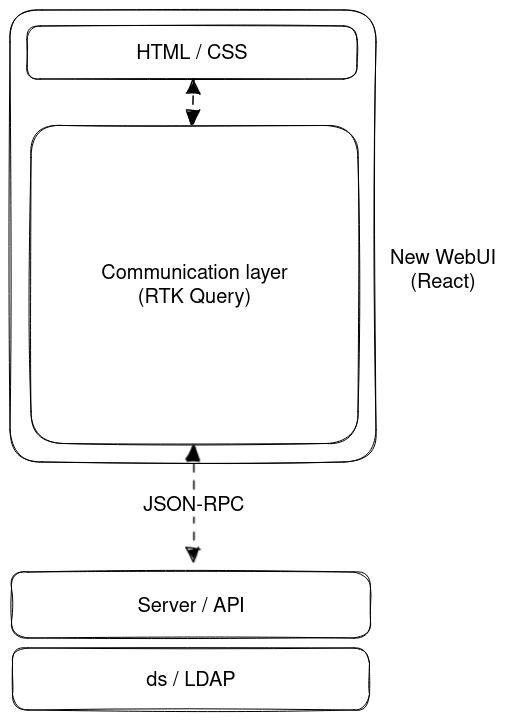
| 80 |
- Included tools: Context only provides the basic functionality and nothing else. Redux Toolkit includes some |
| 81 |
[wrappers](https://redux-toolkit.js.org/introduction/getting-started#whats-included) to make it easier to |
| 82 |
configure, as well as the [RTK Query](https://redux-toolkit.js.org/introduction/getting-started#rtk-query) optional |
| 83 |
addon. |
| 84 |
|
| 85 |
### IPA API |
| 86 |
|
| 87 |
FreeIPA provides an API that can be accessed through Python or by using the `ipa <command>` from enrolled IPA |
| 88 |
clients, allowing users to interact with FreeIPA programatically and develop custom tools to respond to specific |
| 89 |
needs not covered by the main interfaces. |
| 90 |
|
| 91 |
But it is also possible to perform operations from other frameworks or non-IPA clients. The current WebUI uses |
| 92 |
the [API commands](https://freeipa.readthedocs.io/en/latest/api/commands.html) and issues JSON-RPC requests to |
| 93 |
the server. After authenticating, the requests need to be posted to the `https://<HOST-NAME>/ipa/session/json` |
| 94 |
endpoint and pass the method (corresponding to a given command) along with the parameters. |
| 95 |
|
| 96 |
Example: Request to retrieve all user IDs by using the `"user_find"` method: |
| 97 |
|
| 98 |
```bash |
| 99 |
curl 'https://<HOST-NAME>/ipa/session/json' \ |
| 100 |
-H 'Accept: application/json, text/javascript, */*; q=0.01' \ |
| 101 |
-H 'Accept-Language: en-US,en;q=0.9' \ |
| 102 |
-H 'Cache-Control: no-cache' \ |
| 103 |
-H 'Connection: keep-alive' \ |
| 104 |
-H 'Content-Type: application/json' \ |
| 105 |
-H 'Cookie: ipa_session=<MY-COOKIE> \ |
| 106 |
-H 'Origin: https://<HOST-NAME>' \ |
| 107 |
-H 'Pragma: no-cache' \ |
| 108 |
-H 'Referer: https://<HOST-NAME>/ipa/ui/' \ |
| 109 |
-H 'Sec-Fetch-Dest: empty' \ |
| 110 |
-H 'Sec-Fetch-Mode: cors' \ |
| 111 |
-H 'Sec-Fetch-Site: same-origin' \ |
| 112 |
-H 'User-Agent: Mozilla/5.0 (X11; Linux x86_64) AppleWebKit/537.36 (KHTML, like Gecko) Chrome/111.0.0.0 Safari/537.36' \ |
| 113 |
-H 'X-Requested-With: XMLHttpRequest' \ |
| 114 |
-H 'sec-ch-ua: "Google Chrome";v="111", "Not(A:Brand";v="8", "Chromium";v="111"' \ |
| 115 |
-H 'sec-ch-ua-mobile: ?0' \ |
| 116 |
-H 'sec-ch-ua-platform: "Linux"' \ |
| 117 |
--data-raw '{"method":"user_find","params":[[""],{"pkey_only":true,"sizelimit":0,"version":"2.251"}]}' \ |
| 118 |
--compressed \ |
| 119 |
--insecure |
| 120 |
``` |
| 121 |
|
| 122 |
Response: |
| 123 |
|
| 124 |
```json |
| 125 |
{ |
| 126 |
"result": { |
| 127 |
"result": [ |
| 128 |
{ |
| 129 |
"uid": ["admin"], |
| 130 |
"dn": "uid=admin,cn=users,cn=accounts,dc=ipa,dc=demo" |
| 131 |
}, |
| 132 |
{ |
| 133 |
"uid": ["bwayne"], |
| 134 |
"dn": "uid=bwayne,cn=users,cn=accounts,dc=ipa,dc=demo" |
| 135 |
}, |
| 136 |
{ |
| 137 |
"uid": ["hqueen"], |
| 138 |
"dn": "uid=hqueen,cn=users,cn=accounts,dc=ipa,dc=demo" |
| 139 |
}, |
| 140 |
{ "uid": ["jdoe"], "dn": "uid=jdoe,cn=users,cn=accounts,dc=ipa,dc=demo" }, |
| 141 |
{ "uid": ["sman"], "dn": "uid=sman,cn=users,cn=accounts,dc=ipa,dc=demo" } |
| 142 |
], |
| 143 |
"count": 4, |
| 144 |
"truncated": false, |
| 145 |
"summary": "4 users matched" |
| 146 |
}, |
| 147 |
"error": null, |
| 148 |
"id": null, |
| 149 |
"principal": "[email protected]", |
| 150 |
"version": "4.9.11" |
| 151 |
} |
| 152 |
``` |
| 153 |
|
| 154 |
## Design |
| 155 |
|
| 156 |
 |
| 157 |
|
| 158 |
The main idea around the communication layer is to connect the WebUI and the IPA server by using |
| 159 |
the API commands. This allows managing data from the server by using the WebUI: |
| 160 |
|
| 161 |
- By accesing specific pages to retrieve data. |
| 162 |
- By using the action or secondary buttons to update data. |
| 163 |
|
| 164 |
For this reason, these API commands need to be consumed by React through a compatible library. |
| 165 |
More details of the proposed solution are given in the 'Implementation' section. |
| 166 |
|
| 167 |
As the new WebUI will be an independent package (`freeipa-webui`) that could be installed alongside |
| 168 |
the old WebUI, is still TBD the way this will be integrated into FreeIPA (either before running the |
| 169 |
`ipa-server-install` or on an already deployed server). |
| 170 |
|
| 171 |
## Implementation |
| 172 |
|
| 173 |
As the new WebUI is using React as Front End framework alongside with TypeScript, it is important to use |
| 174 |
a compatible library that will allow to make API calls by using the command methods, similarly as the |
| 175 |
current WebUI does. Also, since the API is using an RPC-based architecture, the number of possibilities |
| 176 |
is considerably reduced compared to other architectures, such as REST. |
| 177 |
|
| 178 |
A good option to consider for the development of the communication layer is the |
| 179 |
[RTK Query library](https://redux-toolkit.js.org/rtk-query/overview). This is an optional addon included |
| 180 |
in the [Redux Toolkit](https://redux-toolkit.js.org/) package, designed to simplify common cases for loading |
| 181 |
data in web applications and provide data caching. It allows to define a set of endpoints to retrieve data |
| 182 |
from a given API and transform the given response with a specific configuration or data type. Compared to |
| 183 |
[other React tools](https://redux-toolkit.js.org/rtk-query/comparison#comparing-feature-sets), this is a very |
| 184 |
versatile one and support any type of protocol. |
| 185 |
|
| 186 |
As the IPA API uses JSON-RPC, all the API calls will point directly to the `ipa/session/json` URL and the API |
| 187 |
methods and parameters will be passed as part of the body call. |
| 188 |
|
| 189 |
Example for single commands (using RTK Query): |
| 190 |
|
| 191 |
```ts |
| 192 |
export interface Command { |
| 193 |
method: string; |
| 194 |
params: any[]; |
| 195 |
} |
| 196 |
|
| 197 |
const getCommand = (commandData: Command) => { |
| 198 |
const payloadWithParams = { |
| 199 |
url: "ipa/session/json", |
| 200 |
method: "POST", |
| 201 |
body: { |
| 202 |
method: commandData.method, |
| 203 |
params: commandData.params, |
| 204 |
}, |
| 205 |
}; |
| 206 |
return payloadWithParams; |
| 207 |
}; |
| 208 |
``` |
| 209 |
|
| 210 |
Example for batch commands (using RTK Query): |
| 211 |
|
| 212 |
```ts |
| 213 |
const getBatchCommand = (commandData: Command[]) => { |
| 214 |
const payloadBatchParams = { |
| 215 |
url: "ipa/session/json", |
| 216 |
method: "POST", |
| 217 |
body: { |
| 218 |
method: "batch", |
| 219 |
params: [ |
| 220 |
commandData.map((cmd) => cmd), |
| 221 |
{ |
| 222 |
version: "2.251", // This could be taken from global settings |
| 223 |
}, |
| 224 |
], |
| 225 |
}, |
| 226 |
}; |
| 227 |
return payloadBatchParams; |
| 228 |
}; |
| 229 |
``` |
| 230 |
|
| 231 |
These definitions are used in the `createApi` function that will define the entrypoints to the calls |
| 232 |
([usage](https://redux-toolkit.js.org/rtk-query/api/createApi)): |
| 233 |
|
| 234 |
```ts |
| 235 |
export const api = createApi({ |
| 236 |
baseQuery: fetchBaseQuery({ baseUrl: "/" }), // This could be taken from global settings |
| 237 |
endpoints: (build) => ({ |
| 238 |
simpleCommand: build.query<RPCResponse<object>, Command | void>({ |
| 239 |
query: (payloadData: Command) => getCommand(payloadData), |
| 240 |
}), |
| 241 |
commandWithParams: build.mutation<RPCResponse2<object>, Command>({ |
| 242 |
query: (payloadData: Command) => getCommand(payloadData), |
| 243 |
}), |
| 244 |
batchCommand: build.query<RPCResponse2<object>, Command[] | void>({ |
| 245 |
query: (payloadData: Command[]) => getBatchCommand(payloadData), |
| 246 |
}), |
| 247 |
}), |
| 248 |
}); |
| 249 |
``` |
| 250 |
|
| 251 |
After the endpoints are defined, those should be exported as hooks using the `use-` prefix |
| 252 |
and the type of endpoint as suffix (`Query` | `Mutation`). The main difference between these |
| 253 |
two types is that the [Queries](https://redux-toolkit.js.org/rtk-query/usage/queries) are |
| 254 |
normally meant for data retrieval and should be used inside the main component function only. |
| 255 |
The [Mutations](https://redux-toolkit.js.org/rtk-query/usage/mutations) are used for updating |
| 256 |
the data and can be called inside of a inner function as a side-effect (e.g., when clicking |
| 257 |
the 'Add' button inside of the `addUserHandler()` function). |
| 258 |
|
| 259 |
```ts |
| 260 |
export const { |
| 261 |
useSimpleCommandQuery, |
| 262 |
useCommandWithParamsMutation, |
| 263 |
useBatchCommandQuery, |
| 264 |
} = api; |
| 265 |
``` |
| 266 |
|
| 267 |
Finally, the already-defined endpoints can be consumed as hooks from the components that |
| 268 |
refers to a specific page (e.g., The active users' list will be retrieved via API call |
| 269 |
from the `ActiveUsers` component, that refers to the 'Active users' base page). This data |
| 270 |
will be page-specific and will be rendered each time the page components are initialized. |
| 271 |
|
| 272 |
```ts |
| 273 |
// Retrieve all uids |
| 274 |
// 1. Preparing the call data |
| 275 |
const payloadDataUids: Command = { |
| 276 |
method: "user_find", |
| 277 |
params: [ |
| 278 |
[], |
| 279 |
{ |
| 280 |
pkey_only: true, |
| 281 |
sizelimit: 0, |
| 282 |
version: "2.251", |
| 283 |
}, |
| 284 |
], |
| 285 |
}; |
| 286 |
|
| 287 |
// 2. Making the call (hook) |
| 288 |
const { |
| 289 |
data: userIdsData, |
| 290 |
error: uidsError, |
| 291 |
isLoading: areUidsLoading, |
| 292 |
} = useSimpleCommandQuery(payloadDataUids); |
| 293 |
``` |
| 294 |
|
| 295 |
At this point, the response data will be stored in `userIdsData` as a JavaScript Object, ready to be used. |
| 296 |
If there was an error making the API call, the error data will be stored in `uidsError`. To manage the |
| 297 |
state of the asynchronous call, `areUidsLoading` provides a boolean to determine whether the call has |
| 298 |
finished or not. This is very useful to tracking loading state in order to show UI elements such as |
| 299 |
[Spinners](https://www.patternfly.org/v4/components/spinner). |
| 300 |
|
| 301 |
After getting a response data from a Query call, if this contains full information about a |
| 302 |
specific entity (e.g., User, Host, Service, etc), there is a possiblity to store that information |
| 303 |
in a Redux Toolkit `slice`. This has the benefit of greatly reducing the number of API calls |
| 304 |
to get the same data and allows it to be cached and accessible by any component of the application. |
| 305 |
However, this stored data must be updated (retrieved again and written to the `slice`) each time a |
| 306 |
list Mutation is made or some parameter is changed (e.g., a new user is added, a specific field is |
| 307 |
modified, a host is removed, etc.). |
| 308 |
|
| 309 |
## Feature Management |
| 310 |
|
| 311 |
### UI |
| 312 |
|
| 313 |
The feature will be used in the WebUI only. |
| 314 |
|
| 315 |
### CLI |
| 316 |
|
| 317 |
N/A |
| 318 |
|
| 319 |
### Configuration |
| 320 |
|
| 321 |
N/A |
| 322 |
|
| 323 |
## Upgrade |
| 324 |
|
| 325 |
The Communication Layer will depend on the RTK Query library |
| 326 |
[releases](https://github.com/reduxjs/redux-toolkit/releases), so regular checks to the latests |
| 327 |
versions will be needed. This could be done by adding a job inside the Github CI that keeps the library |
| 328 |
updated. |
| 329 |
|
| 330 |
For those new components that require retrieving or managing information from the API (as long as |
| 331 |
there is a command available), one of the already defined hooks can be used in the new component. |
| 332 |
In case the response value differs from the existing ones (see 'Troubleshooting and debugging' section), |
| 333 |
it will be necessary to define a new data type and a new entrypoint as well. |
| 334 |
|
| 335 |
## Test plan |
| 336 |
|
| 337 |
Existing CI tests will be rewritten for the whole WebUI to match new React structure. TBD. |
| 338 |
|
| 339 |
## Troubleshooting and debugging |
| 340 |
|
| 341 |
The information related to API call errors should be given by the `error` variable when invoking |
| 342 |
the hook. Example: |
| 343 |
|
| 344 |
```ts |
| 345 |
const { data, error: myError, isLoading } = useMyEndpointQuery(myPayloadData); |
| 346 |
// `myError` contains the error message |
| 347 |
``` |
| 348 |
|
| 349 |
Other errors can be related to the specific response data type. When defining the endpoints, the |
| 350 |
response type should be explicitely specified (as TypeScript requires). In terms of structure, |
| 351 |
there are two types of response, depending on whether the call is against a single command or a batch: |
| 352 |
|
| 353 |
```ts |
| 354 |
// Single command - Response |
| 355 |
// - Has 'result' > 'result' structure |
| 356 |
interface RPCResponse<ResultType> { |
| 357 |
error: string; |
| 358 |
id: string; |
| 359 |
principal: string; |
| 360 |
version: string; |
| 361 |
result: { |
| 362 |
result: ResultType; |
| 363 |
count: number; |
| 364 |
truncated: boolean; |
| 365 |
summary: string; |
| 366 |
}; |
| 367 |
} |
| 368 |
|
| 369 |
// Batch - Response |
| 370 |
// - Has 'result' > 'results' > 'result' structure |
| 371 |
// - More data under 'result' |
| 372 |
interface RPCResponse2<ResultType> { |
| 373 |
error: string; |
| 374 |
id: string; |
| 375 |
principal: string; |
| 376 |
version: string; |
| 377 |
result: { |
| 378 |
count: number; |
| 379 |
results: { |
| 380 |
result: ResultType; |
| 381 |
truncated: boolean; |
| 382 |
summary: string; |
| 383 |
}; |
| 384 |
}; |
| 385 |
} |
| 386 |
``` |