| 1 |
# Getting Started |
| 2 |
|
| 3 |
## Creating an Application |
| 4 |
|
| 5 |
Typical usage will begin by creating a [`Application`][app_model.Application] |
| 6 |
object. |
| 7 |
|
| 8 |
```python |
| 9 |
from app_model import Application |
| 10 |
|
| 11 |
my_app = Application('my-app') |
| 12 |
``` |
| 13 |
|
| 14 |
## Registering Actions |
| 15 |
|
| 16 |
Most applications will have some number of actions that can be invoked by the |
| 17 |
user. Actions are typically callable objects that perform some operation, such |
| 18 |
as "open a file", "save a file", "copy", "paste", etc. |
| 19 |
These actions will usually be exposed in the application's menus and |
| 20 |
toolbars, and will usually have associated keybindings. Sometimes actions |
| 21 |
hold state, such as "toggle word wrap" or "toggle line numbers". |
| 22 |
|
| 23 |
`app-model` provides a high level [`Action`][app_model.Action] object that |
| 24 |
comprises a pointer to a callable object, along with placement in menus, keybindings, |
| 25 |
and additional metadata like title, icons, tooltips, etc... |
| 26 |
|
| 27 |
```python |
| 28 |
from app_model.types import Action, KeyBindingRule, KeyCode, KeyMod, MenuRule |
| 29 |
|
| 30 |
def open_file(): |
| 31 |
print('open file!') |
| 32 |
|
| 33 |
def close_window(): |
| 34 |
print('close window!') |
| 35 |
|
| 36 |
ACTIONS: list[Action] = [ |
| 37 |
Action( |
| 38 |
id='open', |
| 39 |
title="Open", |
| 40 |
icon="fa6-solid:folder-open", |
| 41 |
callback=open_file, |
| 42 |
menus=['File'], |
| 43 |
keybindings=[KeyBindingRule(primary=KeyMod.CtrlCmd | KeyCode.KeyO)], |
| 44 |
), |
| 45 |
Action( |
| 46 |
id='close', |
| 47 |
title="Close", |
| 48 |
icon="fa-solid:window-close", |
| 49 |
callback=close_window, |
| 50 |
menus=['File'], |
| 51 |
keybindings=[KeyBindingRule(primary=KeyMod.CtrlCmd | KeyCode.KeyW)], |
| 52 |
), |
| 53 |
# ... |
| 54 |
] |
| 55 |
``` |
| 56 |
|
| 57 |
Actions are registered with the application using the |
| 58 |
[`Application.register_action()`][app_model.Application.register_action] method. |
| 59 |
|
| 60 |
```python |
| 61 |
for action in ACTIONS: |
| 62 |
my_app.register_action(action) |
| 63 |
``` |
| 64 |
|
| 65 |
## Registries |
| 66 |
|
| 67 |
The application maintains three internal registries. |
| 68 |
|
| 69 |
1. `Application.commands` is an instance of |
| 70 |
[`CommandsRegistry`][app_model.registries.CommandsRegistry]. It maintains |
| 71 |
all of the commands (the actual callable object) that have been registered with |
| 72 |
the application. |
| 73 |
2. `Application.menus` is an instance of |
| 74 |
[`MenusRegistry`][app_model.registries.MenusRegistry]. It maintains all of |
| 75 |
the menus and submenu items that have been registered with the application. |
| 76 |
3. `Application.keybindings` is an instance of |
| 77 |
[`KeyBindingsRegistry`][app_model.registries.KeyBindingsRegistry]. It maintains |
| 78 |
an association between a [KeyBinding][app_model.types.KeyBinding] and a command |
| 79 |
id in the `CommandsRegistry`. |
| 80 |
|
| 81 |
!!! Note |
| 82 |
Calling [`Application.register_action`][app_model.Application.register_action] with a single |
| 83 |
[`Action`][app_model.Action] object is just a convenience around independently registering |
| 84 |
objects with each of the registries using: |
| 85 |
|
| 86 |
- [CommandsRegistry.register_command][app_model.registries.CommandsRegistry.register_command] |
| 87 |
- [MenusRegistry.append_menu_items][app_model.registries.MenusRegistry.append_menu_items] |
| 88 |
- [KeyBindingsRegistry.register_keybinding_rule][app_model.registries.KeyBindingsRegistry.register_keybinding_rule] |
| 89 |
|
| 90 |
### Registry events |
| 91 |
|
| 92 |
Each of these registries has a signal that is emitted when a new item is added. |
| 93 |
|
| 94 |
- `CommandsRegistry.registered` is emitted with the new command id (`str`) whenever |
| 95 |
[`CommandsRegistry.register_command`][app_model.registries.CommandsRegistry.register_command] |
| 96 |
is called |
| 97 |
- `MenusRegistry.menus_changed` is emitted with the new menu ids (`set[str]`) whenever |
| 98 |
[`MenusRegistry.append_menu_items`][app_model.registries.MenusRegistry.append_menu_items] |
| 99 |
or if the menu items have been disposed. |
| 100 |
- `KeyBindingsRegistry.registered` is emitted (no arguments) whenever |
| 101 |
[`KeyBindingsRegistry.register_keybinding_rule`][app_model.registries.KeyBindingsRegistry.register_keybinding_rule] is called. |
| 102 |
|
| 103 |
You can connect callbacks to these events to handle them as needed. |
| 104 |
|
| 105 |
```python |
| 106 |
@my_app.commands.registered.connect |
| 107 |
def on_command_registered(command_id: str): |
| 108 |
print(f'Command {command_id!r} registered!') |
| 109 |
|
| 110 |
my_app.commands.register_command('new-id', lambda: None, title='No-op') |
| 111 |
# Command 'new-id' registered! |
| 112 |
``` |
| 113 |
|
| 114 |
## Executing Commands |
| 115 |
|
| 116 |
Registered commands may be executed on-demand using [`execute_command`][app_model.registries.CommandsRegistry.execute_command] method on the command registry: |
| 117 |
|
| 118 |
```python |
| 119 |
my_app.commands.execute_command('open') |
| 120 |
# prints "open file!" from the `open_file` function registered above. |
| 121 |
``` |
| 122 |
|
| 123 |
### Command Arguments and Dependency Injection |
| 124 |
|
| 125 |
The `execute_command` function does accept `*args` and `**kwargs` that will |
| 126 |
be passed to the command. However, very often in a GUI application |
| 127 |
you may wish to infer some of the arguments from the current state of the |
| 128 |
application. For example, if you have menu item linked to a "close window", |
| 129 |
you likely want to close the current window. For this, `app-model` uses |
| 130 |
a dependency injection pattern, provided by the |
| 131 |
[`in-n-out`](https://github.com/pyapp-kit/in-n-out) library. |
| 132 |
|
| 133 |
The application has a [`injection_store`][app_model.Application.injection_store] |
| 134 |
attribute that is an instance of an `in_n_out.Store`. A `Store` is a collection |
| 135 |
of: |
| 136 |
|
| 137 |
- **providers**: Functions that can be called to return an instance of a given |
| 138 |
type. These may be used to provide arguments to commands, based on the type |
| 139 |
annotations in the command function definition. |
| 140 |
- **processors**: Functions that accept an instance of a given type and do |
| 141 |
something with it. These are used to process the return value of the command |
| 142 |
function at execution time, based on command definition return type annotations. |
| 143 |
|
| 144 |
See [`in-n-out` getting started](https://ino.readthedocs.io/en/latest/getting_started/) |
| 145 |
for more details on the use of providers/processors in the `Store`. |
| 146 |
|
| 147 |
Here's a simple example. Let's say an application has a `User` object with a `name()` |
| 148 |
method: |
| 149 |
|
| 150 |
```python |
| 151 |
class User: |
| 152 |
def name(self): |
| 153 |
return 'John Doe' |
| 154 |
``` |
| 155 |
|
| 156 |
Assume the application has some way of retrieving the current user: |
| 157 |
|
| 158 |
```python |
| 159 |
def get_current_user() -> User: |
| 160 |
# ... get the current user from somewhere |
| 161 |
return User() |
| 162 |
``` |
| 163 |
|
| 164 |
We register this provider function with the application's injection store: |
| 165 |
|
| 166 |
```python |
| 167 |
my_app.injection_store.register_provider(get_current_user) |
| 168 |
``` |
| 169 |
|
| 170 |
Now commands may be defined that accept a `User` argument, and used |
| 171 |
for callbacks in actions registered with the application. |
| 172 |
|
| 173 |
```python |
| 174 |
def print_user_name(user: User) -> None: |
| 175 |
print(f"Hi {user.name()}!") |
| 176 |
|
| 177 |
action = Action( |
| 178 |
id='greet', |
| 179 |
title="Greet Current User", |
| 180 |
callback=print_user_name, |
| 181 |
) |
| 182 |
|
| 183 |
my_app.register_action(action) |
| 184 |
my_app.commands.execute_command('greet') |
| 185 |
# prints "Hi John Doe!" |
| 186 |
``` |
| 187 |
|
| 188 |
## Connecting a GUI framework |
| 189 |
|
| 190 |
Of course, most of this is useless without some way to connect the application |
| 191 |
to a GUI framework. The [`app_model.backends`][app_model.backends] module |
| 192 |
provides functions that map the `app-model` model onto various GUI framework models. |
| 193 |
|
| 194 |
!!! note "erm... someday 😂" |
| 195 |
|
| 196 |
Well, really it's just Qt for now, but the abstraction is valuable for the |
| 197 |
ability to swap backends. And we hope to add more backends if the demand is |
| 198 |
there. |
| 199 |
|
| 200 |
### Qt |
| 201 |
|
| 202 |
Currently, we don't have a generic abstraction for the application window, so |
| 203 |
users are encouraged to directly use the classes in the `app_model.backends.qt` |
| 204 |
module. One of the main classes is the [`QModelMainWindow`][app_model.backends.qt.QModelMainWindow] object: a subclass of `QMainWindow` that knows how to map |
| 205 |
an `Application` object onto the Qt model. |
| 206 |
|
| 207 |
```python |
| 208 |
from app_model.backends.qt import QModelMainWindow |
| 209 |
from qtpy.QtWidgets import QApplication |
| 210 |
|
| 211 |
app = QApplication([]) |
| 212 |
|
| 213 |
# create the main window with our app_model.Application |
| 214 |
main = QModelMainWindow(my_app) |
| 215 |
|
| 216 |
# pick menus for main menu bar, |
| 217 |
# using menu ids from the application's MenusRegistry |
| 218 |
main.setModelMenuBar(['File']) |
| 219 |
|
| 220 |
# add toolbars using menu ids from the application's MenusRegistry |
| 221 |
# here we re-use the File menu ... but you can have menus |
| 222 |
# dedicated for toolbars, or just exclude items from the menu |
| 223 |
main.addModelToolBar('File') |
| 224 |
main.show() |
| 225 |
|
| 226 |
app.exec() |
| 227 |
``` |
| 228 |
|
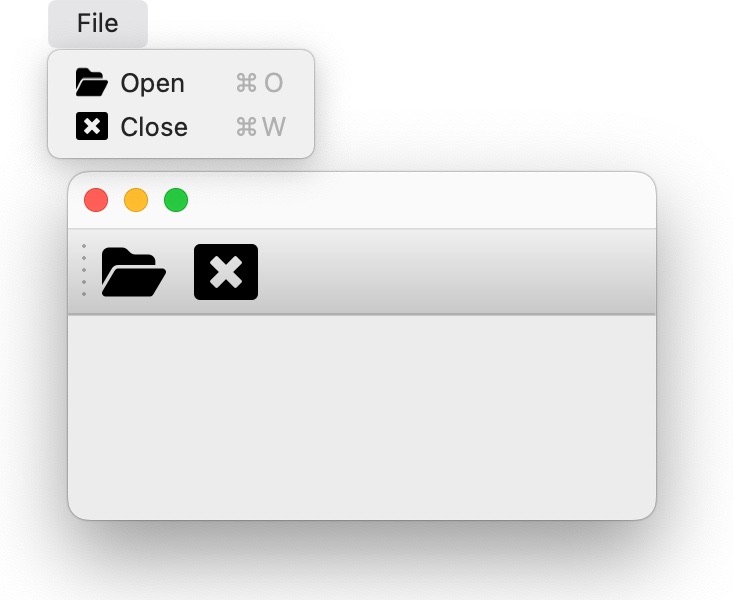
| 229 |
You should now have a QMainWindow with a menu bar and toolbar populated with |
| 230 |
the actions you registered with the application with icons, keybindings, |
| 231 |
and callbacks all connected. |
| 232 |
|
| 233 |
 |
| 234 |
|
| 235 |
Once objects have been registered with the application, it becomes very easy to |
| 236 |
create Qt objects (such as |
| 237 |
[`QMainWindow`](https://doc.qt.io/qt-6/qmainwindow.html), |
| 238 |
[`QMenu`](https://doc.qt.io/qt-6/qmenu.html), |
| 239 |
[`QMenuBar`](https://doc.qt.io/qt-6/qmenubar.html), |
| 240 |
[`QAction`](https://doc.qt.io/qt-6/qaction.html), |
| 241 |
[`QToolBar`](https://doc.qt.io/qt-6/qtoolbar.html), etc...) with very minimal |
| 242 |
boilerplate and repetitive procedural code. |
| 243 |
|
| 244 |
See all objects in the [Qt backend API docs][app_model.backends.qt]. |
| 245 |
|
| 246 |
!!! Tip |
| 247 |
|
| 248 |
Application registries are backed by |
| 249 |
[psygnal](https://github.com/pyapp-kit/psygnal), and emit events when modified. |
| 250 |
These events are connected to the Qt objects, so `QModel...` objects such as |
| 251 |
`QModelMenu` and `QCommandAction` will be updated when the application's |
| 252 |
registry is updated. |