| 1 |
# Getting Started with ANTLR v4 |
| 2 |
|
| 3 |
Hi and welcome to the version 4 release of ANTLR! It's named after the fearless hero of the [Crazy Nasty-Ass Honey Badger](http://www.youtube.com/watch?v=4r7wHMg5Yjg) since ANTLR v4 takes whatever you give it--it just doesn't give a crap! See [Why do we need ANTLR v4?](faq/general.md) and the [preface of the ANTLR v4 book](http://media.pragprog.com/titles/tpantlr2/preface.pdf). |
| 4 |
|
| 5 |
## Installation |
| 6 |
|
| 7 |
ANTLR is really two things: a tool that translates your grammar to a parser/lexer in Java (or other target language) and the runtime needed by the generated parsers/lexers. Even if you are using the ANTLR Intellij plug-in or ANTLRWorks to run the ANTLR tool, the generated code will still need the runtime library. |
| 8 |
|
| 9 |
The first thing you should do is probably download and install a development tool plug-in. Even if you only use such tools for editing, they are great. Then, follow the instructions below to get the runtime environment available to your system to run generated parsers/lexers. In what follows, I talk about antlr-4.9-complete.jar, which has the tool and the runtime and any other support libraries (e.g., ANTLR v4 is written in v3). |
| 10 |
|
| 11 |
If you are going to integrate ANTLR into your existing build system using mvn, ant, or want to get ANTLR into your IDE such as eclipse or intellij, see [Integrating ANTLR into Development Systems](https://github.com/antlr/antlr4/blob/master/doc/IDEs.md). |
| 12 |
|
| 13 |
### UNIX |
| 14 |
|
| 15 |
0. Install Java (version 1.7 or higher) |
| 16 |
1. Download |
| 17 |
``` |
| 18 |
$ cd /usr/local/lib |
| 19 |
$ curl -O https://www.antlr.org/download/antlr-4.9-complete.jar |
| 20 |
``` |
| 21 |
Or just download in browser from website: |
| 22 |
[https://www.antlr.org/download.html](https://www.antlr.org/download.html) |
| 23 |
and put it somewhere rational like `/usr/local/lib`. |
| 24 |
|
| 25 |
2. Add `antlr-4.9-complete.jar` to your `CLASSPATH`: |
| 26 |
``` |
| 27 |
$ export CLASSPATH=".:/usr/local/lib/antlr-4.9-complete.jar:$CLASSPATH" |
| 28 |
``` |
| 29 |
It's also a good idea to put this in your `.bash_profile` or whatever your startup script is. |
| 30 |
|
| 31 |
3. Create aliases for the ANTLR Tool, and `TestRig`. |
| 32 |
``` |
| 33 |
$ alias antlr4='java -Xmx500M -cp "/usr/local/lib/antlr-4.9-complete.jar:$CLASSPATH" org.antlr.v4.Tool' |
| 34 |
$ alias grun='java -Xmx500M -cp "/usr/local/lib/antlr-4.9-complete.jar:$CLASSPATH" org.antlr.v4.gui.TestRig' |
| 35 |
``` |
| 36 |
|
| 37 |
### WINDOWS |
| 38 |
|
| 39 |
(*Thanks to Graham Wideman*) |
| 40 |
|
| 41 |
0. Install Java (version 1.7 or higher) |
| 42 |
1. Download antlr-4.9-complete.jar (or whatever version) from [https://www.antlr.org/download/](https://www.antlr.org/download/) |
| 43 |
Save to your directory for 3rd party Java libraries, say `C:\Javalib` |
| 44 |
2. Add `antlr-4.9-complete.jar` to CLASSPATH, either: |
| 45 |
* Permanently: Using System Properties dialog > Environment variables > Create or append to `CLASSPATH` variable |
| 46 |
* Temporarily, at command line: |
| 47 |
``` |
| 48 |
SET CLASSPATH=.;C:\Javalib\antlr-4.9-complete.jar;%CLASSPATH% |
| 49 |
``` |
| 50 |
3. Create short convenient commands for the ANTLR Tool, and TestRig, using batch files or doskey commands: |
| 51 |
* Batch files (in directory in system PATH) antlr4.bat and grun.bat |
| 52 |
``` |
| 53 |
java org.antlr.v4.Tool %* |
| 54 |
``` |
| 55 |
``` |
| 56 |
@ECHO OFF |
| 57 |
SET TEST_CURRENT_DIR=%CLASSPATH:.;=% |
| 58 |
if "%TEST_CURRENT_DIR%" == "%CLASSPATH%" ( SET CLASSPATH=.;%CLASSPATH% ) |
| 59 |
@ECHO ON |
| 60 |
java org.antlr.v4.gui.TestRig %* |
| 61 |
``` |
| 62 |
* Or, use doskey commands: |
| 63 |
``` |
| 64 |
doskey antlr4=java org.antlr.v4.Tool $* |
| 65 |
doskey grun =java org.antlr.v4.gui.TestRig $* |
| 66 |
``` |
| 67 |
|
| 68 |
### Testing the installation |
| 69 |
|
| 70 |
Either launch org.antlr.v4.Tool directly: |
| 71 |
|
| 72 |
``` |
| 73 |
$ java org.antlr.v4.Tool |
| 74 |
ANTLR Parser Generator Version 4.9 |
| 75 |
-o ___ specify output directory where all output is generated |
| 76 |
-lib ___ specify location of .tokens files |
| 77 |
... |
| 78 |
``` |
| 79 |
|
| 80 |
or use -jar option on java: |
| 81 |
|
| 82 |
``` |
| 83 |
$ java -jar /usr/local/lib/antlr-4.9-complete.jar |
| 84 |
ANTLR Parser Generator Version 4.9 |
| 85 |
-o ___ specify output directory where all output is generated |
| 86 |
-lib ___ specify location of .tokens files |
| 87 |
... |
| 88 |
``` |
| 89 |
|
| 90 |
## A First Example |
| 91 |
|
| 92 |
In a temporary directory, put the following grammar inside file Hello.g4: |
| 93 |
Hello.g4 |
| 94 |
|
| 95 |
``` |
| 96 |
// Define a grammar called Hello |
| 97 |
grammar Hello; |
| 98 |
r : 'hello' ID ; // match keyword hello followed by an identifier |
| 99 |
ID : [a-z]+ ; // match lower-case identifiers |
| 100 |
WS : [ \t\r\n]+ -> skip ; // skip spaces, tabs, newlines |
| 101 |
``` |
| 102 |
|
| 103 |
Then run ANTLR the tool on it: |
| 104 |
|
| 105 |
``` |
| 106 |
$ cd /tmp |
| 107 |
$ antlr4 Hello.g4 |
| 108 |
$ javac Hello*.java |
| 109 |
``` |
| 110 |
|
| 111 |
Now test it: |
| 112 |
|
| 113 |
``` |
| 114 |
$ grun Hello r -tree |
| 115 |
(Now enter something like the string below) |
| 116 |
hello parrt |
| 117 |
(now,do:) |
| 118 |
^D |
| 119 |
(The output:) |
| 120 |
(r hello parrt) |
| 121 |
(That ^D means EOF on unix; it's ^Z in Windows.) The -tree option prints the parse tree in LISP notation. |
| 122 |
It's nicer to look at parse trees visually. |
| 123 |
$ grun Hello r -gui |
| 124 |
hello parrt |
| 125 |
^D |
| 126 |
``` |
| 127 |
|
| 128 |
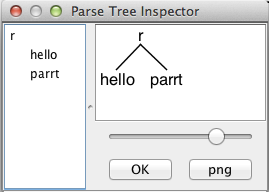
That pops up a dialog box showing that rule `r` matched keyword `hello` followed by identifier `parrt`. |
| 129 |
|
| 130 |
 |
| 131 |
|
| 132 |
## Book source code |
| 133 |
|
| 134 |
The book has lots and lots of examples that should be useful too. You can download them here for free: |
| 135 |
|
| 136 |
[http://pragprog.com/titles/tpantlr2/source_code](http://pragprog.com/titles/tpantlr2/source_code) |
| 137 |
|
| 138 |
Also, there is a large collection of grammars for v4 at github: |
| 139 |
|
| 140 |
[https://github.com/antlr/grammars-v4](https://github.com/antlr/grammars-v4) |
| 141 |
/ |