# Slack
!!! attention "New URL format"
The URL format for Slack has been changed to allow for API- as well as webhook tokens.
Using the old format (`slack://xxxx/yyyy/zzzz`) will still work as before and will automatically be upgraded to
the new format when used.
The Slack notification service uses either [Slack Webhooks](https://api.slack.com/messaging/webhooks) or the
[Bot API](https://api.slack.com/methods/chat.postMessage) to send messages.
See the [guides](../../../guides/slack/index.md) for information on how to get your *token*.
## URL Format
!!! note ""
Note that the token uses a prefix to determine the type, usually either `hook` (for webhooks) or `xoxb` (for bot API).
--8<-- "docs/services/chat/slack/config.md"
!!! info "Color format"
The format for the `Color` prop follows the [Slack docs](https://api.slack.com/reference/messaging/attachments#fields)
but `#` needs to be escaped as `%23` when passed in a URL.
So #ff8000 would be `%23ff8000` etc.
## Getting the Channel ID
!!! note
Only needed for Bot API tokens. Use `webhook` as the channel for Webhook tokens.
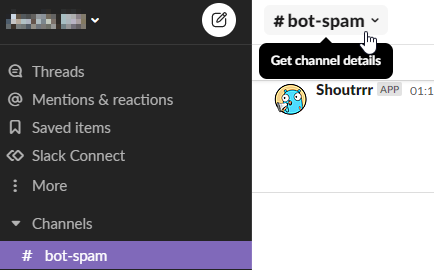
1. In the channel you wish to post to, open **Channel Details** by clicking on the channel title.
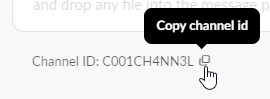
2. Copy the Channel ID from the bottom of the popup and append it to your Shoutrrr URL.
## Examples
!!! example "Bot API"
```uri
slack://xoxb:123456789012-1234567890123-4mt0t4l1YL3g1T5L4cK70k3N@C001CH4NN3L?color=good&title=Great+News&icon=man-scientist&botname=Shoutrrrbot
```
!!! example "Webhook"
```uri
slack://hook:WNA3PBYV6-F20DUQND3RQ-Webc4MAvoacrpPakR8phF0zi@webhook?color=good&title=Great+News&icon=man-scientist&botname=Shoutrrrbot
```